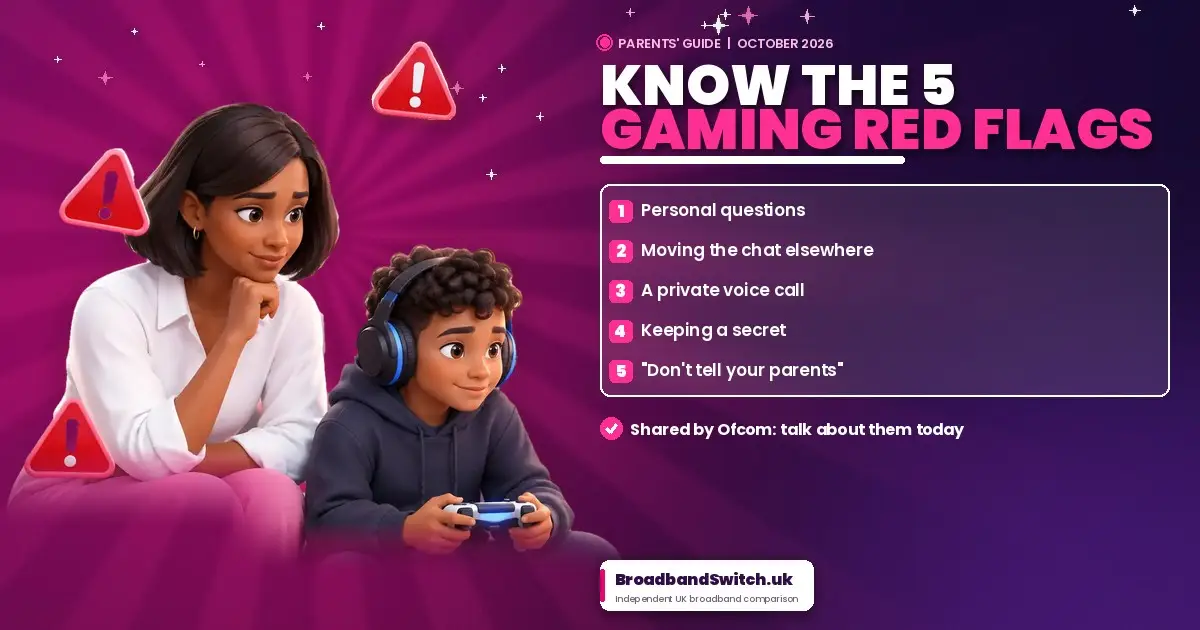
Shared by Ofcom, October 2026 5 gaming red flags to talk about with your child before they game online Ofcom, the UK's online safety regulator, has shared five gaming red flags for parents to talk through with their children: someone asking personal questions, asking to move the chat elsewhere, asking for a private voice call, encouraging a secret, or saying "don't tell your parents". Together they describe one pattern: someone trying to get a child alone, away from the game's safety tools and away from you. Children don't need to work out anyone's motive; they just need to spot the step and tell you. The best protection is a calm, regular chat where your child knows they won't be in trouble for telling you, backed by the contact settings inside each game and console. Home broadband filters help with websites, but they don't control in-game chat. Key facts, checked 7 October 2026 Who this is for: Parents, grandparents and carers of children who play Roblox, Fortnite, Minecraft or any game with chat, on a console, PC, tablet or phone. No technical knowledge needed. Direct answer: They're five warning signs Ofcom wants parents to talk through with children before they game online: someone asking personal questions, asking to move the chat elsewhere, asking for a private voice call, encouraging a secret, or saying "don't tell your parents". Ofcom shared them in October 2026 as part of its Parents Power Up campaign, alongside a simple message: chat about gaming with your child today. Ofcom regulates online services under the Online Safety Act, and its advice to parents is to talk regularly, use parental controls, and make sure children sign up with their real age. Direct answer: Because together they describe one pattern: someone getting to know a child, getting them alone away from the game's safety tools, and keeping it hidden from the adults who would step in. The NSPCC calls this grooming. One pattern, five warning signs flag 1 Get to know Personal questions flags 2 and 3 Get them alone Move the chat elsewhere, or a private voice call flags 4 and 5 Keep it hidden Keep a secret, or "don't tell your parents" Your child doesn't need to work out anyone's motive, and you don't need to frighten them. They just need to recognise the step and tell you. For the wider signs that something may be wrong, such as secrecy, new contacts or sudden changes in mood, see our guide to the warning signs of online harm. Direct answer: Very. Ofcom found that 72% of 8 to 17-year-olds game online, and more than half of children who game online play at least sometimes with people they've only met online. Most of that play is fun and harmless, which is why simple, shared rules work better than bans. Gaming online in UK homes Parents are already on it: 91% of parents of children who game have gaming rules, and 64% say their top worry is their child talking to strangers. The NSPCC reports that police recorded 7,263 Sexual Communication with a Child offences in a year, almost double the number when the offence was introduced in 2017/18, so the conversation is worth having. Direct answer: Little and often, and without fear. Play together, ask them to show you their favourite game, practise the five flags like a quiz, and promise they'll never be in trouble for telling you about something that worried them. How to talk about it, by age Under 9 9 to 12 Teens Ofcom found 66% of parents talk to their children about online safety at least every few months, but those conversations tend to fade with older teenagers, just when online contact grows. Schools help too: most children have had lessons on being online, so ask what they learned. Is your home Wi-Fi set up to protect your family? Our free sister site, ParentalControl.uk, checks your home connection in about 30 seconds, in your browser, with no sign-up. Direct answer: The contact settings inside each console and each game. Set who can message, voice chat and send friend requests in the console's family app, then check the chat settings in every game your child plays online, because they're separate. On Roblox, link a parent account first; you can then manage chat, friends, spending and screen time. On Fortnite, set Epic's parental controls and restrict the console's own party chat too, as it sits outside Epic's settings. Our gaming console parental controls guide has the full menu paths for PlayStation, Xbox, Nintendo Switch and Steam. Direct answer: Ofcom reports that Roblox has turned off voice chat for under-13s and uses age checks so children chat mainly with similar age groups. Ofcom lists Xbox among services that have introduced age checks, and PlayStation's UK age verification for messages and voice chat was reported as mandatory from June 2026. How gaming safety has changed These changes follow the Online Safety Act's children's safety duties, which have been enforceable since 25 July 2025 and cover games with chat or user content. Ofcom says it will keep evaluating how well the protections work, and that they only work properly when backed by effective age checks. Direct answer: No. The free filters from your broadband provider block harmful websites on your home Wi-Fi, which is well worth doing, but they don't control voice or text chat inside games, and they stop working on mobile data. Chat is controlled in the game and console. Broadband filters: what they do, and what they don't They do They don't Turn on your broadband's free filters Every major UK provider includes them. Our guide shows exactly where to find yours, provider by provider. Direct answer: No. PEGI rates a game's own content, not conversations with other players, so a game rated PEGI 7 can still connect your child with adults. Check the chat settings whatever the number on the box. PEGI's In-Game Purchases label always appears when extra content can be bought. Since June 2026, PEGI says games with paid random items, often called loot boxes, are rated PEGI 16 or 18. Direct answer: Stay calm and thank your child for telling you. Screenshot the messages and usernames, never images, then block and report the player. Report grooming or sexual contact to CEOP, and call 999 if a child is in immediate danger. If something worries you Immediate danger Call 999. Grooming or sexual contact Report to CEOP, part of the National Crime Agency, at ceop.police.uk. Advice for parents NSPCC Helpline: 0808 800 5000 (10am to 4pm, Monday to Friday) or help@nspcc.org.uk. For children Childline: 0800 1111. Report Remove helps under-18s get nude images of themselves taken down. In the game Block and report the player, then report to the platform. Screenshot messages and usernames, never images. Ofcom's role Ofcom regulates platforms but can't handle individual complaints. You can still tell it about a platform's failings. Our guide to reporting online harm explains every route in more detail, including what happens after you report. Direct answer: Have the chat, set the console, set each game, and turn on your broadband filter. It takes about 15 minutes, and the first step matters most. Your 15-minute family plan Have the chat Go through the five red flags together, and promise they won't be in trouble for telling you. Set the console Use the PlayStation Family, Xbox Family Settings or Nintendo Switch Parental Controls app to limit who can contact them. Set each game Check chat and voice settings in Roblox, Fortnite and any other game they play online; they're separate from the console. Turn on your broadband filter Free with every major provider, for websites. Our broadband parental controls guide shows how. In summary Choosing a new broadband provider? Every major UK provider includes free parental filters. If you're moving home or your contract has ended, compare broadband at your postcode, then switch the filter on from day one. Alex's closing thought As a dad of four, the most useful thing I've learned is that settings matter, but the conversation matters more. Kids game online with their friends, and most of it is brilliant. The five flags give them simple words for the moment something feels off, and the confidence to come and tell you. Have the chat today, set up the controls this weekend, and keep the door open. Set it up Share it with the school parents' group, grandparents, or anyone whose children game online. You are welcome to quote and link to this article. Please credit BroadbandSwitch.uk and link to this page. In a sentence: Ofcom's five gaming red flags for UK parents, shared in October 2026, are someone asking personal questions, asking to move the chat elsewhere, asking for a private voice call, encouraging a secret, or saying "don't tell your parents"; the best protection is a regular, no-blame family conversation backed by contact settings in each game and console. If someone asks personal questions; if your child is asked to move the chat elsewhere; if a player asks for a private voice call; if they're encouraged to keep a secret; and if a player says "don't tell your parents". Ofcom shared them in October 2026. Together they describe a pattern used in grooming: getting to know a child, getting them alone away from the game's safety tools, and keeping it hidden from parents. Spotting any one step is enough to tell an adult. Stop replying, don't share anything, block and report the player, and tell a trusted adult. They should know they won't be in trouble for telling you. It's safer than it was. Since 16 June 2026, under-16s use Roblox Kids or Roblox Select accounts, chat needs an age check, and Ofcom reports voice chat is off for under-13s. Link a parent account and check the chat settings yourself. Set contact to friends-only or off in both the console's family app and each game, and require your approval for friend requests. Then talk through the five red flags together. No. Broadband filters block websites on your home Wi-Fi, not voice or text chat inside games. Chat settings are in each game and console. Ofcom reports Roblox has turned off voice chat for under-13s and uses age checks to limit who children chat with. Ofcom lists Xbox among services that introduced age checks. PlayStation's UK age verification for messages and voice chat was reported as mandatory from June 2026. Games with chat or user content must assess and reduce risks to children. The children's safety duties have been enforceable since 25 July 2025, and Ofcom enforces them. Roblox is for ages 5 and up, with special accounts for under-16s. Fortnite is rated PEGI 12, with Cabined Accounts for under-13s. Discord is for ages 13 and over. No. PEGI rates a game's content, not chat with other players, so a low-rated game can still connect your child with strangers. Check the chat settings whatever the age rating. Report to CEOP, part of the National Crime Agency. Call 999 if a child is in immediate danger. For advice, call the NSPCC Helpline on 0808 800 5000. Play together, ask them to show you their games, agree simple rules, practise the five red flags, and promise they won't be in trouble for telling you about anything that worries them. Written by Dr Alex J. Martin-Smith, Founder of BroadbandSwitch.uk and dad of four (LinkedIn). Reviewed by Adrian James, Broadband Editor. Published 7 October 2026. This guide gives general safety information, not legal advice. If a child is in immediate danger, call 999. Corrections are logged publicly.Ofcom's 5 gaming red flags: what every UK parent should know, and do
What are Ofcom's five gaming red flags?
Red flag Why it matters What your child should do 1. If someone asks personal questions Questions about where they live, their school, their real name or whether they're alone. Don't answer. Keep to game talk, and tell a trusted adult. 2. If they're asked to move the chat elsewhere A request to carry on in another app or a private space, away from the game's safety tools. Say no. Stay in the game, and tell a trusted adult. 3. If a player asks for a private voice call One-to-one voice or video is harder for the game to moderate. Decline, leave the call, and tell a trusted adult. 4. If they're encouraged to keep a secret Secrets separate a child from the people who would protect them. A secret that makes you feel worried is never one you have to keep. 5. If a player says "Don't tell your parents" The clearest warning of all: the person knows a parent would step in. Tell a parent or trusted adult straight away. You won't be in trouble. Why do these five signs matter?
How common is gaming with strangers?
How do I talk to my child about the red flags?
Which settings stop strangers contacting my child?
Platform Age Where the chat settings are Source Roblox Under 16s use Roblox Kids (5 to 8) or Select (9 to 15) Link a parent account, then Settings, Parental Controls, Communication Roblox PlayStation Set by the parent PlayStation Family app: child, Parental Controls, Online Communication PlayStation UK Xbox and Minecraft Child Microsoft account Xbox Family Settings app: child, Communication and multiplayer Microsoft, via ESRB Nintendo Switch and Switch 2 Set for the console Nintendo Switch Parental Controls app: restrict Free Communication With Others Nintendo UK Fortnite PEGI 12; under-13s get a Cabined Account Epic Parental Controls: voice and text chat permissions; restrict console party chat too Epic Games Discord 13 and over only Family Center lets a linked parent see activity, not messages Discord What has Ofcom secured from Roblox, PlayStation and Xbox?
Platform What's changed Source Roblox Voice chat off for under-13s; age checks so children chat mainly with similar ages; a commitment to let parents switch off direct chat for under-16s Ofcom report, 21 May 2026 Xbox Age checks introduced; UK adults asked to verify their age to keep full social features Ofcom; Xbox, 28 July 2025 PlayStation Age verification needed for messages and voice chat in the UK, mandatory from June 2026 Reported by the gaming press, quoting Sony Do broadband parental controls stop in-game chat?
Do PEGI age ratings cover online chat?
What should I do if something worries me?
What can I do this week?
Keep going: more help for parents
Share this article
Cite this page
Martin-Smith, A. J. (2026, October 7). Ofcom's 5 gaming red flags: what every UK parent should know, and do. BroadbandSwitch.uk. https://broadbandswitch.uk/insights/ofcom-gaming-red-flags-parents-guide/ Frequently asked questions
What are Ofcom's five gaming red flags?
Why are these red flags?
What should my child do if they see a red flag?
Is Roblox safe for children in the UK?
How do I stop strangers messaging my child in games?
Do broadband parental controls block in-game chat?
What has Ofcom secured from Roblox, PlayStation and Xbox?
What does the Online Safety Act mean for gaming?
What age is Roblox, Fortnite or Discord for?
Do PEGI ratings cover online chat?
Where do I report grooming in the UK?
How do I talk to my child about online gaming safety?
References
Ofcom's 5 gaming red flags: what every parent should know
Written by Alex Martin-Smith (LinkedIn) • Reviewed by Adrian James (LinkedIn)
Last reviewed: 7 October 2026
Quick summary: Ofcom's five gaming red flags explained for UK parents: what each one means, how to talk to your child, the settings to switch on, and where to get help.
1
If someone asks personal questions
2
If they're asked to move the chat elsewhere
3
If a player asks for a private voice call
4
If they're encouraged to keep a secret
5
If a player says "Don't tell your parents"
→
→
The pattern breaks the moment your child tells a trusted adult.
Children aged 8 to 17 who game online
72%
Gaming children who play with people they've only met online, at least sometimes
55%
Parents worried about strangers in games
64%
Parents with gaming rules
91%
For every age: "You'll never be in trouble for telling me." Children who fear losing their console go quiet.
25 Jul 2025
Online Safety Act children's safety duties become enforceable for services with chat or user content, including games.
28 Jul 2025
Xbox starts asking UK adults to verify their age to keep full social features.
21 May 2026
Ofcom reports Roblox's changes, including voice chat off for under-13s.
16 Jun 2026
Roblox Kids and Roblox Select accounts launch globally; no chat without an age check.
Jun 2026
PlayStation age verification for messages and voice chat becomes mandatory in the UK (reported).
Oct 2026
Ofcom's Parents Power Up campaign shares the five gaming red flags.
1
2
3
4