Full fibre vs FTTC vs cable vs 4G and 5G home broadband: the four UK technologies compared on speed, on latency, and on what you are owed when it goes wrong
The four technologies are closer on speed than the adverts suggest and further apart on what happens when it goes wrong. That is the comparison worth making, and it is the one nobody puts on the box. On speed they overlap. The fastest FTTC line Openreach sells is quicker than the slowest full fibre package most providers sell, so full fibre is not automatically the faster of the two on the plan you actually buy. On Ofcom's last measured data, 4.9 to 7.3 ms of latency on full fibre against 12.5 to 14.8 ms on cable and about 24 ms on old copper, and cable came out ahead of full fibre on download outright. Anyone quoting that figure as proof that cable is faster than full fibre has misread it. Ofcom measured the packages its panel had bought, and in 2023 Virgin Media was selling gigabit packages to far more people than the full fibre networks were. Then the part that actually separates them. Buy a fixed line from a provider that has signed both of Ofcom's schemes and you get three things: a minimum speed in writing before you buy, a way out without penalty if it is missed, and money back automatically when the line goes down. Buy 4G or 5G home broadband and you get none of the three. Ofcom's speed code covers fixed wireless by name, so the gap is not technical. It is that the companies selling 4G and 5G home broadband have not applied it to those products, and the automatic compensation scheme's own scope is limited to fixed products. Before you sign anything, ask for the guaranteed minimum download speed in writing. If the seller cannot give you one, you have learned something more useful than any headline speed. Compare every technology available at your address at broadbandswitch.uk/compare/.
See which of these four you can get at your address
One postcode, every provider we can switch you to, sorted by price with the lowest first. This is the only question on the page a national average cannot answer: 82% of homes can get full fibre and yours is either one of them or it is not.
IndependentLowest price firstLive, refreshed dailyPostcode only, nothing stored
Every number here carries the date it was checked, and here is where each one comes from. Availability, take-up and the premises below decent broadband are Ofcom's, from its Connected Nations update published 13 May 2026 on January 2026 data. Every latency, upload and peak-time figure comes from Ofcom's UK Home Broadband Performance report for March 2023, which is the last one it published before closing the programme, and each is labelled with that date on the page rather than presented as current. The speed code wording, the signatory list, the automatic compensation rates and the switch-off date are Ofcom's. The FTTC speeds, the stop sell figures and the telecare safeguards are Openreach's own; the network footprint is BT Group's own trading update. All three 4G and 5G prices and headline speeds were read from Three's, EE's and Vodafone's own pages on 21 September 2026. The live comparison lower down is refreshed daily.
Which technology to choose
Direct answer: For most households at most addresses the order is full fibre, then cable, then FTTC, then wireless. Speed is the smallest part of why. A fixed line from a provider that has signed both of Ofcom's schemes carries three protections, and 4G or 5G home broadband carries none of them.
Full fibre (FTTP)
Choose it if you can get it
Full fibre if you can get it. It measured the lowest latency and the steadiest peak-time performance, it has the highest upload speeds by a distance, and it is the only one of the four with no published end date hanging over it.
Cable (Virgin Media)
Choose it if full fibre has not reached you
Cable if full fibre has not reached you and Virgin Media has. The download speeds are genuinely gigabit, the protections are the same as full fibre's, and the trade is upload speed and a little more peak-time wobble.
FTTC (part fibre)
Choose it only if neither of those reaches you
FTTC only if neither of the above reaches you, and then on the shortest contract you can get, because the copper network behind it has a published retirement date and the broadband half has no published replacement date.
4G or 5G home broadband
Choose it if no fixed line reaches you
4G or 5G home broadband if no fixed line reaches you, or if you are only staying a few months. It is quick to set up, it moves with you and it is cheap, and you are giving up the guaranteed minimum, the right to exit and the automatic compensation to get that.
Two things make that order less tidy than it looks. The first is availability: 82% of UK homes can get full fibre and 89% can get something gigabit-capable, but the remainder is a real number of real houses, and at those addresses the list above starts further down. 39,000 premises still cannot get what Ofcom calls decent broadband at all. The second is that the four overlap on speed. The fastest FTTC line Openreach sells is quicker than the slowest full fibre package most providers sell, so full fibre is not automatically the faster of the two on the plan you actually buy. Which means the technology name on the advert tells you less than the number next to it, and the number next to it tells you less than the guaranteed minimum underneath.
Before you sign anything, ask for the guaranteed minimum download speed in writing. If the seller cannot give you one, you have learned something more useful than any headline speed. That one question does more work than any speed test, because a guaranteed minimum is the only number on the whole sales process that a provider has to stand behind afterwards.
Run the full comparison to see which of these four reaches your address, or start from full fibre from every network or the cheapest deals.
How to tell which one you have now
Direct answer: Look at where the cable enters your home. A white box on the wall with a small fibre socket means full fibre. A cable running into a phone socket means FTTC or ADSL. A coaxial screw connector like an aerial lead means Virgin Media cable. No cable at all means wireless.
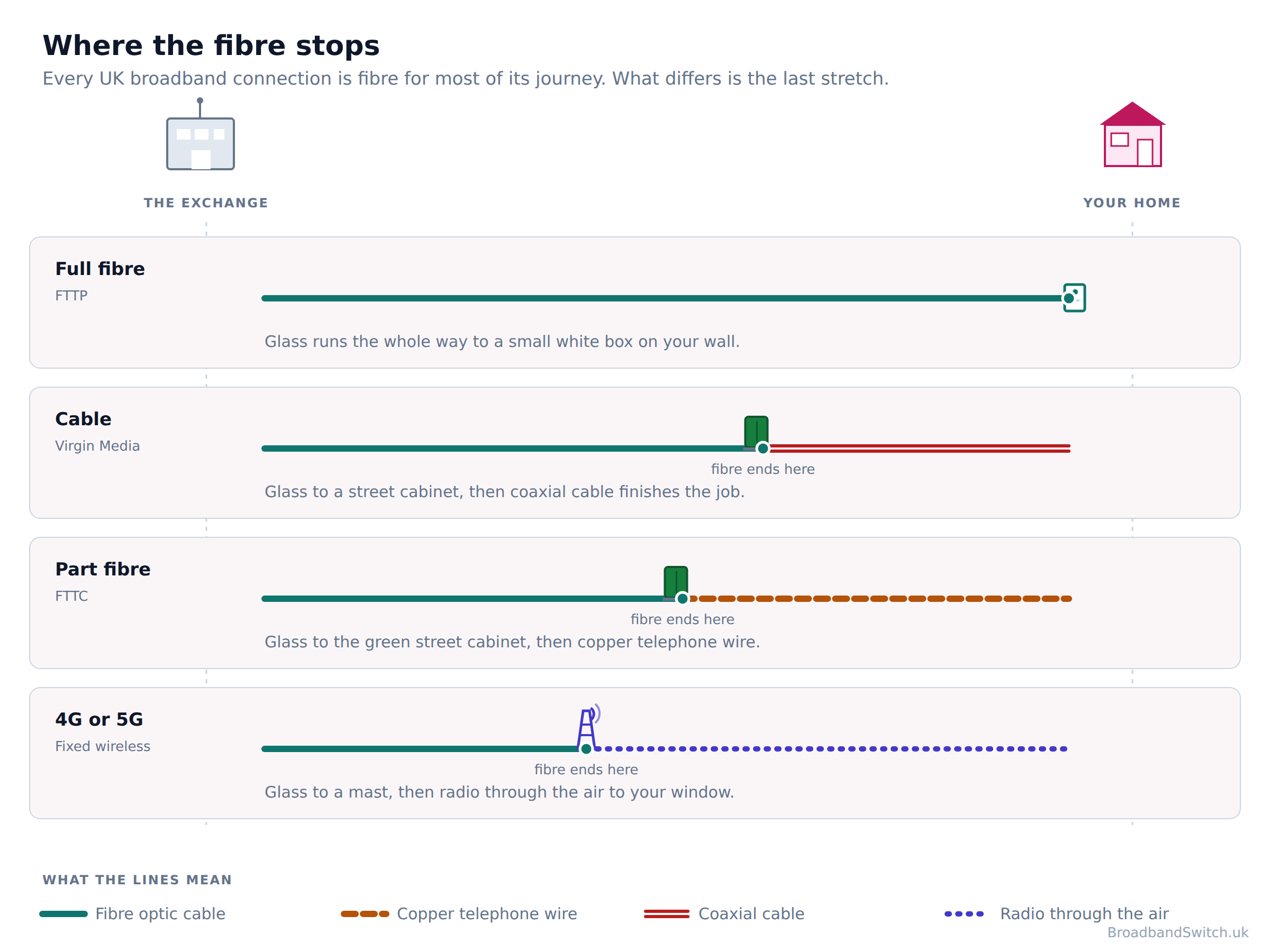
Your bill and your contract both name the technology, and the package name usually gives it away: anything sold as Full Fibre, Fibre 900, Gig1 or 1Gb is full fibre or cable, and anything at 76 Mbps or below on an Openreach line is FTTC. The word Fibre on its own settles nothing, because both use it. There is one rule that cuts through it: ask where the fibre stops. At the cabinet in your street is FTTC, at a box on your wall is full fibre, and at a street cabinet with coaxial the rest of the way is Virgin Media cable.
The quickest answer is a postcode check, because it tells you what is available at your address rather than what the country average is. A national figure tells you what is likely and a postcode check tells you what is true, and on this subject the two can be a long way apart: an address can sit inside 82% coverage and still be one of the 39,000 premises Ofcom counts as below decent broadband, because coverage is measured street by street rather than house by house. Openreach publishes its own explanation of why one house on a street can order full fibre and the one next door cannot.
One more figure worth sitting with before you go any further. 24.9 million homes can get full fibre and 12.4 million have taken it, which is 47% of the homes that could. So more than half the households who could move to the best technology on this page have not, and a good number of them are paying the same money or more for FTTC.
Our speed test tells you what you are getting now, what is FTTP explains the best case in plain words, and why can't I get full fibre when next door can covers the address lottery. A sister question this page does not answer is whose network you are on: how to tell which network your provider uses does.
All four compared, side by side
Direct answer: The first five rows are the ones the adverts compete on and the next three are the ones that decide what happens to you when something breaks. Buy a fixed line from a provider that has signed both of Ofcom's schemes and you get three things: a minimum speed in writing before you buy, a way out without penalty if it is missed, and money back automatically when the line goes down. Buy 4G or 5G home broadband and you get none of the three.
| Full fibre (FTTP) | Cable | FTTC | 4G or 5G | |
|---|---|---|---|---|
| Where the fibre stops | A box on your wall | A street cabinet, then coaxial | The green street cabinet, then copper | A mast, then through the air |
| Typical download sold | 100 Mbps to 2.5 Gbps | 132 Mbps to 2 Gbps | up to 76Mbps | All three headline figures land near 150 Mbps, on three different bases |
| Typical upload sold | Symmetrical or close to it on most packages | 20 Mbps on M125 rising to 200 Mbps on Gig2 | up to 15Mbps, and Ofcom measured 17.5 to 18.5 Mbit/s | Not published by any of the three |
| Latency, Ofcom March 2023 | 4.9 to 7.3 ms | 12.5 to 14.8 ms | 10.1 to 12.5 ms | 15 to 21 ms on 5G and 18 to 23 ms on 4G |
| Speed held at peak, Ofcom March 2023 | 97.6% to 99.3% | 94.2% to 97.9% | Not separately published | Not measured |
| Guaranteed minimum speed before you buy | Yes, from a code signatory | Yes, from a code signatory | Yes, from a code signatory | No. None of Three, EE or Vodafone publishes a minimum guaranteed download speed for its 4G or 5G home broadband, so there is no figure for a speed complaint to be measured against. |
| Right to leave without penalty if it is missed | Yes | Yes | Yes | No |
| Automatic compensation when it goes down | Yes, from a scheme member | Yes, from a scheme member | Yes, from a scheme member | No. “This scheme covers all residential fixed broadband and landline products.” |
| Availability | 82% of UK homes | About half of UK homes | 96% of the country | 96% of premises |
| Affected by the copper switch-off | No | Its own landline network will move later | Yes. 31 January 2027 | No |
| Best for | Anyone who can get it | Big downloads where full fibre has not arrived | Addresses the other two have not reached | No fixed line, or a short stay |
Three rows in that table are the whole argument of this page, and they say from a code signatory rather than simply yes for a reason: the protection travels with the company you buy from and not with the wire in the ground. Ofcom runs two schemes, both voluntary, and a provider can be in one and not the other. The next section takes them apart.
And one row deserves a warning rather than a footnote. The latency and peak-time figures are more than three years old. Ofcom closed the programme. Its final report covered March 2023, so the most recent measured comparison of latency and upload speed by technology in this country is three and a half years old, and no regulator has published one since. Nobody is measuring this any more, which is worth knowing before you trust any comparison of these four, including ours.
Go deeper on any one pairing: which is faster, FTTP, FTTC, 5G or Virgin cable, full fibre against part fibre against cable, FTTP against Virgin Media cable and fixed wireless against fibre. Or see FTTC deals, full fibre deals and 5G home broadband deals as they stand today.
Speed, and why the headline number misleads
Direct answer: The fastest FTTC line Openreach sells is quicker than the slowest full fibre package most providers sell, so full fibre is not automatically the faster of the two on the plan you actually buy. Which means the technology name on the advert tells you less than the number next to it, and the number next to it tells you less than the guaranteed minimum underneath.
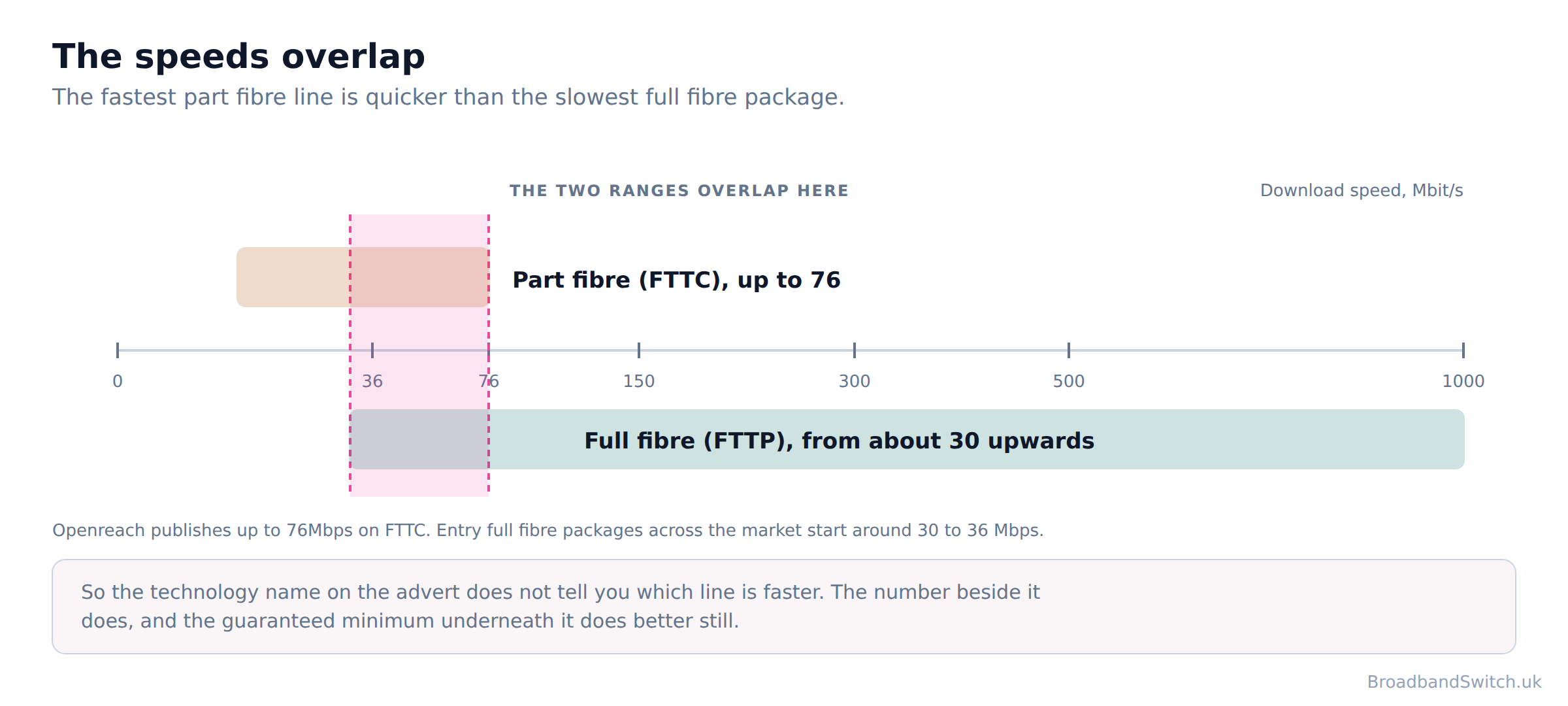
Start with the number nobody expects. Cable came out fastest on download, at a median of 270.6 Mbit/s against full fibre's 149.2 Mbit/s, because the figures reflect the packages people had bought rather than what each technology can do. Read that once and it looks like proof that coaxial cable beats glass, which would be an extraordinary finding. It is not what it means. Anyone quoting that figure as proof that cable is faster than full fibre has misread it. Ofcom measured the packages its panel had bought, and in 2023 Virgin Media was selling gigabit packages to far more people than the full fibre networks were. The gap was 121.4 Mbit/s, and it measures a market rather than a technology.
The same trap sits under every headline figure on this page. Providers now report an average maximum download of 285 Mbit/s across the UK, and that sounds like the speed you would get. That is a line capability reported by the providers rather than anything measured, so it is not the number a speed test gives you. It is the line's capability, added up and divided, and the number on your own speed test depends on the package you bought, the wiring in your house, your Wi-Fi and the time of day.
On upload the technologies genuinely do separate, and it is the one place where full fibre wins on every package rather than on the package you happened to buy. Most full fibre is symmetrical or close to it. Virgin Media publishes 20 Mbps on M125 rising to 200 Mbps on Gig2, though you have to dig for it: Virgin Media's main speeds page publishes download figures for all six tiers and no upload figure for any of them. Its own explanation is about demand rather than engineering: “Most internet plans have higher download speeds than upload speeds because people usually download more than they upload.” On FTTC, Openreach publishes up to 76Mbps and upload speeds of up to 15Mbps and Ofcom measured 17.5 to 18.5 Mbit/s on the top tier. Across all technologies the median upload Ofcom measured was 18.4 Mbit/s.
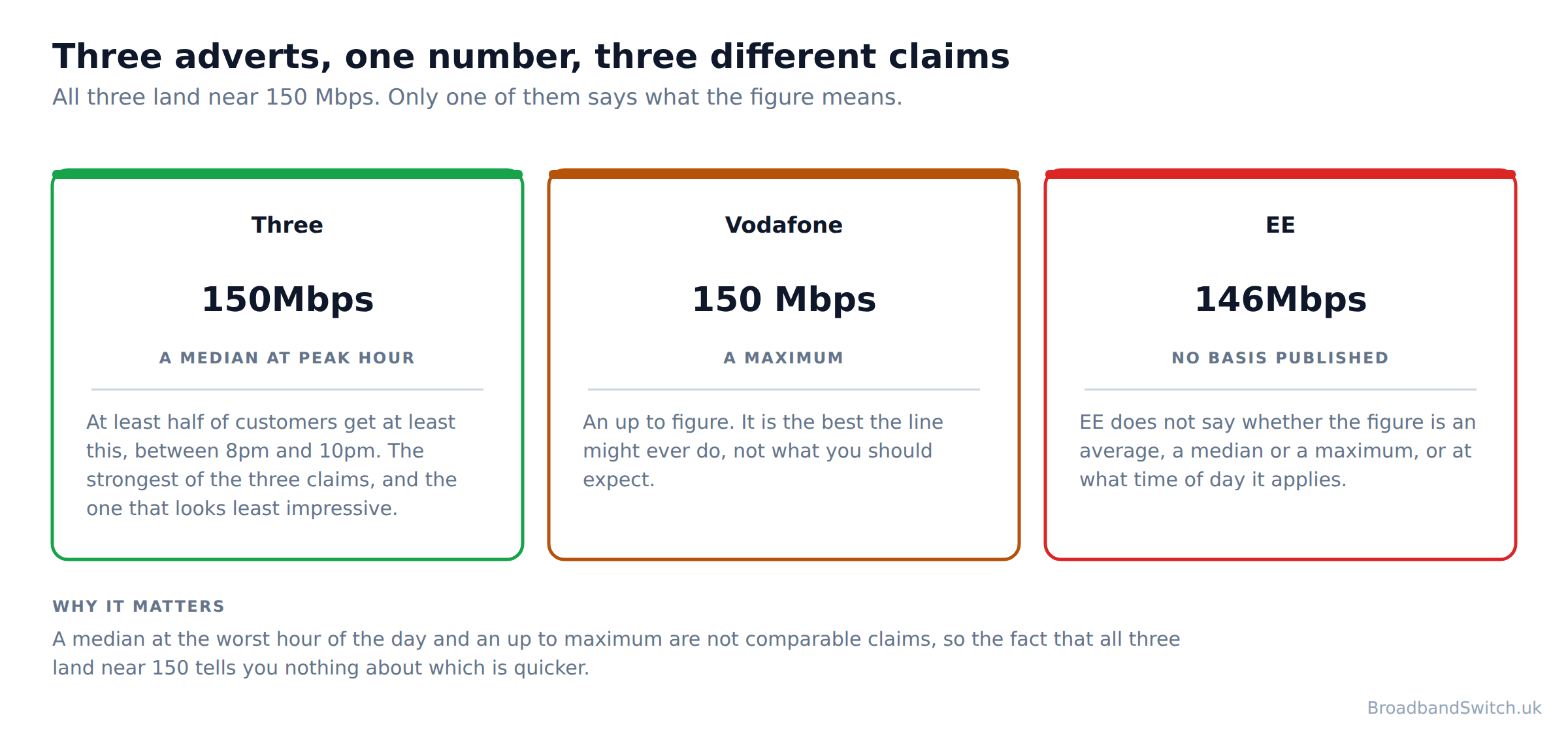
Where the wireless numbers sit is harder to say, because the three companies selling it are publishing different things behind similar figures. Three's 150Mbps is a median at the worst hour of the day, in its own words: “at least 50% of 5G Broadband customers within 5G coverage areas, between the peak hours of 8pm and 10pm”. Vodafone publishes its 150 Mbps as an up to figure, which is a maximum rather than a median. EE publishes no basis for its headline speed. It does not say whether the figure is an average, a median or a maximum, and it does not say at what time of day it applies. A median at peak and an up to maximum are not the same claim, and Three's is by some distance the more useful disclosure even though the number looks identical.
Our guide to upload against download speed covers which one you actually notice, and what speed do I need works back from how your household uses it.
Latency and peak time, where they really differ
Direct answer: Full fibre was the lowest, then FTTC, then cable, with old copper worst by a distance. The spread between the best full fibre and the best cable was 7.6 ms, and small as that sounds it is the difference you feel rather than the one you measure.
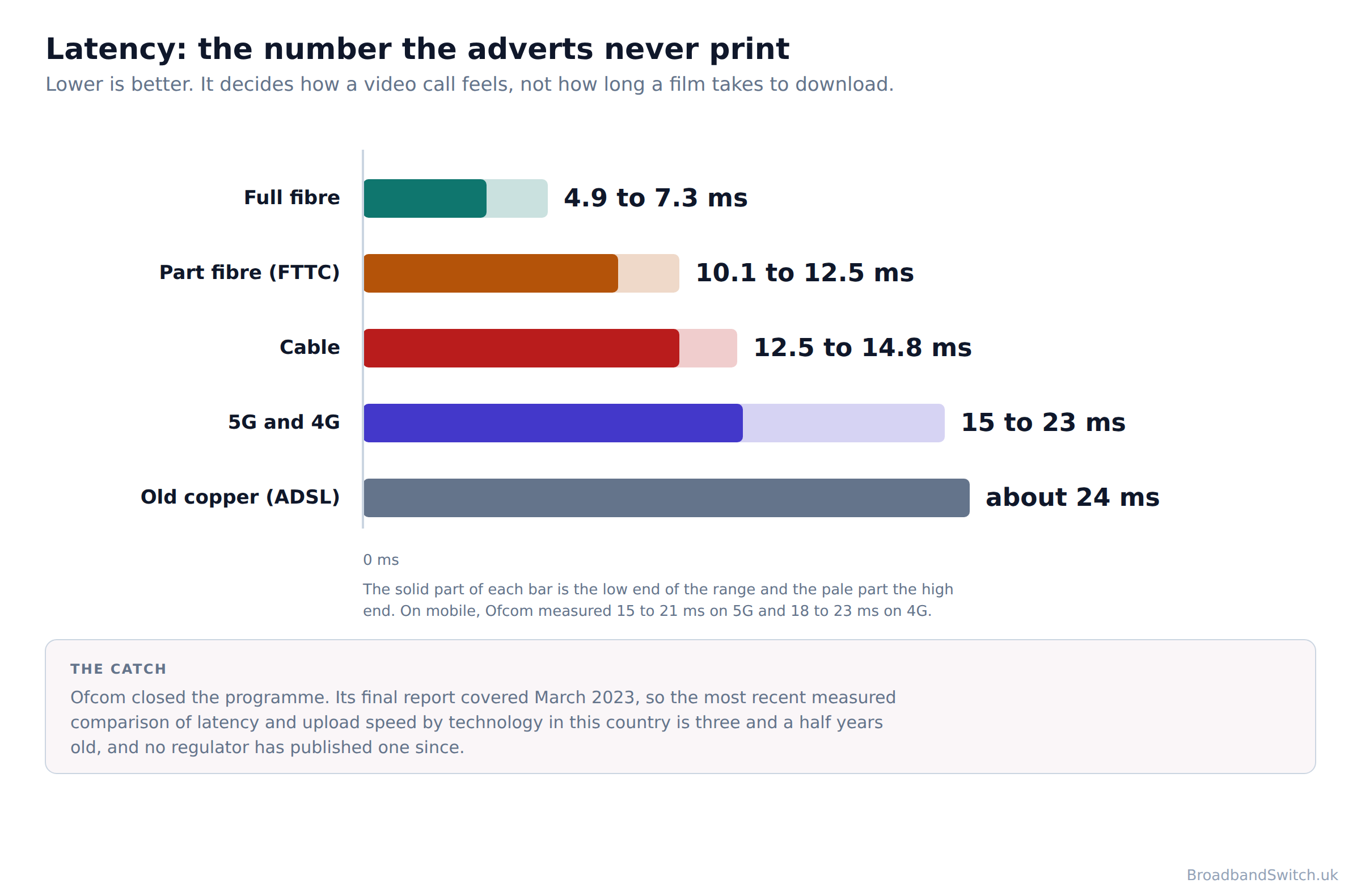
A few thousandths of a second sounds like nothing, and for a film or a web page it is nothing. It is the difference you feel on a video call, in a game, and on anything where your computer has to ask a question and wait for the answer before it can ask the next one. Download speed decides how long a big file takes. Latency decides how a video call feels, whether a game is playable, and how quickly a page starts to appear rather than how quickly it finishes. It is the number the adverts never print and the one most worth asking about.
| Technology | Latency, measured | Share of maximum speed held at peak |
|---|---|---|
| Full fibre (FTTP) | 4.9 to 7.3 ms | 97.6% to 99.3% |
| FTTC (part fibre) | 10.1 to 12.5 ms | Not separately published |
| Cable | 12.5 to 14.8 ms | 94.2% to 97.9% |
| 4G and 5G | 15 to 21 ms on 5G and 18 to 23 ms on 4G | Not measured |
| Old copper (ADSL) | about 24 ms | Not separately published |
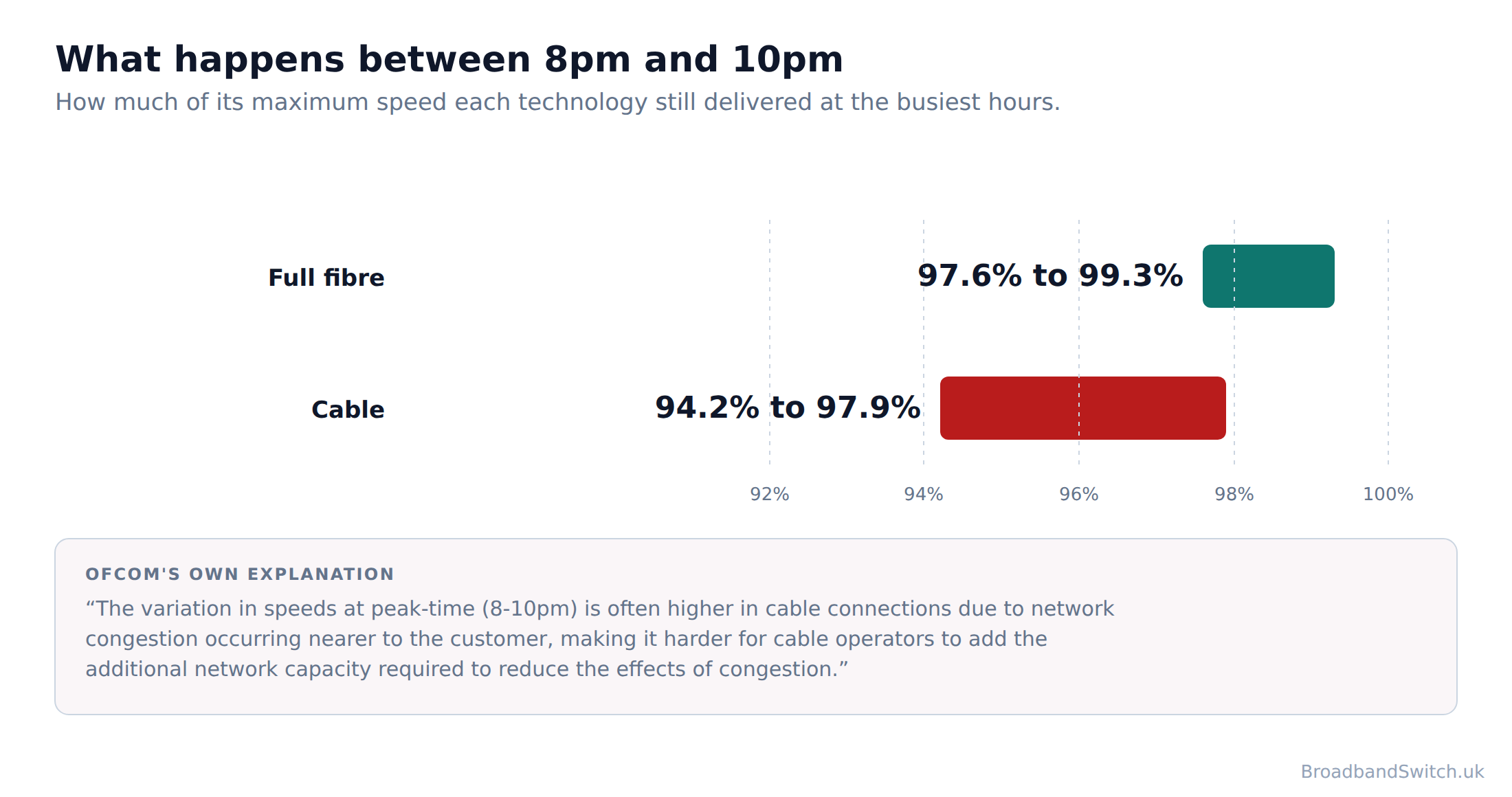
The peak-time column is the other half of the story and it is where cable shows its one structural weakness. At the busiest hours full fibre held 97.6% to 99.3% of its maximum speed and cable held 94.2% to 97.9%. Ofcom's own explanation is worth reading in full: “The variation in speeds at peak-time (8-10pm) is often higher in cable connections due to network congestion occurring nearer to the customer, making it harder for cable operators to add the additional network capacity required to reduce the effects of congestion.” In plain terms, on cable your street shares capacity in a way that full fibre customers do not, so the evening is when you notice it.
Wireless sits in a different category again. Ofcom measured 15 to 21 ms on 5G and 18 to 23 ms on 4G, which is respectable and a long way behind full fibre. But that figure moves with how busy the mast is, how far you are from it and what the weather is doing, and none of the three companies selling 4G or 5G home broadband publishes a latency figure at all, so there is nothing to hold them to.
Our guide to latency, jitter and packet loss explains the three numbers behind this, why speeds drop in the evening covers peak time in detail, and broadband for gaming is where latency matters most.
What you are owed when it goes wrong
Direct answer: Buy a fixed line from a provider that has signed both of Ofcom's schemes and you get three things: a minimum speed in writing before you buy, a way out without penalty if it is missed, and money back automatically when the line goes down. Buy 4G or 5G home broadband and you get none of the three.
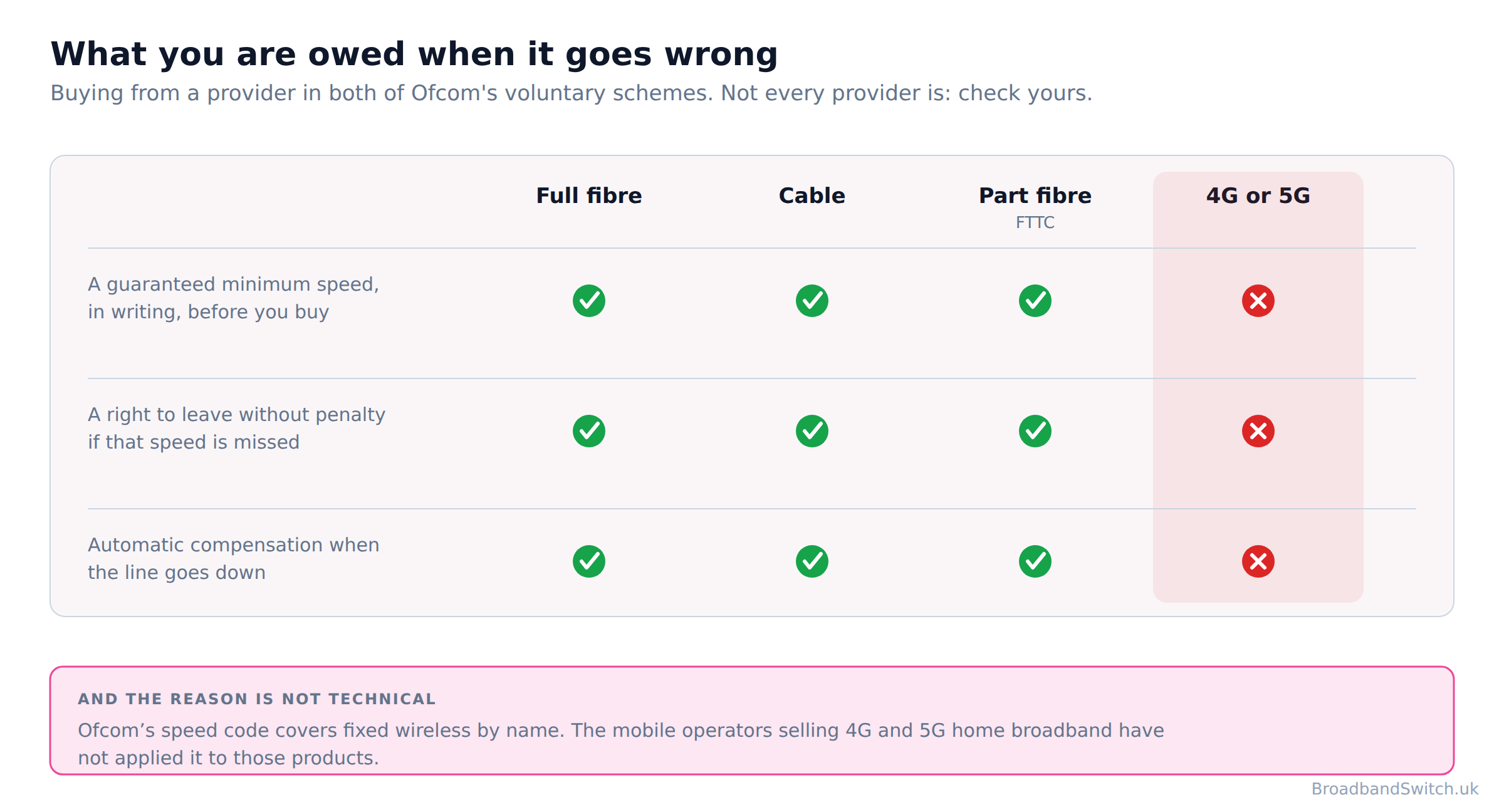
Ofcom runs two voluntary schemes and most people have never heard of either. The first is the residential broadband speed code. Its signatories are BT, EE, NOW Broadband, Plusnet, Sky, TalkTalk, Utility Warehouse, Virgin Media and Zen Internet, and signing means three things. You get a minimum guaranteed download speed at the point of sale, specific to your address rather than to the package. On cable and full fibre, Ofcom's rule is that the figure must be at least 50% of the advertised speed for the package that is being enquired about. On technologies where distance matters, which means FTTC and old copper, it is set at the 10th percentile of the ISP's similar customers, adjusted to account for the impact of congestion at peak time. And then the part that gives that figure teeth. If your speed drops below the guaranteed minimum on a daily basis for at least three successive days after you report it, and the provider has not fixed it within 30 calendar days, you can leave without penalty.
If your broadband came in a bundle you get the choice: leave the whole bundle, keep the whole bundle, or leave only the parts that depend on the broadband connection. That matters more than it sounds, because a slow line is often sold with TV and a mobile SIM attached, and without that rule a speed problem on the broadband would leave you locked into the rest.
The second scheme is automatic compensation, and the word automatic is the whole point. You do not have to claim. The payment appears as a credit on your bill within 30 days, and it is paid whether or not you asked for it. The published rates are £10.34 for each day a total loss of service is not repaired, £32.31 for a missed engineer appointment and £6.46 for each day a new service starts late. Its members are BT, EE, Hyperoptic, Plusnet, Sky including NOW Broadband, TalkTalk, Utility Warehouse, Virgin Media, Vodafone and Zen Internet.
| Full fibre | Cable | FTTC | 4G or 5G | |
|---|---|---|---|---|
| A guaranteed minimum download speed, in writing, before you buy | Yes | Yes | Yes | No |
| A right to leave without penalty if it is missed | Yes | Yes | Yes | No |
| Automatic compensation when the line goes down | Yes | Yes | Yes | No |
| How the minimum is set | at least 50% of the advertised speed for the package that is being enquired about | at least 50% of the advertised speed for the package that is being enquired about | the 10th percentile of the ISP's similar customers, adjusted to account for the impact of congestion at peak time | Nothing is set |
| Paid per day of total loss | £10.34 | £10.34 | £10.34 | Nothing |
| Paid per missed engineer appointment | £32.31 | £32.31 | £32.31 | Nothing |
| Paid per day a new line starts late | £6.46 | £6.46 | £6.46 | Nothing |
Check the provider, not the technology
The two lists are not the same list, so check both. Vodafone and Hyperoptic pay automatic compensation and have not signed the speed code. Three has signed neither. The two schemes are separate, both are voluntary, and a provider can be in one and not the other. Several of the newer full fibre networks have signed neither, so full fibre by itself does not guarantee you any of the three rows above. Ask the provider directly, or check Ofcom's two published lists before you sign.
Now the finding this page exists for. Ofcom's speed code sets out its own scope, and it is worth quoting exactly because almost nobody has read it: “This covers broadband using Asymmetric Digital Subscriber Line (ADSL), fibre-to-the-cabinet (FTTC) broadband services, G.fast, fibre-to-the-premises (FTTP) broadband services, cable services, and fixed broadband delivered via fixed wireless technology, including satellite services.” Ofcom's speed code covers fixed wireless by name, so the gap is not technical. It is that the companies selling 4G and 5G home broadband have not applied it to those products, and the automatic compensation scheme's own scope is limited to fixed products. Three has signed neither Ofcom's residential broadband speed code nor its automatic compensation scheme. It does publish a 30-day money-back guarantee of its own, which is a commercial promise rather than a right, and it is not the same thing at all.
The automatic compensation scheme is a scope question rather than a signature one. Ofcom's own wording is “This scheme covers all residential fixed broadband and landline products.” EE and Vodafone are both members and both sell 4G or 5G home broadband, and the scheme's own words limit it to fixed products, so the wireless product falls outside it even at a member. None of Three, EE or Vodafone publishes a minimum guaranteed download speed for its 4G or 5G home broadband, so there is no figure for a speed complaint to be measured against.
Our guide to the minimum guaranteed download speed explains how yours is worked out, up to speed against guaranteed minimum takes the two numbers apart, can poor speeds let you leave early covers the exit right step by step, and the automatic compensation rates and compensation and service failure cover what you are owed.
4G and 5G home broadband, fairly
Direct answer: 4G and 5G home broadband is a genuinely good answer in two situations: an address a fixed line has not reached, and a home you are only in for a few months. It installs in minutes, it moves with you, and at £18 it is cheaper than most fixed lines.
Fixed wireless access means a router in your window that picks up the same 4G or 5G signal a mobile phone uses, so no cable is laid to your home at all. It reaches 96% of UK premises, which is more than full fibre and more than cable, and it is the only one of the four that needs no engineer, no appointment and no hole in the wall. For a rented flat, a house move in six months, a caravan, a building site or an address the fixed networks have simply not reached, it is the right answer and this page will not pretend otherwise.
| Three | EE | Vodafone | |
|---|---|---|---|
| Price a month | £18 a month on a 24-month contract | £19 to £55 a month depending on the plan | £18 a month on a 24-month contract |
| Headline speed | 150Mbps | 146Mbps | 150 Mbps |
| What the headline speed means | A median at peak hour | Not published | A maximum |
| Published fair use threshold | Not published | usage above 1000GB/month | Not published |
| Guaranteed minimum speed | No | No | No |
| Latency published | No | No | No |
| Signed Ofcom's speed code | No | Yes, for its fixed lines | No |
| In the automatic compensation scheme | No | Yes, for its fixed lines | Yes, for its fixed lines |
| Anything published about telecare alarms | No | No | No |
| Its own commercial promise | 30-day money-back guarantee | Not published | Not published |
Read the two speed rows together, because that is where the adverts stop being comparable. All three headline figures land near 150 Mbps and only Three says what its figure means: “at least 50% of 5G Broadband customers within 5G coverage areas, between the peak hours of 8pm and 10pm”. Vodafone publishes its 150 Mbps as an up to figure, which is a maximum rather than a median. EE publishes no basis for its headline speed. It does not say whether the figure is an average, a median or a maximum, and it does not say at what time of day it applies. A median at the worst hour of the day is a far stronger promise than a maximum, so on published evidence Three's number is the one to trust and it is the one that looks least impressive in a list.
EE is the only one of the three that tells you in advance what happens when the network is busy: past 1000GB in a month your traffic can be slowed at peak times. That is a limit rather than a benefit, and publishing it is still better practice than the silence from the other two. On what happens when the mast is busy and you are not over any threshold, none of the three publishes anything at all.
Two practical points before you buy one. Do not assume the switching service moves you off mobile broadband the way it moves you between fixed lines. Three directs leavers to One Touch Switch and also asks for 30 days' notice, so give notice as well as starting the switch. Then the silence that matters most. None of the three publishes a latency figure, a guaranteed minimum speed, or anything at all about telecare and personal alarms. If anyone in the house relies on a personal alarm, a lift line or a telecare device, that silence is the reason to choose a fixed line if one is available to you.
See what is on sale today in 5G home broadband deals and 4G home broadband deals, compare the two in 4G against 5G at home, and if you are waiting for an installation, mobile broadband as a temporary bridge covers the short-stay case.
The copper switch-off and what it means for FTTC
Direct answer: The old copper telephone network is being switched off, so landline calls move to a digital service that runs over your broadband connection. 31 January 2027 is the date BT has given for retiring the old network.
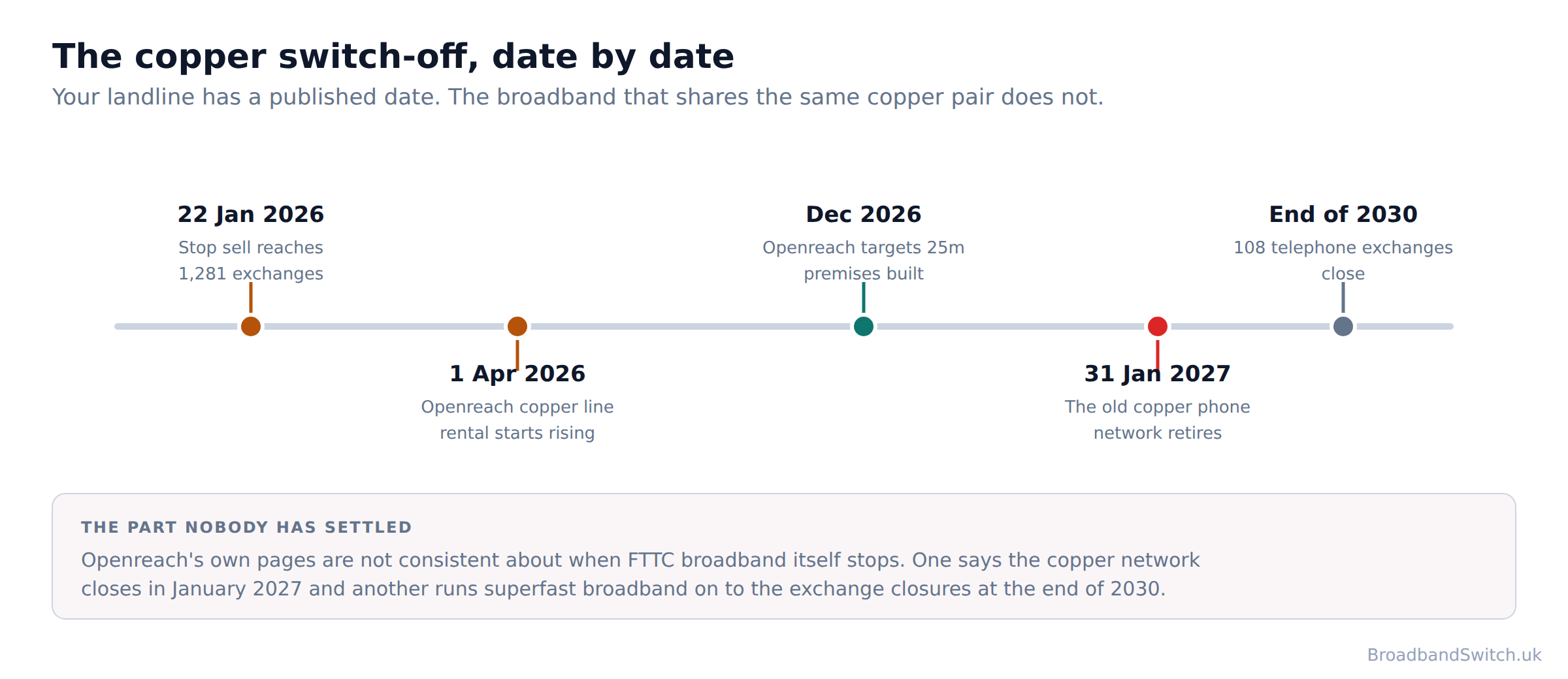
Start with the part that stops people worrying, because it gets lost in most of the coverage. Stop sell does not cut anyone off. It means that at those exchanges nobody can buy a new copper line or move to a different copper package, so if you change provider or change package you will be moved to full fibre. It is already running at 1,281 exchanges covering about 12.5 million premises, which Openreach describes as 51 per cent of Openreach's total full fibre footprint.
The second thing to say is the part Openreach has not made clear. Openreach's own pages are not consistent about when FTTC broadband itself stops. One says the copper network closes in January 2027 and another runs superfast broadband on to the exchange closures at the end of 2030. Your landline has a published date. The broadband that shares the same copper pair does not, and the two Openreach pages that address it do not agree with each other. Until that is settled, one thing is worth saying plainly. Buying a new FTTC line in 2026 is buying into a technology with a published end date and no published replacement date for the broadband half of it.
For scale: Openreach can now reach 23.4 million premises with full fibre, 9.4 million are actually connected, and it is building towards 25 million by December 2026. So the network to move people onto largely exists, and the gap between what is built and what is connected is the whole switch-off programme in one pair of numbers.
If anyone in your home uses a telecare alarm, read this first
If you have a telecare alarm, a personal alarm or a lift line, tell your provider before any switch. Openreach can roll a line back to copper where a device will not work on digital, and there is a temporary voice service for homes where full fibre is not ready. Do not wait to be contacted, and do not assume a device that has worked for years will keep working after a switch. The same applies to lift lines, door entry systems and any alarm that dials out over the phone line.
One correction to a common belief: this is not only an Openreach event. Virgin Media O2 also plan to retire their old landline networks, but dates for switching those have not yet been set. So a Virgin Media customer is not exempt, only further back in the queue, and no date has been published to plan around.
Check your own address with our landline switch-off checker, read what the copper switch-off actually changes and what happens to your landline, and if anybody in the house uses an alarm, will my care alarm still work is the one to read first. What changes at home covers the move from FTTC to full fibre.
Why the names are such a mess
Direct answer: There is one rule that cuts through it: ask where the fibre stops. At the cabinet in your street is FTTC, at a box on your wall is full fibre, and at a street cabinet with coaxial the rest of the way is Virgin Media cable.
Part fibre, fibre broadband, superfast and even fibre to the cabinet are all used for a line that ends in copper, and Virgin Media uses FTTC for its coaxial network, which is a different technology with the same acronym. Advertising rules have allowed fibre in the name of a part-copper product for years, so the word on the advert is not a guide to the technology behind it. So a package called Fibre Broadband at 67 Mbps and a package called Full Fibre at 900 Mbps are different technologies wearing overlapping names, and the only reliable way to tell them apart is the question above.
Virgin Media's naming deserves its own paragraph, because it is the one that catches people who already know what FTTC means. Virgin Media calls its own coaxial network fibre to the cabinet, or FTTC, on its own help page. That is the same acronym Openreach uses for an entirely different technology running over copper telephone pairs. Two different things, one label. Its own description of what it runs is clear enough: “So, most of your broadband runs over a fibre link, while our coax cables finish the job.” That is a hybrid fibre coaxial network, it is genuinely capable of gigabit speeds, and calling it FTTC in its own help pages helps nobody.
There is a second wrinkle at Virgin Media that matters if you are comparing upload speeds. Virgin Media sells over two different networks and tells you which only on its fastest tier, where it names nexfibre. On every other tier it does not say whether you are getting cable or fibre. So two Virgin Media customers on different tiers can be on entirely different technologies, and only one of them is told.
On FTTC, the honest description is Openreach's own. “Generally, the closer you are to your street cabinet the better. Speeds can start to drop noticeably beyond around 300 to 400 metres from the cabinet.” Because some of the journey still uses copper wire, your speed can vary slightly depending on the distance between your home and the cabinet. That is why an FTTC quote is personal to your address in a way a full fibre quote is not, and why Ofcom's code sets the minimum for it at the 10th percentile of the ISP's similar customers, adjusted to account for the impact of congestion at peak time rather than at a flat share of the advertised speed. On the folklore that rain and damp slow an FTTC line, there is less published than you would think. Openreach says copper is more susceptible to weather-related disruption than fibre, but neither it nor Ofcom publishes any figure for how much weather, damp or water in a duct actually affects an FTTC line.
Our full fibre against standard broadband guide takes the naming apart in more detail, and is full fibre worth it answers the question the names are usually obscuring.
Which one suits which household
Direct answer: The right technology depends less on how fast you want to go and more on what you do with it, and on what happens when it stops. Find your household below.
A household that works from home
Full fibre, and upload is the reason rather than download. Most of it is symmetrical or close to it, and a video call is an upload problem long before it is a download one.
A gaming household
Full fibre first, cable second. Full fibre was the lowest, then FTTC, then cable, with old copper worst by a distance. At peak time full fibre held 97.6% to 99.3% of its maximum and cable 94.2% to 97.9%, and the evening is exactly when the house is playing.
A big-download household
Cable, if full fibre has not arrived. It is genuinely competitive and often cheaper, the protections are identical, and what you give up is upload speed and a little peak-time steadiness.
A rural address with no fixed line
4G or 5G, with your eyes open. It is often the only answer, and you give up all three of the protections above to take it. Ask about the mast rather than the technology, because your distance from it decides everything.
A rented flat or a short stay
4G or 5G. No engineer, no installation, no hole in the wall, and it moves with you. Three publishes a 30-day money-back guarantee if you are unsure the signal will hold.
Anyone with a telecare alarm
A fixed line, and tell the provider about the alarm before anything is switched. None of the three wireless sellers publishes a word about telecare, and Openreach publishes real safeguards.
A household still on FTTC and content with it
Check the price of full fibre at your address before you renew. It is often the same money or less, which makes the latency and upload improvement free.
A household that only wants the cheapest bill
Run the postcode, then read the guaranteed minimum rather than the headline speed. It is the only number on the whole sales process a provider has to stand behind afterwards.
If your address has none of the fixed options, our rural switching guide covers what to do next, and the full comparison is still the fastest way to find out which of the four can actually reach you.
Live deals across all four technologies at your postcode
Find out which of the four reaches your address
One postcode shows every provider we can switch you to, lowest price first, across full fibre, FTTC, cable and 5G home broadband. Availability is the first question on this page and the only one a national average cannot answer.
Show every provider at my postcode →Broadband technology: frequently asked questions
Is full fibre always faster than FTTC?
No, and this is the single most common mistake on this subject. The fastest FTTC line Openreach sells is quicker than the slowest full fibre package most providers sell, so full fibre is not automatically the faster of the two on the plan you actually buy. Openreach publishes up to 76Mbps and upload speeds of up to 15Mbps on FTTC, and entry-level full fibre packages across the market start around 30 to 36 Mbps. Which means the technology name on the advert tells you less than the number next to it, and the number next to it tells you less than the guaranteed minimum underneath. Where full fibre wins on any package is upload, latency and steadiness at peak time, and those are the three things the advert never leads with.
Is cable as good as full fibre?
On download, yes, and Ofcom's last measurements put it ahead. Cable came out fastest on download, at a median of 270.6 Mbit/s against full fibre's 149.2 Mbit/s, because the figures reflect the packages people had bought rather than what each technology can do. Anyone quoting that figure as proof that cable is faster than full fibre has misread it. Ofcom measured the packages its panel had bought, and in 2023 Virgin Media was selling gigabit packages to far more people than the full fibre networks were. The genuine differences are upload and peak time. Virgin Media publishes 20 Mbps on M125 rising to 200 Mbps on Gig2, against symmetrical or near-symmetrical upload on most full fibre. And at the busiest hours, cable delivered 94.2% to 97.9% of its maximum speed against full fibre's 97.6% to 99.3%. Ofcom's explanation: “The variation in speeds at peak-time (8-10pm) is often higher in cable connections due to network congestion occurring nearer to the customer, making it harder for cable operators to add the additional network capacity required to reduce the effects of congestion.” On protections the two are identical, because both sit inside Ofcom's schemes.
Is 4G or 5G home broadband any good?
For the right household it is genuinely good, and this page will not pretend otherwise. 4G and 5G home broadband is a genuinely good answer in two situations: an address a fixed line has not reached, and a home you are only in for a few months. It installs in minutes, it moves with you, and at £18 it is cheaper than most fixed lines. What you are giving up is not speed. Buy a fixed line from a provider that has signed both of Ofcom's schemes and you get three things: a minimum speed in writing before you buy, a way out without penalty if it is missed, and money back automatically when the line goes down. Buy 4G or 5G home broadband and you get none of the three. Ofcom's speed code covers fixed wireless by name, so the gap is not technical. It is that the companies selling 4G and 5G home broadband have not applied it to those products, and the automatic compensation scheme's own scope is limited to fixed products. None of Three, EE or Vodafone publishes a minimum guaranteed download speed for its 4G or 5G home broadband, so there is no figure for a speed complaint to be measured against. If your address can get a fixed line and you are staying put, that is a real cost for a saving of a few pounds a month.
Why do Three, EE and Vodafone all advertise about 150 Mbps?
Because they are publishing different things behind the same number, and only one of them says so. Three's 150Mbps is published as a median at the worst time of day: its own wording is “at least 50% of 5G Broadband customers within 5G coverage areas, between the peak hours of 8pm and 10pm”. Vodafone publishes its 150 Mbps as an up to figure, which is a maximum rather than a median. EE publishes no basis for its headline speed. It does not say whether the figure is an average, a median or a maximum, and it does not say at what time of day it applies. A median at peak hour and an up to maximum are not comparable claims, so the fact that all three land near 150 tells you nothing about which is quicker. Three's is the more useful disclosure by a distance.
What happens to my FTTC broadband when copper is switched off?
Your landline moves first, and the broadband question is less settled than most coverage suggests. The old copper telephone network is being switched off, so landline calls move to a digital service that runs over your broadband connection. 31 January 2027 is the date BT has given Ofcom for retiring the old network. Openreach's own pages are not consistent about when FTTC broadband itself stops. One says the copper network closes in January 2027 and another runs superfast broadband on to the exchange closures at the end of 2030. Stop sell has already started, at 1,281 exchanges covering about 12.5 million premises. Stop sell does not cut anyone off. It means that at those exchanges nobody can buy a new copper line or move to a different copper package, so if you change provider or change package you will be moved to full fibre. Virgin Media O2 also plan to retire their old landline networks, but dates for switching those have not yet been set.
I have a telecare alarm. What should I do?
Tell your provider before anything changes, and do not wait to be asked. If you have a telecare alarm, a personal alarm or a lift line, tell your provider before any switch. Openreach can roll a line back to copper where a device will not work on digital, and there is a temporary voice service for homes where full fibre is not ready. This applies whether you are switching provider, changing package or simply being moved by the switch-off programme, and it applies to lift lines and door entry systems in blocks of flats as well as to personal alarms.
How do I find out which technology I have?
Look at where the cable enters your home. A white box on the wall with a small fibre socket means full fibre. A cable running into a phone socket means FTTC or ADSL. A coaxial screw connector like an aerial lead means Virgin Media cable. No cable at all means wireless. Your bill and your contract both name the technology, and the package name usually gives it away: anything sold as Full Fibre, Fibre 900, Gig1 or 1Gb is full fibre or cable, and anything at 76 Mbps or below on an Openreach line is FTTC. The quickest answer is a postcode check, because it tells you what is available at your address rather than what the country average is. One warning while you look: Part fibre, fibre broadband, superfast and even fibre to the cabinet are all used for a line that ends in copper, and Virgin Media uses FTTC for its coaxial network, which is a different technology with the same acronym. There is one rule that cuts through it: ask where the fibre stops. At the cabinet in your street is FTTC, at a box on your wall is full fibre, and at a street cabinet with coaxial the rest of the way is Virgin Media cable.
Who actually measures these speeds?
Nobody, any more, and that is worth knowing before you trust any comparison of the four. Ofcom closed the programme. Its final report covered March 2023, so the most recent measured comparison of latency and upload speed by technology in this country is three and a half years old, and no regulator has published one since. Ofcom still publishes availability in Connected Nations, and providers still report an average maximum download of 285 Mbit/s. That is a line capability reported by the providers rather than anything measured, so it is not the number a speed test gives you. So every latency and upload figure on this page carries the date it was measured, and where the honest answer is that nothing has been published, this page says so rather than filling the gap.
Which technology has the best upload speed?
Full fibre, and it is not close. Most full fibre providers sell symmetrical or near-symmetrical packages, so a gigabit down comes with something near a gigabit up. Virgin Media publishes 20 Mbps on M125 rising to 200 Mbps on Gig2. On FTTC, Openreach publishes up to 76Mbps and upload speeds of up to 15Mbps and Ofcom measured 17.5 to 18.5 Mbit/s on the top tier. Virgin Media's own explanation for the gap is about demand rather than technology: “Most internet plans have higher download speeds than upload speeds because people usually download more than they upload.” Virgin Media's main speeds page publishes download figures for all six tiers and no upload figure for any of them.
Should I switch to full fibre if FTTC is working fine?
Check the price first, because the answer is often yes on cost alone. Full fibre packages frequently cost the same as or less than the FTTC package they replace, which makes the speed and latency improvement free. And if you are staying on FTTC, it is worth knowing what you are staying on. Buying a new FTTC line in 2026 is buying into a technology with a published end date and no published replacement date for the broadband half of it. Run your postcode through the comparison above, look at what full fibre costs at your address, and compare it with what you pay now rather than with what full fibre cost two years ago.
In short
- The four technologies are closer on speed than the adverts suggest and further apart on what happens when it goes wrong. That is the comparison worth making, and it is the one nobody puts on the box.
- The fastest FTTC line Openreach sells is quicker than the slowest full fibre package most providers sell, so full fibre is not automatically the faster of the two on the plan you actually buy. Which means the technology name on the advert tells you less than the number next to it, and the number next to it tells you less than the guaranteed minimum underneath.
- Cable came out fastest on download, at a median of 270.6 Mbit/s against full fibre's 149.2 Mbit/s, because the figures reflect the packages people had bought rather than what each technology can do. Anyone quoting that figure as proof that cable is faster than full fibre has misread it. Ofcom measured the packages its panel had bought, and in 2023 Virgin Media was selling gigabit packages to far more people than the full fibre networks were.
- Full fibre was the lowest, then FTTC, then cable, with old copper worst by a distance. Full fibre measured 4.9 to 7.3 ms against cable's 12.5 to 14.8 ms.
- At peak time full fibre held 97.6% to 99.3% of its maximum and cable 94.2% to 97.9%.
- Buy a fixed line from a provider that has signed both of Ofcom's schemes and you get three things: a minimum speed in writing before you buy, a way out without penalty if it is missed, and money back automatically when the line goes down. Buy 4G or 5G home broadband and you get none of the three.
- Ofcom's speed code covers fixed wireless by name, so the gap is not technical. It is that the companies selling 4G and 5G home broadband have not applied it to those products, and the automatic compensation scheme's own scope is limited to fixed products. None of Three, EE or Vodafone publishes a minimum guaranteed download speed for its 4G or 5G home broadband, so there is no figure for a speed complaint to be measured against.
- The two lists are not the same list, so check both. Vodafone and Hyperoptic pay automatic compensation and have not signed the speed code. Three has signed neither.
- 4G and 5G home broadband is a genuinely good answer in two situations: an address a fixed line has not reached, and a home you are only in for a few months. It installs in minutes, it moves with you, and at £18 it is cheaper than most fixed lines.
- The old copper telephone network is being switched off, so landline calls move to a digital service that runs over your broadband connection. 31 January 2027 is BT's date, and Openreach's own pages are not consistent about when FTTC broadband itself stops. One says the copper network closes in January 2027 and another runs superfast broadband on to the exchange closures at the end of 2030.
- If you have a telecare alarm, a personal alarm or a lift line, tell your provider before any switch. Openreach can roll a line back to copper where a device will not work on digital, and there is a temporary voice service for homes where full fibre is not ready.
- There is one rule that cuts through it: ask where the fibre stops. At the cabinet in your street is FTTC, at a box on your wall is full fibre, and at a street cabinet with coaxial the rest of the way is Virgin Media cable.
- Nobody is measuring this any more, which is worth knowing before you trust any comparison of these four, including ours.
- Before you sign anything, ask for the guaranteed minimum download speed in writing. If the seller cannot give you one, you have learned something more useful than any headline speed.
Each line stands on its own and carries its date. Reviewed by a person at least quarterly, last on 21 September 2026.
References
- Ofcom
Ofcom. (2026, May 13). Connected Nations update: spring 2026, the full fibre and gigabit availability figures, take-up, and the premises below decent broadband. ofcom.org.uk
- Ofcom
Ofcom. (2025). Connected Nations 2025, the definition of gigabit-capable and the fixed wireless access reach figure. ofcom.org.uk
- Ofcom
Ofcom. (2023, September). UK Home Broadband Performance, March 2023, the last measured latency, upload and peak-time figures by technology published in this country. ofcom.org.uk
- Ofcom
Ofcom. (2024). Home Broadband Performance: confirmation of cessation, the decision to close the measurement programme. ofcom.org.uk
- Ofcom
Ofcom. (2022, September 21). 2022 Voluntary Code of Practice: Better Broadband Speed Information (Residential), the scope wording that includes fixed wireless, the minimum guaranteed speed rules and the right to exit. ofcom.org.uk
- Ofcom
Ofcom. (2025, July 16). Codes of practice, the residential signatory list, read 21 September 2026. ofcom.org.uk
- Ofcom
Ofcom. (2026). Automatic compensation: what you need to know, the three published rates, the scope wording and the participant list. ofcom.org.uk
- Ofcom
Ofcom. (2026, August 26). The future of landline calls, the 31 January 2027 date and the position of the other networks. ofcom.org.uk
- Openreach
Openreach. (2026). Superfast fibre broadband, the published FTTC speeds, the distance effect and the note on weather. openreach.com
- Openreach
Openreach. (2026, January 22). Openreach stops copper for another million premises, the exchange count, premises covered and share of the full fibre footprint. openreach.com
- Openreach
Openreach. (2026). The big switch off, the programme pages whose FTTC end dates do not agree, and the telecare safeguards. openreach.com
- BT Group
BT Group. (2026, July). Q1 FY27 trading update, the Openreach full fibre footprint, connected premises and build target. bt.com
- Virgin Media
Virgin Media. (2026). Our fibre network, the description of the hybrid network, the FTTC naming and the nexfibre position. virginmedia.com
- Virgin Media
Virgin Media. (2026). Broadband speeds, the published download figures for all six tiers and the absence of upload figures. virginmedia.com
- Three
Three. (2026). Home broadband, the price, the 150Mbps figure and the published basis for it. three.co.uk
- EE
EE. (2026). Mobile broadband, the price range, the 146Mbps figure and the 1000GB deprioritisation threshold. ee.co.uk
- Vodafone
Vodafone. (2026). 5G home broadband, the price and the up to 150 Mbps figure. vodafone.co.uk
- BroadbandSwitch.uk
BroadbandSwitch.uk. (2026). Broadband deals, checked by hand, the package prices and guaranteed minimum speeds quoted here. broadbandswitch.uk
Ready to find out which technology reaches your address?
One postcode shows every provider that can reach you, lowest price first, on all four technologies. Then ask the one question on this page that does the most work: what is the guaranteed minimum download speed?
Compare at your postcode →