Care alarms, pendants and security alarms: who checks it still works when the line changes
If a care alarm, pendant or monitored alarm works through the phone line, a broadband or line change can stop it working, and the thing to understand is who is supposed to catch that.
Twelve companies signed the Government's PSTN Charter, including BT, Sky, Virgin Media O2, TalkTalk and Vodafone. Its telecare commitment reads: “No telecare users will be migrated to digital landline services without us, the consumer, or the telecare company confirming that they have a compatible and functioning telecare solution in place.” Read the middle of it. Us, the consumer, or the telecare company. Any one of the three satisfies the promise, so twelve companies have agreed that somebody will have checked without agreeing who. Of the three, the household is the only one present in every case.
Which is why every page either side says the same thing. Lewisham Council: “Lewisham Linkline are not responsible for any changes to your telephone line and you should speak to your provider to assist you with connecting your router.” Vodafone: “Contact your local authority or the maker of the device to check.” No broadband provider read for this guide publishes that it will contact a household's telecare service itself. One publishes that the telecare service may contact it. So do the two things nobody else will: look behind the box, and ring whoever supplies the alarm.
Start with your postcode
Start where the work actually is. Check the exact address rather than the postcode, because what reaches it decides which options are real before anybody rings anybody.
Not sure what you are allowed to do? Answer three questions and see all five jobs sorted into what you can do and what only they can. Is there a care alarm in the house? Start there instead, because that call comes before everything.
The short version, before anything changes
Direct answer: If the alarm works through the phone line, a line change can stop it working. The question worth understanding is who is supposed to catch that.

A care alarm spends most of its life being forgotten, which is the point of it and also the problem. Nobody checks a thing they have stopped noticing, and the UK is in the middle of changing the network most of them were designed around. BT plans to retire its old landline network by 31 January 2027. That is the date everything on this page is measured against, and it is close enough now that a household with an analogue alarm has months rather than years.
This page is about one question and hands everything else to whichever page already owns it. The migration itself is in our digital voice and switch-off guide. What a provider will let a relative do on somebody else’s account is in our elderly parent guide, which is where this page is usually arrived at from. Ending the phone line altogether is in our guide to switching without a landline, and broadband for an older household generally is in our pensioners guide.
What is left is the alarm itself: which kind you have, who is responsible for it, who you ring and in what order. None of it is difficult and all of it is quick. The only hard part is knowing that it is yours to do rather than somebody else’s, which is what the rest of this page is about.
The promise twelve companies made
Direct answer: “No telecare users will be migrated to digital landline services without us, the consumer, or the telecare company confirming that they have a compatible and functioning telecare solution in place.”
That is the telecare commitment in the Government’s PSTN Charter, published on 18 December 2023 and last updated 22 January 2026 and signed by twelve companies: Ogi, BT, Virgin Media O2, Sky, TalkTalk Consumer, Vodafone, KCOM, Zen Internet, Broadband for the Rural North (B4RN), Immervox, Digital Space, Utility Warehouse.
It is a real commitment and it is worth knowing about, because it is the strongest thing a household can point at. Now read the middle of it again. Us, the consumer, or the telecare company. Any one of the three satisfies the promise.
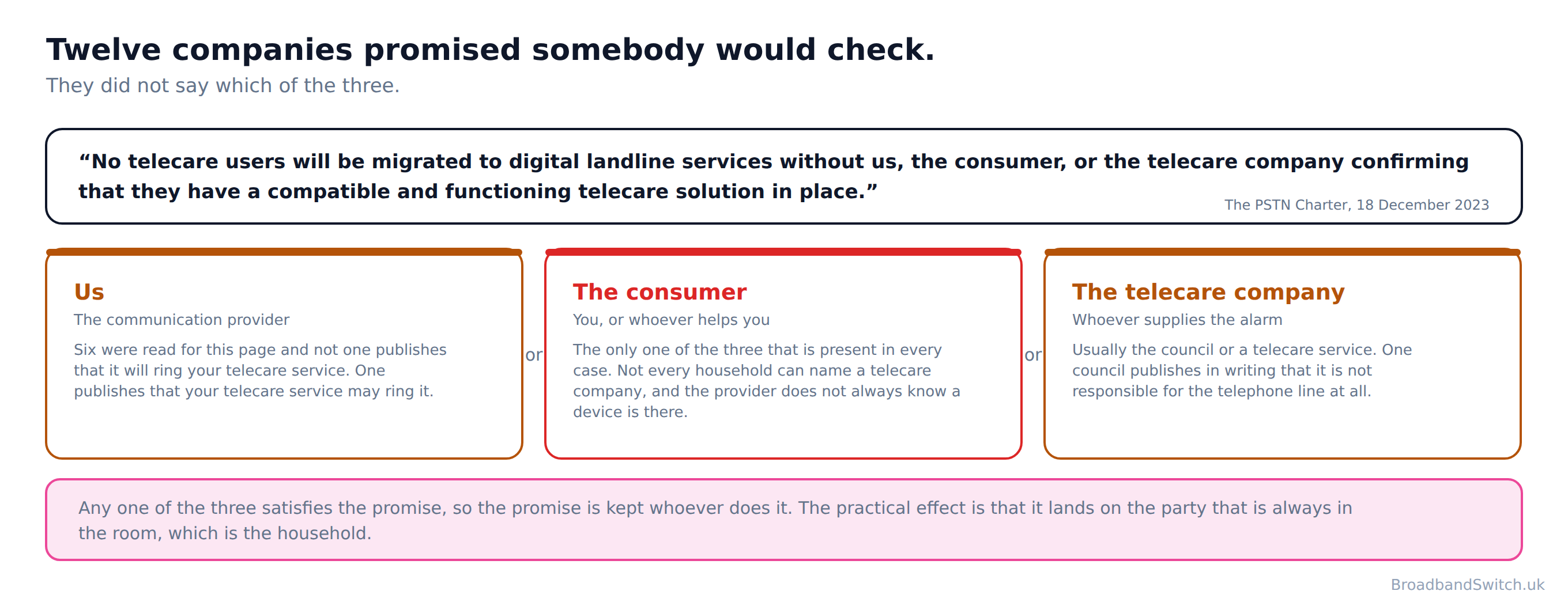
Nobody drafted that carelessly. It is the only wording twelve companies and a government department could all have agreed to, because any other version would have made one of them answerable for something the other two control. But a promise that can be kept by any of three parties is a promise that gets kept by whichever of them has no choice.
And of the three named, only one is guaranteed to be there. Not every household can name a telecare company: an alarm that came with sheltered housing may belong to a contract the resident never signed. The communication provider does not always know a device is in the house, which is why one of its own commitments is to go looking for them. The consumer is the constant.
What the Government says about it since
The Telecare National Action Plan, published 11 February 2025 and last updated 10 September 2026, restates the same commitment as an outcome: “no telecare user will be migrated to digital landline services without the communication provider, the customer or the telecare service provider confirming that the user has a compatible and functioning telecare solution in place.” The same three parties, the same “or”.
On what the communication provider should do about testing it goes as far as this: “Communication providers should play an important role in facilitating testing before and after a migration to ensure that migration is only completed when compatibility of the device is assured.” Should, not must. The one duty it states flatly falls on the other side: “This means that telecare service providers must ensure the reliability of the specific combination of equipment and services they use.”
The other two promises in the same charter
Two more of the charter’s commitments reach a household with an alarm. On pace: “We will not undertake any non-voluntary migrations to digital landlines, until we have full confidence that we are taking all possible steps to protect vulnerable people through the migration process.” On power cuts: “Where battery back-up solutions are provided, we will work to provide solutions that go beyond the Ofcom minimum of 1 hour of continued, uninterrupted access to emergency services in the event of a power outage.”
Read the second one slowly, because it is more carefully built than it first looks. It promises to work to provide solutions that go beyond the Ofcom minimum of one hour, where a battery solution is provided at all. One hour is the floor. A care alarm that reaches the monitoring centre through the router has exactly the same problem in a power cut as the phone does, and an hour is not a long evening.
Both documents are voluntary commitments rather than regulations, and this page says so rather than dressing them up. They are still the most useful thing to have read before you pick up the phone, because they tell you that you are not asking for a favour.
Which kind of alarm you have
Direct answer: One lead or two, and where the second one goes. That is the whole test and it takes ten seconds.
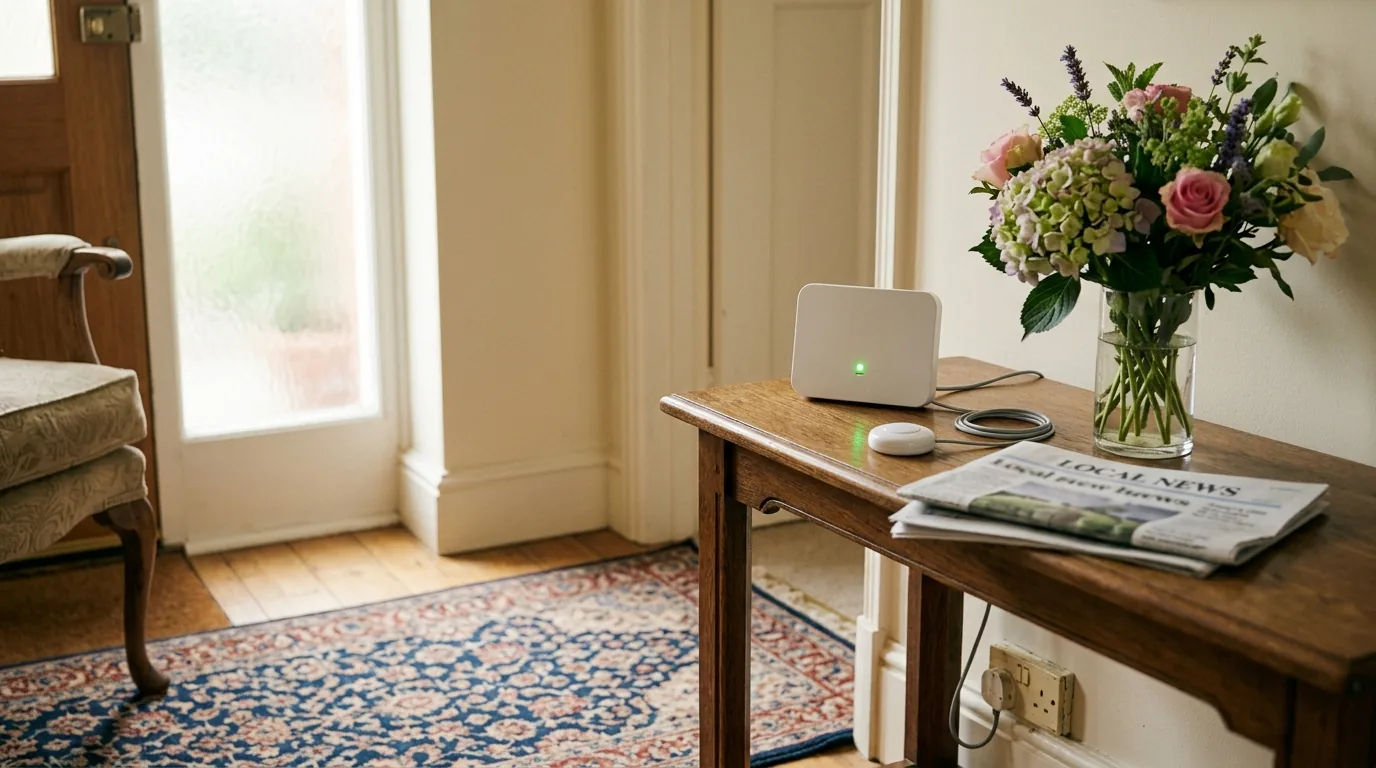
Pull the base unit forward and look at what goes into the back of it. If there is one lead, running to an ordinary three pin socket, and nothing else, the alarm has its own mobile connection and the line change does not reach it. If there is a second, thinner cable going into a telephone socket, the alarm dials the monitoring centre down the phone line and everything on this page applies.
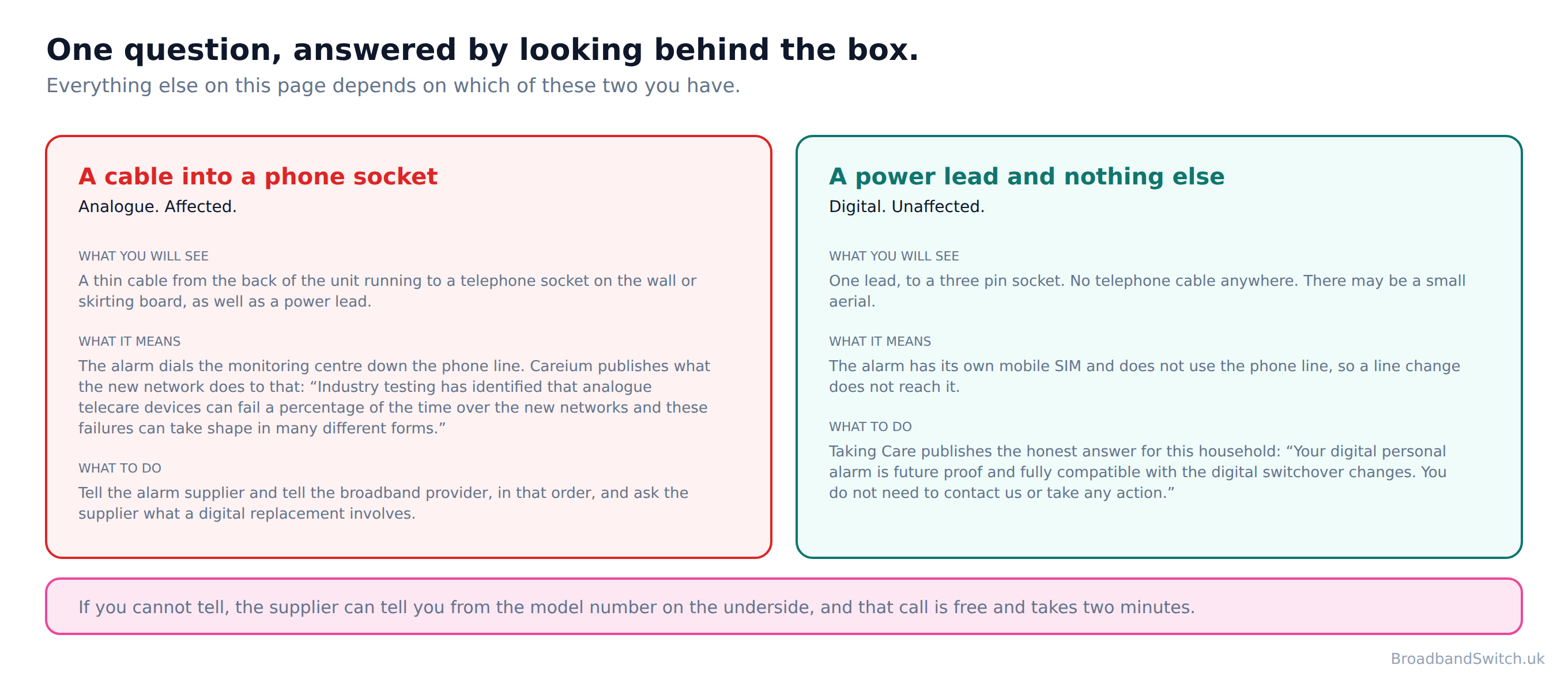
Careium publishes what the new network does to the first kind, and it is franker than anything on the telecoms side: “Industry testing has identified that analogue telecare devices can fail a percentage of the time over the new networks and these failures can take shape in many different forms.” Note the shape of that. Not always, and not never. A device that works the day somebody tests it can still fail the day it is needed, which is why the testing section of this page asks for three tests rather than one.
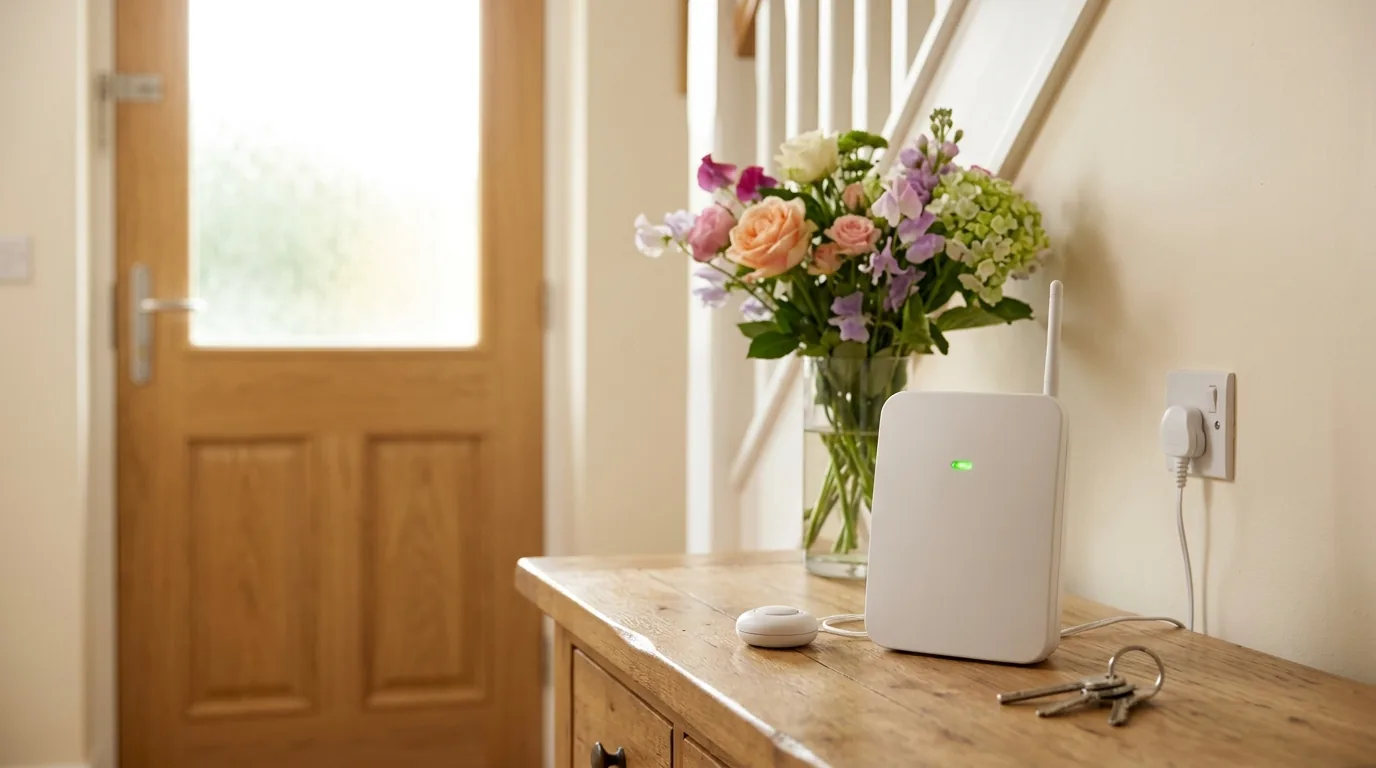
Taking Care publishes the honest answer for the second kind: “Your digital personal alarm is future proof and fully compatible with the digital switchover changes. You do not need to contact us or take any action.” That is genuinely the whole of it, and a household in that position can stop reading here with our blessing.
If you cannot tell which you have, the supplier can tell you from the model number on the underside of the unit. That call is free and it takes two minutes, and it is a better use of an afternoon than guessing.
The third kind of alarm, which lives on your broadband
Direct answer: A newer alarm may go through the router instead of the phone line. That moves the risk from the switchover to the power cut.
The look-behind-the-unit test earlier on this page sorts alarms into two piles, and for most households that is the whole answer. There is a third pile, it is growing, and a household that has already been upgraded is probably in it: an alarm that reaches its monitoring centre through the broadband router.
This is the good outcome of the switchover rather than a problem with it. A router-connected alarm is not waiting to be caught out by a line change, because the line change has already happened to it. What it has instead is a new dependency, and Careium puts it in nine words on its own site: “Digital lines require your broadband router to be on.”
Careium also says what is being given up, which few suppliers do: “With the old landlines, your phone and alarm often worked during a power cut.” An analogue alarm drew its power from the exchange and rode out a power cut without anybody thinking about it. That quiet resilience is the thing the country is trading away, and it is worth naming rather than glossing.
So what covers the power cut
Careium's answer is the industry answer: “To address this, providers are offering free battery backup units to vulnerable customers.” Note vulnerable customers rather than everybody, which matches the regulator's own conditional wording in the next section.
Appello publishes the detail that actually decides whether a battery helps, and it is the only supplier page read for this guide that says it out loud: “Provided with a battery back-up which uniquely and critically covers both the converter and router, ensuring service availability during any power or broadband downtime.” Both the converter and the router. A battery that keeps the alarm powered while the router sits dark has kept the wrong box alive, and that is a distinction a household can check on its own kit in about a minute.
No UK telecare supplier read for this page publishes, on its own site, what happens to a router-connected alarm when the broadband drops but the mains power is fine. Two address it indirectly by supplying or recommending a mobile fallback. So the honest position is that the industry answers the broadband-goes-down question with hardware rather than with a sentence: a mobile fallback inside the device, or a second battery that covers the router. If you have a router-connected alarm, that is the question to ask your supplier, in those words.
Three questions for a router-connected alarm
Does the battery back-up cover the router as well as the alarm, and for how long. Does the device have a mobile fallback if the broadband drops while the power is still on. And does any of that change if we switch broadband provider. Write the answers down with the date, the same as for an analogue alarm, because the answers are specific to the model rather than to the supplier.
What you need to do
Direct answer: Three questions. Five jobs, sorted into the ones that are yours and the ones that are already taken care of.
The first question decides the other two, which is why it is first. A household that guesses it either does work it did not need to do or skips the only work that mattered.
The second question does not change what has to happen. It changes who you ring, which is the part that differs most between households and the part guides leave out: a council alarm, an alarm bought direct and an alarm that came with the housing are three different phone calls.
It runs entirely in your browser. There is no form to submit, nothing sent to any server and nothing stored. On this page that matters more than on any other we have built, because the three questions amount to saying that somebody vulnerable lives at an address and what equipment keeps them safe. None of it leaves the tab.
Three questions, and five jobs sorted into the ones that are yours and the ones that are already done
The first question is the one that decides the other two, and it is answered by looking at the back of the unit. Every rule quoted carries the date it was read. Nothing you answer here leaves your browser.
The order to do this in
Direct answer: Two phone calls and one look behind a box, and the order they happen in is most of the advice.
The date to work back from is 31 January 2027. The date that actually matters to one household is whenever its own provider writes to it, which is usually a good deal sooner, so the safe assumption is that the letter arrives before you feel ready for it.
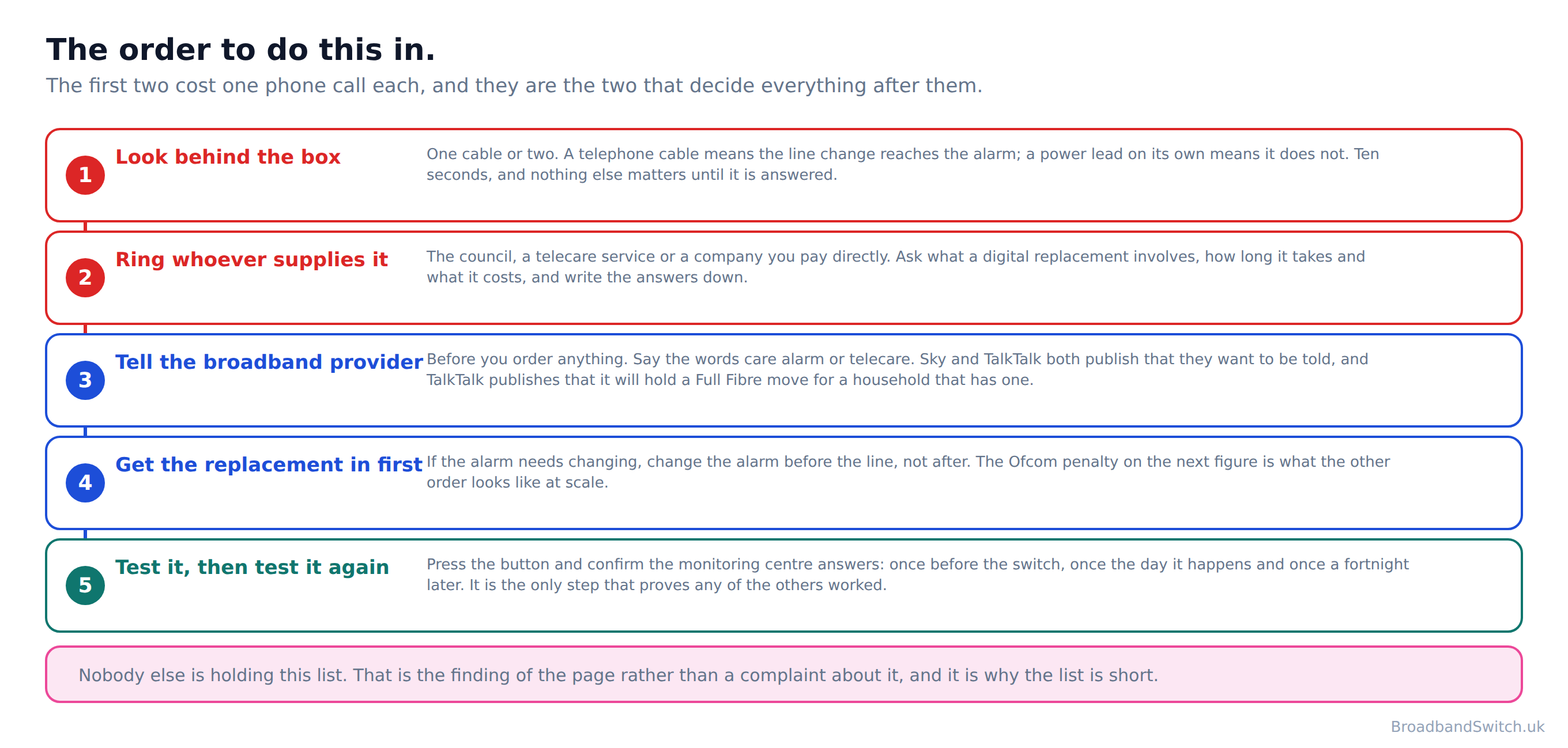
Step four is the one that gets done backwards. If the alarm needs replacing, replace the alarm and then change the line, rather than changing the line and sorting the alarm out afterwards. The next section is what the other order looks like when it happens to thousands of households at once.
What to say when you ring
To the alarm supplier: does this device work on a digital line, and if it does not, what is the replacement, how long does it take and what does it cost. Three questions, and write the answers down with the date and the name of whoever gave them.
To the broadband provider: say the words care alarm or telecare rather than describing it. Those are the words their systems are built around, and the difference between saying them and describing a box in the hall is the difference between a note on the account and a pleasant conversation that changes nothing.
Ofcom publishes what should happen when you do: “If you tell your landline provider in advance, they can help check whether your device will work and make any necessary arrangements, including pausing the change until a safe solution is in place if needed.” Pausing the change until a safe solution is in place, in a regulator's own words, is the thing to ask for by name. It only operates if the household speaks first, which is the whole reason this page exists.
And if a migration is already scheduled, ask for it to be held. Careium publishes that this is a thing you can ask for and where to ask: “Some telephone line providers will allow you to request to delay your transition, but you will need to arrange this directly with your telephone provider and you can notify them that you are in receipt of a special service personal alarm.”
What each organisation publishes
Direct answer: Six broadband providers and two councils, read on their own sites on 1 October 2026.
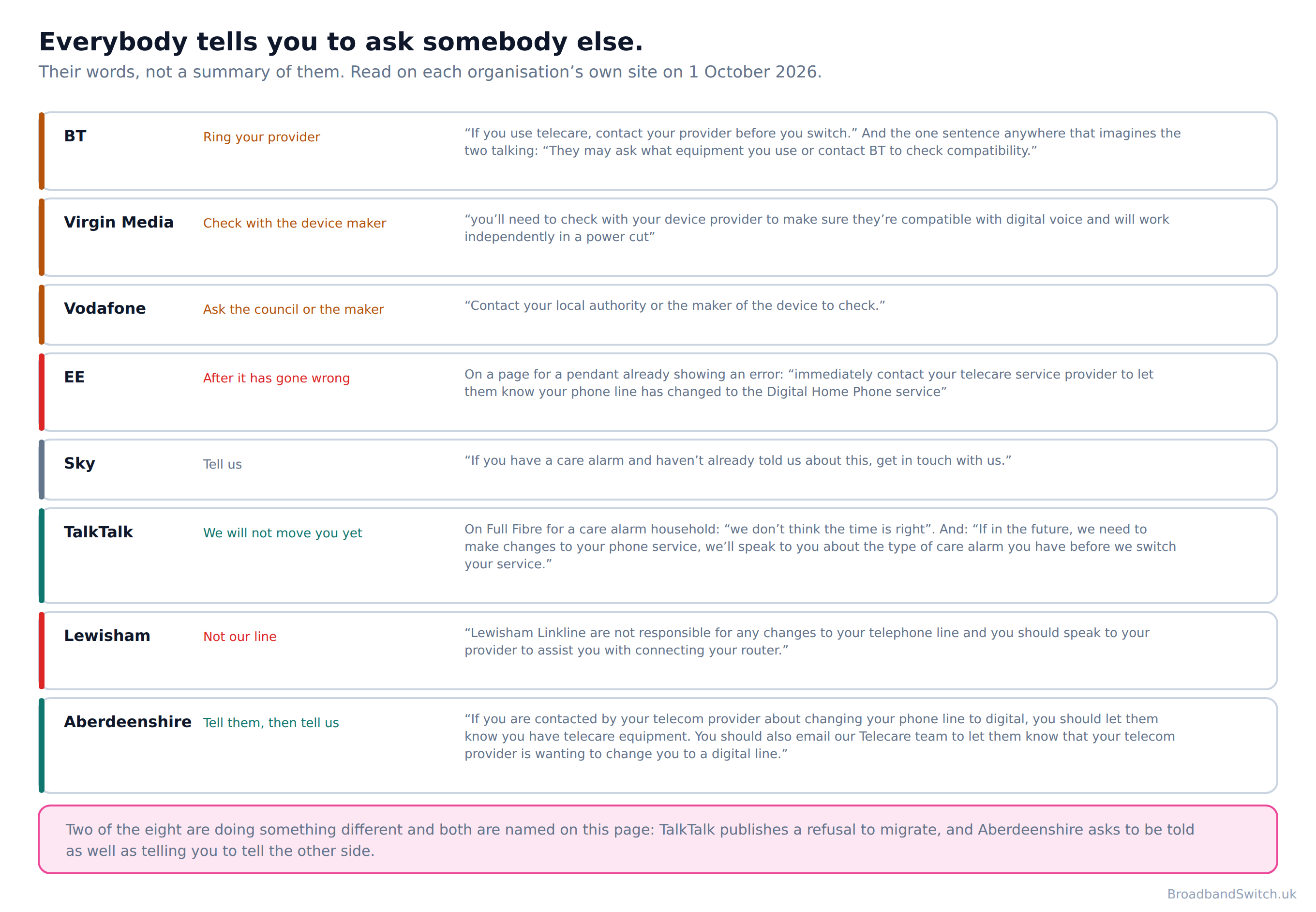
Read them together and the pattern is not malice, it is geometry. Every one of these organisations gives correct, sensible advice. BT tells you to ring your telecare provider, and you should. The council tells you to ring your phone company, and you should. Follow all of it perfectly and you will have made every call yourself.
Lewisham Council states the position most plainly of the eight, and it is a reasonable thing for a council to say: “Lewisham Linkline are not responsible for any changes to your telephone line and you should speak to your provider to assist you with connecting your router.” The duty is handed over in the sentence after it: “If you upgrade your telephone provider please remember to tell them you have a telecare alarm installed.” Careium does the same about cost: “Ultimately this is down to your telephone line provider.”
BT also publishes the reassuring one, and it is true: “We're working with telecare providers to make sure their equipment works with Digital Voice.” It is an industry-level statement about equipment rather than a promise about your mother’s hall, and the sentences after it are where the household’s own job lands. That distinction is the one this whole page turns on.
The one sentence anywhere in the set that imagines the two organisations speaking to each other is BT’s, and all three things about it are worth noticing: “They may ask what equipment you use or contact BT to check compatibility.” It is the telecare provider contacting BT rather than the reverse. It is may rather than will. And it only happens after you have made the first call.
The two doing something different
TalkTalk publishes a refusal rather than a warning. For a household with a care alarm, on moving to its Full Fibre service, it says “we don't think the time is right”. And separately: “If in the future, we need to make changes to your phone service, we'll speak to you about the type of care alarm you have before we switch your service.” That is the strongest published position of the six broadband providers read for this page and it deserves saying out loud.
And then even TalkTalk ends where every other one of them does: “It might be a good idea to contact the organisation that gave you your care alarm, so that they can update your details and can provide you with advice and support.” That is not a criticism of the best performer in the set. It is the shape of the whole set, visible even in the one doing most.
Aberdeenshire Council is the other. It is the only organisation of the eight that asks to be told as well as telling you to tell the other side: “If you are contacted by your telecom provider about changing your phone line to digital, you should let them know you have telecare equipment. You should also email our Telecare team to let them know that your telecom provider is wanting to change you to a digital line.” And it comes to you: “If you still have a telecare alarm that connects to a phone socket, then a member of the team will contact you over the coming months to arrange a visit to swap out the old equipment.” Two notifications is still two more than nobody, and both are still made by the resident.
What does exist between the two industries
Ofcom’s own letter to industry records it: “We note that the Telecare Advisory Board (TAB), convened by BT, is coordinating the telecoms industry, central and local government, and telecare alarm industry to identify telecare users through better data sharing.” Note what it is for. Finding telecare users across the country, through data sharing, is a genuinely useful thing and it is not the same thing as confirming that the alarm in one particular hall is working this week. No broadband provider read for this guide publishes that it will contact a household's telecare service itself. One publishes that the telecare service may contact it.
What it looks like when nobody calls
Direct answer: “Ofcom has today fined Virgin Media £23.8 million, after it disconnected telecare customers during its programme to migrate customers to digital landlines.”
That is Ofcom, on 1 December 2025, and the penalty was £23.8 million. The guide we replaced cited this penalty and described it as being about vulnerable customer migration handling. On a page about care alarms the first sentence says what it was.
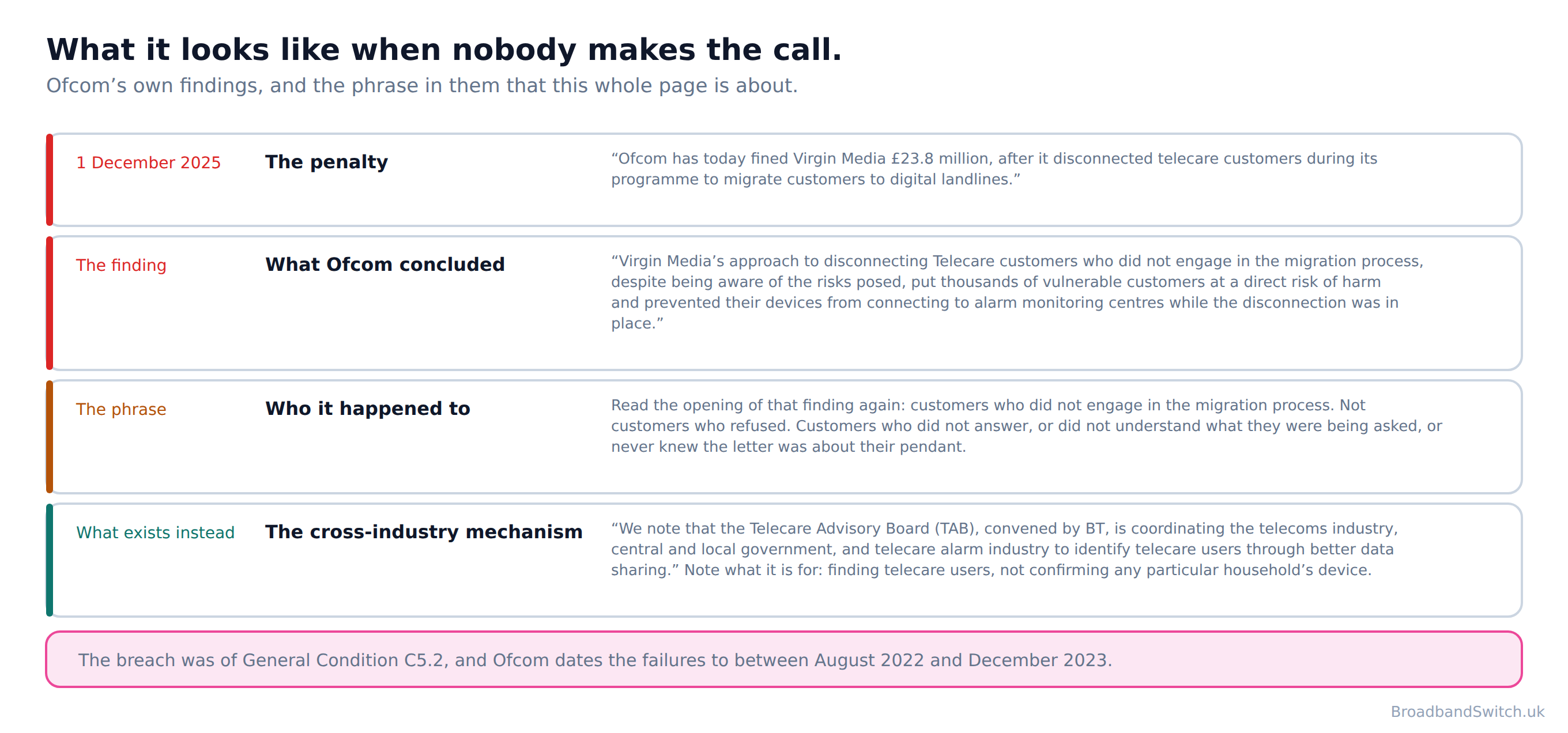
Ofcom’s finding is the part worth reading twice: “Virgin Media's approach to disconnecting Telecare customers who did not engage in the migration process, despite being aware of the risks posed, put thousands of vulnerable customers at a direct risk of harm and prevented their devices from connecting to alarm monitoring centres while the disconnection was in place.”
The phrase to sit with is customers who did not engage in the migration process. That is not a description of somebody being difficult. It is a description of somebody who did not open the letter, or opened it and did not realise it was about the box in the hall, or meant to ring and then the week went. Which is most of us, about most letters, most of the time.
The breach was of General Condition C5.2 and Ofcom dates the failures to between August 2022 and December 2023. That start is five months after BT had already paused its own rollout over the same class of risk, which is the part no guide on this subject draws.
Burglar alarms and security alarms, which nobody signed for
Direct answer: A monitored intruder alarm signals down the same line. It has no charter behind it and the one hard date has already passed.
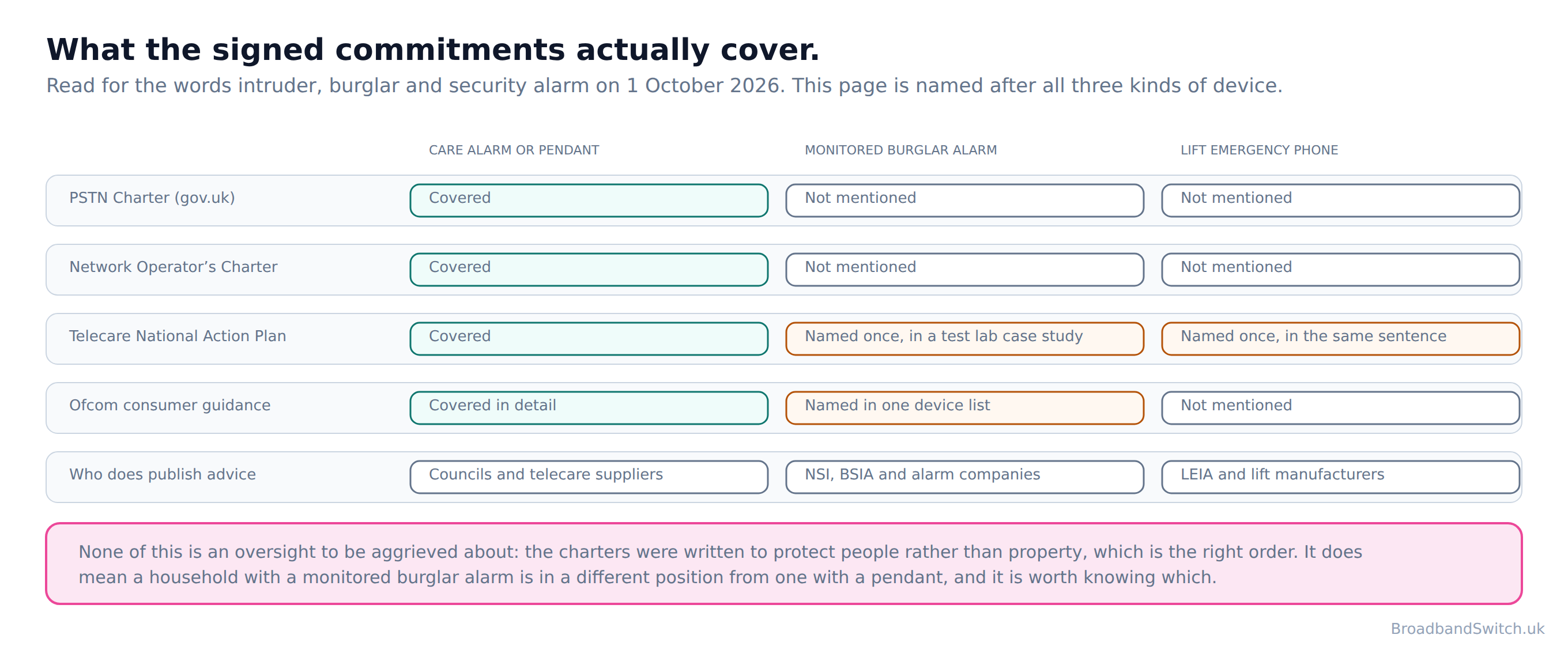
This page is named after a regulator's own list. Ofcom's landline guidance says to act if “you have a care alarm, health pendant, security alarm or other connected device that uses the telephone line”, and it is the only place a UK regulator sets a security alarm beside a care alarm. Everything underneath that sentence on Ofcom's page is about telecare. So is everything in the charter twelve companies signed. So is the national action plan.
No security or intruder alarm is covered by the PSTN Charter. The words intruder, burglar and security alarm do not appear in it, or in the PSTN Network Operator's Charter. The Telecare National Action Plan names intruder alarms once, in a case study about a test laboratory, rather than as anything a household can rely on. The single mention is inside a case study about Openreach's test laboratory: “This lab has had many visitors from different industries, to test products including telecare, intruder alarms, fire alarms, lift alarms, flood defences and more.” Intruder alarms and lift alarms appear there as things that were tested in a building in 2021, not as anything anybody promised to check in your hall.
That is not an oversight anybody should feel aggrieved about, because the charter was written to protect people rather than property, and that is the right order. But it does mean a household with a monitored burglar alarm is in a different position from a household with a pendant, and it should know which position it is in.
What the security industry publishes about it
The National Security Inspectorate is a UKAS-accredited certification body and it puts the position in one sentence on its own householder page: “When you migrate your home to the new digital service your traditional telephone connection, including your intruder alarm, may no longer be able to send signals to alert anyone.” Read the end of it rather than the middle. Not that the alarm stops making a noise. That it may no longer be able to alert anyone.
The British Security Industry Association has tested the equipment and published what it found, in the words of its own Director of Technical Services: “Through rigorous testing of alarm signalling equipment on the new All IP networks, we have seen incompatibilities emerge, which can result in alarm signals either not reaching the monitoring centre or being corrupted, so the appropriate response cannot always be initiated.” Signals that do not arrive, or arrive corrupted, so the response is not sent. A bell still ringing in an empty street is the failure mode here.
And the BSIA on the clock: “time is running out for end-users that do not recognise the need to have their alarm signalling systems checked and updated if necessary.” That was published in May 2023, which tells you how long this has been known about in the trade and how little of it has reached householders.
Both bodies also publish the reassuring half, and it belongs here too. NSI: “Not all alarm systems will be affected by the change and it may not be necessary to replace or upgrade your system”. Plenty of alarms are already signalling over mobile or IP and will not notice the change at all. The point is not to worry. It is to find out which kind is on your wall, and there is exactly one way to do that: “you should contact your alarm/maintenance provider before your line is upgraded to check whether your alarm system requires adaptation or replacement, to ensure compatibility with the new IP network.”
The date that has already gone
Everything else on this page is about a deadline ahead of us. This one is behind us. BT publishes it flatly: “As of 15 December 2025, BT has closed all Redcare services.” Redcare was the best known monitored alarm signalling service in the country and it is already switched off, not switching off.
BT's instruction to anybody still on it is the same instruction as everywhere else: “If you're still relying on Redcare services, you should speak to your alarm maintenance provider to understand your available options.” If your alarm contract has the word Redcare anywhere in it, that call is overdue rather than forthcoming, and it is the most urgent thing on this entire page.
One company that takes the job
It would be easy to write this section as a complaint and it would also be unfair, because at least one monitoring company has published the opposite of handing the job back. SECOM, which runs its own alarm receiving centre, says this on its own site: “SECOM will undertake these checks and replace signalling equipment if necessary, during one of your forthcoming planned maintenance inspections.” And then: “Don't worry though, you do not have to do anything and where equipment needs to be changed to a compatible updated version, we will install a new signalling device and ensure that the new device meets or exceeds the polling performance of your existing device.”
That is what the good version looks like, and it is worth knowing it exists so a household can ask its own provider for the same thing. Even SECOM asks for one piece of help, and it is the same piece everybody else asks for: “If you plan to change your phone/broadband service provider, you may need to contact us beforehand to arrange to undertake these checks ahead of your planned maintenance visit.” Tell them before you switch, not after.
The sentence to keep if you take nothing else from this section
SECOM publishes a warning about the conversation you are most likely to have: “Your phone/broadband provider may advise you that existing PSTN / ISDN related services will be unaffected by their upgrading or changing your home/business router, however this is not necessarily always the case.” A security company, in writing, saying the broadband provider's reassurance may be wrong. Nobody on the broadband side is being dishonest when they say it; they genuinely cannot see your alarm. That is precisely why the check has to happen on the alarm side.
Age UK, which has no commercial interest either way, names them together where the charters do not: “The switch to digital landlines may affect telecare devices and other equipment such as personal alarms and security alarms if they're connected to your phone line.” One sentence on a charity's advice page is currently doing work that no signed commitment does.
The lift in a block of flats, which nobody in the flat can fix
Direct answer: If the lift phone goes quiet, the person who needs it cannot fix it. Telling the building owner is the whole job.
Every other section of this page ends in something you can do. This one does not, and saying so plainly is more use than pretending otherwise. A lift emergency telephone belongs to the building, the building belongs to a freeholder or a landlord or a management company, and a resident has no standing to ring the lift company at all.
The lift industry is clear about whose job it is. The Lift and Escalator Industry Association, in its own publication: “The communication link is typically under the responsibility of the building owner.” LEIA addresses the building owner and the lift owner throughout and never breaks that down for a residential block, so this page will not invent a breakdown either. In practice it is whoever your service charge is paid to.
Why a lift phone is exactly the wrong thing to put on a digital line
LEIA explains the mechanism, and it is the same one that catches care alarms. A lift autodialler does not talk to the monitoring centre so much as beep at it, in the touch tones a telephone keypad makes, and LEIA is blunt about where that leaves things: “Compatibility of these over the VoIP system needs to be checked.” Tones carrying data down a voice path is precisely what a digital line handles unpredictably. A conversation survives the change; a sequence of tones pretending to be a conversation may not.
Avire, which manufactures lift emergency communications, publishes what that looks like in a list of failure modes on its own site. One: “Legacy autodiallers may not detect a dial tone”. And the one that matters most: “Alarms may appear functional but fail during an emergency”. An emergency phone that looks fine on the wall and does not connect when somebody is shut in behind it.
There is supposed to be a backstop, and Avire states it: “EN 81-28 requires lifts to have two-way emergency communications, battery backup and automated test calls every 72 hours.” A lift that calls out every three days on its own should never be able to fail quietly. The uncomfortable part is that the Avire list includes the test calls stopping too, which means the backstop is one of the things that can go.
Avire also names who carries this when nobody has been appointed to: “In unmanaged systems, housing providers often end up responsible.” For a leaseholder that is actually useful, because it tells you the organisation to write to is the one managing the building rather than the one that installed the lift.
What the government says, and who it is talking to
One gov.uk page names lift emergency lines and it is written for schools rather than homes. The Department for Education lists what the switch-off touches: “alarms and security systems, including fire and intruder alarms, lift emergency lines, closed-circuit television (CCTV) and door-entry systems”. Fire alarms, intruder alarms, lift emergency lines, CCTV and door entry, in one line, for a school estate manager.
No council or housing body page could be found that tells a resident of a block of flats what happens to the lift emergency telephone when the phone line changes, or who to tell. The resident in the lift is the one party nobody has written a page for, which is why the only honest advice this guide can give is the unglamorous kind.
What to actually do, as a resident
Write to whoever your service charge goes to, name the lift, name the date your own phone line is changing, and ask two questions: has the lift emergency telephone been checked for the digital switchover, and what is the battery arrangement. Ask in writing rather than in person, because the value of this is the record of having asked. If the building has a residents association, one letter from it outweighs twelve from individual flats.
Two different one hour rules, and neither is about your alarm
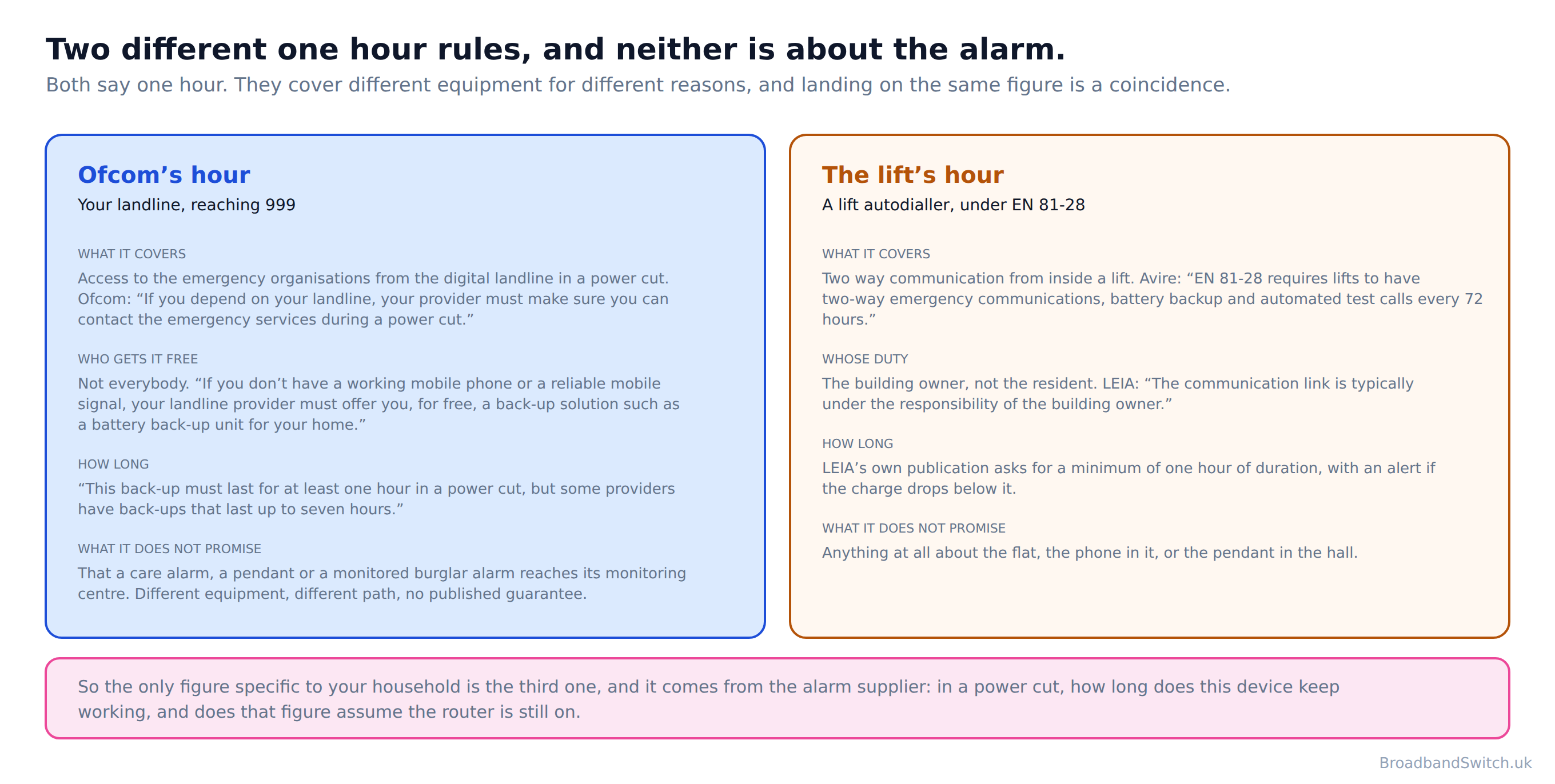
Direct answer: The famous one hour of battery back-up is a rule about reaching 999 from the landline. It does not promise the alarm works.
Repeat the one hour figure anywhere near this subject and somebody will tell you it covers the care alarm. It does not, and the confusion is worth half a page because it is the difference between a household that is protected and a household that believes it is.
Ofcom's hour
Start with the plain fact: “Digital landlines need mains electricity and will not work in a power cut unless there is a battery back-up.” Then the duty: “If you depend on your landline, your provider must make sure you can contact the emergency services during a power cut.” Contact the emergency services. That is the scope, in Ofcom's own words, and a care alarm reaching its monitoring centre is a different thing from you reaching 999.
Then the hour itself: “This back-up must last for at least one hour in a power cut, but some providers have back-ups that last up to seven hours.” Up to seven hours from some providers is genuinely good news and worth asking for by name, because the floor and the best available are six hours apart.
And then the clause that gets dropped every time this is passed along: “If you don't have a working mobile phone or a reliable mobile signal, your landline provider must offer you, for free, a back-up solution such as a battery back-up unit for your home.” A household with a decent signal and a charged mobile is not owed a free battery, because the mobile is the back-up. That is a reasonable rule and it is not the rule most people think they have.
The lift’s hour, which is a different hour
The lift standard sets its own duration for its own reasons, and the two numbers landing on the same figure is a coincidence rather than a connection. A lift battery covering an hour of talk time in a stuck lift has nothing to do with whether your landline can dial out, and neither of them has anything to do with a pendant in the hall.
What this means for the alarm
No published rule guarantees that a care alarm, a pendant or a monitored burglar alarm keeps working through a power cut. What exists is Ofcom's conditional landline duty, the charter commitment to work towards going beyond the hour where a battery is provided at all, and whatever your own device happens to have in it. Three partial answers, and the only one specific to your household is the third.
Which turns into one question for the alarm supplier: in a power cut, how long does this device keep working, and does that figure assume the router is still on. Ask it in those words and write down the answer. It is the single most useful sentence in this section.
Who pays
Direct answer: Two of the five costs on this page are published. The one everybody asks about is not.
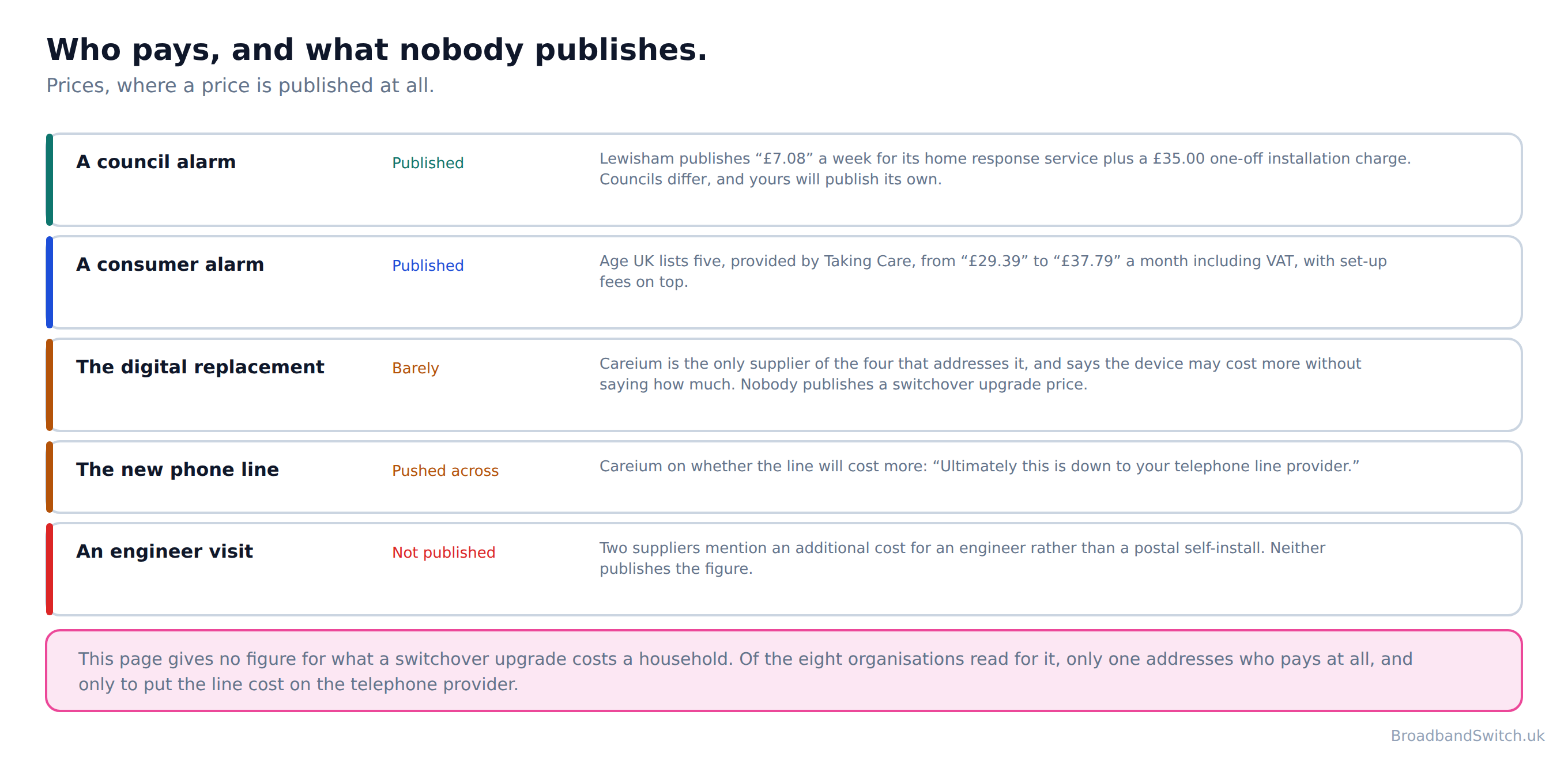
Council services publish their charges and they are modest. Lewisham publishes “£7.08” a week for its home response service plus a £35.00 one-off installation charge. Yours will publish its own and they differ by a lot.
Consumer services publish theirs too. Age UK lists five alarms, provided by Taking Care, from “£29.39” to “£37.79” a month including VAT, with set-up fees on top. That is a different market from the council one and it is worth knowing both exist before assuming the only option is the dear one.
This page gives no figure for what a switchover upgrade costs a household. Of the eight organisations read for it, only one addresses who pays at all, and only to put the line cost on the telephone provider. Careium is the one supplier that addresses it at all, and it says the device may cost a little more without saying how much, while putting the cost of the line itself across the way: “Ultimately this is down to your telephone line provider.”
So the honest advice is to ask the price before you agree to anything, and to ask whether a cheaper route exists. If the alarm came from the council, the council’s replacement programme is the first thing to ask about, because several are replacing equipment at no charge and none of them publishes that in a way a household would find.
Testing it, and testing it again
Direct answer: Press the button and confirm somebody answers. Once before, once on the day, once a fortnight later.

Three tests rather than one, and the reason is in Careium’s own sentence about analogue devices on the new network: they can fail a percentage of the time, in several different ways. A single successful test proves the alarm worked once. It does not prove it works.
Tell the monitoring centre it is a test before you press, press the button, and wait for them to answer. The thing you are checking is not that the light comes on. It is that a person speaks.
The fortnight-later test is the one people skip and the one that catches the intermittent fault, because a device that has been quietly failing one call in five will usually show it by then. Put it in the diary the day the line changes.
If somebody rings asking for payment
Taking Care publishes the sentence worth keeping: “We will never call and ask for payment or personal details to keep your personal alarm service running after the digital switchover.” A national deadline with a date on it is exactly the shape of thing that gets used as a telephone or doorstep script. Your alarm supplier already has your payment arrangement. Ring them back on the number you already have rather than one you have just been given.
If it has already stopped working
Direct answer: Ring the monitoring centre's own number, not the button. And if somebody is at risk right now, ring 999.
Most of this page assumes there is time. Sometimes there is not, because the line changed three weeks ago and nobody has pressed the button since, and the household has just worked out what that means. So this section is for that afternoon.
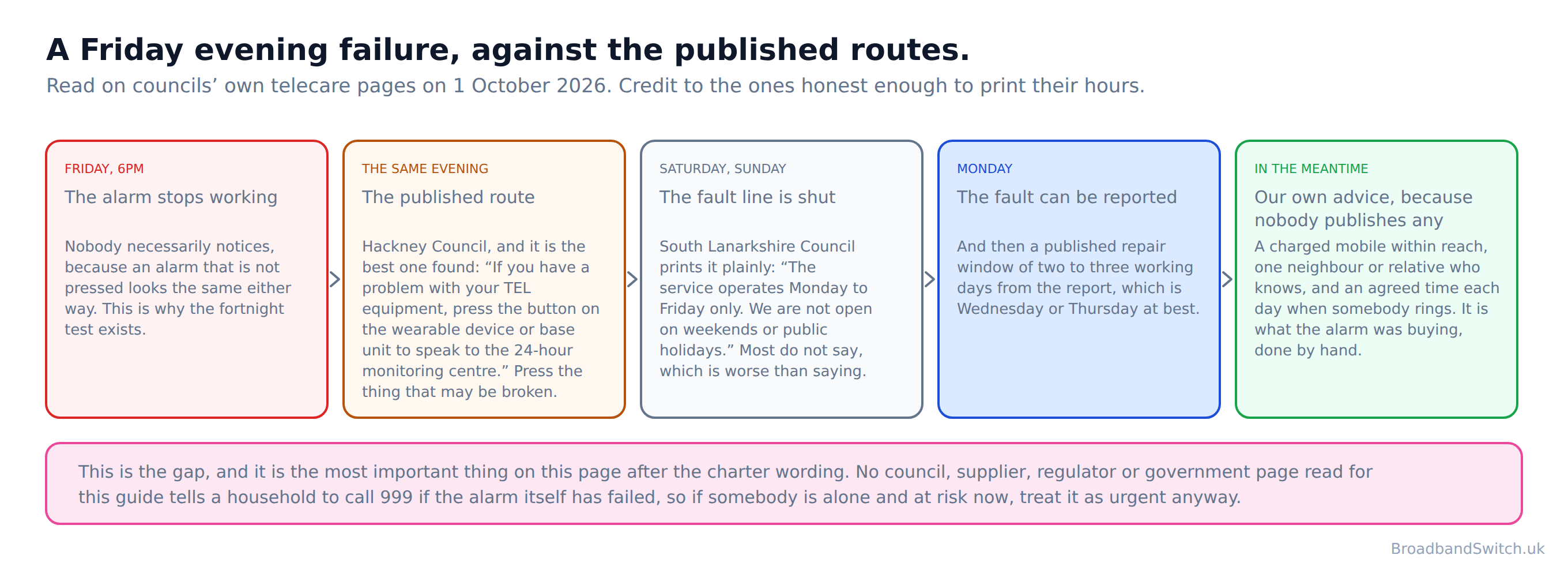
The best published route found anywhere is Hackney Council's, and it is worth reading twice for the problem inside it: “If you have a problem with your TEL equipment, press the button on the wearable device or base unit to speak to the 24-hour monitoring centre.” Press the button to report that the button does not work. That is not a criticism of Hackney, whose page is better than most, and the council does give the alternative: a direct number and an email address for anyone who cannot get through on the device.
Which is the actual first move, and it generalises to every supplier: ring the monitoring centre on a telephone number rather than through the alarm. The number is on the paperwork, on a sticker on the base unit, or on your council's telecare page. Ask them when they last received a signal from the device. That one question tells you whether this is a three week old silence or a problem from five minutes ago.
The part nobody publishes, and should
Hackney also publishes a testing interval, which is rarer than it should be: “To make sure your monitored equipment is working and connected to the monitoring centre, you should do a test call at least once a month.” Monthly, and the fact that a council has to say it suggests how often it is not happening.
South Lanarkshire Council publishes the sentence that explains why this section exists at all: “The service operates Monday to Friday only. We are not open on weekends or public holidays.” And on timing: “Repairs will be carried out within 2-3 working days from the time the issue is reported.” Both of those are honest and both are the kind of thing most organisations leave off the page, and credit is due for printing them.
But read them together with a calendar. An alarm that fails on a Friday evening meets a fault line that opens on Monday and a repair window of two to three working days after that. The published route for a weekend failure is the 24-hour monitoring centre, reached through the device, which is the thing that is broken. That is the gap, and it is the most important sentence on this page after the charter one.
Our own advice, and we are saying so because nobody else does
No council, telecare supplier, regulator or government page read for this guide tells a household to call 999 if the alarm itself has stopped working. Every one of them routes to a service number or back to the broadband provider. So this is BroadbandSwitch's advice rather than anybody's published guidance: if the alarm is not working and the person who depends on it is alone and at risk now, that is a 999 call or an urgent call to whoever would normally be rung first, not a Monday morning email. A failed alarm is not a technical fault that happens to involve a person. It is a person without the thing that was keeping them safe.
And for the days in between, the stopgap is unglamorous and it works: a charged mobile within reach, a neighbour or relative who knows, and an agreed time each day when somebody rings. It is what the alarm was buying, done by hand.
While you wait
Get the fault logged with a reference number and a date, from both the alarm service and the broadband provider. It is dull and it is the thing that makes the next section possible, because an escalation with no record of the original report is an argument rather than a complaint.
Escalating it, and the rule the provider is actually bound by
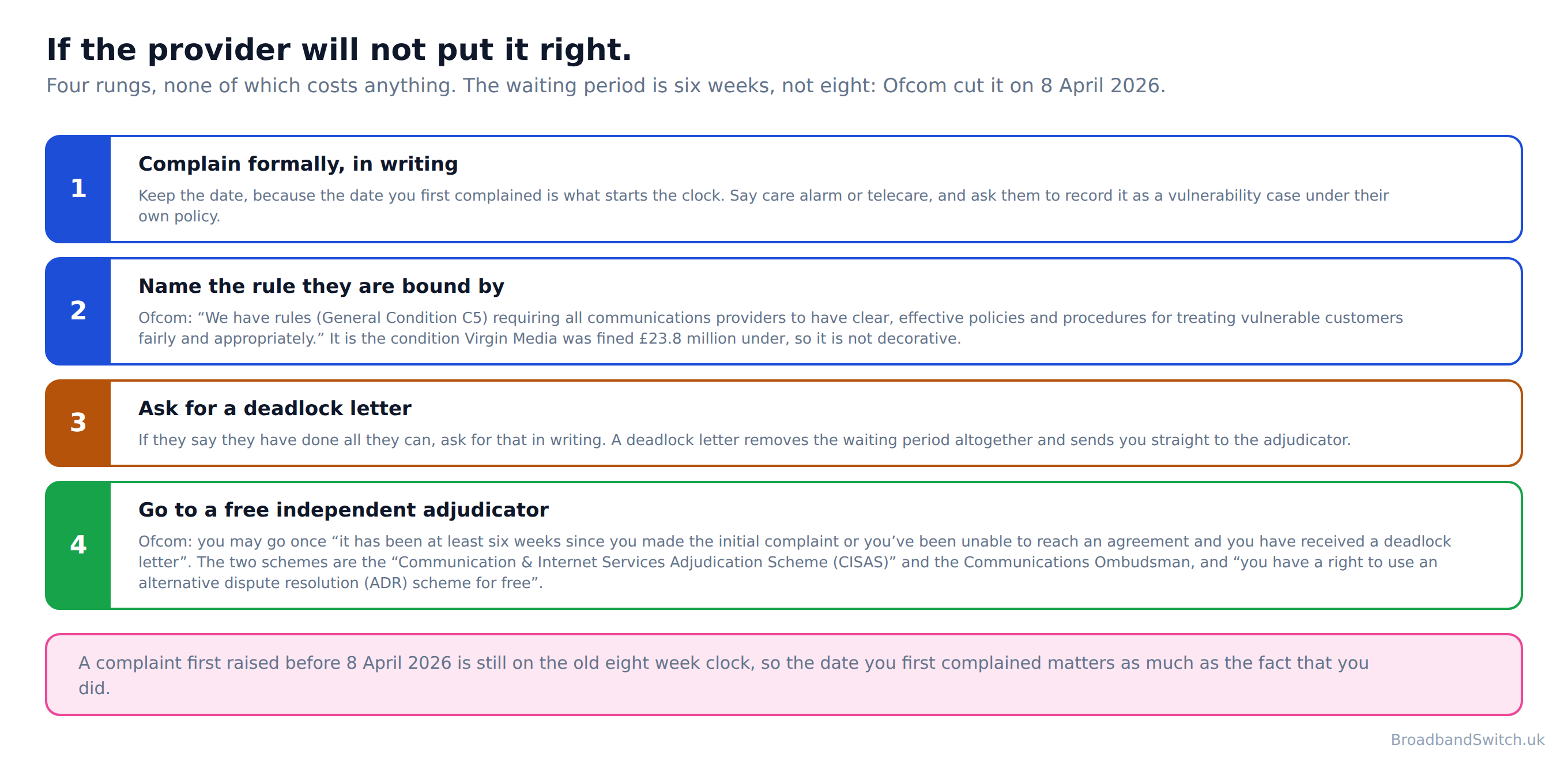
Direct answer: The charter is voluntary. General Condition C5 is not, and a free independent adjudicator is six weeks away.
Everything on this page so far has been voluntary commitments, which are useful and are not rules. There is a rule, it is the one Virgin Media was fined £23.8 million under, and a household is entitled to name it.
Ofcom publishes it like this: “We have rules (General Condition C5) requiring all communications providers to have clear, effective policies and procedures for treating vulnerable customers fairly and appropriately.” General Condition C5, and it is a general fair-treatment duty rather than a telecare-specific one. That distinction matters and this page is not going to blur it. What makes it bite here is that Ofcom has already enforced it on exactly this failure, which is why the penalty earlier on this page is more than a news story.
Ofcom also names telecare inside that duty: “While the transition will be straightforward for most customers, some customers might require additional support, for instance if they use telecare devices, or rely on their landlines to make emergency calls.” So a household saying the words care alarm is not asking for a favour; it is identifying itself as the customer the condition was written about.
The free adjudicator, and the number that changed
If the provider will not fix it, an independent adjudicator will look at it and it costs nothing: “you have a right to use an alternative dispute resolution (ADR) scheme for free”. There are two schemes and Ofcom names them. The first is the “Communication & Internet Services Adjudication Scheme (CISAS)” and the second is the Communications Ombudsman. Your provider belongs to one of them and has to tell you which.
The waiting period is the part most guides have wrong, including an earlier draft of our own. Ofcom's own wording is that you can go to a scheme once “it has been at least six weeks since you made the initial complaint or you've been unable to reach an agreement and you have received a deadlock letter”. Six weeks, not eight. Ofcom cut it on 8 April 2026, and a complaint first raised before that date is still on the old eight week clock, so the date you first complained matters as much as the fact that you did.
The deadlock letter is the shortcut worth knowing about, because it removes the wait entirely. If the provider says it has done all it can, ask for that in writing and you can go straight to the scheme.
The order that works
Complain formally to the provider first, in writing, and keep the date. Say care alarm or telecare, say somebody vulnerable depends on it, and ask them to record it as a vulnerability case under their own policy. If it is not resolved, ask for a deadlock letter. If you do not get one, wait the six weeks and go to the scheme. Nothing in that sequence costs money.
And if you would rather talk it through with somebody independent before any of that, Age UK runs a free advice line and the hours are generous: “Lines are open 8am-7pm, 365 days a year.” The number is 0800 678 1602. Its own page does not list telecare faults among the line's topics, so this is general help from people who are good at it rather than a specialist alarm helpline, and it is offered on that basis.
Age UK's own advice on the underlying job is the same as everybody else's, which by this point in the page will not surprise you: “You should contact your device supplier to check if your device will work with the new system or whether any equipment will need to be upgraded.”
What we could not find out
Direct answer: Four things a household would reasonably want to know that nobody publishes.
Filling these with a confident sentence about somebody else’s unpublished policy would be easy and this page does not do it.
What a switchover upgrade costs
This page gives no figure for what a switchover upgrade costs a household. Of the eight organisations read for it, only one addresses who pays at all, and only to put the line cost on the telephone provider. Of the four telecare suppliers read, one addresses it and does so without a figure. Two mention an extra charge for an engineer visit rather than a postal self-install and neither quantifies it. It is the single biggest blank in the sector and it is the first thing a household asks.
What the largest manufacturer tells a household to do
This page quotes nothing from Tunstall about what to do when a phone line changes. The largest UK telecare manufacturer publishes no consumer guidance on it on either of its two websites. Its consumer site has effectively three pages. That is not a criticism of the equipment, which is in hundreds of thousands of homes; it is an observation about who its website is written for, which is councils and housing providers rather than the people wearing the pendants.
What Ofcom tells consumers directly
This page quotes no Ofcom consumer guidance on protecting customers during the migration. The page exists on Ofcom's own site and redirects to a sign-in screen, so nothing on it could be read. Ofcom’s letter to industry could be read and is quoted on this page. Its consumer-facing guidance could not, and we are not going to characterise a page we could not read.
Whether anybody will make the call for you
No broadband provider read for this guide publishes that it will contact a household's telecare service itself. One publishes that the telecare service may contact it. We looked for a published commitment by a named provider to contact a named household’s telecare service and did not find one. If one exists and we have missed it, tell us and it goes on the page with a correction note attached.
Broadband at their postcode
Direct answer: Check the exact address rather than the postcode, and check it before anybody rings anybody.
This is the part of the job that is entirely yours and needs nobody’s permission. Two or three options with the monthly price, the minimum term and what happens to the phone written next to each, and then a four minute phone call that your parent makes.

Every provider that reaches their address
One postcode shows every provider that reaches the address, lowest price first. Two or three of them, written down, is all your parent needs to choose from.
Show every provider at their postcode →What this page used to say, and why it changed
Direct answer: Five corrections. Four are factual and the fifth is the reason the page was rebuilt rather than edited.
Two of the four were already published as corrections on this site's rural guide three weeks ago, which is the uncomfortable part: the same two errors were live on two pages at once. Publishing them here rather than quietly editing is the only way somebody who acted on the old version can tell whether they acted on something wrong.
Never mentioning the one signed commitment that covers telecare users
What this page said
The page ran to 15,761 words about telecare and the switch-off without naming the PSTN Charter once, and told readers instead that “the wider regulatory and policy framework is robust”.
What it says now, and why
Twelve companies signed a specific telecare commitment on 18 December 2023: “No telecare users will be migrated to digital landline services without us, the consumer, or the telecare company confirming that they have a compatible and functioning telecare solution in place.” A guide to this subject that omits it is missing its own subject, and the omission matters in both directions. It is the strongest thing a household can point at, and the word or in the middle of it is the reason nobody is pointing at anybody. The page now quotes it in full, names all twelve signatories, and says plainly that it is a voluntary commitment rather than a regulation.
A figure in the wrong unit, attributed to the wrong body
What this page said
The page said “approximately 1.7 million UK households use a telecare service of some kind per Technology Enabled Care Services Association (TSA) estimates” and carried 1.7 million as a headline statistic.
What it says now, and why
The TSA publishes people, not households: “Over 1.7 million people benefit from these services and the peace of mind they offer.” It also publishes a different figure of 2.3 million on another of its own pages, and neither page carries a date. gov.uk publishes “An estimated 2 million people in the UK currently use telecare services” in a document that is dated and maintained, so that is the figure this page uses. Households and people are not interchangeable in a sentence about how many people depend on something.
Giving a telecare company a name it has never had
What this page said
The provider table listed “Careium (formerly DorroLifeline)”.
What it says now, and why
Careium's own site says: “We are extremely proud of our heritage as Centra, Eldercare and Welbeing.” DorroLifeline appears to fuse Doro, a former parent company, with Lifeline, which is a Tunstall product name rather than a Careium one. It is a small error and it is on this page's correction list because a reader ringing round to find out who supplies their alarm is the exact person a wrong company name sends to the wrong place.
Calling one company's date a firm national deadline
What this page said
The page said “the PSTN switch-off date of 31 January 2027 is firm” and referred to the switch-off throughout without attributing the date to anybody.
What it says now, and why
Ofcom attributes it to BT wherever it appears: “BT plans to retire its old landline network by 31 January 2027.” Other providers have retirement plans of their own and Ofcom publishes that some of their dates are not yet set. Fourth page in this programme to correct the same claim. What is not in doubt is the direction of travel, and this page still says an analogue alarm is better replaced early than late.
Dating BT's pause a year late
What this page said
The page said “In 2023 BT had been rolling out Digital Voice at increasing pace” and that the rollout was paused in April 2023, resuming in 2024.
What it says now, and why
BT published the pause on 29 March 2022 and restarted in 2023. The corrected dates matter on this page more than they did on the two where we first found the error, because they put BT's pause five months before the period Ofcom dates Virgin Media's telecare failures to. The industry knew what the risk was before the failures Ofcom fined began.
Four provider programmes that do not exist under those names
What this page said
The page listed “BT Consumer-First, Sky Accessibility, Virgin Media Accessibility, EE Accessibility” and told readers the protections “require activation” through them.
What it says now, and why
None of those four names appears on those companies' own sites. This rebuild quotes what each organisation publishes and calls each thing what that organisation calls it, which is why no programme name on this page is one we have supplied. Telling a provider about a telecare device in the house remains worth doing, and the page still says so, for the reason the providers themselves give rather than through a programme we invented.
A price range that misses most of the market
What this page said
The page said “direct-to-consumer mobile-connected alarm services typically cost £15 to £30 per month”.
What it says now, and why
Age UK's own comparison page lists five alarms, provided by Taking Care, from “£29.39” to “£37.79” a month including VAT, with set-up fees of up to £119.99 on top. Council services are a different market again and are published separately: Lewisham charges “£7.08” a week plus £35.00 to install. The page now gives both markets and names the figure nobody publishes, which is what the upgrade itself costs.
Broadband without a landline: frequently asked questions
Does the care alarm promise cover my burglar alarm too?
No, and that is worth knowing rather than assuming. No security or intruder alarm is covered by the PSTN Charter. The words intruder, burglar and security alarm do not appear in it, or in the PSTN Network Operator's Charter. The Telecare National Action Plan names intruder alarms once, in a case study about a test laboratory, rather than as anything a household can rely on. The security industry is the body saying it instead. The National Security Inspectorate publishes that “When you migrate your home to the new digital service your traditional telephone connection, including your intruder alarm, may no longer be able to send signals to alert anyone.” The practical answer is the same as for telecare, just without anybody signed up behind you: “you should contact your alarm/maintenance provider before your line is upgraded to check whether your alarm system requires adaptation or replacement, to ensure compatibility with the new IP network.”
I had Redcare. Is that still running?
No. BT publishes it plainly: “As of 15 December 2025, BT has closed all Redcare services.” Past tense, not future. Redcare was the best known monitored alarm signalling service in the country, and if that word appears anywhere in your alarm paperwork the call to your alarm company is overdue rather than something to plan. BT's own instruction: “If you're still relying on Redcare services, you should speak to your alarm maintenance provider to understand your available options.”
Who sorts out the emergency phone in my block's lift?
Not you, and that is the point. The lift industry addresses the building owner: the Lift and Escalator Industry Association publishes that “The communication link is typically under the responsibility of the building owner.” In practice that is whoever your service charge is paid to. No council or housing body page could be found that tells a resident of a block of flats what happens to the lift emergency telephone when the phone line changes, or who to tell. So the useful thing a resident can do is ask in writing, naming the lift and the date, and keep the reply.
My alarm goes through the router rather than the phone socket. Am I fine?
For the switchover itself, yes, and that is genuinely good news. What changes is the power question. Careium publishes the nine words that matter: “Digital lines require your broadband router to be on.” So the thing to check is whether any battery back-up covers the router as well as the alarm. Appello is the one supplier that says this out loud: “Provided with a battery back-up which uniquely and critically covers both the converter and router, ensuring service availability during any power or broadband downtime.”
Does the one hour battery back-up keep the care alarm working?
It is not a promise about the alarm. Ofcom's duty is about reaching the emergency services from the landline: “If you depend on your landline, your provider must make sure you can contact the emergency services during a power cut.” And the offer is conditional: “If you don't have a working mobile phone or a reliable mobile signal, your landline provider must offer you, for free, a back-up solution such as a battery back-up unit for your home.” A household with a charged mobile and a decent signal is not owed a free battery, because the mobile is the back-up. Ask the alarm supplier separately how long the device itself lasts, and whether that figure assumes the router is still on.
The alarm has stopped working and it is the weekend. What now?
Ring the monitoring centre on a telephone number rather than through the device, and ask when they last had a signal from it. Be aware of what the published routes actually offer: South Lanarkshire Council is honest enough to print “The service operates Monday to Friday only. We are not open on weekends or public holidays.” No council, telecare supplier, regulator or government page read for this guide tells a household to call 999 if the alarm itself has stopped working. Every one of them routes to a service number or back to the broadband provider. So this is our own advice rather than anybody's guidance: if the person who depends on it is alone and at risk now, treat it as urgent and ring 999 or whoever would normally be rung first. For the days in between, a charged mobile within reach and an agreed daily call does by hand what the alarm was doing.
What can I do if the provider will not put it right?
Name the rule. Ofcom publishes it as “We have rules (General Condition C5) requiring all communications providers to have clear, effective policies and procedures for treating vulnerable customers fairly and appropriately.” It is the condition Virgin Media was fined £23.8 million under. Complain formally in writing and keep the date, ask for a deadlock letter if they will not fix it, and then go to a free independent adjudicator: “you have a right to use an alternative dispute resolution (ADR) scheme for free”. The wait is “it has been at least six weeks since you made the initial complaint or you've been unable to reach an agreement and you have received a deadlock letter”. Six weeks, not eight, for a complaint raised on or after 8 April 2026.
Will my care alarm stop working when the phone line changes?
Only if it works through the phone line, and the way to tell takes ten seconds: look behind the unit. A cable running into a telephone socket as well as a power lead means the line change reaches it. A power lead on its own, with no telephone cable anywhere, means the alarm has its own mobile SIM and the change does not reach it. Taking Care publishes the honest answer for that second household: “Your digital personal alarm is future proof and fully compatible with the digital switchover changes. You do not need to contact us or take any action.”
Who is responsible for making sure it still works?
That is the question, and the published answer is three people. The PSTN Charter commits its signatories that “No telecare users will be migrated to digital landline services without us, the consumer, or the telecare company confirming that they have a compatible and functioning telecare solution in place.” Any one of the three satisfies it. No broadband provider read for this guide publishes that it will contact a household's telecare service itself. One publishes that the telecare service may contact it. In practice that means you, or whoever helps you, because you are the only one of the three guaranteed to be in the room.
How much does a digital replacement cost?
Nobody publishes a figure for the upgrade itself, and that is the biggest blank in the sector. This page gives no figure for what a switchover upgrade costs a household. Of the eight organisations read for it, only one addresses who pays at all, and only to put the line cost on the telephone provider. What is published is the ongoing cost of the service: Lewisham charges “£7.08” a week for its home response service plus a £35.00 one-off installation charge, and Age UK lists five consumer alarms from “£29.39” to “£37.79” a month including VAT.
Does an analogue alarm actually fail on a digital line, or is that scaremongering?
A supplier publishes the answer about its own class of device, which is franker than anything on the telecoms side: “Industry testing has identified that analogue telecare devices can fail a percentage of the time over the new networks and these failures can take shape in many different forms.” Note the shape of that. Not always, and not never. A device that works on the day somebody tests it can still fail on the day it is needed, which is why the testing section of this page asks for three tests rather than one.
Somebody rang about my alarm and the switchover and asked for payment.
Taking Care publishes the line worth keeping for this: “We will never call and ask for payment or personal details to keep your personal alarm service running after the digital switchover.” A national deadline is exactly the shape of thing that gets used as a doorstep or telephone script. Your alarm supplier already has your payment arrangement. Ring them back on the number you already have rather than one you have just been given.
My alarm came with my housing. Who do I ring?
Whoever manages the building, and then the council's adult social care team if they cannot tell you. Council alarm services publish their own guidance and it differs: Lewisham publishes that it is not responsible for the line, Aberdeenshire publishes that “If you still have a telecare alarm that connects to a phone socket, then a member of the team will contact you over the coming months to arrange a visit to swap out the old equipment.” Both are reasonable positions and you cannot tell which yours takes without asking.
Is the switch-off date fixed?
It is one company's date for one company's network, and Ofcom attributes it that way wherever it appears: “BT plans to retire its old landline network by 31 January 2027.” The live version of this page called it firm and attributed it to nobody. What is not in doubt is the direction, and an alarm that needs replacing is better replaced early than in the last fortnight with everybody else.
In short
- A care alarm that works through the phone line can stop working when the line changes.
- Twelve companies signed the Government's PSTN Charter on 18 December 2023.
- They are: Ogi, BT, Virgin Media O2, Sky, TalkTalk Consumer, Vodafone, KCOM, Zen Internet, Broadband for the Rural North (B4RN), Immervox, Digital Space, Utility Warehouse.
- The telecare commitment: “No telecare users will be migrated to digital landline services without us, the consumer, or the telecare company confirming that they have a compatible and functioning telecare solution in place.”
- Read the middle of it. Us, the consumer, or the telecare company. Any one of the three.
- The Telecare National Action Plan states it again as an outcome: “no telecare user will be migrated to digital landline services without the communication provider, the customer or the telecare service provider confirming that the user has a compatible and functioning telecare solution in place.”
- On the provider's part in testing it goes as far as: “Communication providers should play an important role in facilitating testing before and after a migration to ensure that migration is only completed when compatibility of the device is assured.”
- The one flat duty it states is on the other side: “This means that telecare service providers must ensure the reliability of the specific combination of equipment and services they use.”
- No broadband provider read for this guide publishes that it will contact a household's telecare service itself. One publishes that the telecare service may contact it.
- Lewisham Council, in writing: “Lewisham Linkline are not responsible for any changes to your telephone line and you should speak to your provider to assist you with connecting your router.”
- And the duty handed over in the next sentence: “If you upgrade your telephone provider please remember to tell them you have a telecare alarm installed.”
- Careium, on whether the new line will cost more: “Ultimately this is down to your telephone line provider.”
- Vodafone: “Contact your local authority or the maker of the device to check.”
- Virgin Media: “you'll need to check with your device provider to make sure they're compatible with digital voice and will work independently in a power cut”
- BT: “If you use telecare, contact your provider before you switch.”
- And the only sentence anywhere that imagines the two organisations speaking: “They may ask what equipment you use or contact BT to check compatibility.”
- EE, on a page for a pendant already showing an error: “immediately contact your telecare service provider to let them know your phone line has changed to the Digital Home Phone service”
- Sky: “If you have a care alarm and haven't already told us about this, get in touch with us.”
- TalkTalk is the exception and is named as one. On Full Fibre for a care alarm household: “we don't think the time is right”.
- And: “If in the future, we need to make changes to your phone service, we'll speak to you about the type of care alarm you have before we switch your service.”
- Aberdeenshire Council is the other exception: “If you are contacted by your telecom provider about changing your phone line to digital, you should let them know you have telecare equipment. You should also email our Telecare team to let them know that your telecom provider is wanting to change you to a digital line.”
- And it comes to you: “If you still have a telecare alarm that connects to a phone socket, then a member of the team will contact you over the coming months to arrange a visit to swap out the old equipment.”
- Taking Care, for a household whose alarm already has a SIM: “Your digital personal alarm is future proof and fully compatible with the digital switchover changes. You do not need to contact us or take any action.”
- And the sentence worth keeping: “We will never call and ask for payment or personal details to keep your personal alarm service running after the digital switchover.”
- Careium, on what the new network does to analogue devices: “Industry testing has identified that analogue telecare devices can fail a percentage of the time over the new networks and these failures can take shape in many different forms.”
- And on asking for a delay: “Some telephone line providers will allow you to request to delay your transition, but you will need to arrange this directly with your telephone provider and you can notify them that you are in receipt of a special service personal alarm.”
- Ofcom, on 1 December 2025: “Ofcom has today fined Virgin Media £23.8 million, after it disconnected telecare customers during its programme to migrate customers to digital landlines.”
- What it found: “Virgin Media's approach to disconnecting Telecare customers who did not engage in the migration process, despite being aware of the risks posed, put thousands of vulnerable customers at a direct risk of harm and prevented their devices from connecting to alarm monitoring centres while the disconnection was in place.”
- The phrase that matters is customers who did not engage in the migration process.
- What exists across the industries: “We note that the Telecare Advisory Board (TAB), convened by BT, is coordinating the telecoms industry, central and local government, and telecare alarm industry to identify telecare users through better data sharing.”
- It is for finding telecare users, not for confirming one household's device.
- gov.uk's own figure: “An estimated 2 million people in the UK currently use telecare services”.
- The TSA publishes people too, not households: “Over 1.7 million people benefit from these services and the peace of mind they offer.”
- Council prices are published: Lewisham, “£7.08” a week plus £35.00 to install.
- Consumer prices are published: Age UK lists five from “£29.39” to “£37.79” a month including VAT.
- This page gives no figure for what a switchover upgrade costs a household. Of the eight organisations read for it, only one addresses who pays at all, and only to put the line cost on the telephone provider.
- This page quotes nothing from Tunstall about what to do when a phone line changes. The largest UK telecare manufacturer publishes no consumer guidance on it on either of its two websites.
- This page quotes no Ofcom consumer guidance on protecting customers during the migration. The page exists on Ofcom's own site and redirects to a sign-in screen, so nothing on it could be read.
- The switch-off date is one company's: “BT plans to retire its old landline network by 31 January 2027.”
- Two things nobody else will do for you: look behind the box, and ring whoever supplies the alarm.
- This page's title names a security alarm, so this rebuild covers one.
- No security or intruder alarm is covered by the PSTN Charter. The words intruder, burglar and security alarm do not appear in it, or in the PSTN Network Operator's Charter. The Telecare National Action Plan names intruder alarms once, in a case study about a test laboratory, rather than as anything a household can rely on.
- The National Security Inspectorate: “When you migrate your home to the new digital service your traditional telephone connection, including your intruder alarm, may no longer be able to send signals to alert anyone.”
- The British Security Industry Association, on its own testing: “Through rigorous testing of alarm signalling equipment on the new All IP networks, we have seen incompatibilities emerge, which can result in alarm signals either not reaching the monitoring centre or being corrupted, so the appropriate response cannot always be initiated.”
- BT, past tense: “As of 15 December 2025, BT has closed all Redcare services.”
- SECOM is the counterweight, and it takes the job: “SECOM will undertake these checks and replace signalling equipment if necessary, during one of your forthcoming planned maintenance inspections.”
- SECOM also warns about the conversation you will have: “Your phone/broadband provider may advise you that existing PSTN / ISDN related services will be unaffected by their upgrading or changing your home/business router, however this is not necessarily always the case.”
- A lift emergency phone belongs to the building, not the flat.
- LEIA: “The communication link is typically under the responsibility of the building owner.”
- Avire, on how a lift phone fails: “Alarms may appear functional but fail during an emergency”.
- No council or housing body page could be found that tells a resident of a block of flats what happens to the lift emergency telephone when the phone line changes, or who to tell.
- A third kind of alarm reaches its centre through the router.
- Careium: “Digital lines require your broadband router to be on.”
- Appello is the one supplier naming the real test: “Provided with a battery back-up which uniquely and critically covers both the converter and router, ensuring service availability during any power or broadband downtime.”
- No UK telecare supplier read for this page publishes, on its own site, what happens to a router-connected alarm when the broadband drops but the mains power is fine. Two address it indirectly by supplying or recommending a mobile fallback.
- Ofcom's one hour of back-up is about reaching 999 from the landline, not about the alarm.
- And it is conditional: “If you don't have a working mobile phone or a reliable mobile signal, your landline provider must offer you, for free, a back-up solution such as a battery back-up unit for your home.”
- Hackney publishes the best fault route, with a circularity in it: “If you have a problem with your TEL equipment, press the button on the wearable device or base unit to speak to the 24-hour monitoring centre.”
- South Lanarkshire is honest about the hours: “The service operates Monday to Friday only. We are not open on weekends or public holidays.”
- No council, telecare supplier, regulator or government page read for this guide tells a household to call 999 if the alarm itself has stopped working. Every one of them routes to a service number or back to the broadband provider. Our own advice is to treat a failed alarm as urgent.
- The rule that is not voluntary: “We have rules (General Condition C5) requiring all communications providers to have clear, effective policies and procedures for treating vulnerable customers fairly and appropriately.”
- A free adjudicator is six weeks away, not eight: “it has been at least six weeks since you made the initial complaint or you've been unable to reach an agreement and you have received a deadlock letter”.
- Ofcom cut the wait from eight weeks to six on 8 April 2026.
- Age UK's free advice line is 0800 678 1602. “Lines are open 8am-7pm, 365 days a year.”
Each line stands on its own and carries its date. Reviewed by a person at least quarterly, last on .
References
- nsi.org.uk
National Security Inspectorate. UK transition from analogue to digital landlines. The householder page of a UKAS-accredited certification body: intruder alarms may no longer be able to send signals to alert anyone, what to do before the line is upgraded, and the reassurance that not all systems are affected. Read 1 October 2026. nsi.org.uk
- bsia.co.uk
British Security Industry Association. Spotlight on… All IP and the Alarm Industry, 5 May 2023. David Wilkinson, the BSIA's Director of Technical Services, on what their testing of alarm signalling equipment on All IP networks found. Read 1 October 2026. bsia.co.uk
- bt.com
BT Business. What is BT Redcare?, 15 December 2025. BT's own confirmation that all Redcare services are closed, and what it tells anybody still relying on them to do. Read 1 October 2026. bt.com
- secom.plc.uk
SECOM plc. PSTN Switch Off. The counterweight on this page: an alarm receiving centre operator publishing that it will do the checks itself, that the customer need do nothing, and that the broadband provider's reassurance about the router may not be correct. Read 1 October 2026. secom.plc.uk
- leia.co.uk
Lift and Escalator Industry Association. Analogue telephone line shutdown and migration to VOIP-based services, November 2019. Responsibility for the communication link, and why DTMF signalling is what breaks. The document predates the current deadline and its own date references are out of step, which is why only its responsibility and mechanism statements are used here. Read 1 October 2026. leia.co.uk
- avire-global.com
Avire Global. PSTN Switch-off Guide for Housing Providers, Lift Emergency Communications, 16 January 2026. A lift emergency communications manufacturer on how an autodialler fails, what EN 81-28 requires, and who ends up responsible in unmanaged systems. Product claims on the same page are marketing and are not used. Read 1 October 2026. avire-global.com
- gov.uk
Department for Education. Prepare your education estate for the PSTN and ISDN switch-off, published 13 January 2026, last updated 23 July 2026. The only gov.uk page found that names lift emergency lines, and it addresses schools rather than homes. Read 1 October 2026. gov.uk
- careium.co.uk
Careium. The landline switchover: a clear guide for telecare alarm users, 17 December 2025. That digital lines require the router to be on, what the old landlines did in a power cut, and the free battery back-up offer to vulnerable customers. Read 1 October 2026. careium.co.uk
- appello.co.uk
Appello. SmartBridge Converter. The only supplier page found that states the battery back-up covers both the converter and the router. No duration is published on it. Read 1 October 2026. appello.co.uk
- hackney.gov.uk
London Borough of Hackney. Telecare. The best published fault route found, and a monthly testing interval that almost no other council states. Read 1 October 2026. hackney.gov.uk
- southlanarkshire.gov.uk
South Lanarkshire Council. Telecare. The council that prints its actual hours and repair times, which is the most honest sentence on the subject and the reason this page has a section about weekends. Carries no visible date; read 1 October 2026. southlanarkshire.gov.uk
- ofcom.org.uk
Ofcom. Alternative dispute resolution schemes, published 8 March 2024, last updated 6 August 2026. The six week wait, the two scheme names and that they are free. Ofcom reduced the wait from eight weeks to six on 8 April 2026. Read 1 October 2026. ofcom.org.uk
- ofcom.org.uk
Ofcom. Rules for phone and broadband providers, published 19 July 2023, last updated 25 April 2025. General Condition C5, and Ofcom naming telecare devices inside that general duty. Read 1 October 2026. ofcom.org.uk
- ageuk.org.uk
Age UK. Changes to landline telephones, last updated 26 August 2026. A charity naming personal alarms and security alarms together where the charters do not, and its free advice line hours. Read 1 October 2026. ageuk.org.uk
- gov.uk
Department for Science, Innovation and Technology. Public Switched Telephone Network Charter, published 18 December 2023, last updated 22 January 2026. The telecare commitment and the twelve signatories, plus the commitments on non-voluntary migrations and battery back-up. The load-bearing source for this page. Read 1 October 2026. gov.uk
- gov.uk
Department of Health and Social Care and DSIT. Telecare National Action Plan: protecting telecare users through the digital phone switchover, published 11 February 2025, last updated 10 September 2026. Outcome 1, the wording on testing, the duty on telecare service providers, and the estimate of how many people use telecare. Read 1 October 2026. gov.uk
- gov.uk
DSIT. Further agreement with telecoms firms to protect vulnerable customers, published 11 March 2024. The separate network operator charter, signed by Openreach, CityFibre, AllPointsFibre, Community Fibre, Ogi, KCOM and WightFibre. Read 1 October 2026. gov.uk
- Ofcom
Ofcom. Ofcom fines Virgin Media £23.8 million for putting vulnerable customers at risk of harm, published 1 December 2025. The penalty, what it was for, the finding about disconnecting telecare customers, the breach period and the General Condition breached. Read 1 October 2026. ofcom.org.uk
- Ofcom
Ofcom. Published letter to business on PSTN switch-off deadline, 29 January 2026, from the Director of Consumers and Retail Markets. The Telecare Advisory Board convened by BT, and Ofcom’s expectations of providers. Read 1 October 2026. ofcom.org.uk
- Ofcom
Ofcom. Your landline is going digital: what you need to know, published 7 February 2024 and last updated 26 August 2026. The retirement date and who Ofcom attributes it to. Read 1 October 2026. ofcom.org.uk
- BT
BT. Digital Voice, no date shown. What BT publishes about telecare and burglar alarms, including the only sentence found anywhere contemplating the telecare provider contacting the broadband provider. Read 1 October 2026. bt.com
- TalkTalk
TalkTalk. Care Alarms and Personal Emergency Response Systems, last updated 28 July 2025, and Telecare, published 3 September 2025 and last modified 7 July 2026. The published position on Full Fibre for a care alarm household, and the commitment to speak to the customer before changing the phone service. Read 1 October 2026. talktalk.co.uk
- Virgin Media
Virgin Media. Digital voice switchover, no date shown. That the customer must check with the device provider, and the emergency backup line commitment. Read 1 October 2026. virginmedia.com
- Vodafone
Vodafone. What is Digital Voice?, no date shown. That telecare devices and monitored alarms might not work, and that the customer should contact the local authority or the maker. Read 1 October 2026. vodafone.co.uk
- EE
EE. Health pendant or burglar alarm showing an error, no date shown. The instruction to contact the telecare service provider, published on a page for a device that has already stopped working. Read 1 October 2026. ee.co.uk
- Sky
Sky. Telecare and care alarms, no date shown. That Sky asks to be told about a care alarm. The one Sky help page in this programme whose text could be read. Read 1 October 2026. sky.com
- Careium
Careium. Analogue to digital phone upgrade: your questions answered, posted 19 June 2025 and modified 15 July 2025, and We are changing to Careium, 1 December 2021. That the line is the telephone provider’s business, that a delay can be requested from them, what industry testing found about analogue devices, and the company’s own former names. Read 1 October 2026. careium.co.uk
- Taking Care
Taking Care. Landline digital switchover, no date shown. That a digital alarm needs no action, that landline alarms have been tested, and the warning about calls asking for payment. Read 1 October 2026. taking.care
- Age UK
Age UK. Compare personal alarms, no date shown. The published monthly and set-up prices of five alarms, and that they are provided by Taking Care Personal Alarms Limited. Read 1 October 2026. ageuk.org.uk
- Lewisham Council
London Borough of Lewisham. Community alarm system, Linkline telecare, published 27 June 2025. That Linkline is not responsible for changes to the telephone line, that residents should tell their provider about the alarm, and the published weekly and installation charges. Read 1 October 2026. lewisham.gov.uk
- Aberdeenshire Council
Aberdeenshire Council. Telecare digital switchover, no date shown. The only organisation read for this page that asks residents to notify it as well as their telecom provider, and that commits to visiting to swap equipment. Its own timetable says the end of 2025 and is stale. Read 1 October 2026. aberdeenshire.gov.uk
- TSA
TEC Services Association. The big picture, no date shown. The figure for how many people benefit from telecare services, quoted here because the version of this page we replaced attributed a different unit to the same organisation. Read 1 October 2026. tsa-voice.org.uk
Ready to see what reaches your address?
One postcode shows every provider that reaches it, lowest price first. It costs nothing to look, and looking is what the first four steps are for.
Compare at this postcode →