4G home broadband: online in fifteen minutes, judged honestly
The router arrives by post, plugs into a normal socket, and the house is online in about fifteen minutes: no engineer, no drilling, no two-to-six-week wait. Typical UK speeds run 20 to 100 Mbps at £20 to £35 a month, and the whole outcome turns on one variable, the 4G signal at the exact spot the router will sit. This page turns your signal band into an honest expectation, walks the five-minute coverage check that prevents nearly every disappointment, and compares live 4G deals at your postcode.


The live comparison further down is pre-filtered to 4G home broadband, or run the full check here and see every technology side by side.
Independent and free. Or jump to the 4G deals below.- 20 to 100 Mbpstypical UK 4G download, signal depending
- £20 to £35typical monthly range, unlimited data now the norm
- ~15 minutesfrom opening the box to devices online
- No engineerthe router plugs in and goes
- Who it suits
- Speeds by signal
- Versus fixed and 5G
- The coverage check
- Setup day
- Providers
- Live deals
- FAQ
What 4G home broadband actually is
It is home internet over the 4G LTE network, the same masts that carry your phone's data. The provider posts a router with a built-in SIM; plug it in and it connects to the nearest mast, then broadcasts Wi-Fi your devices join exactly as they would on any fixed line. The single design choice, no physical cable from exchange to home, creates every advantage, setup speed, portability, renter-friendliness, and the one constraint that rules everything else: speed depends on mast signal strength at your address, which is why this page keeps returning to the coverage check.
Five households it is perfect for
- Renters in shared housingNo landlord permission, no drilling, no fixed address on the contract, and the router leaves when the tenancy does. The renters guide carries the wider playbook.Take it with you
- Short stays and movesThree to six months at an address makes a rolling 1-month 4G plan quicker and usually cheaper than any fixed install: cancel when you leave, or take it along. The rolling guide prices the premium.Flexibility native
- Rural homes without fibreWhere FTTP has not arrived and long copper runs strangle FTTC, a strong 4G signal often beats both. Check mast coverage first; the rural guide goes deeper.The copper-beater
- New-builds awaiting fibreNew estates can wait months for the first FTTP lines, and 4G is the bridge: plug in on move-in day, switch when the fibre arrives. The new-builds guide covers the timing.Bridge the build
- Backup for home workingA rolling 4G plan beside the main fibre line turns outages into non-events, with mesh routers with failover switching over in seconds. Setup lives in the downtime guide.Insurance that streams
The killer feature is not speed: it is how quickly, flexibly and un-fussily 4G gets you online. For the right profile, that beats the extra Mbps a fixed line would deliver.
Typical speeds, band by band
4G speed is highly variable because it follows your local signal: distance to the mast, what stands in between, and how busy the cell is at peak. The four bands below are typical UK ranges, not promises, and they power the translator at the top of the page. One quiet strength: uploads on 4G often beat FTTC at a similar tier, which is why video calls and cloud backup hold up so well on a good signal.
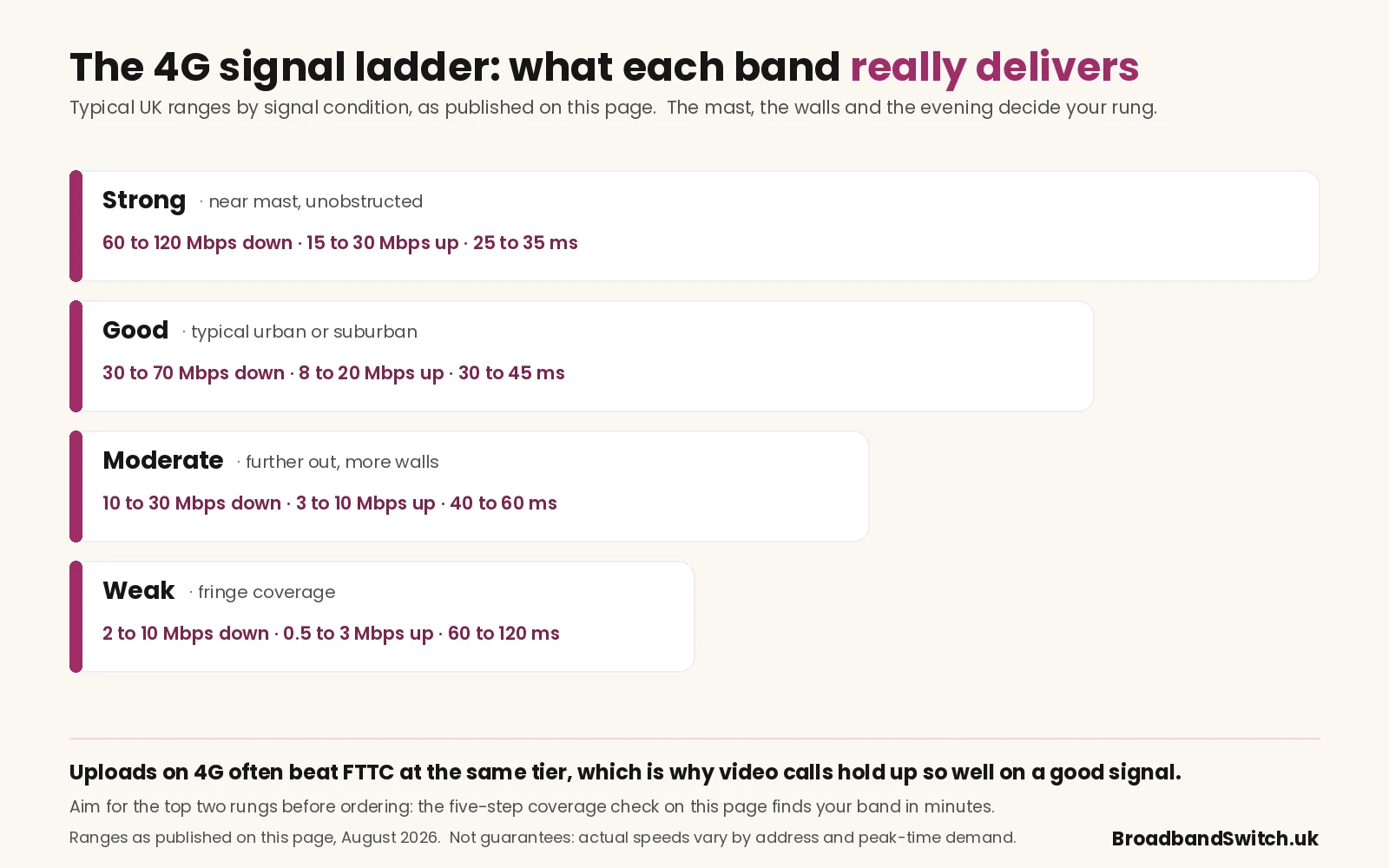
- Strong · near mast, unobstructed60 to 120 Mbps down, 15 to 30 Mbps up, 25 to 35 ms latency.
- Good · typical urban or suburban30 to 70 Mbps down, 8 to 20 Mbps up, 30 to 45 ms latency.
- Moderate · further from mast, walls10 to 30 Mbps down, 3 to 10 Mbps up, 40 to 60 ms latency.
- Weak · fringe coverage2 to 10 Mbps down, 0.5 to 3 Mbps up, 60 to 120 ms latency.
4G against fixed-line and 5G
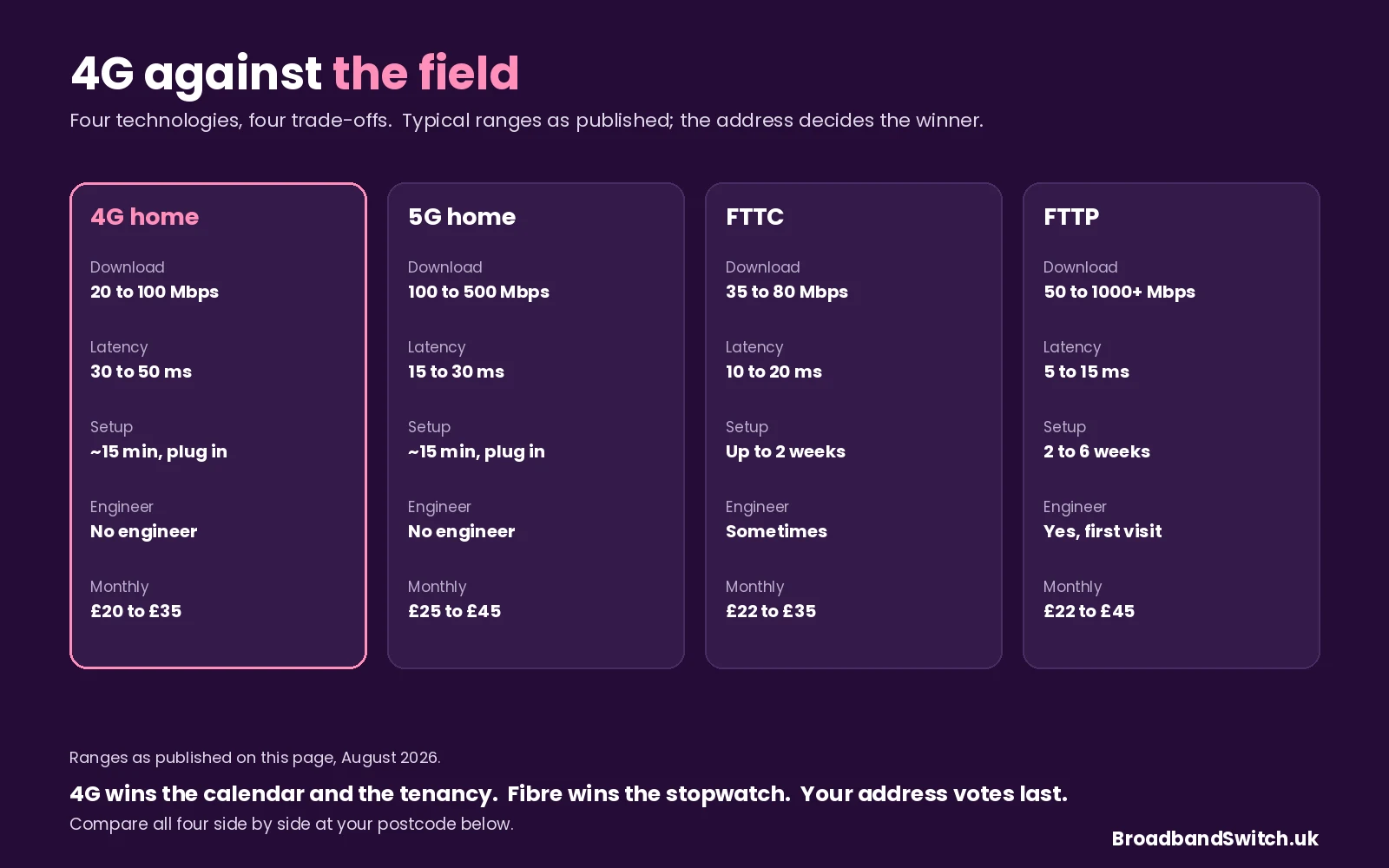
- 4G home20 to 100 Mbps down, 5 to 20 up, 30 to 50 ms. Setup ~15 minutes, no engineer, usually portable, £20 to £35 a month.
- 5G home100 to 500 Mbps down, 20 to 100 up, 15 to 30 ms. Same plug-in setup, often portable, £25 to £45. The 5G page has the detail.
- FTTC35 to 80 Mbps down, 2 to 20 up, 10 to 20 ms. Up to two weeks to activate, sometimes an engineer, £22 to £35. Not portable.
- FTTP50 to 1000+ Mbps down, 20 Mbps to symmetrical up, 5 to 15 ms. 2 to 6 weeks with a first-install visit, £22 to £45. The technology comparison sets all four side by side.
The coverage check, step by step
- Run the provider's own postcode checkerEvery 4G provider has one. Aim for "good" or "very good" on indoor 4G at your address; a "limited" or "poor" result means do not order.
- Cross-reference Ofcom's independent mapOfcom's coverage checker shows mast coverage per network independently of the providers' marketing maps. Two sources agreeing is your green light.
- Test with a phone on the same networkThe router uses the same masts. A speed test on a Three, EE, Vodafone or O2 handset at the exact spot the router will sit previews reality, and the router usually does the same or slightly better thanks to its bigger antenna.
- Plan the router's positionSignal is strongest near windows and external walls, weakest in basements and internal rooms. Upstairs, near a window facing the mast, is the classic winning spot.
- Confirm the trial window before signingMany providers offer a 14 or 30-day window to cancel without penalty if the signal disappoints, and rolling 1-month plans remove the risk entirely for a small premium. Get the exact policy in writing.
Setup day, start to finish
- 1. The box arrivesTypically 1 to 3 working days after ordering: router, power supply, and a pre-activated SIM already inside. Nothing else needed.
- 2. Plug in near a windowThe spot you planned in the coverage check: upstairs, external wall, facing the mast. Standard UK socket, switch on.
- 3. It finds the networkTwo to three minutes to register, status lights confirming when ready. No wizard, no activation call.
- 4. Join the Wi-FiNetwork name and password are on the sticker underneath. Connect phones, laptops and the TV as normal.
- 5. Test the speedRun the speed test at the router's spot and compare against your band's range above. Much lower than expected? Move it closer to a window and test again.
- 6. Decide inside the windowStill poor after repositioning? You are usually within the 14 or 30-day window to return the router for a full refund, which is exactly what it exists for.
Who sells 4G home broadband in 2026
Almost always the mobile networks or brands running on them, which means the best provider for you is simply whichever network is strongest at your address, the coverage check's verdict, not the marketing's.
- Three Home BroadbandOne of the most popular UK 4G providers: typically unlimited data on rolling or 24-month terms, with good urban coverage that still varies by area. See Three deals.
- EE 4GEE HomeStrong UK-wide 4G coverage with unlimited-data home plans, often the pick where EE is the strongest local network. See EE deals.
- Vodafone GigaCube and 4G routersCompetitive pricing on Vodafone's network, with coverage varying by area as ever. See Vodafone deals.
The full market lives in the providers directory, and the faster wireless sibling on the 5G page.
Live 4G deals at your postcode
Everything below is limited to 4G home broadband, sorted by monthly price, router included and no engineer needed. Enter your postcode inside the widget, and run the coverage check before committing, because the deal is only as good as the signal at your sofa.
If 4G looks thin at your address, the full comparison shows every technology together, and the 5G page covers the faster wireless option where it reaches.
Related ways to compare
4G home broadband, asked and answered
How fast is 4G home broadband?
Typically 20 to 100 Mbps download in the UK, entirely dependent on signal at your address: strong signal near a mast can pass 100 Mbps, typical urban conditions give 30 to 70, and fringe coverage can fall to single figures. Uploads run 5 to 20 Mbps, often better than FTTC at a similar price, and latency of 30 to 50 ms suits streaming, browsing and casual gaming comfortably.
Do I need an engineer to install it?
No, and that is the product's superpower: the router arrives by post, plugs into a standard socket, and is online within minutes, with no drilling, no external cabling and no appointment to wait for. It is why 4G suits renters, short-term tenants and anyone who needs to be online this week rather than next month.
Does 4G home broadband have a data limit?
Mostly not any more: unlimited data is the 2026 norm across UK 4G home plans, though a few entry tariffs still carry monthly caps such as 100 GB or 300 GB. Read the allowance wording before ordering, because a capped plan under a streaming household empties fast.
Can I take the router with me when I move?
Usually, yes: the router is not tied to an address the way a fixed line is, so it packs, moves and reconnects to whatever signal the new home offers. Check coverage at the new address before relying on it, and note that some providers ask to be told about the move for billing purposes.
Is 4G good for gaming?
Casual gaming, yes; competitive gaming, honestly, no. Latency of 30 to 50 ms is fine for most titles but noticeable against fibre's 5 to 15 ms on fast competitive games where every millisecond counts. If ranked play matters in your house, fibre is the better choice where it is available.
Is 4G good for video calls?
In most homes, yes: an HD call needs 2 to 4 Mbps of upload and a good 4G signal delivers 8 to 20, comfortably clear of the bar and often better than FTTC manages. Latency sits within what the platforms handle well, though all-day heavy call workloads still prefer a fixed line for sheer consistency.
How do I know if 4G will work at my address?
Run the five-step coverage check on this page: the provider's own postcode checker, Ofcom's independent map as the cross-reference, a speed test on a phone using the same network at the router's exact spot, a sensible window-facing position, and written confirmation of the cancellation window. Good or very good indoor signal from two sources is the standard to order against.
Does One Touch Switch cover the move to 4G?
Not in the seamless fixed-line way: OTS coordinates switches between fixed-line providers, and moving onto 4G means leaving that system, so you cancel the existing contract yourself, observing its notice terms, and order the 4G plan separately. Align the dates to avoid paying twice, and note that some providers will help coordinate the handover.
About this guide. Compiled by Adrian James and reviewed by Dr Alex J. Martin-Smith, with every range and figure stated as published at 5 August 2026, and the translator reading its numbers from this page's own band cards so tool and text cannot drift. 4G performance depends on local mast coverage and indoor signal, so treat the ranges as typical rather than promised, and verify tariff terms with the provider before ordering. We earn commission when you order through the comparison, which never changes the price you pay: see how we rank deals, the editorial policy and the affiliate disclosure, or submit a correction and a human will read it.
References
- Ofcom. (2024, July 19). Ofcom bans mid-contract price rises linked to inflation. Office of Communications. https://www.ofcom.org.uk/phones-and-broadband/bills-and-charges/ofcom-bans-mid-contract-price-rises-linked-to-inflation
- Ofcom. (2024, September 12). Simpler and quicker broadband switching is here. Office of Communications. https://www.ofcom.org.uk/phones-and-broadband/switching-provider/simpler-broadband-switching-is-here
- Ofcom. (n.d.). Ofcom checker: mobile and broadband coverage. Office of Communications. Retrieved August 5, 2026, from https://www.ofcom.org.uk/phones-and-broadband/coverage-and-speeds/ofcom-checker
Band checked, window picked, trial window confirmed, and thirty seconds to see the 4G and fixed prices side by side at your door.
Independent and free. Also worth a look: 5G deals and full fibre.