Gigabit broadband deals: what 1Gbps actually delivers, and what stands in the way
A gigabit line is real and it is cheap now, but the number on the tariff is measured to your router and no further. Between the router and your screen sit three ceilings that every provider publishes and none of them adds up for you: the ethernet port, the Wi-Fi radio and the device in your hand.
The clearest example is Sky's. Here is the tier it sells: “Average speeds: 5000Mbps download, 5000Mbps upload.” And here, in the specification block on the page selling it, is the hub: “Max ethernet speeds: 1Gbps”. Its own newsroom says that same hub has “Plus, it includes two 10 Gbps ethernet ports (1 x WAN and 1 x LAN) to support a direct connection for faster speeds for heavy streamers and hefty file downloaders.” Both are Sky's words about the same device, a factor of ten apart.
So the useful question is not which gigabit deal is cheapest. It is whether your household has the shape that gigabit helps, and whether you are willing to run one cable. This page answers both, quotes eleven providers on their own sites, and finishes with the live deals at your address.
Start with your postcode
Gigabit availability is built street by street, so a national figure cannot answer this. Check the exact address rather than the postcode, because the house next door is sometimes a different answer.
Want the answer for your own house? Answer three questions and see which of the five jobs actually change what you get. Already sold on gigabit and just want it to arrive? Skip to the part about making it reach a screen.
The short version, in a minute
Direct answer: A gigabit is measured to your router. Three things sit between that router and your screen, and every one of them has a published ceiling.
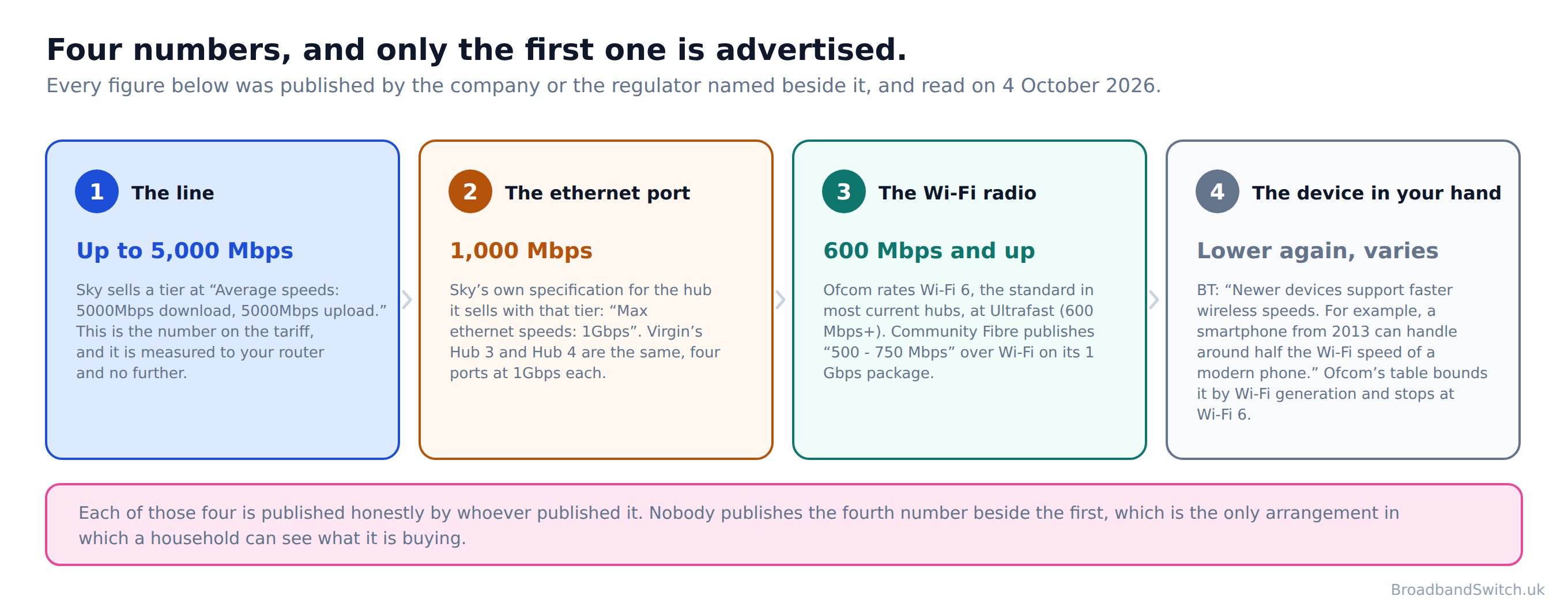
Gigabit lines are a genuinely good thing and this page is not an argument against buying one. They are faster than anything most households had five years ago, they are more reliable, and they get cheaper in real terms every year. Gigabit-capable coverage in the UK now stands at 89%, on Ofcom's January 2026 data.
What nobody publishes is the sentence at the end. Each company describes its own component accurately, and no one is responsible for adding them up. TalkTalk states on the page selling its fastest tier that “These speeds refer to the connection from TalkTalk to your router or hub and do not include Wi-Fi speeds between your hub and wireless devices.” Hyperoptic defines its own advertised figure as a measurement taken “1Gb (900Mbps download/upload), when connecting only 1 device to the router (and that connection is wired).” Both are true, both are published, and between them they describe a gigabit that most households will never see.
This page does the arithmetic. If you want the technology rather than the speed, our full fibre guide covers what FTTP is and what the install involves, and our full fibre versus standard comparison covers whether to upgrade at all. If you want to know which network reaches you, our network guide answers that.
What counts as gigabit, and one word that no longer means anything
Direct answer: Ofcom's definition is a thousand megabits and up, and it includes cable as well as fibre.
The regulator's own words, from Connected Nations 2025: a gigabit-capable connection “can offer download speeds of 1 Gbit/s and above. It can be delivered by HFC cable or full fibre.” That last sentence is why the gigabit availability figure is higher than the full fibre one. Ofcom puts the first at 89% of UK homes and the second at 82%, on January 2026 data.
For comparison, Ofcom defines superfast as a connection that “can provide download speeds of at least 30 Mbit/s and can be delivered by FTTC, HFC cable or full fibre.” And its statutory floor, the universal service standard, is a connection that “can provide at least 10 Mbit/s download and 1 Mbit/s upload speeds”. That is the slowest connection a UK household is entitled to. Those three tiers are the whole of the regulator's current vocabulary.
The word that quietly stopped existing
Ofcom no longer uses the word ultrafast in its reporting. It does not appear anywhere in Connected Nations 2025. The last threshold Ofcom published for it was 300 Mbit/s, in a methodology annex dated 18 December 2018.
It is still a perfectly good product name and several providers use it as one. Sky sells a tier called Ultrafast, and that tier runs over part copper G.Fast rather than full fibre. What it is not is a measurement, and this site used to treat it as one on nine separate pages. That correction is at the foot of this page with the others.
The take-up gap, which is the other half of the coverage story
Everybody reports coverage. Almost nobody reports take-up, and Ofcom publishes both in the same document. Of the premises that can get full fibre, 47% have taken it, which is 12.4 million premises. So roughly half the households that could have the better product are paying for the slower one that is also passing the house.
Openreach explains why, in its own words, in a regional press release rather than anywhere a household would look: “It's not automatic - you need to place an order with your chosen provider.” That is the whole of it. The fibre arriving in your street does not arrive in your house, and nobody rings to tell you.
The three ceilings, and why nobody adds them up
Direct answer: The port, the radio and the device. Each is published, and none of them is published beside the tariff.
Here is the shape of the problem, and it is worth stating before any of the detail. A provider sells you a number. That number is tested to the router, and the provider says so if you look. Everything after the router belongs to a different company's specification sheet, and that specification sheet is on a different page.
Openreach, which builds most of the network, draws the line precisely: “We deliver a Full Fibre connection to your property, but your router type, its age, the quality of your setup, and the number of connected devices will all affect the speed you measure online.” Read that as what it is, which is a wholesaler saying honestly that its responsibility ends at your wall.
So where does the speed actually go?
Into three places, in this order. The ethernet port on your hub caps what any one wired device can take. The Wi-Fi radio caps what any wireless device can take, and it caps it lower. And the device itself caps what it can accept, which BT puts a number on: “Newer devices support faster wireless speeds. For example, a smartphone from 2013 can handle around half the Wi-Fi speed of a modern phone.”
There is a fourth thing, which is sharing. BT publishes the simple version: “Your broadband speed is shared between all connected devices. If 4 devices are online at the same time, each one will get roughly a quarter of the available speed.” That is a crude model and real traffic does not divide in fixed shares, so take it as what BT publishes rather than as physics. It does sit oddly beside what the same group's other brand says on its own site: “With EE Full Fibre get blistering speeds of up to 1.6Gbps and connect up to 190 devices at once.”
None of the three ceilings is hidden. All three are published by the companies that own them. The next three sections take them one at a time, with the figures.
Is gigabit worth it at your house?
Direct answer: Three questions, and five jobs sorted into the ones that change what you get and the ones that do not.
The third question decides more than the first two put together, which is the opposite of what most people expect. What carries the line into the room beats what the line is sold as, almost every time.
The second question decides which half of the product matters. Streaming is almost entirely download, which is the half every provider advertises. Uploading is the half nobody sells on, and it is the half that barely moves between tiers.
It runs entirely in your browser. There is no form to submit, nothing sent to any server and nothing stored.
Three questions, and five jobs sorted into the ones that change what you see and the ones that do not
The third question decides more than the first, which is the opposite of what most people expect: a household on Wi-Fi only will see less of a gigabit than a household on a mid tier with one cable run. Every figure quoted carries the date it was read. Nothing you answer here leaves your browser.
The ethernet port nobody mentions
Direct answer: A gigabit port carries about a thousand megabits. Several providers sell tiers of two and five thousand to go through one.
Start with the clearest case, because it belongs to the provider selling the fastest tier in the country. Sky publishes a package at “Average speeds: 5000Mbps download, 5000Mbps upload.” On the specification block of the page selling it, the Gigafast+ Hub is listed as “Max ethernet speeds: 1Gbps”. We read that page three times on 3 and 4 October 2026 and it came back identical every time.
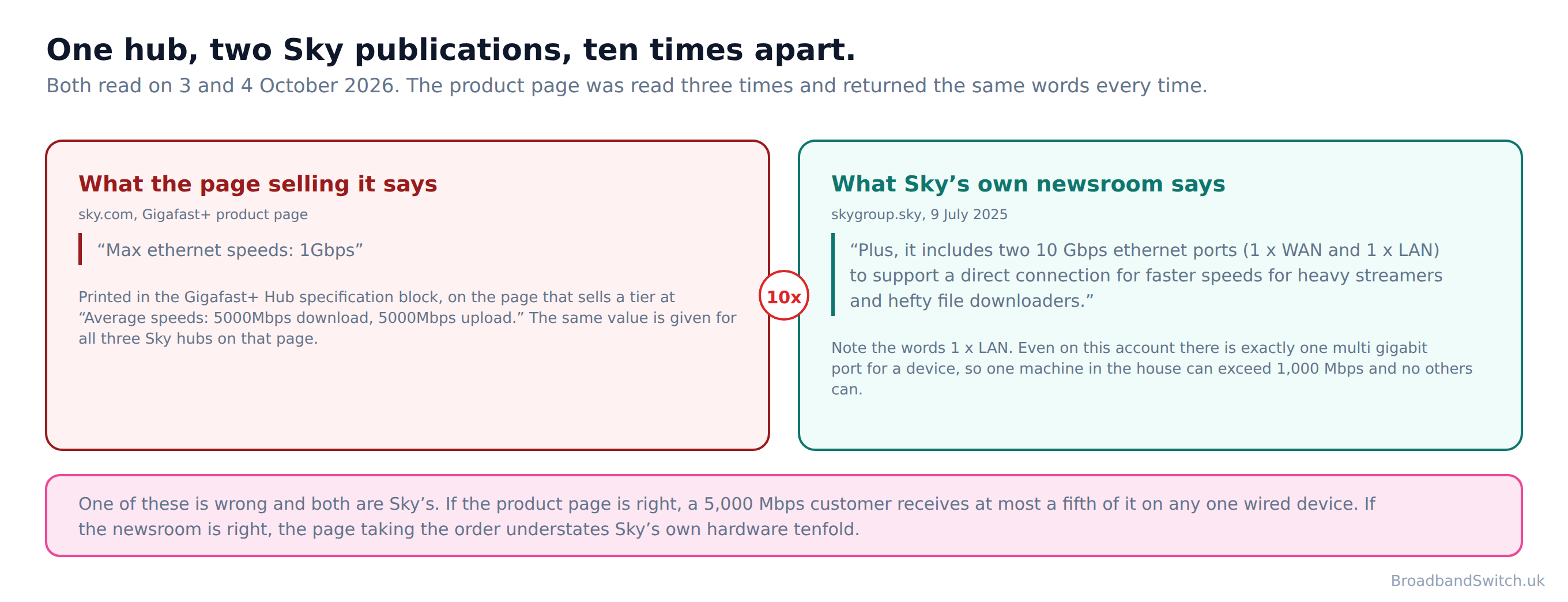
Sky's own newsroom, writing about the same hub on 9 July 2025, says: “Plus, it includes two 10 Gbps ethernet ports (1 x WAN and 1 x LAN) to support a direct connection for faster speeds for heavy streamers and hefty file downloaders.” One of those is wrong and both are Sky's. Notice also the words one times LAN in the newsroom version: even on the more generous account there is exactly one multi gigabit socket for a device, so one machine in the house can exceed a thousand megabits and no others can.
We are not calling this dishonest, and we would not want it read that way. Specification blocks go stale, product pages and newsrooms are maintained by different teams, and neither figure is hidden. It matters because a household choosing between a 2,500 and a 5,000 Mbps tier is choosing on information the seller contradicts elsewhere on its own site.
Virgin Media publishes the whole table, which is useful of it
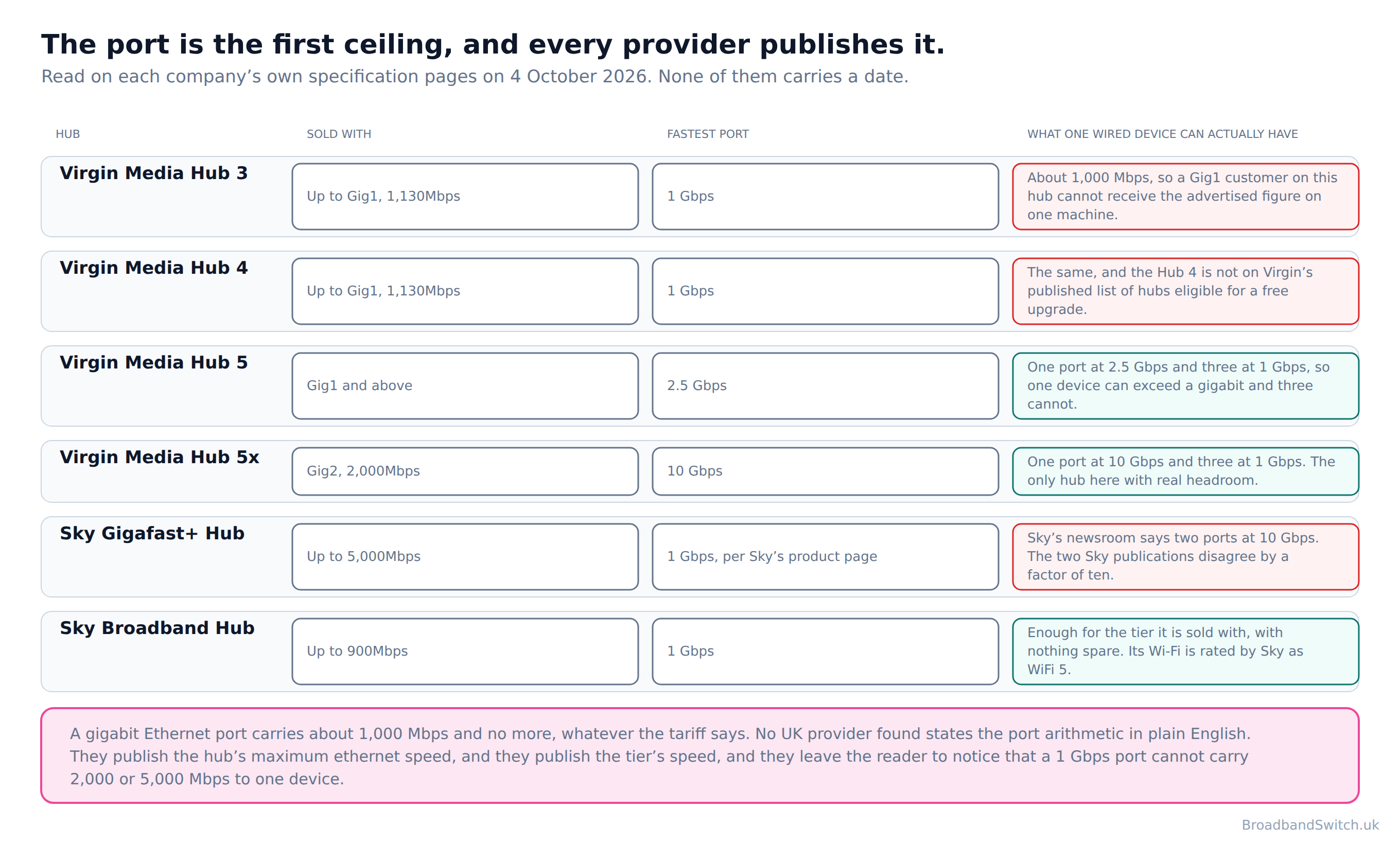
The Ethernet row of Virgin Media's own hub comparison reads: “Hub 3: 4x 1Gbps. Hub 4: 4x 1Gbps. Hub 5: 1x 2.5Gbps, 3x 1Gbps. Hub 5x: 1x 10 Gbps, 3x 1Gbps.” Set that against Gig1, which Virgin sells at “1,130Mbps downloads, 104Mbps uploads (average speeds)”, and the arithmetic does itself. A Gig1 household on a Hub 3 or a Hub 4 cannot receive the advertised download on one wired machine, because the socket will not carry it.
Virgin's upgrade offer is published on the same page: “If you currently have a Hub 3 or older model (including the Superhub 1A, 2A etc.) you're eligible for a Hub upgrade if you order or upgrade to one of our Gig1 Fibre broadband packages.” Read the list. The Hub 4 is not on it, so a Hub 4 household taking Gig1 keeps its thousand megabit sockets and has no published route to anything better. If you are on a Hub 4 and paying for Gig1, that is worth a phone call.
No UK provider found states the port arithmetic in plain English. They publish the hub's maximum ethernet speed, and they publish the tier's speed, and they leave the reader to notice that a 1 Gbps port cannot carry 2,000 or 5,000 Mbps to one device.
Why your Wi-Fi cannot carry it
Direct answer: Ofcom rates Wi-Fi 6, the standard in most current hubs, at 600 Mbps and up. The tiers sold over it go to five thousand.
Ofcom states the principle first, and it is the single most useful sentence on this subject: “your wifi connection will never outperform your broadband service”. Note the direction of it. The regulator's message is not blame the Wi-Fi, it is check the line first, because the line sets the ceiling and the Wi-Fi only ever lowers it.
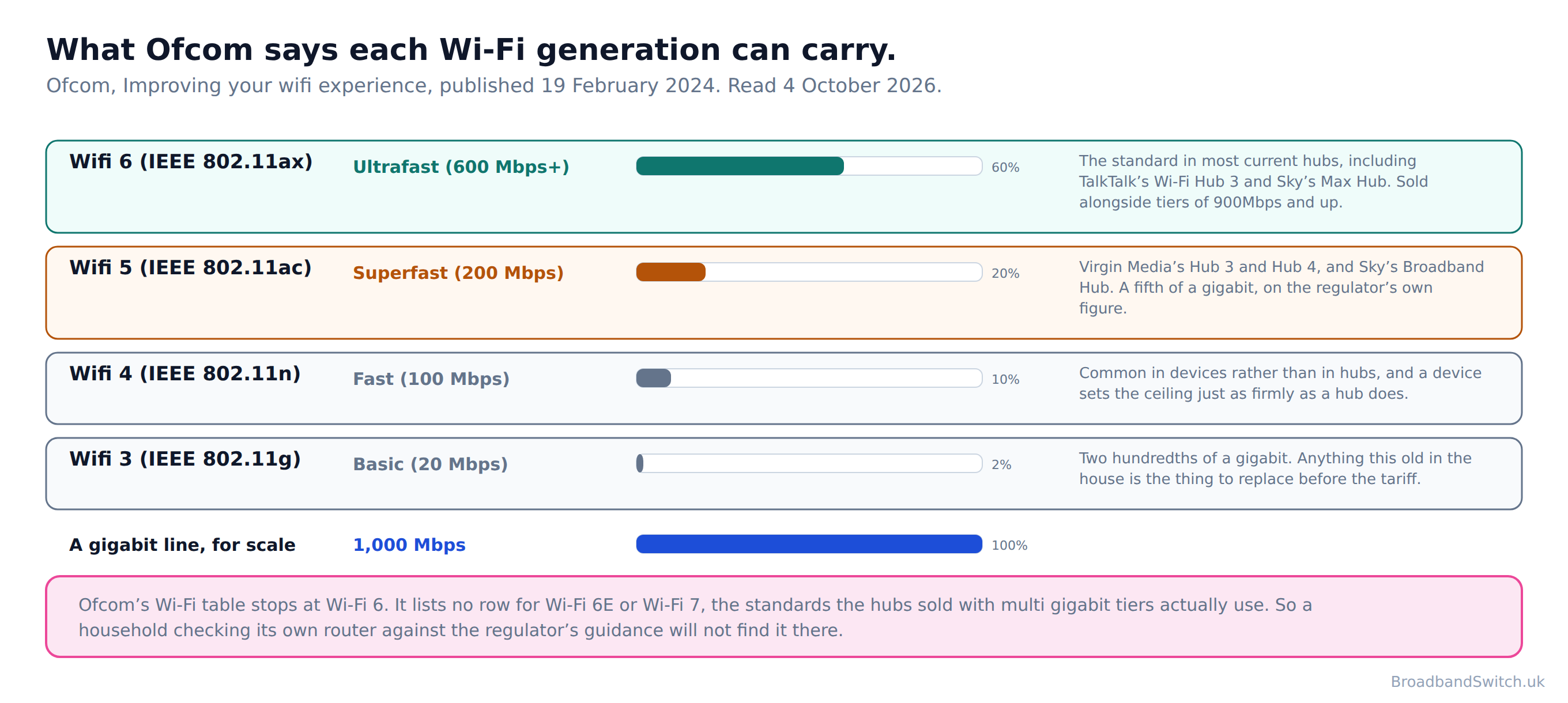
Then Ofcom publishes the numbers, in a table of Wi-Fi standards against typical maximum speeds: “Wifi 6 (IEEE 802.11ax): Ultrafast (600 Mbps+). Wifi 5 (IEEE 802.11ac): Superfast (200 Mbps). Wifi 4 (IEEE 802.11n): Fast (100 Mbps). Wifi 3 (IEEE 802.11g): Basic (20 Mbps).” On the regulator's own figures a Wi-Fi 5 device cannot carry a gigabit and a Wi-Fi 6 device is rated at a little over half of one.
Which generation is in your house is published too, by most providers. Virgin Media's hub comparison gives it as “Hub 3: 5. Hub 4: 5. Hub 5: 6. Hub 5x: 6.” So its Hub 3 and Hub 4 sit on the 200 Mbps row of Ofcom's table. TalkTalk's hub on its 900Mbps tier is “Wi-Fi 6”, which is the 600 Mbps row. Sky's three hubs run from Wi-Fi 5 to Wi-Fi 7.
And the regulator's table has fallen behind
Ofcom's Wi-Fi table stops at Wi-Fi 6. It lists no row for Wi-Fi 6E or Wi-Fi 7, the standards the hubs sold with multi gigabit tiers actually use.
So a household checking its own router against Ofcom's guidance will not find its row. That is not a reason to ignore the table, because the shape of it is right and the direction of travel is right. It is a reason to treat the numbers in it as a floor rather than a ceiling for the newer standards, and to say plainly, as we are doing here, that the regulator's published figures are two and a half years old.
The one provider that publishes what you actually get
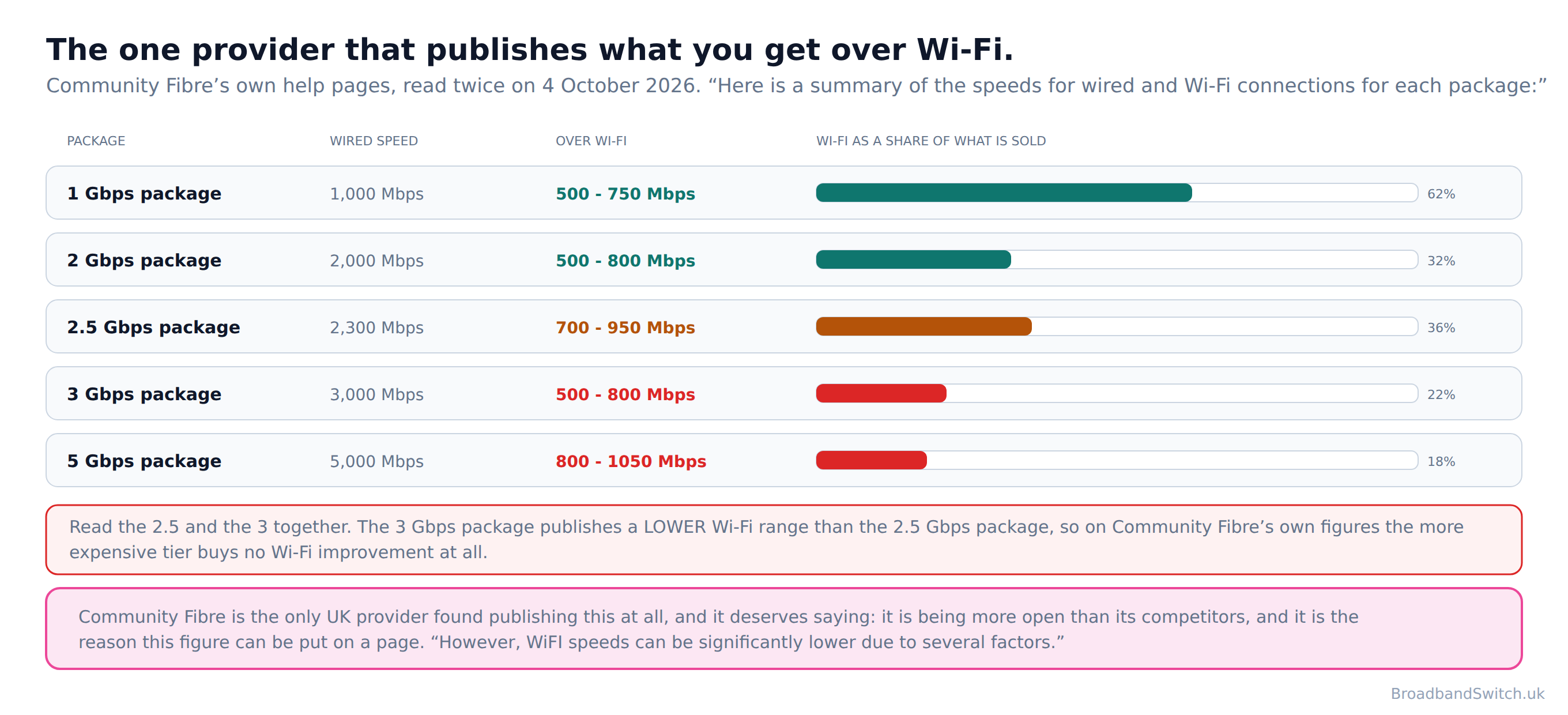
Community Fibre is the only UK provider found that puts a Wi-Fi figure next to the advertised figure, package by package. Its own introduction: “Here is a summary of the speeds for wired and Wi-Fi connections for each package:” On its 1 Gbps package the published Wi-Fi speed is “500 - 750 Mbps”. On its 5 Gbps package it is “800 - 1050 Mbps”, which is about a fifth of what is sold.
There is an oddity in the middle of that table worth reading twice. The 2.5 Gbps package publishes “700 - 950 Mbps” over Wi-Fi. The 3 Gbps package, which costs more, publishes “500 - 800 Mbps”. On the provider's own figures the dearer tier buys a lower Wi-Fi range than the cheaper one. Community Fibre also says plainly why the gap exists at all: “However, WiFI speeds can be significantly lower due to several factors.”
We want to be fair about this, because publishing those figures is the opposite of hiding them. Community Fibre is being more open than any of its competitors, and it is the reason this section can carry a number at all. Every other provider leaves the reader to find out by buying.
What to do about it, which costs nothing
Ofcom's advice is specific and free: “Routers send wifi in all directions, so placing the router centrally in the home and off the floor (for example, on a shelf) will mean the wifi signal is not lost by being sent outside or into the ground.” The router is usually wherever the line enters the building, which in a British house is the hall, and the rooms that need the signal are somewhere else entirely. Moving it is the cheapest improvement on this page.
And Virgin Media publishes a guarantee that puts the whole section in proportion: “Our WiFi guarantee is our promise you'll enjoy download speeds of at least 30Mbps in every room or get £100 bill credit.” Thirty megabits in every room, on a product it sells at “1,130Mbps downloads, 104Mbps uploads (average speeds)”. That is the gap between the number on the tariff and the number the seller will stand behind.
The half nobody sells on
Direct answer: EE's download nearly doubles between its two fastest tiers. Its upload moves five megabits.
Here are the two figures together. EE's fastest residential tier is “1.6Gbps Core Broadband” with “115Mbps upload speed”. Its 900Mbps tier has “110Mbps upload speed”. Buying the faster one nearly doubles what you can pull down and adds five megabits to what you can send.
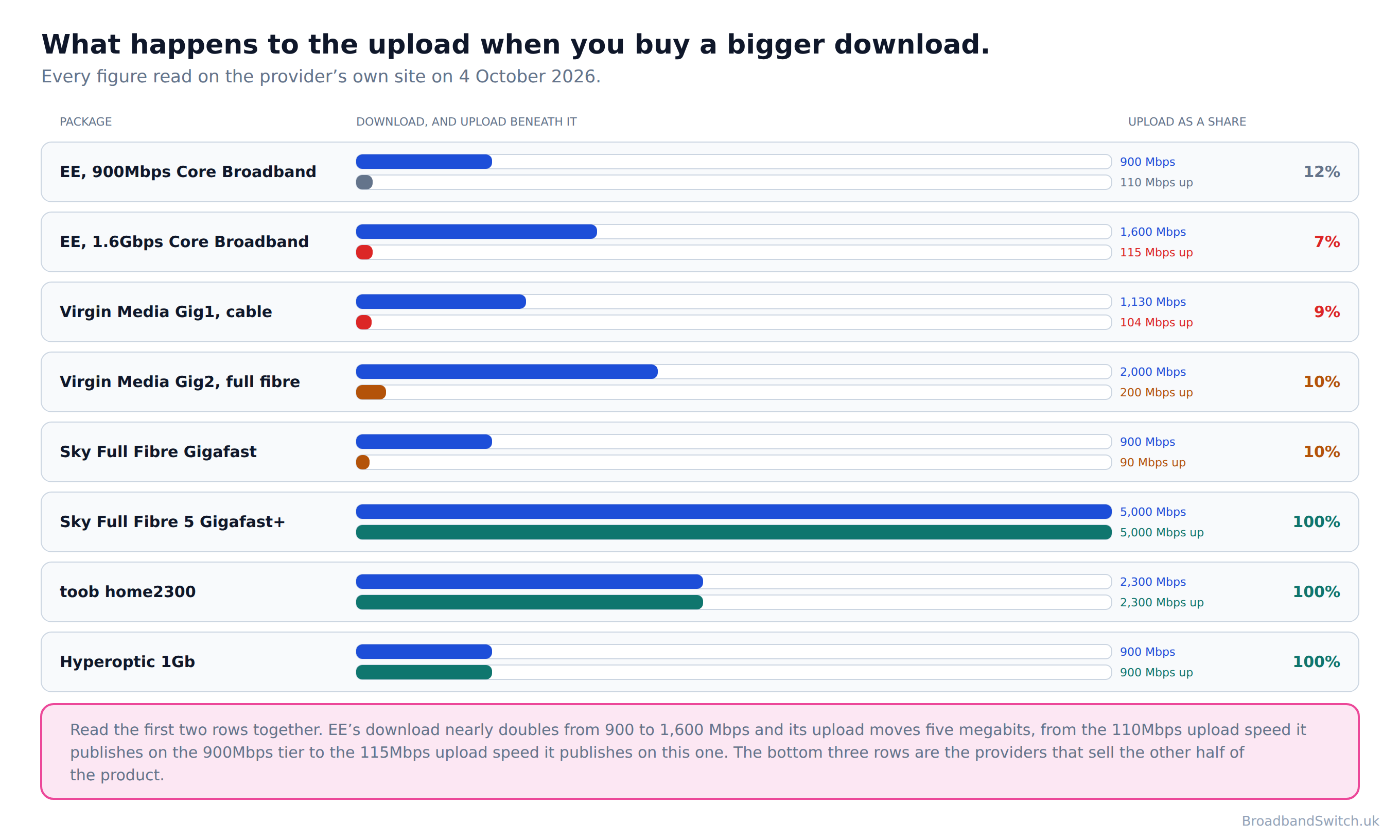
That is not unusual, it is the market. Virgin Media's cable Gig1 is “1,130Mbps downloads, 104Mbps uploads (average speeds)”. About eleven to one. Sky's Gigafast is “Average speeds: 900Mbps download, 90Mbps upload.”. Ten to one. The pattern holds across almost every large retailer, and the ratio gets worse as the tier gets faster rather than better.
Openreach, which has no retail customers to sell to, describes what the alternative is worth: “Symmetric speeds give customers the ability to upload as quickly as they download.” That is one sentence and it is the whole of the argument for symmetric speeds.
Where symmetric speeds actually exist
Four kinds of answer. Hyperoptic publishes “1Gb (900Mbps download/upload), when connecting only 1 device to the router (and that connection is wired).” Toob sells its top tier at “2300 Mbps download and 2300 Mbps upload”. Vodafone's Pro 3 publishes “Download speed: Up to 2.2 Gbps. Upload speed: Up to 2.2 Gbps”, though it is sold on up to wording rather than the average speed convention the others use, which is a weaker basis for a claim. And Sky's two multi gigabit tiers are symmetric. Its fastest reads “Average speeds: 5000Mbps download, 5000Mbps upload.”
Virgin Media sells the difference as an add-on: “Boost your upload speed for an extra £6 a month and upload as fast as you download.” That is on its full fibre footprint rather than on cable, and it is one of the very few prices on any of these pages that is published without a postcode.
Whether any of this matters to you depends entirely on what you do. If you only ever pull things down, the upload figure will never reach you. If anybody in the house is on video calls, backing up photographs, sending work files or streaming out rather than in, it is the number to compare and it is almost never the one on the front of the page.
Who sells gigabit in the UK
Direct answer: Six providers publish a gigabit tier. Three of the largest do not.
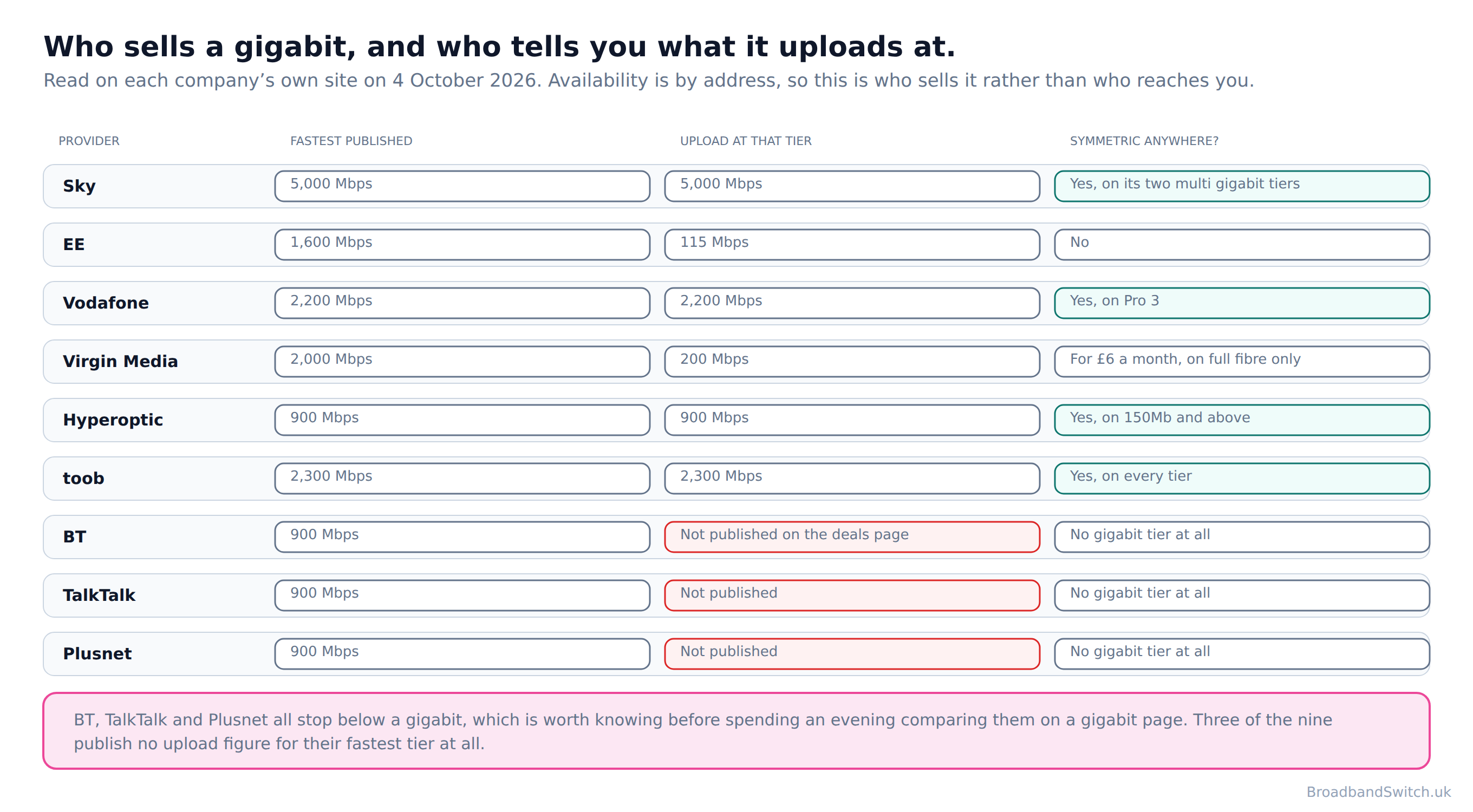
The first useful thing to know is who is not on this page. BT's fastest published residential download is 900Mbps, and TalkTalk's and Plusnet's are the same. All three stop just below a gigabit, which is worth knowing before spending an evening comparing them on a gigabit page.
Of those who do sell one, Sky publishes the highest figure found anywhere in the UK, at “Average speeds: 5000Mbps download, 5000Mbps upload.”. EE goes to “1.6Gbps Core Broadband”. Vodafone's Pro 3 publishes “Download speed: Up to 2.2 Gbps. Upload speed: Up to 2.2 Gbps”. Virgin Media's Gig2 is “2,000Mbps downloads, 200Mbps uploads (average speeds)”. Toob's top tier is “2300 Mbps download and 2300 Mbps upload”, and Hyperoptic's is “1Gb (900Mbps download/upload), when connecting only 1 device to the router (and that connection is wired).”
Note the shape of that last one, because Hyperoptic is the only provider in this research that states the condition attached to its own headline figure. Everyone else publishes the number and leaves the conditions to a footnote or to nowhere. Hyperoptic also states it as policy rather than as small print: “We provide a minimum download speed that you can expect on a package, at any time of day, when connecting one device to the router (and that connection is wired).”
Availability is by address rather than by brand, so the table above is who sells a gigabit and not who can reach you. Openreach's network now reaches “Openreach's Full Fibre network - which now reaches more than 23.4m premises”, and “more than 9.4 million customers have upgraded so far”. Which of those applies to your house is the postcode check and nothing else.
Cable gigabit and fibre gigabit
Direct answer: Identical on download. Completely different the moment you send something.
Ofcom counts both as gigabit-capable and says so explicitly: a gigabit-capable connection “can offer download speeds of 1 Gbit/s and above. It can be delivered by HFC cable or full fibre.” So a household on Virgin Media cable and a household on Openreach full fibre are, by the regulator's definition, on the same tier of product.
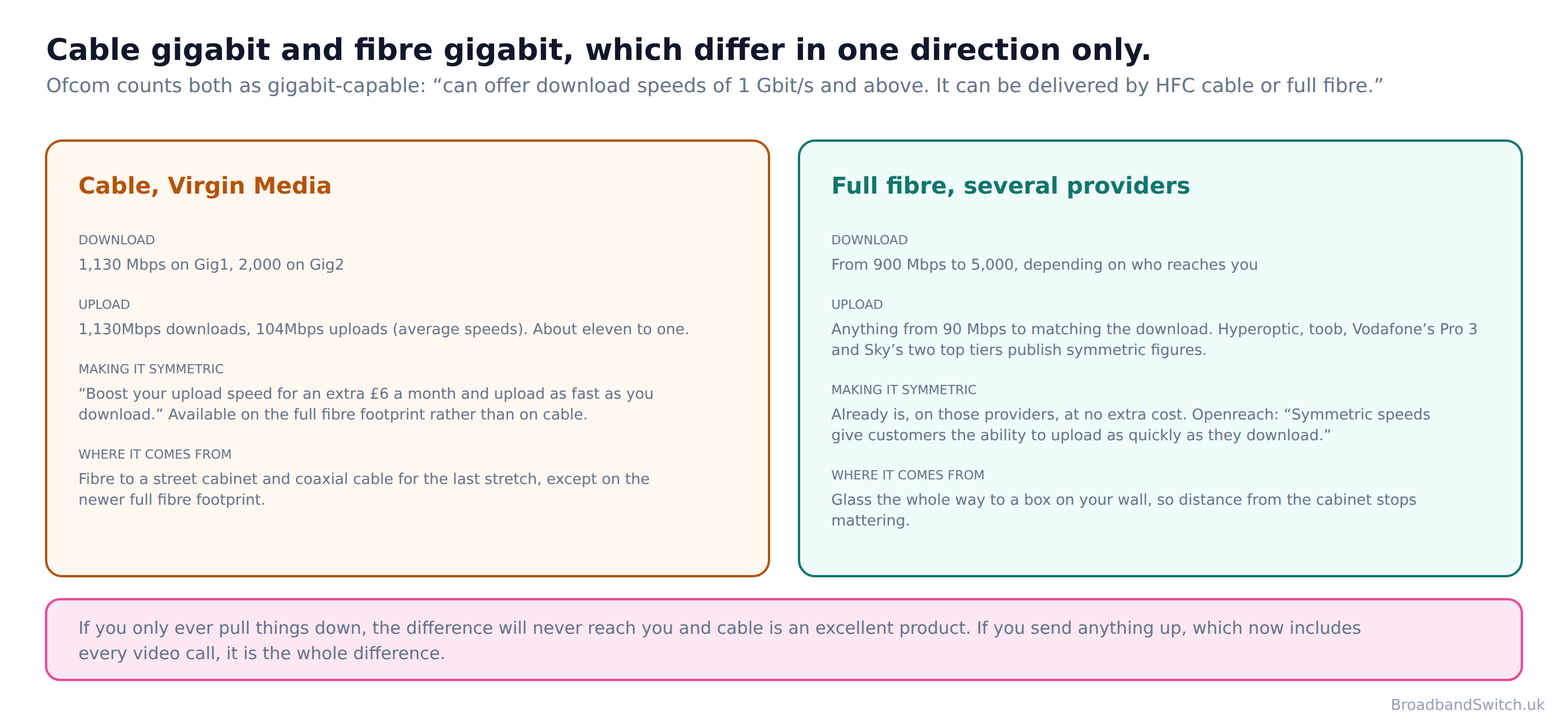
On download they genuinely are. Virgin's Gig1 at “1,130Mbps downloads, 104Mbps uploads (average speeds)” will pull things down as fast as anything, and its Gig2 at “2,000Mbps downloads, 200Mbps uploads (average speeds)” faster than most. For streaming, browsing, downloading games and everything else that arrives rather than leaves, cable is an excellent product and nothing on this page says otherwise.
The difference is in one direction. Cable is asymmetric by design, at roughly eleven to one on Gig1 and ten to one on Gig2. Full fibre ranges from similar ratios at the cheaper end to fully symmetric at several providers. Ofcom's own definition of full fibre notes the other advantage: “The connection from the exchange to the premises is provided entirely over fibre. Generally, distance to the premises does not affect the speed delivered. Full fibre can offer gigabit speeds.”
If you want the technology comparison rather than the speed comparison, our guide to full fibre, FTTC, cable and 4G or 5G covers all four, and our FTTP page covers what a full fibre install actually involves.
Who actually needs a gigabit
Direct answer: Households doing several heavy things at once. Not households doing one heavy thing.
This is the distinction that matters and it is almost never drawn. A single 4K stream needs a small fraction of a gigabit. Four of them still do. What fills a line is not one demanding activity, it is several at the same time, plus the thing nobody counts, which is the dozen devices in a modern house quietly updating themselves.

Where a gigabit earns its money
Four or more people online most evenings, doing different things. A household with somebody working from home all day on top of the evening load. A house where several people upload rather than only download, which now includes anybody on video calls for a living. And a household that has simply had enough of the evening slowdown and wants the headroom, which is a perfectly good reason to buy something.
Where it very probably does not
One or two people who rarely overlap. A household whose complaint is a room with no signal, because that is a Wi-Fi problem and no tier fixes it. And gaming, which is the one activity on this list that a bigger number does not help: what a game needs is a short, steady round trip rather than volume, and a full fibre line at 150Mbps will usually beat a congested gigabit on both.
Each of those has a page of its own that goes further than this one can. Broadband for streaming, broadband for gaming, broadband for home working and broadband for large households between them cover the four patterns.
How to actually get your gigabit
Direct answer: One cable, one decision about where the router lives, and one test done properly.
Everything above this point is diagnosis. This is the treatment, and it is short, because there are only three things worth doing and two of them are free.
One. Run a cable to whatever does the heaviest work
This is the whole of the advice and it costs about eight pounds. A cable bypasses the lowest of the three ceilings entirely, and it is the arrangement every provider measures its own product in. Hyperoptic says so outright: its advertised 1Gb figure is “1Gb (900Mbps download/upload), when connecting only 1 device to the router (and that connection is wired).”
Which device? Not necessarily the one you would guess. The machine that benefits most is the one that moves the largest amounts of data, which in most houses is a desktop computer, a games console or a television used for 4K streaming, rather than the laptop somebody browses on.

Two. Move the router, or ask for a newer one
Ofcom again: “Routers send wifi in all directions, so placing the router centrally in the home and off the floor (for example, on a shelf) will mean the wifi signal is not lost by being sent outside or into the ground.” Free, reversible, and on most lines it makes more difference than two tiers of extra speed. If the hub is several years old, check your provider's own specification page for its ports and its Wi-Fi standard, because several of them publish both, and ask whether a newer one comes with an upgrade.
Three. Test it over a cable before you ring anybody
Ofcom's advice is explicit: “Use an Ethernet cable to connect your computer directly to your router rather than using WiFi. An Ethernet cable is a computer networking cable which should give you a faster, more reliable connection.” A test run over Wi-Fi measures your Wi-Fi, which is a useful thing to know and a different thing from the one you are paying for. Ofcom also publishes what to expect at the worst time of day, which is “the estimated speed you are likely to experience at busy times of the day, when average speeds are often lower. These times are 8-10pm for home services, and 12-2pm for business services.”
Test wired first, then test where you actually sit, and expect the two numbers to differ by a lot. The first is the number your provider is responsible for. The second is the number you live with, and the three steps above are how you close the gap between them.
What you can do if you do not get it
Direct answer: There is a published right to leave, and it is worth knowing before you ring rather than after.
Ofcom runs a voluntary code of practice on broadband speeds, and the useful part of it is this: “Your provider should always give you a minimum guaranteed speed for your broadband service.” That minimum is the figure your complaint rests on, not the advertised average, so find it in your contract before anything else.

Then the remedy, in Ofcom's own words: “If the problem lies within their network, and they can't fix it within 30 days, they must offer you the right to exit your contract without being penalised.” Ofcom restates the same right for consumers slightly differently: “If your speed drops below the level your provider promised you, they have one month to improve the performance before they must allow you to walk away without being penalised.” One month to fix it, then out without a penalty.
Two caveats belong with that, and we would rather give them than have somebody ring a provider expecting more than the rule offers. The code is voluntary, and its signatories are the larger providers, so check whether yours has signed. And the right attaches to the minimum guaranteed speed over the line, which is why the wired test in the last section matters: a Wi-Fi number will not support a claim.
And who actually sets the advertising rules
Not Ofcom, which is a thing most guides get wrong and this site got wrong on four pages. The Advertising Standards Authority sets the standard for numerical speed claims: “Advertisers making numerical speed claims should be able to demonstrate that the speed quoted is achievable for at least 50% of the relevant customer base at peak time.” The ASA takes Ofcom's definition of peak time and applies its own rule, so an advertised average speed is a figure half of customers should reach at the busiest hours.
One number this page cannot give you
Ofcom no longer measures actual broadband speeds. Its UK Home Broadband Performance programme ended with the report of 14 September 2023, on measurements taken in March 2023, so there is no current regulator figure for what households actually receive.
So any current claim about what households actually receive in the UK comes from a commercial speed-test dataset rather than from the regulator. Those datasets are useful and we use them elsewhere, and they are not the same thing as a regulator figure, so wherever this site quotes one it says whose it is.
Live gigabit deals at your postcode
Direct answer: Availability is built street by street, so the only answer that applies to you is your own address.
Gigabit-capable coverage across the UK is 89% and full fibre reaches 82%. Neither figure tells you anything about your house. The check below shows every provider that reaches the address, lowest price first, including the altnets that no national figure counts separately.
Every gigabit option that reaches your address
One postcode shows every provider that reaches it, lowest price first, with the speed and the minimum term beside each. Read the upload figure as well as the download before you choose.
Compare at your postcode →What this page used to say, and why it changed
Direct answer: Four corrections. Two of them were on nine other pages of this site as well, and those are being fixed too.
None of these four was a lie and all four were wrong. Three come from using a word or a figure that was current when somebody wrote it and has since stopped being current, which is the ordinary way a comparison site goes out of date. The fourth is attributing a rule to the wrong regulator, which is just a mistake. Publishing them here rather than quietly editing is the only way somebody who read the old version can tell what changed.
Calling 300Mbps and up ultrafast
What this page said
That ultrafast was a tier with a definition, sitting between superfast and gigabit, and that it began at 300Mbps. This site used the word on nine pages as though it were current regulatory language.
What it says now, and why
Ofcom no longer uses the word ultrafast in its reporting. It does not appear anywhere in Connected Nations 2025. The last threshold Ofcom published for it was 300 Mbit/s, in a methodology annex dated 18 December 2018. Ofcom's current published tiers are the decent broadband floor, superfast, and gigabit-capable, and nothing between. Where a provider uses the word as a product name, which several do, this site now says so rather than treating it as a measurement.
Treating the advertised speed as the speed at your device
What this page said
That a 900Mbps package meant 900Mbps to whatever you were using. Several pages on this site made speed comparisons on that basis without naming the gap.
What it says now, and why
The advertised figure stops at the router, and TalkTalk publishes the clearest statement of it on the page selling its fastest tier: “These speeds refer to the connection from TalkTalk to your router or hub and do not include Wi-Fi speeds between your hub and wireless devices.” Hyperoptic goes further and defines its own advertised figure as a measurement taken with “1Gb (900Mbps download/upload), when connecting only 1 device to the router (and that connection is wired).” Every speed on this page is now labelled with where it is measured.
Saying Ofcom sets the advertising rules on speed
What this page said
That the 50% at peak time rule for advertised speeds was an Ofcom rule. It appeared that way on four pages of this site.
What it says now, and why
It is the Advertising Standards Authority's: “Advertisers making numerical speed claims should be able to demonstrate that the speed quoted is achievable for at least 50% of the relevant customer base at peak time.” The ASA takes Ofcom's definition of peak time and sets the advertising standard itself. Ofcom's role is the code of practice on minimum guaranteed speeds, which is a different instrument and a voluntary one.
Quoting a regulator figure for real-world speeds
What this page said
That Ofcom published what households actually receive, and citing it in comparisons.
What it says now, and why
Ofcom no longer measures actual broadband speeds. Its UK Home Broadband Performance programme ended with the report of 14 September 2023, on measurements taken in March 2023, so there is no current regulator figure for what households actually receive. So any current claim about average real-world speed in the UK comes from a commercial speed-test dataset rather than from the regulator, and this site now names the source whenever it uses one.
Gigabit broadband: frequently asked questions
Is gigabit broadband worth it?
For a particular shape of household, yes, and it is cheaper than it was. The households it helps are the ones doing several heavy things at once rather than one heavy thing: four or five people streaming, gaming and on video calls in the same evening, or a home with a lot of large uploads. For one or two people streaming and browsing, a 150 to 300Mbps tier does the same job, and the money is better spent on the Wi-Fi.
Will I actually get 1Gbps?
To one device, over a cable, very probably. Over Wi-Fi, no. Ofcom's own table rates the Wi-Fi standard in most current hubs at “600 Mbps+”, and Community Fibre, the one UK provider that publishes a Wi-Fi figure beside its advertised figure, gives “500 - 750 Mbps” over Wi-Fi on its 1 Gbps package. Hyperoptic states the condition outright: its advertised 1Gb is “1Gb (900Mbps download/upload), when connecting only 1 device to the router (and that connection is wired).”
Why is my upload so much slower than my download?
Because almost every UK provider sells it that way. EE's fastest tier is “1.6Gbps Core Broadband” with “115Mbps upload speed”, and its 900Mbps tier has “110Mbps upload speed”, so the download nearly doubles and the upload moves five megabits. Virgin Media's Gig1 is “1,130Mbps downloads, 104Mbps uploads (average speeds)”. Symmetric speeds exist, at Hyperoptic, Toob and on Vodafone's and Sky's top tiers, and you have to go looking for them.
Do I need a new router for gigabit?
Possibly, and your provider's own specification will tell you. Virgin Media publishes its hub ports: “Hub 3: 4x 1Gbps. Hub 4: 4x 1Gbps. Hub 5: 1x 2.5Gbps, 3x 1Gbps. Hub 5x: 1x 10 Gbps, 3x 1Gbps.” A Hub 3 or Hub 4 has only 1 Gbps ports, so a Gig1 customer at “1,130Mbps downloads, 104Mbps uploads (average speeds)” cannot receive the advertised speed on one wired device. Virgin's upgrade offer reads: “If you currently have a Hub 3 or older model (including the Superhub 1A, 2A etc.) you're eligible for a Hub upgrade if you order or upgrade to one of our Gig1 Fibre broadband packages.” The Hub 4 is not on that list.
Is cable gigabit as good as full fibre gigabit?
For download, yes. For upload, not at all, and the gap is the whole difference. Virgin Media's cable Gig1 is “1,130Mbps downloads, 104Mbps uploads (average speeds)”, which is about eleven to one. Full fibre at the same download runs anywhere from ten to one to symmetric, and Openreach puts the point plainly: “Symmetric speeds give customers the ability to upload as quickly as they download.” If you only ever pull things down, the difference will not reach you.
What is the difference between gigabit-capable and full fibre?
Gigabit-capable is the wider category because it includes cable. Ofcom defines it as a connection that “can offer download speeds of 1 Gbit/s and above. It can be delivered by HFC cable or full fibre.” That is why the gigabit availability figure, 89%, is higher than the full fibre one, 82%. Ofcom publishes the longer form of both: “Gigabit-capable broadband availability has increased to 89% (27.1 million homes)”, and “Full fibre is available to 24.9 million UK residential premises (82% of the UK's 30.5 million homes)”.
Can my phone or laptop even use a gigabit?
Over a cable, most machines from the last decade can. Over Wi-Fi it depends on the device, and BT publishes the only UK figure found on it: “Newer devices support faster wireless speeds. For example, a smartphone from 2013 can handle around half the Wi-Fi speed of a modern phone.” Ofcom's Wi-Fi table is the better guide, because it bounds what each Wi-Fi generation can carry, and it stops at Wi-Fi 6.
Does a gigabit get divided between everyone in the house?
In practice it is shared rather than divided, and BT publishes the simple version: “Your broadband speed is shared between all connected devices. If 4 devices are online at the same time, each one will get roughly a quarter of the available speed.” That is a crude model and real traffic does not work in fixed shares, but the direction is right, and it sits oddly beside EE's claim on the same group's other brand: “With EE Full Fibre get blistering speeds of up to 1.6Gbps and connect up to 190 devices at once.”
What can I do if I do not get the speed I pay for?
Ofcom's code of practice gives you a way out, and it is worth knowing before you ring: “If the problem lies within their network, and they can't fix it within 30 days, they must offer you the right to exit your contract without being penalised.” Ofcom states it again for consumers: “If your speed drops below the level your provider promised you, they have one month to improve the performance before they must allow you to walk away without being penalised.” The code is voluntary and its signatories are the larger providers, so check whether yours has signed it.
Should I test my speed over Wi-Fi?
Not if you want to know what the line is doing. Ofcom's advice is explicit: “Use an Ethernet cable to connect your computer directly to your router rather than using WiFi. An Ethernet cable is a computer networking cable which should give you a faster, more reliable connection.” A Wi-Fi speed test measures your Wi-Fi, which is a useful thing to measure and a different thing from the one you are paying for.
Where should the router go?
Centrally, and off the floor. Ofcom: “Routers send wifi in all directions, so placing the router centrally in the home and off the floor (for example, on a shelf) will mean the wifi signal is not lost by being sent outside or into the ground.” It is the cheapest improvement available on this entire page, and on most gigabit lines it will make more difference than the tier you chose.
Is gigabit available at my address?
Gigabit-capable coverage is 89% on Ofcom's January 2026 data, and full fibre is at 82%. Neither tells you about your address, because coverage is a national figure and the network is built street by street. The postcode check at the top of this page is the only answer that applies to you.
In short
- A gigabit is measured to your router and no further.
- TalkTalk publishes it on the page selling its fastest tier: “These speeds refer to the connection from TalkTalk to your router or hub and do not include Wi-Fi speeds between your hub and wireless devices.”
- Hyperoptic defines its own advertised figure as “1Gb (900Mbps download/upload), when connecting only 1 device to the router (and that connection is wired).”
- Between the router and your screen are three ceilings.
- The first is the ethernet port.
- Sky's Gigafast+ Hub specification says “Max ethernet speeds: 1Gbps”, on the page selling a tier at “Average speeds: 5000Mbps download, 5000Mbps upload.”
- Sky's own newsroom says the same hub has “Plus, it includes two 10 Gbps ethernet ports (1 x WAN and 1 x LAN) to support a direct connection for faster speeds for heavy streamers and hefty file downloaders.”
- Note the words 1 x LAN. One multi gigabit port means one device.
- Virgin Media publishes its hub ports: “Hub 3: 4x 1Gbps. Hub 4: 4x 1Gbps. Hub 5: 1x 2.5Gbps, 3x 1Gbps. Hub 5x: 1x 10 Gbps, 3x 1Gbps.”
- A Hub 3 or Hub 4 has 1 Gbps ports only, against a Gig1 tier of “1,130Mbps downloads, 104Mbps uploads (average speeds)”
- The second ceiling is Wi-Fi.
- Ofcom's own table: “Wifi 6 (IEEE 802.11ax): Ultrafast (600 Mbps+). Wifi 5 (IEEE 802.11ac): Superfast (200 Mbps). Wifi 4 (IEEE 802.11n): Fast (100 Mbps). Wifi 3 (IEEE 802.11g): Basic (20 Mbps).”
- Ofcom's Wi-Fi table stops at Wi-Fi 6. It lists no row for Wi-Fi 6E or Wi-Fi 7, the standards the hubs sold with multi gigabit tiers actually use.
- Community Fibre is the only UK provider found publishing a Wi-Fi figure per package.
- On its 1 Gbps package it publishes “500 - 750 Mbps” over Wi-Fi.
- On its 5 Gbps package it publishes “800 - 1050 Mbps”
- Its 3 Gbps package publishes “500 - 800 Mbps”, which is lower than its 2.5 Gbps package at “700 - 950 Mbps”
- Virgin Media guarantees “Our WiFi guarantee is our promise you'll enjoy download speeds of at least 30Mbps in every room or get £100 bill credit.”
- The third ceiling is the device, and BT publishes the only UK figure: “Newer devices support faster wireless speeds. For example, a smartphone from 2013 can handle around half the Wi-Fi speed of a modern phone.”
- Upload is the half nobody sells on.
- EE's fastest tier is “1.6Gbps Core Broadband” with “115Mbps upload speed”
- Its 900Mbps tier has “110Mbps upload speed”
- Virgin Media's cable Gig1 is “1,130Mbps downloads, 104Mbps uploads (average speeds)”
- Symmetric exists: Hyperoptic, Toob at “2300 Mbps download and 2300 Mbps upload”, Vodafone's Pro 3 and Sky's two multi gigabit tiers.
- No UK provider found states the port arithmetic in plain English. They publish the hub's maximum ethernet speed, and they publish the tier's speed, and they leave the reader to notice that a 1 Gbps port cannot carry 2,000 or 5,000 Mbps to one device.
- Ofcom: “Gigabit-capable broadband availability has increased to 89% (27.1 million homes)”
- Ofcom: “Full fibre is available to 24.9 million UK residential premises (82% of the UK's 30.5 million homes)”
- Of the premises that can get it, “47%” have taken it.
- Openreach explains why: “It's not automatic - you need to place an order with your chosen provider.”
- If you do not get what you pay for, Ofcom's code says “If the problem lies within their network, and they can't fix it within 30 days, they must offer you the right to exit your contract without being penalised.”
- Run one cable to the thing that matters most. It is the whole of the advice.
Each line stands on its own and carries its date. Reviewed by a person at least quarterly, last on .
References
- ofcom.org.uk
Ofcom. Connected Nations update: Spring 2026. Published 13 May 2026 on data as at January 2026. The gigabit-capable and full fibre coverage figures, and the take-up figure that almost nobody reports. ofcom.org.uk
- ofcom.org.uk
Ofcom. Connected Nations 2025: UK report. Published 19 November 2025. The definitions of superfast, gigabit-capable, decent broadband and full fibre used on this page, and the report in which the word ultrafast does not appear. ofcom.org.uk
- ofcom.org.uk
Ofcom. Improving your wifi experience. Published 19 February 2024. The table of Wi-Fi generations and their typical maximum speeds, the statement that Wi-Fi never outperforms the line, and the advice on where to put the router. ofcom.org.uk
- ofcom.org.uk
Ofcom. Broadband speeds code of practice. Published 21 November 2022. The minimum guaranteed speed, the thirty day repair window and the right to exit without penalty. The code is voluntary. ofcom.org.uk
- ofcom.org.uk
Ofcom. Broadband speeds. Published 22 December 2023, last updated 24 September 2024. The consumer restatement of the exit right, and the advice to test over a cable rather than over Wi-Fi. ofcom.org.uk
- asa.org.uk
Advertising Standards Authority. Broadband and telecoms speed claims. Page dated 4 April 2024. The 50% at peak time standard for advertised speeds, which is the ASA’s rule and not Ofcom’s. asa.org.uk
- sky.com
Sky. Sky Full Fibre Gigafast+. The Gigafast+ Hub specification block, including the maximum ethernet speed and the WiFi bands field. Carries no date, so read 3 and 4 October 2026 and read three times. sky.com
- skygroup.sky
Sky Group. Sky becomes UK’s fastest major broadband provider. Published 9 July 2025. The two 10 Gbps ethernet ports, and the description of the hub as tri-band. skygroup.sky
- sky.com
Sky. Broadband. The tier ladder with download and upload for every tier, which is more than any other large retailer publishes. No price is shown without a postcode. Read 4 October 2026. sky.com
- virginmedia.com
Virgin Media. Gigabit broadband. The Gig1 and Gig2 average download and upload figures and the £6 a month upload boost. Read 4 October 2026. virginmedia.com
- virginmedia.com
Virgin Media. Hub comparison. The Ethernet and WiFi Spec rows for the Hub 3, Hub 4, Hub 5 and Hub 5x, and the hub upgrade eligibility wording. Read 4 October 2026. virginmedia.com
- virginmedia.com
Virgin Media. Intelligent WiFi. The WiFi guarantee of at least 30Mbps in every room. Read 4 October 2026. virginmedia.com
- help.communityfibre.co.uk
Community Fibre. What speeds should I be getting?. The only table found on any UK provider’s site giving a Wi-Fi speed beside the advertised speed, package by package. Read 4 October 2026 and read twice. help.communityfibre.co.uk
- hyperoptic.com
Hyperoptic. Home broadband price plans. The condition attached to the advertised 1Gb figure, and the minimum download speed policy. Read 4 October 2026. hyperoptic.com
- ee.co.uk
EE. Broadband. The 1.6Gbps and 900Mbps tiers with their upload figures, and the 190 devices claim. Read 4 October 2026. ee.co.uk
- talktalk.co.uk
TalkTalk. Full Fibre 900. The statement that advertised speeds refer to the connection to the router and exclude Wi-Fi, and the hub’s Wi-Fi standard. Read 4 October 2026. talktalk.co.uk
- bt.com
BT. Five steps to improve slow BT broadband speeds. The statement that speed is shared between connected devices, and the 2013 smartphone comparison. Read 4 October 2026. bt.com
- openreach.com
Openreach. Important info about Ultrafast Full Fibre broadband. The statement that Openreach delivers to the property and that the router, its age, the setup and the device count all affect what you measure. Carries no date, so read 4 October 2026. openreach.com
- openreach.com
Openreach. Openreach plans for wider UK rollout of next-gen Full Fibre. Published 19 August 2026. The 23.4m premises reached, the 9.4 million upgraded, and the statement on symmetric speeds. openreach.com
- toob.co.uk
toob. Home broadband. The home2300 package at 2300 Mbps in both directions. Page modification timestamp 22 September 2026. toob.co.uk
Ready to see what reaches your address?
Put the address in once and every network that reaches it comes back, cheapest first. Compare the upload as well as the download, and price a 500 against the gigabit before assuming the bigger number is the answer.
Compare at this postcode →