BROADBAND SPEED
UK broadband speed words: what they officially mean, and who decides
The UK government says ultrafast broadband starts at over 100 Mbit/s. Ofcom’s own consumer checker says it starts above 300. Both pages were live when we read them on 13 October 2026, so a 150 Mbit/s line is ultrafast, and is not ultrafast, depending which arm of the state you ask.
It goes further. Ofcom has dropped the word from Connected Nations altogether. Its research vocabulary now runs straight from superfast to gigabit, and its consumer checker names only two bands: standard up to 30 and ultrafast above 300. Every speed in between has no official name at all, which is most of what the country is sold.
This page is the vocabulary, not the shopping advice. What each official word means and who set it. The four different numbers that all describe your one connection. And the thing almost nobody knows: the minimum guaranteed speed everyone calls a consumer right is a voluntary code signed by nine companies.
Want to know what your own speed is called? Put the number in. Want the disagreement? Start with the words.
What each official word means, and who set it
Direct answer: The government sets ultrafast at over 100 Mbit/s. Ofcom's own consumer checker sets it above 300. Both were live on 13 October 2026.
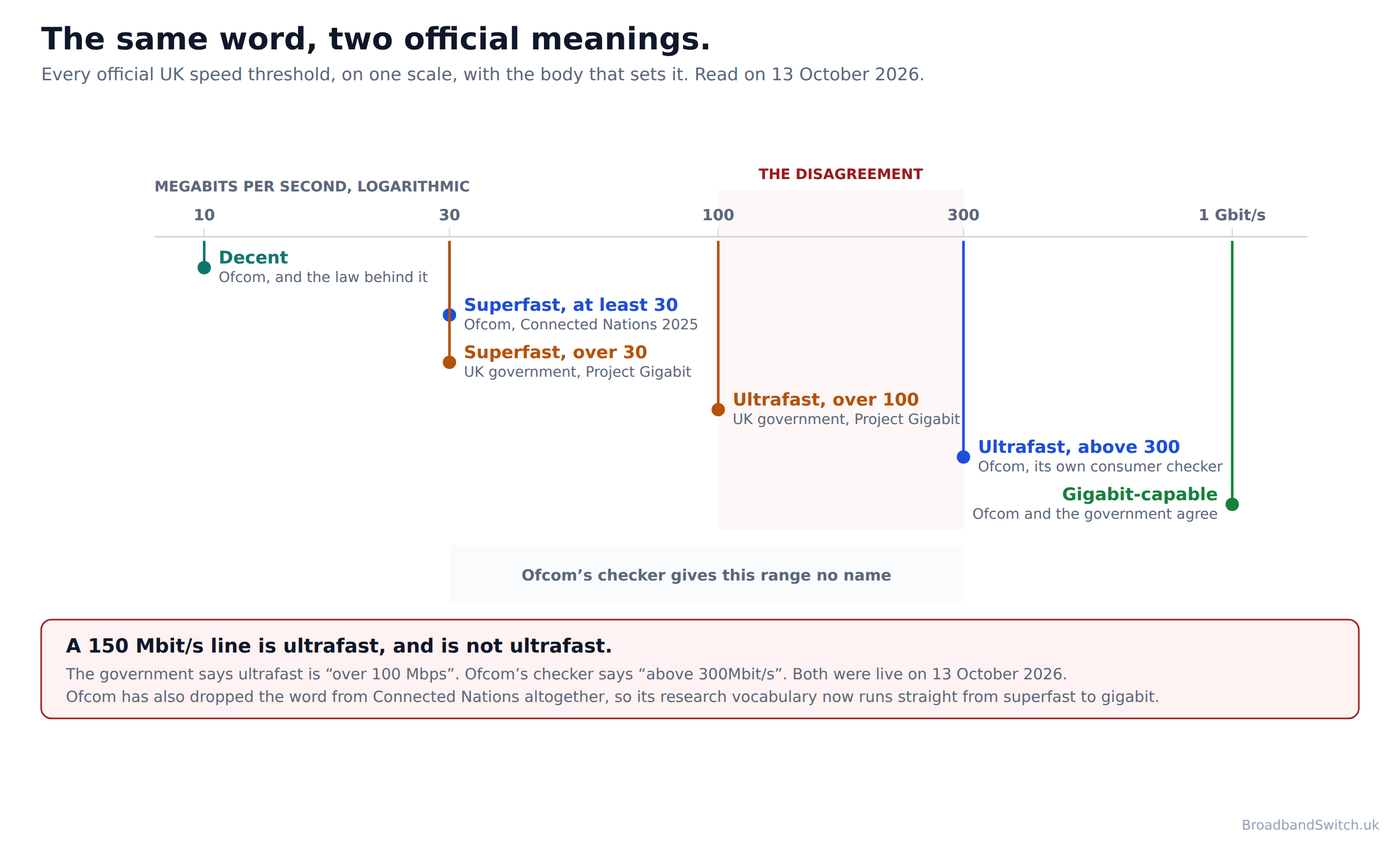
Start with the one everybody agrees on. Superfast is 30 Mbit/s to both bodies. Ofcom's threshold is at least 30; the government's is over 30. The only daylight between them is that one word, which matters to a line running at exactly 30 and to nobody else.
Then the one nobody agrees on. The government puts ultrafast at over 100 Mbit/s. Ofcom's consumer checker puts it above 300. That is a threefold gap on the same word, and it is not a historical hangover we dug up: both pages were live on the day we read them. The table below gives all of it in their own words, so you can check us.
The strangest part is what Ofcom has done with the word since: the word ultrafast does not appear anywhere in Ofcom's Connected Nations 2025 methodology annex. It defined ultrafast in Connected Nations 2023 and the term is simply absent from the 2025 methodology. The regulator's research vocabulary now runs decent, superfast, gigabit-capable, full fibre, and nothing in between.

Which leaves a hole where most of the market lives. Ofcom's checker names two bands and only two: standard up to 30 Mbit/s, and ultrafast above 300. So on Ofcom's own consumer checker, every speed between 30 and 300 Mbit/s has no name at all. A 150 Mbit/s full fibre package, which is roughly what a typical British household is sold today, sits in that gap with no official name on the regulator's own tool.
| Word | Who defines it | Threshold | In their own words |
|---|---|---|---|
| Decent | Ofcom, with law behind it | 10 Mbit/s down, 1 Mbit/s up | “A broadband connection that provides a download speed of at least 10 Mbit/s and an upload speed of at least 1 Mbit/s.” |
| Standard | Ofcom, on its consumer checker only | up to 30 Mbit/s | “Standard broadband services deliver download speeds up to 30 Mbit/s.” |
| Superfast | Ofcom | at least 30 Mbit/s | “A data service or connection that can deliver download speeds of at least 30 Mbit/s.” |
| Superfast | UK government | over 30 Mbps | “superfast broadband is defined as offering download speeds of over 30 Mbps” |
| Ultrafast | UK government | over 100 Mbps | “and ultrafast broadband as offering download speeds of over 100 Mbps.” |
| Ultrafast | Ofcom, on its consumer checker only | above 300 Mbit/s | “Ultrafast broadband services deliver download speeds above 300Mbit/s.” |
| Gigabit-capable | Ofcom and the government agree | 1 Gbit/s or more | “A network connection to a customer's premises capable of delivering download speeds of 1 Gbit/s or more.” |
| Full fibre | Ofcom | not a speed at all | “An access network structure in which an optical fibre runs all the way from customers' premises to the local exchange or access node.” |
One row there is doing something different from the others, and it is worth pausing on. Ofcom's definition of full fibre is “An access network structure in which an optical fibre runs all the way from customers' premises to the local exchange or access node.” Read it again: there is no speed anywhere in it. In short, full fibre describes how the line is built, every other tier word describes how fast it goes. That is why full fibre and gigabit get used as though they were the same word when they are not.
The practical version of that: gigabit-capable is not a promise of fibre. Ofcom’s own note on its definition reads “In the UK, this is typically delivered over FTTP or hybrid fibre coaxial (HFC) cable networks.” If your street is described as gigabit-capable, it may be cable. Our guide to the four connection technologies sets out what actually differs between them.
What is your speed called, and do you have any rights?
Direct answer: Two questions. The answer names every official word for your speed, and tells you whether your provider has signed the code that creates the minimum guaranteed speed.
Speed word checker
Nothing is sent anywhere. It runs in your browser.
The advertised or estimated download speed. It is on your bill, in your account, or on the deal you are looking at.
This decides whether the minimum guaranteed speed and the 30-day exit apply to you at all.
The second answer is the one worth acting on. The minimum guaranteed speed is not a right that comes with buying broadband in Britain; it is a commitment made by the providers that have signed Ofcom’s code. The section below sets out who has and who has not.
Four numbers describe your one connection
Direct answer: four different numbers describe the same connection, and each one is set by a different rule. The advertised speed, the minimum your provider guarantees, what the line is recorded as able to carry, and what your device actually sees.
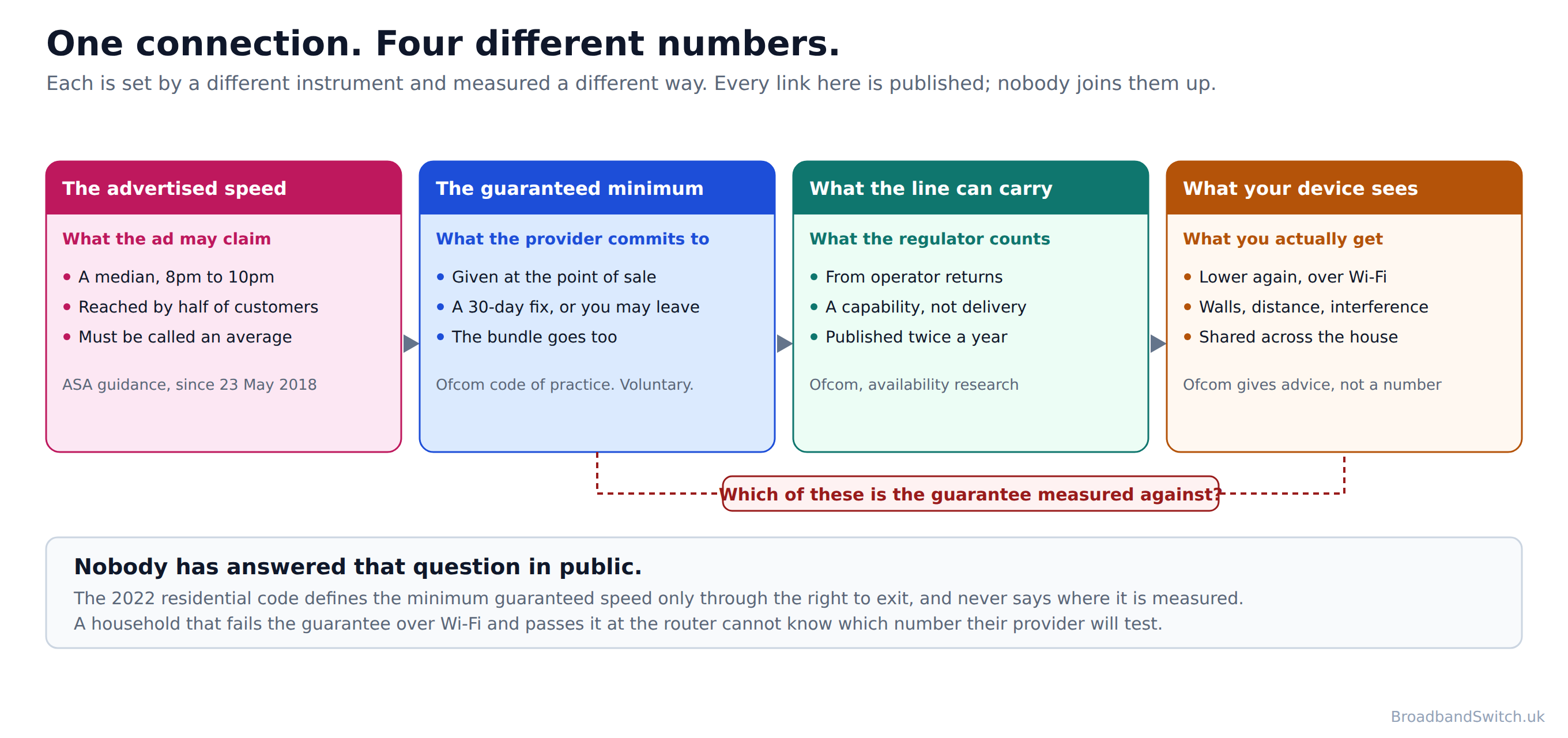
Every one of those four is published by somebody. No two are measured the same way, none of them is the number on your speed test, and we could not find anywhere that sets them side by side. That is why a reader can do everything right and still end up with four figures that do not reconcile.
The first is a marketing figure governed by advertising rules. The second is a contractual commitment governed by a voluntary code. The third is an availability statistic collected from operators for research. The fourth is whatever your house and your router do to the third one, and no body publishes a figure for it at all.
There is also a question at the end of that chain that nobody has answered in public: no primary source states whether the minimum guaranteed speed is measured at the router or at the device. Ofcom's 2022 residential code defines the term only through the right to exit. A household failing the guarantee over Wi-Fi and passing it at the router has no way to know which number will be tested, which is worth knowing before you make a complaint.
What an advertised speed is allowed to mean
Direct answer: A median measured between 8 and 10pm, which at least half the customer base reaches. The other half do not, and that is the rule working as designed.

The Advertising Standards Authority sets the basis for any speed claim, and it is stricter than it looks. The number has to be one that at least half the relevant customer base actually reaches at peak time, and peak time means between 8 and 10pm. Where a claim meets that test, it has to be described as an average. Which is why broadband adverts say average where they once said up to.
In their own words
- ASA and CAP, broadband speed claims guidance
- “The guidance makes clear that speed claims must be based on the actual experience of users.”
- “achievable for at least 50% of the relevant customer base at peak time”
- “(defined by Ofcom as between 8 and 10pm)”
- “the speed should be described as 'average', or similar.”
Read that carefully, because the design of it surprises people. The advertised number is deliberately a figure that half the customer base fails to reach at the busiest time of day. It is not a maximum, it is not a minimum and it is not a promise to you. It is a description of the middle of a distribution you have not seen.
Two things nearly every guide gets wrong about this. The rule took effect on 23 May 2018, not in 2017, which is the date of the consultation that produced it. And “up to” was never banned: no primary source says 'up to' speed claims are prohibited. The guidance says plainly that it is not a mandatory approach, so an advertiser may use a different basis and take the risk of a ruling. The reason you no longer see “up to” is commercial caution, not illegality.
What your provider actually guarantees
Direct answer: A minimum guaranteed speed, and an exit if they cannot fix it in 30 days. But the speed code is voluntary, and the altnets have not signed it, so whether you have either depends entirely on who you buy from.
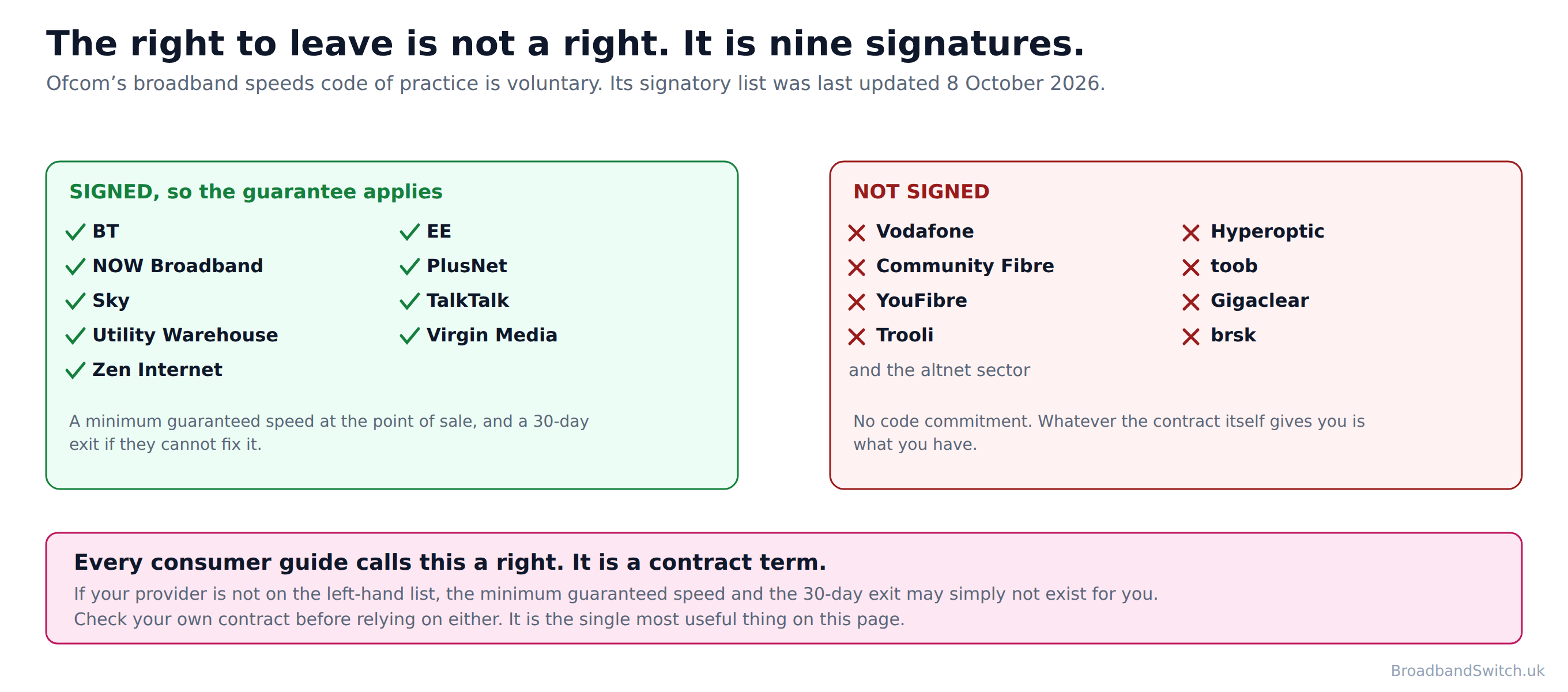
Start with what the code gives you, because it is genuinely strong. Your provider should always give you a minimum guaranteed download speed, and an estimate of what you will actually see at the busiest time of day. Busy means 8 to 10pm on a home line, and noon to 2pm on a business one. If your speed drops below the guarantee and they cannot fix it within 30 days, they have to let you leave. The television and the phone line go with you.
In their own words
- Ofcom, broadband speeds codes of practice
- “Your provider should always give you a minimum guaranteed speed for your broadband service.”
- “You should get the estimated speed you are likely to experience at busy times of the day”
- “These times are 8-10pm for home services, and 12-2pm for business services.”
- “If the problem is on their network and they can't fix it within 30 days, they must let you leave your contract”
- “This right to exit also applies to 'bundled' products.”
Now the part that is almost never said out loud. That code is voluntary. Ofcom publishes the list of providers that have signed it, and nine of them are residential: BT, EE, NOW Broadband, PlusNet, Sky, TalkTalk, Utility Warehouse, Virgin Media and Zen Internet. The list was last updated on 8 October 2026, so it is current.
In their own words
- Ofcom, broadband speeds codes of practice
- “Currently, the following providers have signed up to the new codes:”

Vodafone is not on it. Neither are Hyperoptic, Community Fibre, toob, YouFibre, Gigaclear, Trooli, brsk or the rest of the alternative network sector, which is the fastest growing part of the market. Every consumer guide on this subject, including the previous version of this one, describes the minimum guaranteed speed and the 30-day exit as though they were rights that come with buying broadband in Britain. They are contract terms that nine companies have agreed to.
That is not a reason to avoid an altnet, and several of them are excellent. It is a reason to read what your own contract says about speed before you rely on a remedy you may not have. Our guides to minimum guaranteed speeds and to leaving early over slow speeds cover how the remedy works when you do have it.
Nobody measures what you actually get
Direct answer: Ofcom measured the speeds households received until 14 September 2023. Then it stopped, and no current Ofcom publication gives an average measured UK broadband speed.
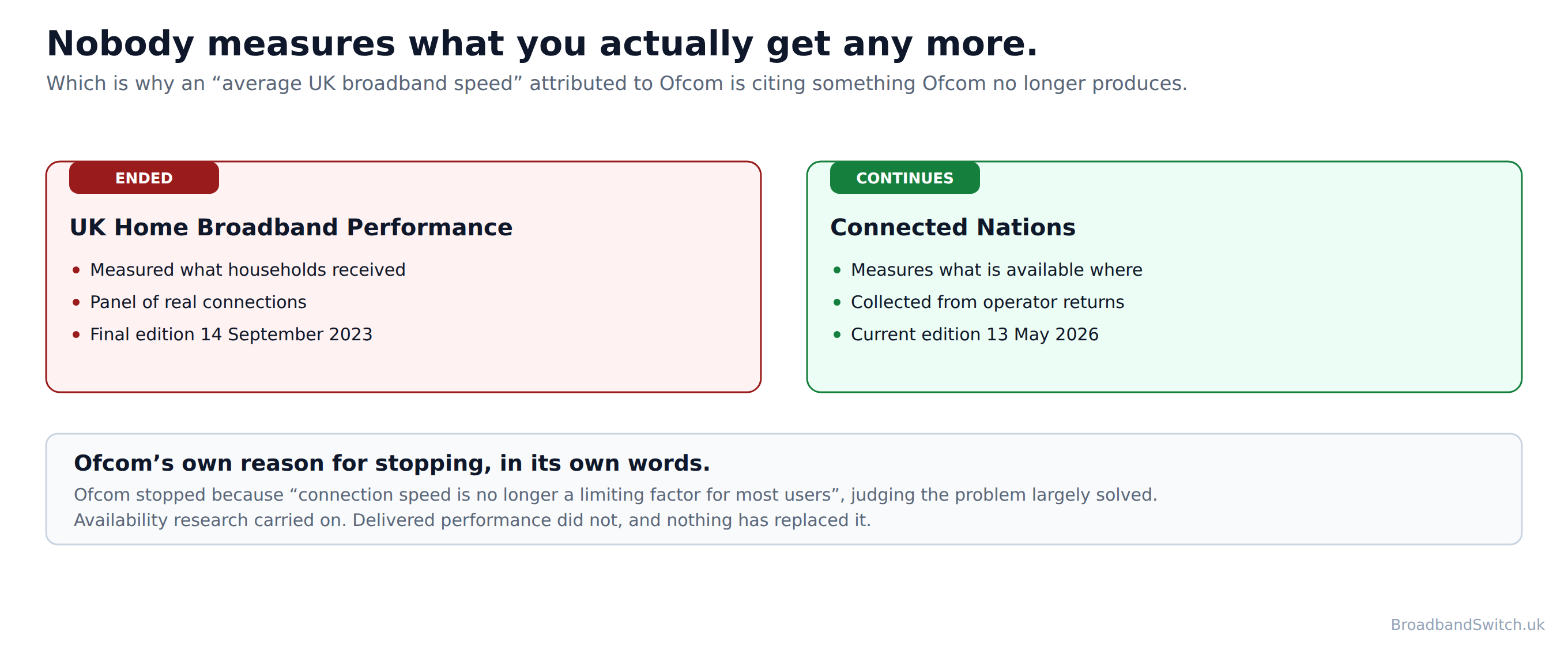
For years Ofcom ran a panel of real connections in real homes and published what they delivered. In June 2023 it gave notice that it was stopping, and that the report covering March 2023 measurements would be the last one. That report appeared on 14 September 2023.
Its reason was a reasonable one. Ofcom judged that connection speed had stopped being the thing holding most people back, and on the whole it was right. What carried on in its place is Connected Nations, which reports what can be bought at an address rather than what that address actually receives.
In their own words
- Ofcom, consultation on its published reports
- “We are proposing to stop publishing UK Home Broadband Performance reports”
- “the report covering March 2023 measurements, which is due for publication later this year, will be the final report.”
- “connection speed is no longer a limiting factor for most users,”
- Ofcom, Connected Nations
- “Ofcom's Connected Nations research will continue to report on progress in the availability of broadband services in the UK”

So when you see an average UK broadband speed quoted and attributed to Ofcom, it is coming from a series that ended three years ago or from a source that is not the regulator. The previous version of this page did exactly that, and led with a figure that is not in the report it was credited to. We have taken it out rather than replace it with another one.
One honest qualification, because the page would be weaker without it: the cessation document is a proposal rather than a confirmed decision. Responses were due in July 2023 and we could not find a confirming statement. The cessation is established by what followed rather than by a decision document: no edition exists after 14 September 2023, and the series is gone from Ofcom's own coverage and speeds pages.
If you want to know what your own line is doing, measure it. Our free broadband speed test gives you a number for your connection, which is the only one that describes your house.
Where the speed goes between the line and the screen
Direct answer: Ofcom puts it better than we could: “your wifi connection will never outperform your broadband service.” Everything after the router subtracts.

That one sentence resolves most arguments about broadband speed. Whatever arrives at the router is the ceiling; Wi-Fi can only take away from it. So a speed test run on a phone in an upstairs bedroom is measuring the house as much as the line, and a complaint built on that number is on weak ground.
Ofcom's own list of what moves the figure: “Your Wi-Fi speed can be affected by your router, your device, distance from the router, walls and interference.” And the one people forget, which matters most in a full house: “Your bandwidth is shared between devices.” Its blunter warning for anyone about to ring their provider is “A slow Wi-Fi test does not always mean there is a fault with your broadband line.”
The practical conclusion is dull and it works. If you want to know what you are paying for, test with a cable. If the cabled number is fine and the wireless number is not, the problem is in the house and no provider can fix it for you. Our guide to router placement covers what to do about that.
How to use any of this when you are choosing
Direct answer: Ignore the adjective and read the number. Check whether your provider has signed the code. Then compare on what reaches your address.
Ignore the adjective and read the number. Ultrafast means two different things, superfast means the same thing twice with different wording, and the range most households actually buy has no official name at all. The Mbit/s figure is the only part of a package name that means the same to everybody.
Check whether your provider has signed the code. BT, EE, NOW Broadband, PlusNet, Sky, TalkTalk, Utility Warehouse, Virgin Media and Zen Internet have. If yours has not, you may have no minimum guaranteed speed and no 30-day exit, whatever a comparison page tells you about your rights. It is one line in a contract and it is worth finding before you order.
Then compare on what reaches your address. Every word on this page describes what a premises can get, and that is a street-level fact rather than a national one. Ofcom put full fibre availability at 82% of UK homes in January 2026, which tells you nothing at all about yours.
What this page used to say
Direct answer: Five things, including the headline figure and nine sections that belong to other guides on this site.
An average UK speed that Ofcom no longer publishes
What this page saidThis page led, in its own page description, with “the 285 Mbps average”, and in the body attributed a UK average maximum download speed of 285 Mbps to Connected Nations 2025. We searched that report and the figure is not in it. It can only come from a downloadable dataset, and Ofcom’s own notes on the equivalent dataset describe the field as average maximum download speed taken from operator returns. That is what lines are capable of, not what households receive. Dropping the word “maximum”, as the description did, turns one into the other.
What it says now, and whyRemoved. In its place the page states what is actually true and considerably more useful: no current Ofcom publication gives an average measured UK broadband speed, because the measurement series ended on 14 September 2023. We would rather publish the absence than a number we cannot stand behind.
Speed tier thresholds with nobody’s name attached
What this page saidThis page listed the tiers as a single settled ladder: decent at 10 Mbps, superfast at 30, ultrafast at 100, gigabit at 1,000. Every figure there is real, but the page never said who set any of them, and the 100 Mbps ultrafast figure is the UK government’s. Ofcom’s own consumer checker puts ultrafast three times higher, at “Ultrafast broadband services deliver download speeds above 300Mbit/s.”
What it says now, and whyEvery threshold on this page now carries the body that set it, and where two bodies disagree the page shows both rather than picking one. That disagreement is now the page’s opening argument instead of a detail it smoothed over.
Coverage figures one edition out of date
What this page saidThis page gave full fibre availability as 78% and gigabit-capable as 87%. Those are the July 2025 figures from Connected Nations 2025. Ofcom has since published a newer snapshot.
What it says now, and whyUpdated to Ofcom’s “Connected Nations update: Spring 2026”, published 13 May 2026 and covering January 2026: full fibre 82% of UK homes and gigabit-capable 89%. The superfast figure of 98% stays at its Connected Nations 2025 value, because no superfast figure appears in the newer update, and the page says so.
Nine sections that belong to other pages
What this page saidThis page ran to 10,443 words of body copy and covered speed requirements by activity, upload against download, latency and jitter, connection technologies, speed testing, Wi-Fi, regional differences, the price of each tier and the PSTN switch-off. Every one of those is covered in more depth by a dedicated guide on this site, several of which have been rebuilt from primary sources in the last week. Saying it all twice helps nobody and splits the subject.
What it says now, and whyEach of those sections now points at the guide that owns it, and this page keeps only what nothing else covers: what the official words mean, who sets them, and the four different numbers that describe a single connection. It is shorter and it is the only page on the subject.
The claim that “up to” speeds were banned
What this page saidThis page described the 2018 advertising change as the end of “up to” speed claims. That is the common account and it is not right. We searched the current CAP and BCAP guidance, the ASA’s advice page and the ASA’s own practitioner article: the phrase does not appear in any of them, and the guidance states plainly that it is not a mandatory approach.
What it says now, and whyCorrected. Since 23 May 2018 a numerical speed claim is expected to be a peak-time average reached by at least half the customer base and described as an average. “Up to” stopped being the recommended basis; it was never outlawed, and no primary source says 'up to' speed claims are prohibited.
Corrections are published rather than quietly edited, with the date each source was read. If you think something here is still wrong, tell us and a person will check it against the source.
UK broadband speed words: frequently asked questions
What does superfast broadband mean in the UK?
At least 30 Mbit/s, on both official definitions, with one difference of wording. Ofcom says: “We use 30 Mbit/s download speeds as the threshold for defining superfast services.” The UK government’s Project Gigabit guidance says “superfast broadband is defined as offering download speeds of over 30 Mbps”. So a line running at exactly 30 Mbit/s is superfast to Ofcom and not quite superfast to the government. In practice the two are the same threshold, and 98% of UK premises could get it as at July 2025.
What does ultrafast broadband mean in the UK?
That depends entirely on who you ask, and the gap is threefold. The UK government puts ultrafast at over 100 Mbit/s. Ofcom’s own consumer broadband checker puts it above 300. Both pages were live on 13 October 2026. In the government’s own words: “and ultrafast broadband as offering download speeds of over 100 Mbps.” In Ofcom’s: “Ultrafast broadband services deliver download speeds above 300Mbit/s.” Ofcom has also removed the word from its Connected Nations research altogether: the word ultrafast does not appear anywhere in Ofcom's Connected Nations 2025 methodology annex. If a provider calls a package ultrafast, ask what speed it actually is, because the word on its own now tells you very little.
Is gigabit-capable the same as full fibre?
No, and this one costs people money. Ofcom defines gigabit-capable as “A network connection to a customer's premises capable of delivering download speeds of 1 Gbit/s or more.” It then adds, in the same breath: “In the UK, this is typically delivered over FTTP or hybrid fibre coaxial (HFC) cable networks.” So a street described as gigabit-capable may be served by cable rather than fibre. Full fibre is a different kind of definition again: “An access network structure in which an optical fibre runs all the way from customers' premises to the local exchange or access node.” That tells you what the line is made of and nothing at all about its speed. Our guide to the four connection technologies covers what that means in practice.
What is decent broadband and am I entitled to it?
Decent broadband is the Universal Service Obligation standard, and Ofcom defines it as “A broadband connection that provides a download speed of at least 10 Mbit/s and an upload speed of at least 1 Mbit/s.” It is the one tier word with law behind it rather than a research convention: eligible premises can request a connection that meets it. As at January 2026, Ofcom put the number of premises unable to get it from a fixed line or fixed wireless network at 39,000. There is more in our guide to the universal service obligation.
What does the speed in a broadband advert actually mean?
It is a median at peak time, not a maximum and not a promise. The ASA is explicit about the basis for any speed claim: “The guidance makes clear that speed claims must be based on the actual experience of users.” Half the customer base has to reach the number between 8 and 10pm, and when it does, “the speed should be described as 'average', or similar.” Turn that round and it says the quiet part: the other half do not reach it at the hour they most want to. That is the rule working exactly as written, not a provider breaking it.
Were “up to” broadband speeds banned?
No, and almost every guide says they were. Since 23 May 2018 the recommended basis for a numerical claim has been a peak-time average reached by at least half the customer base, described as an average. But the CAP and BCAP guidance says in terms that it is not a mandatory approach, and no primary source says 'up to' speed claims are prohibited. An advertiser can use a different basis and risk an upheld ASA ruling. The practical effect is that you rarely see “up to” any more, which is not the same as it being unlawful.
What is a minimum guaranteed download speed?
It is the figure your provider commits to at the point of sale, and it is the one that gives you an exit. Ofcom’s wording is that your provider should always give you one. If your speed drops below it and they cannot fix it within 30 days, they must let you leave. The bundle goes with you, so the television and the phone line are not a reason to stay. The catch is in the next answer. Our guide to minimum guaranteed speeds covers how to claim it.
Does every broadband provider have to give a minimum guaranteed speed?
No. This is the most useful thing on this page and it is almost never stated. The minimum guaranteed speed and the 30-day right to exit come from Ofcom’s broadband speeds code of practice, which is voluntary. Nine residential providers have signed it: BT, EE, NOW Broadband, PlusNet, Sky, TalkTalk, Utility Warehouse, Virgin Media and Zen Internet. Vodafone, Hyperoptic, Community Fibre, toob, YouFibre, Gigaclear and the rest of the alternative network sector are not on Ofcom’s list. If your provider is not a signatory, whatever your own contract gives you is what you have.
What is the average UK broadband speed?
Nobody official publishes one any more, and that is a more honest answer than a number. Ofcom measured what households actually received until its UK Home Broadband Performance series ended, and the final edition appeared on 14 September 2023. It judged that connection speed had stopped being what held most people back. What continues in its place is Connected Nations, which reports availability rather than delivered performance. So no current Ofcom publication gives an average measured UK broadband speed, and any figure you see attributed to Ofcom is either from that discontinued series or from somebody who is not the regulator.
Why is my Wi-Fi slower than the speed I pay for?
Because they are two different things, and Ofcom puts it better than we could: “your wifi connection will never outperform your broadband service.” Ofcom also notes that “A slow Wi-Fi test does not always mean there is a fault with your broadband line.” And that “Your Wi-Fi speed can be affected by your router, your device, distance from the router, walls and interference.” One more that catches people out: “Your bandwidth is shared between devices.” If you want to know what your line is doing rather than what your Wi-Fi is doing, test with a cable. Our guide to router placement covers the rest.
Where is a minimum guaranteed broadband speed actually tested?
Nobody official says, and we looked hard. Ofcom’s 2022 code describes the guarantee only by the remedy it unlocks, and never names a point of measurement, so no primary source states whether the minimum guaranteed speed is measured at the router or at the device. Your own contract may settle it, and it is worth asking the provider to confirm in writing before you test anything. Until they do, use an ethernet cable: a wired figure is the one least open to argument, whichever answer turns out to be right.
How much of the UK can get full fibre now?
Ofcom’s most recent snapshot is its “Connected Nations update: Spring 2026”, published 13 May 2026 and covering January 2026: full fibre available to 24.9 million UK residential premises, or 82% of homes, and gigabit-capable availability at 89%. Note that those are availability figures rather than take-up: they describe what can be ordered, not what people have bought.
In short
- The UK government puts ultrafast at over 100 Mbit/s. Ofcom’s own consumer checker puts it above 300. Three times the threshold, for the same word.
- Ofcom and the government agree on superfast at 30 Mbit/s, with one difference of wording: Ofcom says “at least” and the government says “over”.
- the word ultrafast does not appear anywhere in Ofcom's Connected Nations 2025 methodology annex, so its research vocabulary now has nothing at all between superfast and gigabit.
- Gigabit-capable is not a synonym for full fibre. Ofcom: “In the UK, this is typically delivered over FTTP or hybrid fibre coaxial (HFC) cable networks.”
- An advertised speed is a median measured between 8 and 10pm that at least half the customer base reaches, and it has had to be called an average since 23 May 2018.
- The minimum guaranteed speed and the 30-day right to exit come from a voluntary code signed by nine residential providers: the speed code is voluntary, and the altnets have not signed it.
- Ofcom stopped publishing measured household broadband speeds after 14 September 2023, so no current Ofcom publication gives an average measured UK broadband speed.
Each line stands on its own and carries its date. Reviewed by a person at least quarterly, last on .
References
- OFCOM.ORG.UK
Ofcom. Connected Nations 2025: methodology annex. Published 19 November 2025. The source for Ofcom’s definitions of decent, superfast, gigabit-capable and full fibre. The word “ultrafast” does not appear in it.
- CHECKER.OFCOM.ORG.UK
Ofcom. About the broadband and mobile checker. No date is shown on the page. The only current Ofcom definition of ultrafast, at “above 300Mbit/s”, and the source of the Standard band at “up to 30 Mbit/s”. Between those two bands the checker names nothing.
- GOV.UK
Department for Science, Innovation and Technology. Project Gigabit: UK gigabit programme. First published 1 April 2022, last updated 26 November 2025. Defines superfast as “over 30 Mbps” and ultrafast as “over 100 Mbps” in a single sentence.
- OFCOM.ORG.UK
Ofcom. Connected Nations update: Spring 2026. Published 13 May 2026, snapshot as at January 2026. Full fibre 82% and 24.9 million premises; gigabit-capable 89%; premises without decent broadband 39,000. The current coverage source, newer than Connected Nations 2025.
- ASA.ORG.UK
Advertising Standards Authority. Broadband and telecoms: speed claims. Dated 4 April 2024. The peak-time median basis, the 50% customer-base test and the 8pm to 10pm window. Note that the CAP and BCAP guidance behind it is explicitly not mandatory, and that no primary source prohibits “up to” claims.
- OFCOM.ORG.UK
Ofcom. Broadband speeds: what you need to know. Published 21 November 2022. The point-of-sale information, the minimum guaranteed speed, the 30-day fix and the right to exit including bundled products.
- OFCOM.ORG.UK
Ofcom. Codes of practice. Published 28 April 2010, last updated 8 October 2026. The signatory list: nine residential providers and three business providers. The basis for this guide’s point that the speed guarantee is a voluntary commitment rather than a universal right.
- OFCOM.ORG.UK
Ofcom. Notification of proposed cessation of research project. Published 1 June 2023. States that the March 2023 edition would be the final UK Home Broadband Performance report, and gives Ofcom’s reason. Note that this is a proposal; we could not find a confirming statement, and the cessation is established by the absence of any later edition.
- OFCOM.ORG.UK
Ofcom. Improving your wifi experience. Published 19 February 2024. “Your wifi connection will never outperform your broadband service.”
- OFCOM.ORG.UK
Ofcom. Get help with broadband and Wi-Fi problems. Published 13 October 2023, last updated 25 August 2026. What affects Wi-Fi speed, and why a slow Wi-Fi test does not prove a line fault.
Ready to compare on the number instead of the adjective?
The words are inconsistent. The figures are not. One postcode shows every provider that reaches you, with the actual speed against each one and the cheapest first.
Compare at my postcode →