BROADBAND SPEED · DIAGNOSIS GUIDE · SPEEDS & WI-FI
Why Are My Broadband Speeds Lower Than Advertised?
Paying for 150 and getting 60? There are three usual suspects: what the advert really promised, the line itself, and your own four walls. Here is how to find yours in five minutes with one wired test, how to fix it, and the 30-day rule that lets you walk away free if the line is to blame.
Written by Dr Alex J. Martin-Smith · Reviewed by Adrian James · Published 11 June 2026 · Rules and figures verified June 2026 · ~9 minute read
Prefer to read offline? Download the free PDF guide: Why Are My Speeds Lower Than Advertised? (6 pages, ~270KB). No signup, no email, just the guide.
The quick answer
Three suspects explain almost every speed gap: the advert (the "average" only has to reach half of customers at peak), the line (part-fibre fades with every metre of copper), and your home (Wi-Fi quietly loses what the line delivers). One wired test tells you which one is yours, and if the line is below your guaranteed minimum, you can demand a fix or leave free after 30 days.
Key facts · verified June 2026
- The advertised "average" is a median: since May 2018, UK ads must quote the speed available to at least 50% of customers at peak time, 8pm to 10pm. By definition, half of customers get less at peak.
- You have a personal number that matters more: providers must give you a speed estimate and a minimum guaranteed speed when you order.
- Below the guaranteed minimum? 30 days. Report it, and providers signed to Ofcom's Speeds Code must fix it within 30 days or release you penalty-free, including linked landline and TV. Vodafone is notably not a signatory.
- An "80 Mbps" part-fibre line tops out around 76 in real throughput even beside the cabinet, and fades with distance.
- Wi-Fi is the biggest in-home thief: a cheap single-radio extender can lose around half your speed; a well-set-up mesh keeps roughly 90%.
Suspects one and two: the advert, and the line
Suspect one is the advert itself. Since May 2018, an advertised "average" speed must be available to at least 50% of customers at peak time, 8pm to 10pm. That is a far fairer rule than the old "up to" claims, but it still means half of customers get less than the headline at peak, perfectly legally. Your contract's personal estimate and guaranteed minimum are the numbers that actually bind.
Suspect two is the line, and it mostly applies to part-fibre. On FTTC, fibre reaches the street cabinet and copper does the rest, so every metre of copper costs you speed.
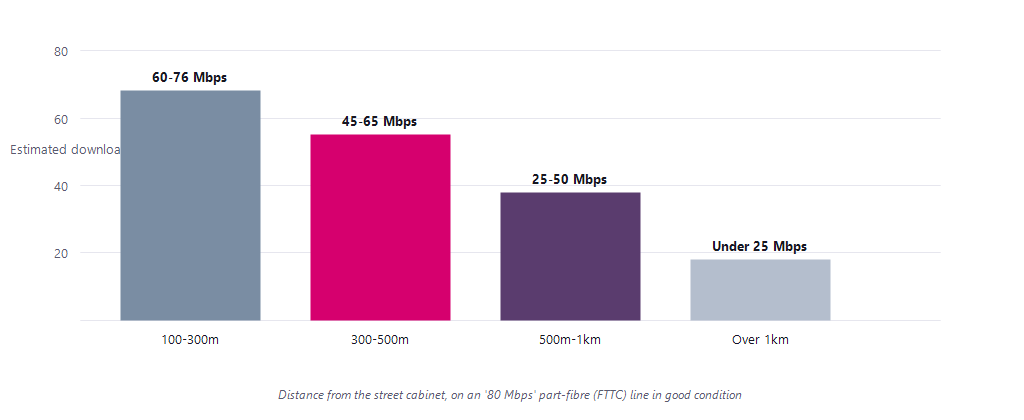
- Even the best part-fibre line undersells the label. The "80 Mbps" product syncs at about 76 Mbps of real throughput at most, before distance takes its share.
- Crosstalk makes it worse, unpredictably. As more neighbours take part-fibre on the same cabinet, the copper signals interfere, and speeds can sag through no fault of yours.
- Full fibre does not play this game. Light down glass barely fades with distance, which is why full fibre delivers its advertised tier so much more faithfully. How the technologies compare end to end: full fibre vs FTTC vs cable vs 4G/5G; what reaches you: full fibre deals.
Suspect three: your own four walls
Here is the suspect nobody wants it to be: the gap is very often inside the house. The line delivers its number to the router, and the home network loses it on the way to your screen.
- Wi-Fi distance and walls. Speed falls with every wall between you and the router. A router in a cupboard or behind the telly is a self-inflicted speed cut, so give it height and open air.
- Cheap extenders halve it. A single-radio extender must receive and re-transmit on the same radio, losing around half the speed. A tri-band or wired mesh keeps roughly 90%.
- Old devices cap it. An ageing laptop or streaming stick with an old Wi-Fi radio cannot go faster than its own hardware, whatever plan you buy.
- Peak-time contention. Copper and cable connections show the largest proportional dips in the busy evening hours, while full fibre stays steadiest. If your speed is fine at 2pm and sags at 9pm, this is your suspect.
- Background noise. Cloud backups, game downloads and a VPN can quietly eat or throttle your measured speed mid-test.
The one test that settles it: plug a laptop into the router with an ethernet cable and test there. Wired speed close to your plan means the line is fine and the gap is your Wi-Fi. Wired speed well below your guaranteed minimum means the line is the problem, and that is the one your provider must fix.
The five-minute diagnosis
Run a wired speed test at the router, once at peak (8 to 10pm) and once off-peak, at ukspeedtest.co.uk. Then read your result here.
| What you found | Likely cause | Quickest fix |
|---|---|---|
| Wired fast, Wi-Fi slow | Home network | Move the router; mesh, not cheap extenders |
| Slow only at 8-10pm | Peak congestion | Full fibre holds up best; compare your options |
| Slow on one device only | That device's radio | Update it, use 5GHz, or wire it |
| Wired test below your guaranteed minimum | The line itself | Report it, start the 30-day clock |
If the diagnosis is "you bought the wrong tier" rather than "something is broken", size the right plan first with our companion guide: what broadband speed do I need by household size?
Below your minimum: fix it or leave free
Your guaranteed minimum speed is on your order confirmation. If the wired test sits below it, the Speeds Code gives your provider 30 days from your report to fix it, or you can leave penalty-free, including linked landline and TV bought at the same time.
- Gather the evidence. Two or three dated wired test results, peak and off-peak, plus your guaranteed minimum from the order.
- Report it and say the words. Tell your provider the wired speed is below your guaranteed minimum and you are invoking the Speeds Code. The 30-day clock starts now.
- Day 31: fixed, or free. Not fixed? Exit penalty-free and pick a line that delivers. If they refuse or stall, the complaints ladder applies, every rung of it mapped in our companion guide: Broadband complaints and your rights: the Escalation Hub.
One related question we are asked constantly, whether poor speeds alone let you out of contract, has its own focused answer at can poor speeds let you leave broadband early without penalty.
Questions people ask
Why is my broadband slower than the advertised speed?
Three reasons cover almost every case: the advertised "average" only has to reach 50% of customers at peak time under the 2018 ad rules, part-fibre lines lose speed with every metre of copper from the cabinet, and home Wi-Fi loses a large share of what the line delivers. A wired test at the router tells you which applies to you.
What is a minimum guaranteed speed?
A personal figure your provider must give you when you order, alongside a speed estimate for your specific line. It is on your order confirmation, and it is the number that binds: if a wired test shows speeds below it, the Speeds Code's 30-day fix-or-exit right applies.
Can I leave my broadband contract because of slow speeds?
If your provider is signed to Ofcom's Speeds Code and your wired speed is below your guaranteed minimum, yes: report it, and if it is not fixed within 30 days you can exit penalty-free, including linked landline and TV. The code is voluntary, and Vodafone is notably not a signatory.
How do I test my real broadband speed?
Plug a laptop into the router with an ethernet cable, pause downloads and backups, and run the test twice: once at peak (8 to 10pm) and once off-peak. The wired figure is your line's true speed; the difference between wired and Wi-Fi results is what your home network is losing.
Why is FTTC slower the further you are from the cabinet?
Because the final stretch is copper, and the VDSL2 signal fades with distance. An "80 Mbps" line in good condition manages roughly 60 to 76 Mbps within 300 metres of the cabinet, 45 to 65 at 300 to 500 metres, 25 to 50 out to a kilometre, and under 25 beyond that, with wiring quality and crosstalk varying it further.
About this guide
This guide is part of the BroadbandSwitch.uk 2026 Guide Library, published by BroadbandSwitch.uk, the consumer arm of the SearchSwitchSave network. Our approach to evidence and corrections is documented in the methodology and trust hub, and every published correction appears in the corrections log.
Take it with you: download the free 6-page PDF guide, including the distance chart, the diagnosis table and full sources.
Citing this guide: BroadbandSwitch.uk. (2026, June 11). Why are my broadband speeds lower than advertised? SearchSwitchSave. https://broadbandswitch.uk/guides/speeds-lower-than-advertised/
Sources
- Advertising Standards Authority. (2018, May 23). New standard on broadband speed claims in ads comes into force today. https://www.asa.org.uk/news/new-standard-on-broadband-speed-claims-in-ads-comes-into-force-today.html
- Ofcom. (n.d.). Switching broadband, phone or pay-TV provider. https://www.ofcom.org.uk/phones-and-broadband/switching-provider
- Ofcom. (2025, November 19). Connected Nations 2025: UK report. https://www.ofcom.org.uk/phones-and-broadband/coverage-and-speeds/connected-nations-20252
- thinkbroadband. (2018). Fibre broadband (FTTC / FTTH) guide. https://www.thinkbroadband.com/guides/fibre-fttc-ftth-broadband-guide
- AMVIA. (2026, March 7). FTTC speeds explained. https://amvia.co.uk/blog/fttc-speeds
- Increase Broadband Speed. (2022). VDSL2 (FTTC) speed vs. distance. https://www.increasebroadbandspeed.co.uk/chart-of-bt-fttc-vdsl2-speed-against-distance-from-the-cabinet
This guide is general consumer information. Distance figures are industry estimates for lines in good condition and vary with wiring and interference; the Speeds Code is voluntary and its fix-or-exit right applies to signatory providers; in-home Wi-Fi losses depend on hardware and layout.