5G home broadband: fibre-rivalling speed at plug-in pace, where coverage allows
5G is the wireless option that genuinely rivals full fibre on speed: 100 to 500 Mbps typical in strong coverage, uploads of 20 to 100 Mbps that beat every FTTC tier, latency approaching fibre's, and all of it from a router that plugs in the day it arrives. The toll is coverage: UK 5G rollout is urban and suburban and still growing, and indoor signal is the single variable that decides whether you get the full experience or a fraction of it. This page gives you the honest checks, the CGNAT and fair-use footnotes nobody reads until they bite, and the live 5G deals at your postcode.


The live comparison further down is pre-filtered to 5G home broadband, or run the full check here and see every technology side by side.
Independent and free. Or jump to the 5G deals below.- 100 to 500 Mbpstypical UK 5G download in strong coverage
- 20 to 100 Mbpstypical upload, beating every FTTC tier
- £25 to £45typical UK monthly range
- No engineerplug in, roughly 15 minutes to online
- Versus full fibre
- Speeds by signal
- The coverage check
- Indoor signal truth
- Fair use and CGNAT
- Contract horizon
- Live deals
- FAQ
What 5G home broadband actually is
Home internet over the 5G network, from a router with a built-in SIM that receives the signal from a nearby mast and broadcasts Wi-Fi, exactly like 4G home broadband but faster and with lower latency. UK consumer 5G runs on two main flavours: mid-band (n77/n78, around 3.5 GHz), the dominant one you will actually meet and the source of the 100 to 500 Mbps headlines, and low-band below 1 GHz, which travels further but behaves more like fast 4G. High-band mmWave, familiar from US headlines, is not widely deployed for UK consumer broadband, and this page does not pretend otherwise.
How it differs from full fibre
FTTP brings a dedicated optical path to your property, which buys steadier latency and speed that ignores the neighbours; 5G shares radio capacity with every phone and hub on the local mast, so evening slowdowns can appear when the cell is busy. The trade runs the other way at setup: many households plug in a 5G hub the day the courier arrives, while FTTP can wait 2 to 6 weeks for an engineer slot. That is why 5G wins with renters, short stays and homes bridging a fibre build, and why it convinces less when you need predictable all-day upstream for large uploads or broadcast-style work. The technology comparison runs the full side-by-side.
Typical speeds, band by band
5G varies more than any fixed line because signal strength, mast distance, what stands between, and how busy the cell is all vote in real time. The four bands below are typical UK experiences, and the safety net is built in: 5G routers fall back to 4G automatically when the 5G signal is weak, so you stay online at 4G speeds rather than dropping out. The honest bar: aim for at least Strong indoors, because below it, cheaper 4G home broadband does the same job for less.
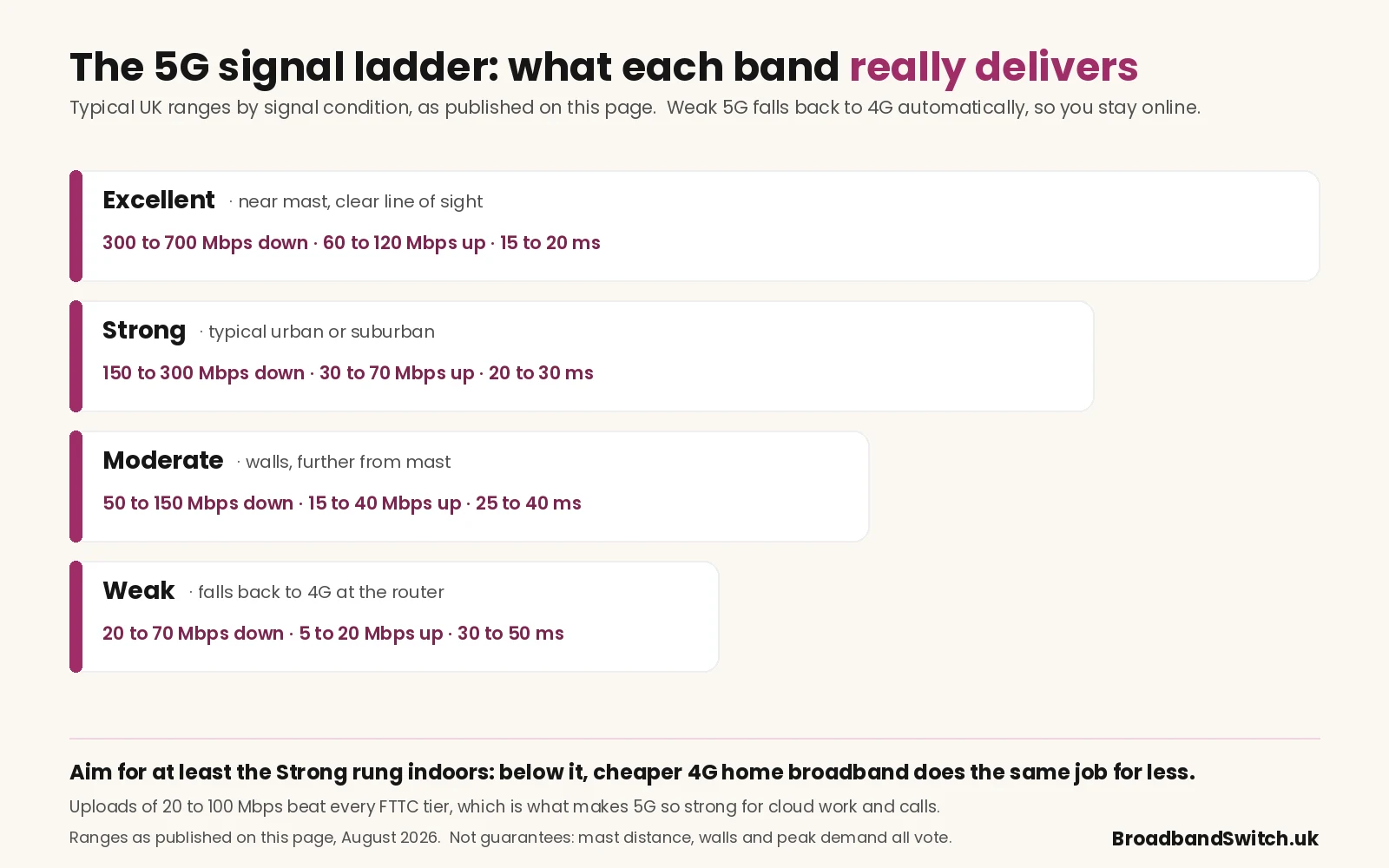
- Excellent · near mast, clear line of sight300 to 700 Mbps down, 60 to 120 Mbps up, 15 to 20 ms latency.
- Strong · typical urban or suburban150 to 300 Mbps down, 30 to 70 Mbps up, 20 to 30 ms latency.
- Moderate · walls, further from mast50 to 150 Mbps down, 15 to 40 Mbps up, 25 to 40 ms latency.
- Weak · falls back to 4G at the router20 to 70 Mbps down, 5 to 20 Mbps up, 30 to 50 ms latency: working, but 4G-priced performance.
5G against 4G and fixed-line
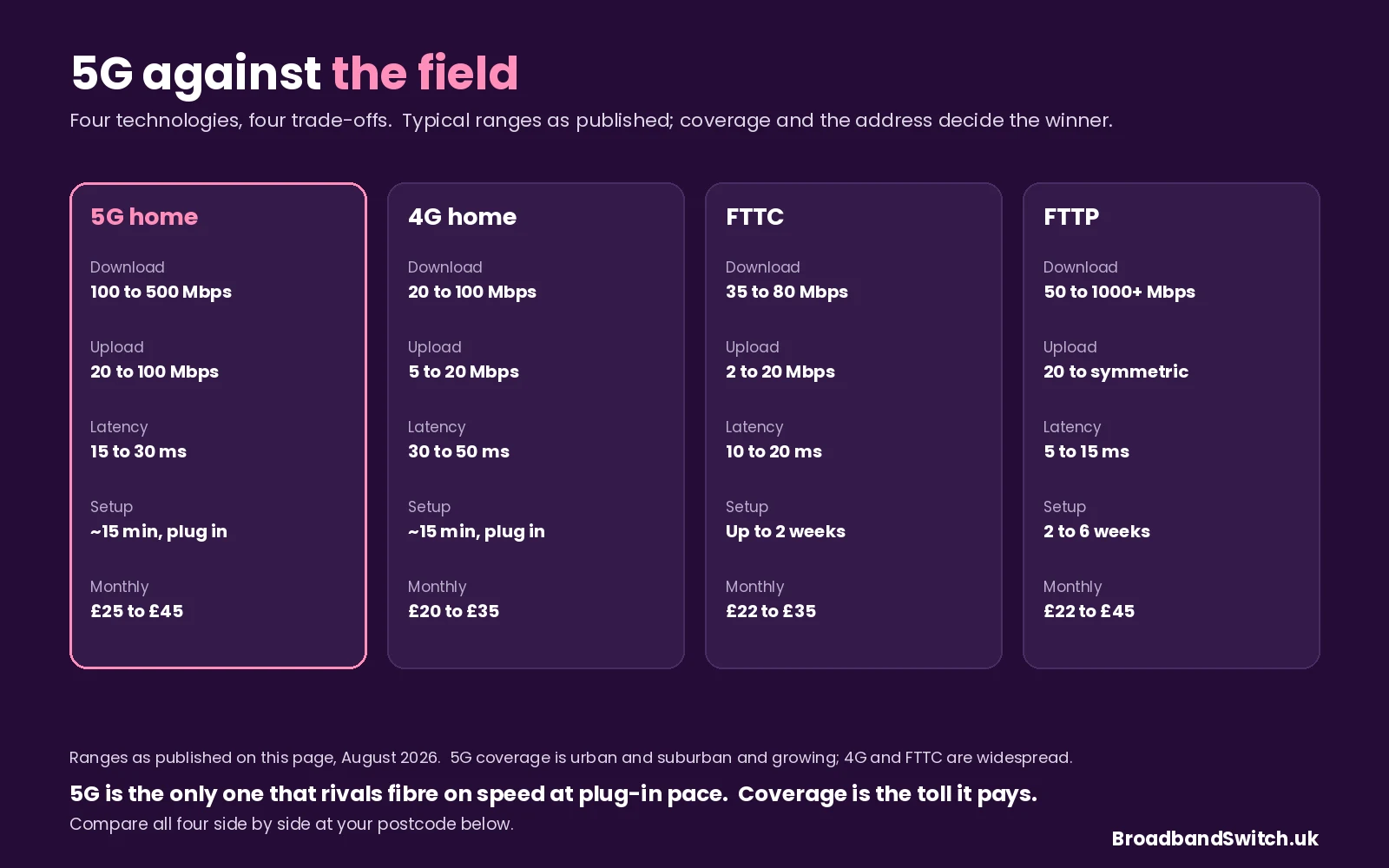
- 5G home100 to 500 Mbps down, 20 to 100 up, 15 to 30 ms. Plug-in setup, no engineer, £25 to £45. Coverage urban and suburban, growing.
- 4G home20 to 100 Mbps down, 5 to 20 up, 30 to 50 ms. Same plug-in setup, £20 to £35, and coverage that is genuinely widespread. The 4G page has the detail.
- FTTC35 to 80 Mbps down, 2 to 20 up, 10 to 20 ms. Up to 2 weeks to activate, sometimes an engineer, £22 to £35, widespread.
- FTTP50 to 1000+ Mbps down, 20 Mbps to symmetrical up, 5 to 15 ms. 2 to 6 weeks with a first-install visit, £22 to £45, growing but not universal.
The 5G coverage check, step by step
- Check the provider's checker for 5G specificallyNot just coverage: 5G availability with a strong indoor rating. If the tool reports 4G only, order 4G instead, because the 5G tariff is not worth paying for a signal that is not there. And if indoor signal is the only doubt, note the outdoor units in the comparison below, which mount the receiver where the signal is.
- Cross-reference Ofcom's independent mapOfcom's coverage checker shows 5G availability per network independently of the providers' own maps, the corrective for optimistic marketing.
- Test with a 5G phone on the same networkThe single most reliable indicator: a speed test on a Three, EE or Vodafone 5G handset at the exact spot the router will sit. The router typically does the same or slightly better through its bigger antenna.
- Plan the placement like it matters, because it doesMid-band 5G passes brick, plasterboard and regular windows reasonably well, but thick insulation, foil-backed plasterboard, basements and metal-framed buildings weaken it sharply. Upstairs near a window facing the serving mast wins, and moving the router three metres can change speeds significantly.
- Confirm the cancellation window before signingA 14 or 30-day window for poor signal is typical; get the exact policy in writing, or take a rolling 1-month plan and remove the risk entirely for a small premium.
Indoor signal: the whole story
Outdoor coverage maps help, but home broadband lives behind walls, and thick insulation, foil-backed plasterboard, metal cladding and basement rooms can attenuate 5G severely: a property that looks well covered outdoors can disappoint badly inside. Work the physics instead of the tariff: try the router near a window on the side facing the nearest mast, re-run speed tests at peak evening hours when local demand is highest, and remember that small changes in height and orientation often matter more than paying for a higher theoretical plan. If Wi-Fi is the bottleneck once the cellular link looks healthy, the router placement guide sorts that layer before you blame the 5G one.
The single biggest cause of 5G disappointment is ordering from outdoor coverage maps without testing indoor signal first. Five minutes with a 5G phone at your address saves most of the headaches this page exists to prevent.
Data allowances, fair use and CGNAT
- Unlimited labels still carry policy textRead how your provider describes heavy usage, tethering, and business-use restrictions if you work from home full-time. Routinely moving hundreds of gigabytes a month? Compare a fixed-line unlimited fibre quote for total peace of mind.Fair use policy
- Public IPv4 is typically sharedMobile-network broadband usually assigns addresses via carrier-grade NAT, which rarely affects Netflix or Teams but can complicate self-hosted cameras, legacy VPN endpoints and some peer-to-peer games. The checker at the top of this page turns your setup into a verdict in seconds.CGNAT and remote access
- Cloud-only smart homes just workBridges and hubs that call out to the cloud, which is most modern kit, run unchanged on 5G. Devices expecting simple port-forwarding on a static WAN IP may need a different architecture, so test one room before migrating the whole house.Smart home
- Standard security hygiene appliesChange the hub's default admin password, enable automatic firmware updates where offered, and segment guest Wi-Fi if visitors connect regularly. A 5G hub is a router like any other, and deserves the same five minutes of care.Hardware security
Contract length for a technology in motion
Eighteen and 24-month 5G promotions appear regularly because they mirror mobile handset economics, but the right term depends on what you expect at your address over the next two years.
- Might move soon: rollingMoving within six months makes a rolling or 1-month plan worth its premium: exit friction costs more than the monthly saving.Renters and short stays
- Settled but fibre is coming: 12 or 18Staying put but likely to upgrade when FTTP arrives? Avoid a 24-month plan whose discount only pays off in a second year you will not use; the 12-month page prices the balance.Keep the exit open
- Students and sharers: align the tenancyEnd the contract when the tenancy ends, because a summer move is easier when nobody is arguing over the final months of someone else's router plan.The house-share rule
Who sells 5G home broadband in 2026
5G home broadband comes from the three mobile network operators running their own 5G infrastructure, and the best one for you is simply whichever network is strongest at your address. Retail branding and router names change with promotions, so treat these as orientation before confirming live pricing below.
- EE 5G homeA 5G hub on the EE mobile network, often on 24-month promotions. Verify the coverage map and plan an indoor trial placement. See EE deals.
- Vodafone 5G homeA 5G hub on Vodafone's network with fixed and flexible offers varying by promotion. Verify whether Pro Broadband extras appear in your basket. See Vodafone deals.
- Three 5G homeA 5G hub on Three's network with promotions changing by channel. Verify the unlimited wording against the traffic management notes. See Three deals.
Live 5G deals at your postcode
Everything below is limited to 5G home broadband, currently featuring Three and Vodafone hubs in indoor and outdoor versions, with 24-month and 30-day terms side by side, each card carrying its average speed, its April 2027 and April 2028 rise amounts in pounds and pence, and any switching credit on offer. Enter your postcode, choose your exact address, and run the coverage check above before committing.
5G coverage is less complete than 4G, so where it is unavailable, a 4G hub or FTTC and FTTP are the sensible alternatives, and the full comparison shows what is actually live at your address.
Related ways to compare
5G home broadband, asked and answered
Is 5G home broadband faster than fibre?
Sometimes on downloads, yes: excellent 5G conditions can pass 500 Mbps and beat mid-tier FTTP plans outright. Fibre usually wins on consistency and latency, especially at peak hours when the local mast is busier, so test at your address rather than trusting national averages. Where both are options, the choice usually comes down to engineer-free setup against maximum consistency.
Can I get 5G home broadband in rural areas?
Where 5G has rolled out, yes, but UK coverage is still concentrated in urban and suburban areas, and many rural postcodes currently depend on 4G or fixed wireless instead. Check your exact address in the comparison, and where 5G is absent, 4G home broadband is usually the next best plug-and-play option for rural households.
Do I need a phone line for 5G home broadband?
No Openreach line at all: the connection rides the mobile network through its own router, with voice handled via mobile or VoIP apps depending on the package. That freedom from the fixed line is exactly why 5G is so popular with renters and new-build residents who do not want to commit to one.
Is 5G good for working from home?
Usually, yes, where coverage is strong: latency of 15 to 30 ms sits comfortably within what video platforms handle well, and uploads of 20 to 100 Mbps make cloud workflows genuinely fast. For interruption-sensitive work such as live presentations or broadcasting, pair it with a backup connection or a low-cost fixed-line fallback for redundancy.
How do I cancel 5G home broadband?
Follow the cooling-off and notice rules in your contract, noting that 5G often bills as a mobile broadband product with different cancellation rules from fixed lines. Within the first 14 to 30 days you can usually cancel for any reason, poor signal included, with a full refund; after that, normal notice terms apply, so confirm the exact policy at the time of order.
What is CGNAT and should I worry about it?
Carrier-Grade NAT is how mobile networks share a limited pool of public IP addresses between many customers, and for streaming, browsing, video calls and most gaming it makes no difference at all. It matters if you self-host a server, run certain legacy VPN setups, or use cameras expecting direct remote access on a static public IP: the checker at the top of this page gives you the verdict, and those workloads either need the provider's CGNAT policy checked or a low-cost fixed line kept alongside.
Does 5G home broadband work with Digital Voice?
Yes, where the provider supports it: Digital Voice runs over any broadband connection, 5G included, and standard VoIP apps work normally. One planning note: a traditional landline tied to your current address does not transfer automatically, so plan the move off Openreach voice separately before switching.
Can I use One Touch Switch to move to 5G?
Not in the seamless fixed-line way: OTS coordinates switches between fixed-line providers, and moving onto 5G means leaving that system, so you cancel the existing contract yourself, observing its notice terms, and order the 5G plan separately. Align the dates to avoid paying twice, and note that some providers will help coordinate the handover.
About this guide. Compiled by Adrian James and reviewed by Dr Alex J. Martin-Smith, with every range and figure stated as published at 6 August 2026, and the CGNAT checker built from this page's own guidance so tool and text cannot drift. 5G performance depends on coverage and indoor signal at your exact address, so treat the ranges as typical rather than promised, and verify tariff terms with the provider before ordering. We earn commission when you order through the comparison, which never changes the price you pay: see how we rank deals, the editorial policy and the affiliate disclosure, or submit a correction and a human will read it.
References
- Ofcom. (2024, July 19). Ofcom bans mid-contract price rises linked to inflation. Office of Communications. https://www.ofcom.org.uk/phones-and-broadband/bills-and-charges/ofcom-bans-mid-contract-price-rises-linked-to-inflation
- Ofcom. (2024, September 12). Simpler and quicker broadband switching is here. Office of Communications. https://www.ofcom.org.uk/phones-and-broadband/switching-provider/simpler-broadband-switching-is-here
- Ofcom. (n.d.). Ofcom checker: mobile and broadband coverage. Office of Communications. Retrieved August 6, 2026, from https://www.ofcom.org.uk/phones-and-broadband/coverage-and-speeds/ofcom-checker
Coverage checked, sofa tested, footnotes read, and thirty seconds to see the 5G and fixed prices side by side at your door.
Independent and free. Also worth a look: 4G deals and full fibre.