Broadband for gaming: what a game actually uses, what really decides your ping, and the number nobody in the UK publishes
Gaming is the one thing broadband is sold on where the number that decides it is never published, and the providers' own gaming pages show it twice: they name latency and quantify speed. Here is the evidence, and all of it is the providers' own. Plusnet's own gaming page says an online game needs a download speed of at least 3Mb and Sky's says most video games recommend at least 3Mb/s, and both pages sell packages several hundred times that. TalkTalk's gaming page publishes “The minimum upload speed for online gaming is 5 Mbps, which comes as standard with TalkTalk” and sells 900 Mbps on the same screen. Meanwhile the number that does decide a game is published by almost nobody: of the nine UK gaming pages on this page, seven carry no latency figure for their own network at all, one publishes two percentages against a baseline it never defines, and one publishes “3-7 ms ping” and footnotes it to somebody else's website. No UK broadband provider publishes a latency guarantee, and no compensation right anywhere is tied to latency. Ofcom's residential broadband speed code does not contain the word latency. It does not contain ping or jitter either. Before you buy anything sold as gaming broadband, measure your own latency, jitter and bufferbloat on the line you already have. Nobody is going to publish those numbers for you. Compare what is available at your address at broadbandswitch.uk/compare/.
See what your address can actually get
One postcode, every provider we can switch you to, sorted by price with the lowest first. Worth knowing before you read any further: if full fibre reaches you, the latency question is largely settled and the rest of this page is about your house rather than your line.
IndependentLowest price firstLive, refreshed dailyPostcode only, nothing stored
Every number here carries the date it was checked, and here is where each one comes from. Every provider claim is quoted from that company’s own gaming page, read on 21 September 2026, and almost none of those pages publishes a date of its own, which is worth knowing. The measured latency figures by technology are Ofcom’s, from its final Home Broadband Performance report of September 2023. The speed code wording and the automatic compensation scope are Ofcom’s. The cloud gaming requirements are NVIDIA’s, Microsoft’s and Sony’s own, in each vendor’s own units. The NAT definitions are Microsoft’s published developer reference. The live comparison lower down is refreshed daily.
The short version, and who it does not apply to
Direct answer: Gaming is the one thing broadband is sold on where the number that decides it is never published, and the providers' own gaming pages show it twice: they name latency and quantify speed.
If you want the one line and nothing else: take a latency reading on the line you already have before you buy anything sold as gaming broadband. Everything below is the working, and it is worth reading because the evidence is unusually one-sided. Almost all of it is the providers’ own published words, quoted from the pages where they sell gaming broadband.
Start with the arithmetic nobody does. Plusnet publishes “For online gaming, you'll need a download speed of at least 3Mb.” on its own gaming page and sells packages up to 900Mb on it. TalkTalk publishes “The minimum upload speed for online gaming is 5 Mbps, which comes as standard with TalkTalk” on its gaming page and, on the same page, “For the best gaming experience, download speeds of 900 Mbps enable quicker downloads and faster gameplay”. Those are not our figures and they are not from a review site.
Then the thing everybody agrees actually matters. Nine UK gaming pages name ping, latency, jitter or lag in their selling copy. Seven publish no millisecond figure about their own network at all, one publishes two percentages against a baseline it never defines, and one publishes a figure and footnotes it to somebody else’s website. Not one of the nine attaches a promise to any of it, and the rulebook behind them is quieter still.
The honest exception comes first rather than last. There are four situations where a faster package does real work, and they are set out in full further down: downloading games, a shared house, streaming what you play, and cloud gaming, which is the one form of gaming where download speed genuinely is the headline number. If you are in one of those, that section is the one to jump to.
This is the fourth guide in this series and the other three answer the questions next to this one: which technology to buy, whose network you are actually on and what a video call really needs. That last one reaches the same conclusion from the opposite direction, which is part of why we trust it.
What a game actually uses
Direct answer: Plusnet's own gaming page says an online game needs a download speed of at least 3Mb and Sky's says most video games recommend at least 3Mb/s, and both pages sell packages several hundred times that.

The striking thing about this evidence is where it comes from. Nobody had to dig it out of a technical annex or a wholesale price list: it is printed on the sales page, in the company’s own words, a few scrolls above the packages. Plusnet’s gaming page says “For online gaming, you'll need a download speed of at least 3Mb.” Sky’s says “Most video games recommend at least 3Mb/s download speed, but 15Mbps to 25Mbps will give you a much smoother gaming experience, reducing your game's ping rate.” And TalkTalk’s says “The minimum upload speed for online gaming is 5 Mbps, which comes as standard with TalkTalk”
Set out side by side, the pattern is hard to miss. Read the middle column of the table below against the right-hand one, because that is the whole argument of this page in six rows.
| Who says it, and where | What they publish | What is sold beside it |
|---|---|---|
| Plusnet, gaming page | 3Mb for an online game | Full Fibre packages up to 900Mb |
| Sky, gaming page | “at least 3Mb/s”, and 15Mbps to 25Mbps for smoother play | Full Fibre 150, 500 and Gigafast |
| TalkTalk, gaming page | 5 Mbps of upload, “which comes as standard” | 900 Mbps, “the best gaming experience” |
| Plusnet, for streaming what you play | “an upload speed of 3-6 Mb” | The one gaming job that genuinely needs upload |
| Sony, console online play | No speed published at all | It publishes figures for Remote Play and cloud streaming |
| Nintendo, console online play | No speed published at all | Its 3 Mbps download figure is a troubleshooting benchmark |
The two absences in that table are as telling as the numbers in it. Between them, Sony and Nintendo make most of the consoles in British living rooms, and neither publishes a recommended connection speed for online multiplayer at all. Both publish figures for other things: Sony for Remote Play and cloud streaming, Nintendo for diagnosing a slow download. A company that publishes a number when it has one, and none for the headline use of its own hardware, is telling you something about how low that number would be.
This is not an accusation of dishonesty and it should not be read as one. A 900 Mbps line is genuinely better than a 30 Mbps one at downloading a 100GB game, and game downloads have grown faster than almost anything else a household does. The point is narrower and it is about labelling: a page that sells speed for gaming, and elsewhere on itself says a game needs 3Mb, is answering a different question from the one its reader arrived with.
Our guide to upload against download speed covers which number matters for which job, how much speed your household really needs does the arithmetic for the rest of the house, and broadband for GTA 6 works through the one gaming job where the download figure really is the headline.
What actually decides your ping
Direct answer: Your ping is mostly made of two things your package does not change: how far away the game server is, and what happens between your device and your router.
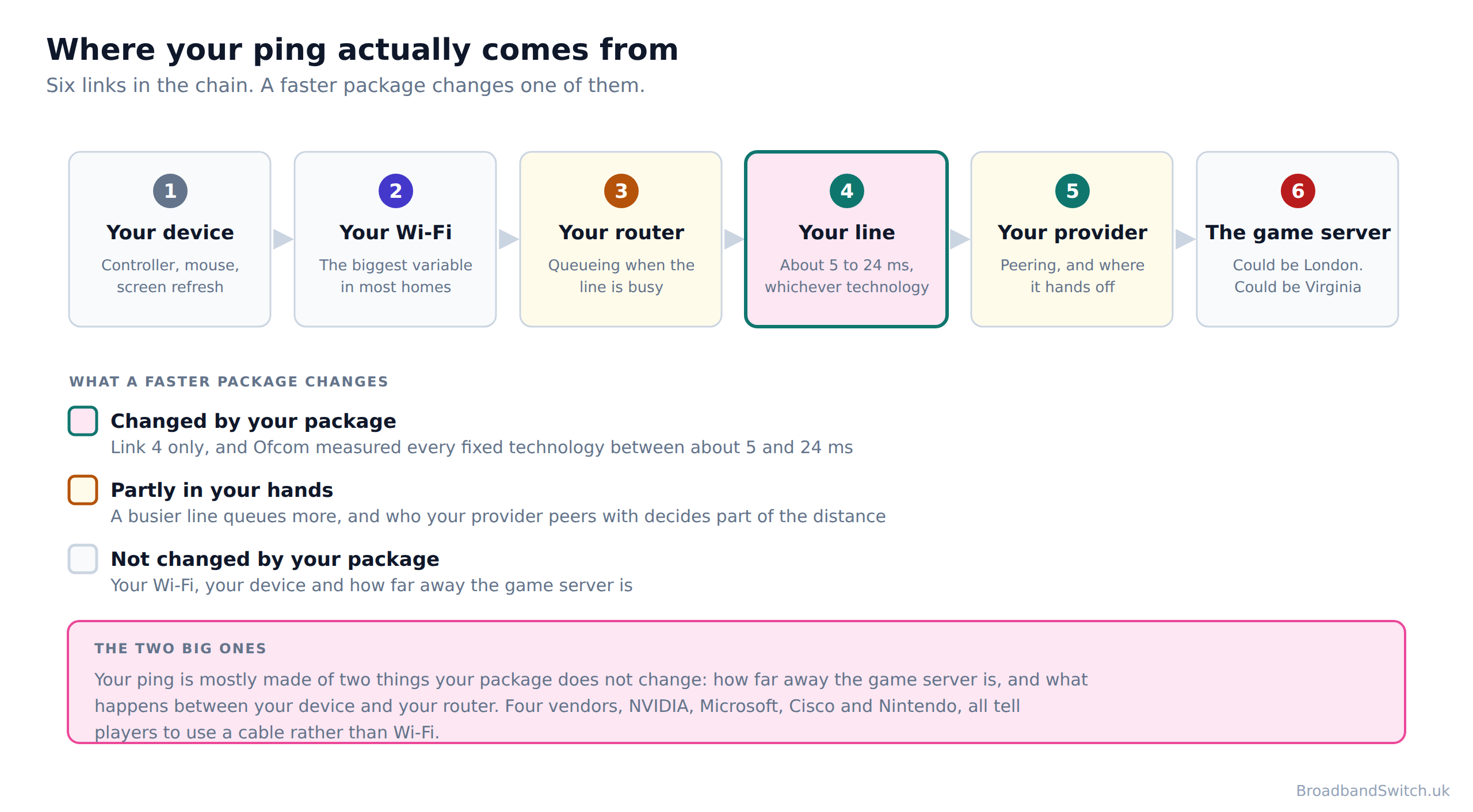
A ping is a round trip, and a round trip is made of everything between your hands and the server and back again. Six things sit in that chain, and a broadband package changes exactly one of them. Worth taking them in turn, because the order surprises people.
Your Wi-Fi is the biggest variable in most homes, and the evidence for that is not ours. Four separate vendors, with nothing to gain from it, tell players to plug in. NVIDIA: “We recommend a hardwired Ethernet connection, or a router with a 5 GHz WiFi connection.” Microsoft: “Where possible, it's recommended that you play over a wired, Ethernet connection, but it's also possible to play over 5 GHz Wi-Fi or 5G with capable devices.” Nintendo tells cloud players to use a wired connection to the router where possible. Cisco tells residential users the same thing in one sentence. Microsoft sets itself twice the failure rate on 2.4 GHz Wi-Fi that it sets on a cable or on 5 GHz: 2.0% of audio streams poor against 1.0%.
Your line is the part a package changes, and the measured range is narrower than the marketing suggests. Ofcom put full fibre at 4.9 to 7.3 ms, FTTC at 10.1 to 12.5 ms, cable at 12.5 to 14.8 ms and old ADSL at about 24ms. Full fibre was the lowest, then FTTC, then cable, with old copper worst by a distance. That full fibre gap is real and worth having. It is also smaller than what a bad Wi-Fi hop adds.

Now set those measurements against the scales the providers publish themselves. Sky’s is “Under 20ms - exceptional, 20 - 100ms - decent, Over 100ms - poor”. Virgin Media publishes “Broadband for gaming should have low ping (0-30 milliseconds is excellent).” Vodafone publishes “A low ping response time of 20ms is exceptional, with anything up to 100ms being sufficient for most gaming”. Three companies, three ladders, broadly the same shape. And every one of them describes gaming in general rather than what that company delivers.
Ofcom said as much about its own worst result, and the clause after the comma is the part usually left out: “The highest (worst) latency values recorded across the technologies tested were found in ADSL2+ connections, but these only averaged around 24ms, a level at which it was still unlikely to negatively affect the user experience for most use cases.” That is the regulator, describing the slowest technology it tested, in the report where it published the numbers.
Ping is also only one of three numbers, and the other two ruin a game just as effectively. Jitter is the variation between one packet and the next, and packet loss is the ones that never arrive: a steady 40 ms plays better than an average of 20 ms that swings between 5 and 90. Published thresholds for both do exist, they are just not published by anybody selling broadband. Microsoft grades one of its own real-time streams poor at more than 30 ms of jitter, more than 10% packet loss or more than 500 ms round trip, and adds that only one metric needs to exceed the defined threshold.
That last clause is the one to carry into a game. A connection does not have to fail on all three counts to ruin an evening, which is why an average ping is a poor summary of a line and why the reading worth taking is all three at once, under load. Zen is the only UK provider that names all three on its gaming page, and it attaches a number to none of them.
The half of your ping no broadband package can touch
The distance to the game server is often the largest single component, and no UK package shortens it. NVIDIA’s own gate makes the point precisely: “We also require less than 80ms of network latency from an NVIDIA data center.” Note what it is measured to. Not to your router, and not to your provider: to a data centre. The one thing an ISP genuinely can do about this half is peer directly with the platforms, and exactly one UK provider makes that claim on its gaming page. Zen: “We have direct connections to major gaming platforms, including Twitch, Steam, and Xbox”
Our explainer on latency, jitter and packet loss covers the three metrics properly, why 900Mbps broadband still lags in competitive gaming works through the same argument on one package, and gaming broadband, low latency and ping explained is the shorter version of this section.
What the gaming pages really promise
Direct answer: Seven of the nine UK gaming pages we read publish no latency figure at all for their own network, and not one of the nine guarantees one.
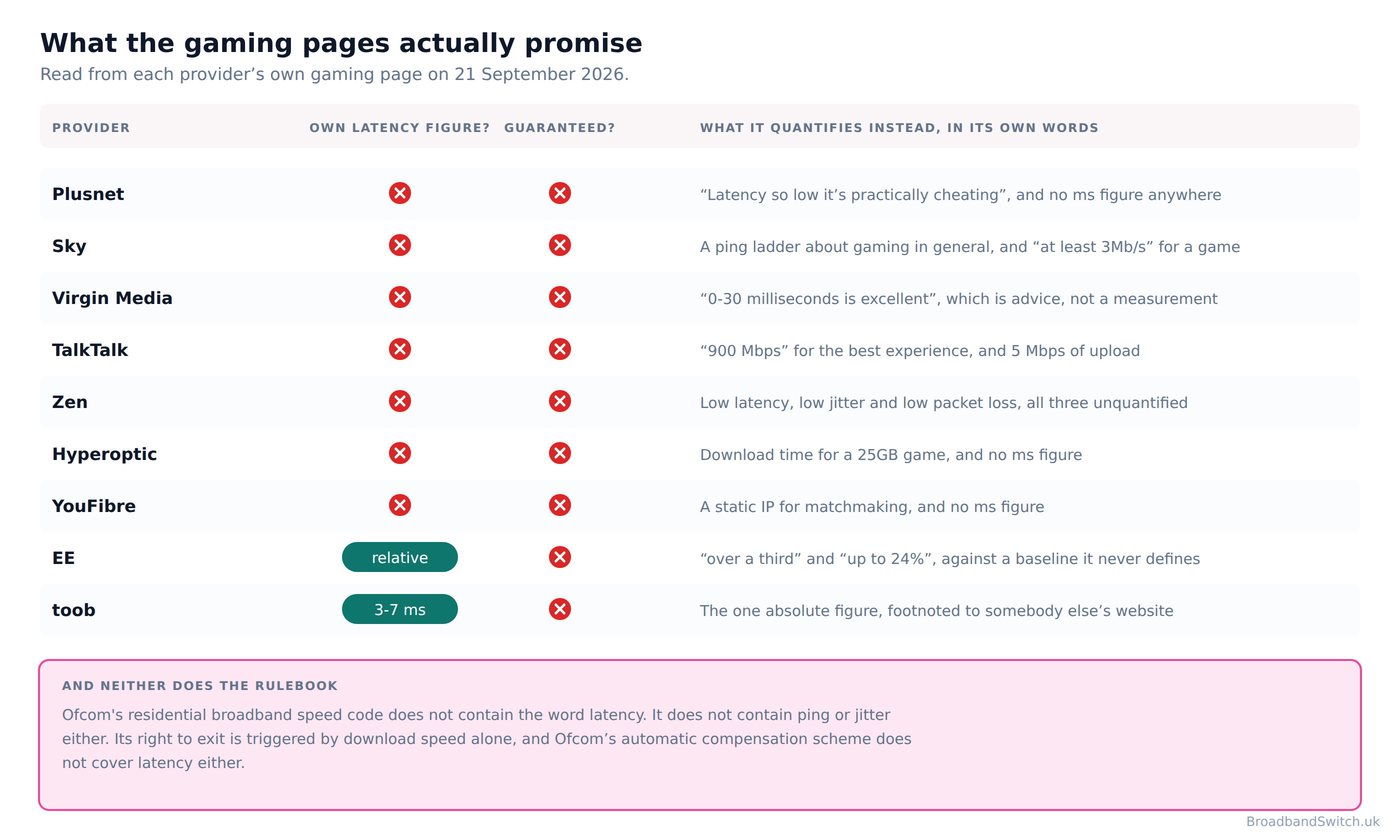
Plusnet is the cleanest illustration, because its headline is a superlative about the exact thing it does not quantify: “Latency so low it's practically cheating”. There is no millisecond figure anywhere on that page. Zen goes furthest of anyone in naming the right metrics and stops at the same place: “Having the best internet for gaming relies on a few factors. We've optimised our provision to ensure low latency, low jitter, low packet loss, and no traffic management.” Three metrics named in one sentence, none of them with a number.
Sky, Virgin Media and Vodafone all print millisecond figures, and this is the distinction that matters most on this page: every one of those figures describes what a good ping is in general rather than what that company delivers. Sky’s only claim about its own network is “Our Full Fibre broadband delivers low latency, giving you the edge in multiplayer gaming”, with no number attached. Virgin Media publishes “Broadband for gaming should have low ping (0-30 milliseconds is excellent).”, which is advice. Hyperoptic publishes “The best way to banish lag and jitter is by getting rock solid, full fibre directly to your building.”, which is a claim about a technology rather than a measurement of its network.
Two providers do publish something about themselves. toob prints “3-7 ms ping” as a headline statistic for its own network, which makes it the only absolute figure in UK gaming broadband. It is worth reading the small print beside it: Both figures on toob's page are footnoted, and both footnotes point at the same third-party website rather than at any measurement of toob's own. The context line it sits next to, “0-30 ms is considered essential for first-person shooters or multiplayer online battle arenas”, is general industry guidance rather than toob’s own measurement.
EE is the other, and it is the only provider selling a distinct gaming package. Its published claims are “Tests on EE's Full Fibre network using Cisco ThousandEyes (formerly SamKnows) performance monitoring technology reveals it offers a latency reduction of over a third compared to standard broadband.” and, for its router feature, “reducing server ping by up to 24% according to tests carried out by developers Netduma”. Both are relative rather than absolute, and neither release defines what standard broadband means. EE's own product and help pages for Game Mode carry no numerical claim at all: both percentages live in a press release rather than in anything a customer is sold.
There is a fair defence of all this and it is worth putting properly, because the page would be weaker without it. A provider genuinely cannot promise you a ping to a game server it does not own, in a country it does not choose, over a route that changes. Promising a number it does not control would be worse than promising nothing. On that argument the silence is honesty rather than evasion, and for the server half of the journey the argument holds completely.
What it does not explain is the other half. A provider knows exactly what its own network adds, because it measures it: EE quotes Cisco ThousandEyes by name when it claims a latency reduction. A measured figure to a fixed reference point is a perfectly publishable number, it is comparable between providers, and it is precisely what Ofcom used to publish before 2023. The gap on these pages is not the unknowable half. It is the half everybody already measures and nobody prints.
What the gaming extras actually do, which is not nothing
Three things sold on gaming pages are real mechanisms and worth understanding on their own terms. Traffic prioritisation works inside your house: EE’s own description of Game Mode is that it “analyses your ping and prioritises your gaming connection over all other traffic in your home”, which helps a busy household and does nothing about the distance to the server. Direct peering works out on the network and is the one thing that does shorten that distance, and Zen is the only provider on this page claiming it. And a static IP addresses matchmaking rather than speed: toob and YouFibre both sell a static IP address on their gaming pages, and toob publishes the price. toob’s published price is £8 a month.
Our guides to CGNAT and how it affects gaming and static IP broadband cover the matchmaking problem properly, and the best broadband for gaming in 2026 covers the packages themselves.
What you are owed, and what you are not
Direct answer: No UK broadband provider publishes a latency guarantee, and no compensation right anywhere is tied to latency.
Ofcom’s residential speed code is the instrument that turns a broadband promise into something you can act on: it requires a minimum guaranteed download speed before you buy, and it gives you a way out if that speed is missed. It is a genuinely useful piece of regulation and it has made the market better. It is also, on the subject of this page, completely silent.
| What you might expect to be owed | Are you? | What the rule actually says |
|---|---|---|
| A minimum download speed, in writing before you buy | Yes, from a code signatory | At least half the advertised speed, on full fibre |
| A right to leave if the download speed is missed | Yes, from a code signatory | Three successive days below it, after you report it |
| A minimum upload speed you can hold them to | No | Upload is quoted for information only |
| Any commitment at all on latency, ping or jitter | No | The word latency is not in the code |
| Automatic compensation when the quality drops | No | Total loss, a missed appointment or a late start |
So a gamer sold a package on a latency headline has no figure to check it against, no threshold to fail, and no remedy if it does. That is not a loophole anybody is exploiting and it is not an accusation: it is a gap between what this part of the market advertises and what the rulebook was written to cover, and the rulebook was written before gaming broadband was a category.
Worth pausing on the fourth row of that table, because it is the one that surprises people most. A provider can headline a gaming page with a superlative about latency, sell a package on it, deliver whatever it delivers, and be in complete compliance with the only code of practice that governs broadband speed claims in this country. Nothing in the code was written badly. It was written for a different argument, at a time when the argument about broadband was about whether the line reached the speed on the advert.
It gets quieter. Ofcom has published no measured fixed-line latency data since its final Home Broadband Performance report of September 2023, so the most recent independent UK figures are three years old. Ofcom’s own decision to stop says “We have decided to proceed with the cessation of Ofcom's Home Broadband Performance research project, and the report covering March 2023 measurements, which is scheduled for publication in September 2023, will be the final report.”, and the reason it gives is entirely about speed: “As consumers have migrated to superfast and ultrafast services, connection speed is no longer a limiting factor for most users, and even the worst performance that we see in the other metrics the research covers are unlikely to negatively impact the user-experience for most use cases.”
There is a detail in that document worth recording, and we record it as a fact about the document rather than as a complaint about the decision. The word latency does not appear anywhere in the document in which Ofcom decided to stop measuring it. Latency was one of the metrics the programme measured, and it played no part in the reasoning that ended it.
Where that leaves the reader
A metric everybody markets, nobody guarantees, one provider quantifies, no rule covers and no regulator has measured for three years. There is one sensible response to a gap that shape, and it is not to read more marketing. It is to take the measurement yourself, on the line you already have, before you spend anything. The next section is how.
Our guides to the minimum guaranteed download speed, the broadband speed guarantee and compensation and service failure cover what you can actually hold a provider to.
Fix these, in this order
Direct answer: Four of the five steps below cost nothing, and the first one is a measurement rather than a purchase.
Step one
Measure what you actually have, on the line you already have. Latency, jitter and bufferbloat, not download speed. It takes two minutes and it is the only number on this page nobody will publish for you.
Our own quality monitor does all three, and so do several free tools. Take the reading twice: once when the house is quiet and once when it is not.
Step two
Plug in. A cable removes the single biggest and most variable part of a home ping, and four vendors recommend it independently.
NVIDIA, Microsoft, Nintendo and Cisco all publish the same advice, and none of them sells you broadband.
Step three
If you cannot plug in, get on 5 GHz and get closer to the router. Microsoft sets itself twice the failure rate on 2.4 GHz Wi-Fi that it sets on a cable or on 5 GHz: 2.0% of audio streams poor against 1.0%.
Microsoft’s own guidance on the band: “5 GHz provides less background interference and higher speeds, and should be prioritized when deploying VoIP over Wi-Fi.”
Step four
Check what else is running, then re-run step one. A line that is saturated queues, and a queue is latency.
This is the difference the second reading in step one is there to show you.
Step five
Only now look at the package, and ask about the two things that are not the headline speed: the guaranteed minimum, and whether they peer directly with your platform.
Before you sign anything, ask for the guaranteed minimum download speed in writing. If the seller cannot give you one, you have learned something more useful than any headline speed.
Step six
If you do switch, take the same reading again on the new line. It is the only way to know whether the thing you paid for did what you bought it for.
It also gives you a number to quote if it did not, which is more than the sales page gave you.
The order matters more here than on almost any other broadband question, because the first step changes what the rest of them mean. Without a reading you are guessing, and the guess that gets sold to you is always the package. With a reading you know whether your problem is in your house, on your line, or three thousand miles away on a server you cannot do anything about.
One practical note on the measurement. Bufferbloat is the one most people have never heard of and the one most likely to be the answer, because it is what turns a fine line into a bad ping the moment somebody else in the house starts a download. A line that measures in single-digit milliseconds when the house is asleep can be unusable at eight in the evening, and a speed test will report the same cheerful number either way.
Start with our live broadband quality monitor, which measures latency, jitter and bufferbloat in your browser. Then when to run an ethernet cable and which cable to buy cover step two, 5 GHz against 2.4 GHz and where to put your router cover step three, and what else is using your Wi-Fi covers step four.
Cloud gaming, the real exception
Direct answer: Sony publishes 13 Mbps for 1080p, Microsoft recommends at least 20 Mbps and NVIDIA asks 25 Mbps for the same resolution, so the three biggest cloud gaming services disagree by roughly a factor of two about the same job.
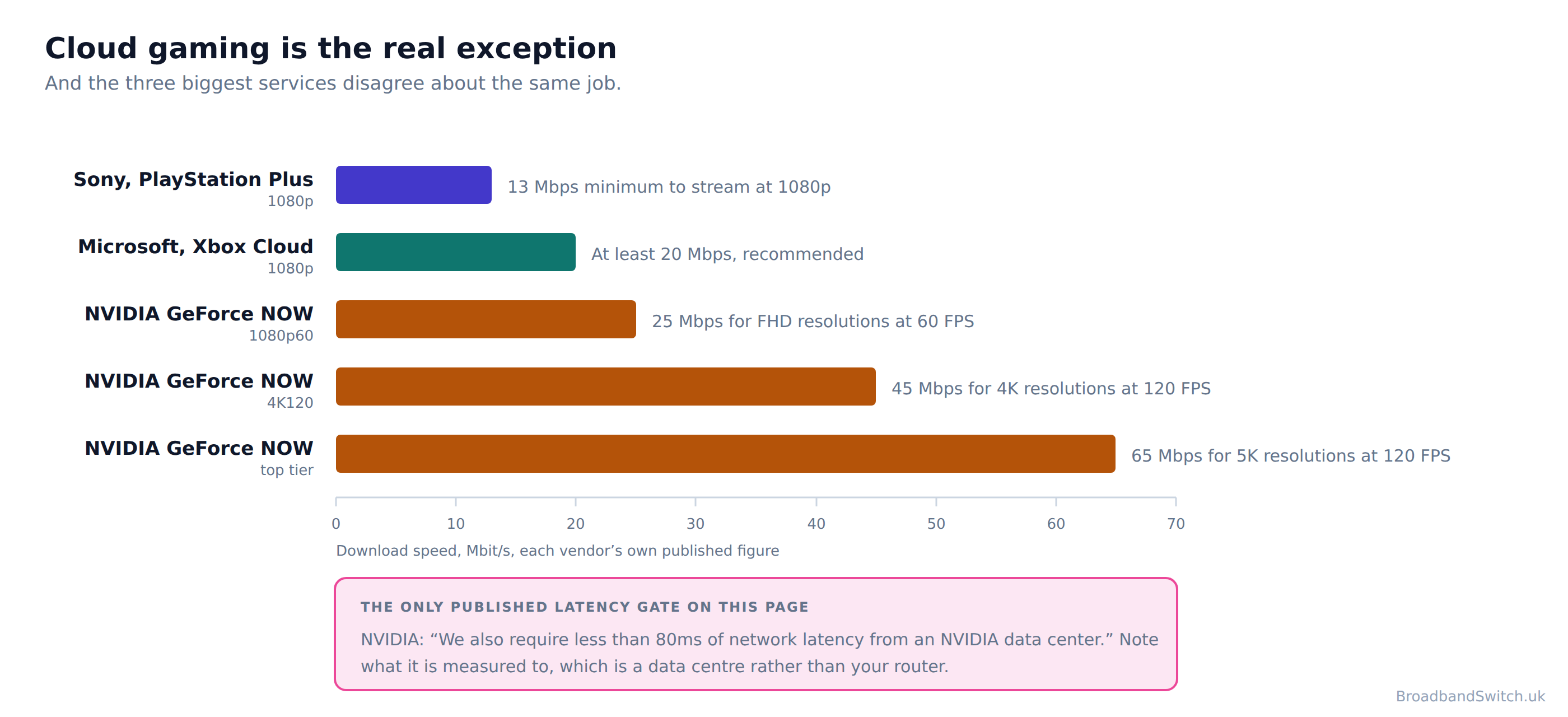
Everything above this section argues that download speed is not what decides a game. Cloud gaming is where that stops being true, because the game is not running on your console at all: the whole picture is being encoded in a data centre and streamed to you, so you are watching a video that happens to respond to your thumbs. That is a genuine bandwidth job and the vendors publish real numbers for it.
They also disagree, by a lot, about the same resolution. Sony publishes “13 Mbps minimum to stream at 1080p”. Microsoft says “it's recommended that you have an internet connection speed of at least 20 Mbps to ensure a stable connection while cloud gaming” NVIDIA publishes “15 Mbps for HD resolutions at up to 60 FPS (e.g. 1280x720)” at the bottom of its ladder and “45 Mbps for 4K resolutions at 120 FPS (e.g. 3840x2160)” for 4K. A reader trying to work out what to buy from those three figures is not being unreasonable to find it confusing.
NVIDIA is also the only vendor on this page that publishes a latency requirement, and it is worth quoting exactly: “We also require less than 80ms of network latency from an NVIDIA data center.” Measured to a data centre rather than to your router, which is the whole argument of the section above, stated by a company with no interest in making it.
Nintendo makes the same point about stability in plainer language: “Yes, a stable and permanent internet connection is required. If your internet connection becomes unstable, the service will disconnect after a few minutes.” Not a speed. A connection that does not fall over.
Our guides to broadband for streaming and 2Gb and 8Gb broadband cover the bandwidth side, and best broadband for streaming covers the watching side, and broadband for large uploads covers the other direction, where upload finally becomes the headline number.
When a faster line genuinely is the answer
Direct answer: A faster package is the right answer for downloading games, for streaming what you play, for cloud gaming, and for a house where several people are online while you play. It is not the answer to a bad ping.
This page argues against buying speed to fix a ping, so it owes you a clear account of when buying speed is exactly right. There are four cases and the first is the one most gamers will recognise immediately.
Game downloads. A modern title is a hundred gigabytes and a patch can be twenty, and this is pure bandwidth: a faster line finishes it proportionally sooner, with no caveats and no arguments about milliseconds. If your evening is regularly spent watching a progress bar, that is a speed problem and a speed problem has a speed solution.
A shared house. Contention inside your home is real, and it is the case where a bigger package does something a cable cannot. Ofcom measured average monthly use of 583 GB per connection, and on full fibre connections it measured more. Somebody is using that, often while you play.
Streaming what you play. This is the one gaming job where upload is the headline number, and the figures are still modest: Plusnet publishes “If you're looking to stream your own videos on Twitch or YouTube you'll need an upload speed of 3-6 Mb.” If you stream in higher quality than that, buy for upload specifically rather than for a download headline.
And cloud gaming, covered above, where the vendors publish real requirements that a slow line will genuinely fail. Outside those four, the honest answer is that a faster package buys you shorter downloads rather than better games.
One more case deserves its own sentence, because it is the only one where the latency argument flips. On an old FTTC line the upload genuinely can be the problem: Openreach publishes up to 15Mbps and Ofcom measured 6 to 9 Mbit/s on the slower variants, which is where a group call and a file upload start to collide. If your line is that one, full fibre is a real upgrade on every measure at once, and the postcode check is the place to start.
Our technology guide compares the four in full, 2Gb and 8Gb broadband covers the top of the market and the upload numbers behind it, and best broadband for online gaming is the shopping list version of this section.
Gaming broadband at your postcode
See what your postcode can actually get
One postcode shows every provider we can switch you to, lowest price first, across full fibre, FTTC, cable and 5G home broadband. Full fibre measured the lowest latency of the four, and it is the one upgrade that improves every number at once.
Show every provider at my postcode →Broadband for gaming: frequently asked questions
What speed do I need for online gaming?
Far less than the packages sold for it, and the providers publish the figures themselves. Plusnet's own gaming page says “For online gaming, you'll need a download speed of at least 3Mb.” Sky's says “Most video games recommend at least 3Mb/s download speed, but 15Mbps to 25Mbps will give you a much smoother gaming experience, reducing your game's ping rate.” TalkTalk's says “The minimum upload speed for online gaming is 5 Mbps, which comes as standard with TalkTalk”. Neither Sony nor Nintendo publishes a recommended speed for console online play at all. So if your games play badly and your download speed is in triple figures, the download speed is not what is wrong.
What is a good ping for gaming?
The providers publish ladders for this and they broadly agree. Sky's own scale is “Under 20ms - exceptional, 20 - 100ms - decent, Over 100ms - poor”. Virgin Media publishes “Broadband for gaming should have low ping (0-30 milliseconds is excellent).” Vodafone publishes “A low ping response time of 20ms is exceptional, with anything up to 100ms being sufficient for most gaming”. Worth knowing what those scales imply: Ofcom measured full fibre at 4.9 to 7.3 ms and the worst fixed technology it tested at about 24ms, so every fixed technology it measured sits inside Sky's own top two bands.
Does full fibre give you a better ping than FTTC or cable?
Slightly, and by less than the marketing implies. Ofcom measured full fibre at 4.9 to 7.3 ms, FTTC at 10.1 to 12.5 ms and cable at 12.5 to 14.8 ms. Full fibre was the lowest, then FTTC, then cable, with old copper worst by a distance. A gap of a few milliseconds is real and it is worth having, and it is much smaller than the gap between playing on a cable and playing on 2.4 GHz Wi-Fi. Your ping is mostly made of two things your package does not change: how far away the game server is, and what happens between your device and your router.
Do any UK broadband providers guarantee a ping or latency?
No. No UK broadband provider publishes a latency guarantee, and no compensation right anywhere is tied to latency. Two publish a number of some kind: toob publishes “3-7 ms ping” for its own network, and EE publishes “reducing server ping by up to 24% according to tests carried out by developers Netduma” and a latency reduction of over a third, both against a baseline it does not define. Neither is a guarantee and neither carries a remedy. Ofcom's residential broadband speed code does not contain the word latency. It does not contain ping or jitter either.
Is gaming broadband worth paying extra for?
Check what the extra actually buys before you decide, because it is usually not latency. What UK providers sell on gaming pages is download speed, a router with traffic prioritisation, and in two cases a static IP address. Those are real things and the first two work inside your house rather than out on the network. EE's own description of Game Mode is that it “analyses your ping and prioritises your gaming connection over all other traffic in your home”, which is a genuine mechanism for a busy household and is not the same as shortening the distance to the game server.
Why is my ping bad when my speed test is fine?
Because a speed test measures the wrong thing. Your ping is mostly made of two things your package does not change: how far away the game server is, and what happens between your device and your router. A speed test measures how much data one greedy transfer can move; a game sends a small, constant stream in both directions where the timing of each packet matters far more than the total. The usual culprits, in order, are Wi-Fi, something else in the house saturating the line, and a game server that is simply a long way away. Before you buy anything sold as gaming broadband, measure your own latency, jitter and bufferbloat on the line you already have. Nobody is going to publish those numbers for you.
Does a static IP help with gaming?
Sometimes, and for matchmaking rather than for speed. Two UK providers sell one on their gaming pages: toob and YouFibre both sell a static IP address on their gaming pages, and toob publishes the price. toob's published price is £8 a month. The problem it addresses is real, and it is about how your connection is presented to the game rather than how fast it is. Microsoft's own definition of the best case is an Open setting, which “Can connect with any consoles regardless of their NAT settings.”
How much speed does cloud gaming need?
This is the one gaming job where download speed genuinely is the headline number, and the vendors disagree about it. Sony publishes 13 Mbps for 1080p, Microsoft recommends at least 20 Mbps and NVIDIA asks 25 Mbps for the same resolution, so the three biggest cloud gaming services disagree by roughly a factor of two about the same job. NVIDIA publishes “15 Mbps for HD resolutions at up to 60 FPS (e.g. 1280x720)” at the bottom of its range and “45 Mbps for 4K resolutions at 120 FPS (e.g. 3840x2160)” for 4K. It is also the only vendor on this page publishing a latency requirement: “We also require less than 80ms of network latency from an NVIDIA data center.”
Should I play on Wi-Fi or a cable?
A cable, and four separate vendors say so in their own documentation. NVIDIA: “We recommend a hardwired Ethernet connection, or a router with a 5 GHz WiFi connection.” Microsoft: “Where possible, it's recommended that you play over a wired, Ethernet connection, but it's also possible to play over 5 GHz Wi-Fi or 5G with capable devices.” Nintendo tells cloud players to use a wired connection to the router where possible, and Cisco tells residential users the same thing in one sentence. It is free, it takes five minutes, and on the published evidence it is the single change most likely to improve your ping.
Has anyone actually measured UK broadband latency recently?
Not since 2023. Ofcom has published no measured fixed-line latency data since its final Home Broadband Performance report of September 2023, so the most recent independent UK figures are three years old. Ofcom's own decision to stop says “We have decided to proceed with the cessation of Ofcom's Home Broadband Performance research project, and the report covering March 2023 measurements, which is scheduled for publication in September 2023, will be the final report.” and the reason it gave was about speed: “As consumers have migrated to superfast and ultrafast services, connection speed is no longer a limiting factor for most users, and even the worst performance that we see in the other metrics the research covers are unlikely to negatively impact the user-experience for most use cases.” One detail is worth recording. The word latency does not appear anywhere in the document in which Ofcom decided to stop measuring it.
In short
- Gaming is the one thing broadband is sold on where the number that decides it is never published, and the providers' own gaming pages show it twice: they name latency and quantify speed.
- Plusnet's own gaming page says an online game needs a download speed of at least 3Mb and Sky's says most video games recommend at least 3Mb/s, and both pages sell packages several hundred times that.
- TalkTalk publishes “The minimum upload speed for online gaming is 5 Mbps, which comes as standard with TalkTalk” on the same page as “For the best gaming experience, download speeds of 900 Mbps enable quicker downloads and faster gameplay”
- Sony publishes no recommended or minimum connection speed for PlayStation online multiplayer. Its network pages distinguish only between a Wi-Fi and a LAN cable connection.
- Nintendo publishes no recommended connection speed for Switch online play, asking only for high-speed internet service and a router.
- Plusnet's gaming headline is “Latency so low it's practically cheating” and there is no millisecond figure anywhere on that page.
- Zen claims “Having the best internet for gaming relies on a few factors. We've optimised our provision to ensure low latency, low jitter, low packet loss, and no traffic management.”
- No UK broadband provider publishes a latency guarantee, and no compensation right anywhere is tied to latency.
- Ofcom's residential broadband speed code does not contain the word latency. It does not contain ping or jitter either.
- Ofcom's automatic compensation scheme covers total loss of service not fixed after two full working days, a missed or late-cancelled engineer appointment, and a service that does not start on the promised date, and nothing else.
- The word latency does not appear anywhere in the document in which Ofcom decided to stop measuring it.
- Ofcom has published no measured fixed-line latency data since its final Home Broadband Performance report of September 2023, so the most recent independent UK figures are three years old.
- Every fixed technology Ofcom measured, including the worst one, lands inside Sky's own top two ping bands, so on the providers' published scales the technology is not what decides whether your ping is good.
- Your ping is mostly made of two things your package does not change: how far away the game server is, and what happens between your device and your router.
- A faster package is the right answer for downloading games, for streaming what you play, for cloud gaming, and for a house where several people are online while you play. It is not the answer to a bad ping.
- Before you buy anything sold as gaming broadband, measure your own latency, jitter and bufferbloat on the line you already have. Nobody is going to publish those numbers for you.
Each line stands on its own and carries its date. Reviewed by a person at least quarterly, last on 21 September 2026.
References
- Plusnet
Plusnet. (2026). Best broadband for gaming, the published download requirement for online gaming and the latency headline. The page carries no last-updated date. plus.net
- Sky
Sky. (2026). Gaming broadband, the published ping scale, the download figure most video games are said to recommend, and the guaranteed minimum download speed wording. The page carries no last-updated date. sky.com
- Virgin Media
Virgin Media. (2026). Broadband for gaming, the definition of ping and the published excellent range. The page carries no last-updated date. virginmedia.com
- TalkTalk
TalkTalk. (2026). Fast, reliable Full Fibre for gamers, the published minimum upload for online gaming and the 900 Mbps claim. The page carries no last-updated date. talktalk.co.uk
- Zen
Zen Internet. (2026). Gaming broadband, the low latency, low jitter and low packet loss claim, the traffic management position and the direct connections to gaming platforms. The page carries no last-updated date. zen.co.uk
- toob
toob. (2026). Broadband for gamers, the 3-7 ms ping figure, its footnotes and the static IP price. The page carries no last-updated date. toob.co.uk
- EE
EE. (2024, June 27). EE launches UK’s first broadband package built for next-level gaming, the latency reduction claim, the Ping Optimiser percentage and the launch price. newsroom.ee.co.uk
- Ofcom
Ofcom. (2022, September 21). Better Broadband Speed Information: 2022 Voluntary Code of Practice (Residential), the minimum guaranteed download speed and the right-to-exit trigger. The words latency, ping and jitter do not appear in it. ofcom.org.uk
- Ofcom
Ofcom. (2023, August 10). Home Broadband Performance: confirmation of cessation, the decision to end the research and the reason given. The word latency does not appear in it. ofcom.org.uk
- Ofcom
Ofcom. (2023, September 14). UK home broadband performance, measurement period March 2023, the measured latency by technology and the note on ADSL2+. The last such report published. ofcom.org.uk
- Ofcom
Ofcom. (2026). Automatic compensation: what you need to know, the three situations the scheme covers. ofcom.org.uk
- NVIDIA
NVIDIA. (2026, August 18). GeForce NOW system requirements, the per-tier bandwidth figures, the 80ms latency requirement and the connection advice. One of the few vendor pages publishing its own last-updated date. nvidia.com
- Microsoft
Microsoft. (2025, December 19). Getting started with Xbox Cloud Gaming, the recommended connection speed and the wired connection advice. news.xbox.com
- Sony
Sony Interactive Entertainment. (2026). Cloud streaming, the published minimums for establishing a session and for 720p and 1080p. Sony publishes no speed requirement for online multiplayer. playstation.com
- BroadbandSwitch.uk
BroadbandSwitch.uk. (2026). Live broadband quality monitor, our own free latency, jitter and bufferbloat test, which is one of several ways to measure the number nobody publishes for you. broadbandswitch.uk
Ready to see what your postcode can get?
Take a latency reading first, then compare. One postcode shows every provider that can reach you, lowest price first, and a reading turns a shopping decision into a diagnosis.
Compare at your postcode →