Mobile broadband while you wait for an installation: what it costs, and what you are owed for the wait
You have ordered broadband, the date is weeks away, and you need to be online in the meantime. The obvious question is whether your new provider will tide you over. We read fifteen of them on their own websites to find out.
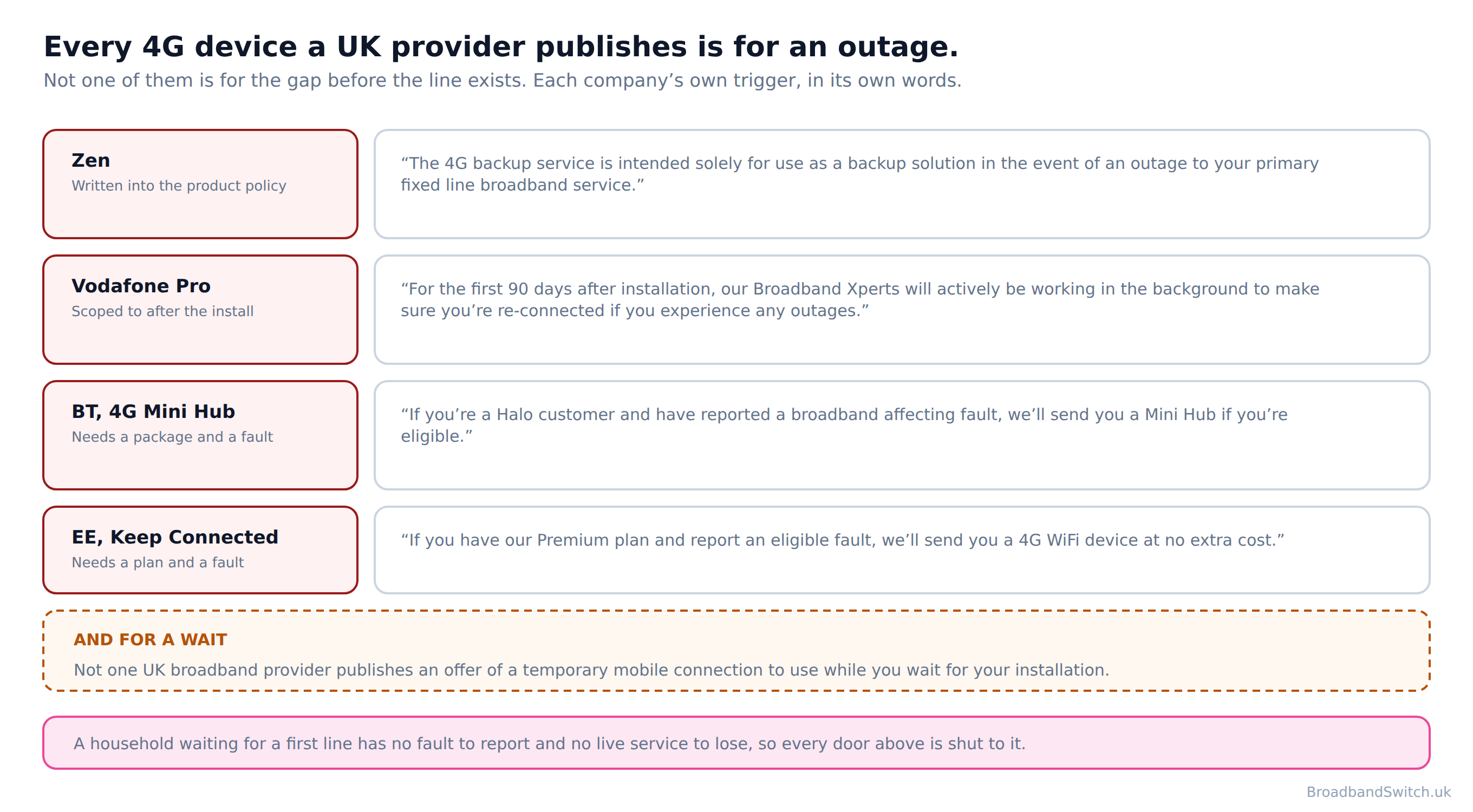
Not one UK broadband provider publishes an offer of a temporary mobile connection to use while you wait for your installation. Every 4G device any of them publishes is for an outage on a line that is already working. Zen writes the exclusion into its own product policy using the word solely. Vodafone scopes its dongle to the ninety days after installation. BT and EE both require a fault to have been reported first, and a household with no line cannot report one.
So you buy your own. Three companies sell one, all three publish a short term option, and the thing almost nobody claims is that a late start pays, from the day it was missed: “£6.46 for each calendar day of delay.” That is usually more than the stopgap costs.
Start with your postcode
Which providers reach your address decides whether a slipped installation date is worth a published daily payment or nothing at all, because only ten of them are in the scheme. Check the exact address rather than the postcode.
Want to know what the wait is worth? Read what a missed start date pays, and from when. Want the answer for your own situation? Answer three questions and see which jobs are yours.
The short version, in a minute
Direct answer: Nobody gives you one. Three companies sell you one. And the delay itself pays more than it costs.
The question underneath this page is simple enough: your line is ordered, the date is weeks out, and you want to know whether the company you just gave your bank details to will tide you over. We read fifteen of them on their own websites rather than on anybody's summary of them.
Not one UK broadband provider publishes an offer of a temporary mobile connection to use while you wait for your installation. What every one of them publishes instead is cover for an outage on a service that already works, and the two things are not the same product for the same person.
If your line is live and it has broken, that is a different page and you are owed different money: our broadband downtime guide has the repair side of the scheme. If you are moving rather than waiting, our moving guide covers what nine providers charge to take a line with you.
What nobody will give you, in their own words
Direct answer: Four published devices, four triggers, and every one of them needs a line that already works.
Zen is the bluntest, and its policy is one of the few dated documents in this whole research: “The 4G backup service is intended solely for use as a backup solution in the event of an outage to your primary fixed line broadband service.” It even prices the alternative: “we reserve the right to charge you for the data usage at the rate of £4 per gigabyte or part gigabyte”

Vodafone's is included rather than sold, and the scope is in the sentence: “For the first 90 days after installation, our Broadband Xperts will actively be working in the background to make sure you're re-connected if you experience any outages.” Read the first four words again. The clock on it starts where this page's problem ends.
BT and EE both run the same shape of promise, and both put a gate in front of it. BT: “If you're a Halo customer and have reported a broadband affecting fault, we'll send you a Mini Hub if you're eligible.” EE: “If you have our Premium plan and report an eligible fault, we'll send you a 4G WiFi device at no extra cost.” A household with no line has no fault to report, so neither door opens.
The one company that does sell for this situation
Three, which has no installation of its own to wait for: “If you're between homes or waiting for works to be finished, you can get online using our portable MiFi mobile Wi-Fi router.” It is a product you buy rather than a gap anybody is covering, and Three is candid about why it can say it: “Three broadband doesn't require a fixed line to work, so no need to wait days or weeks for one to be installed.”
The money for the wait, which almost nobody claims
Direct answer: A missed start date pays from the day it was missed. No qualifying wait, unlike a repair.
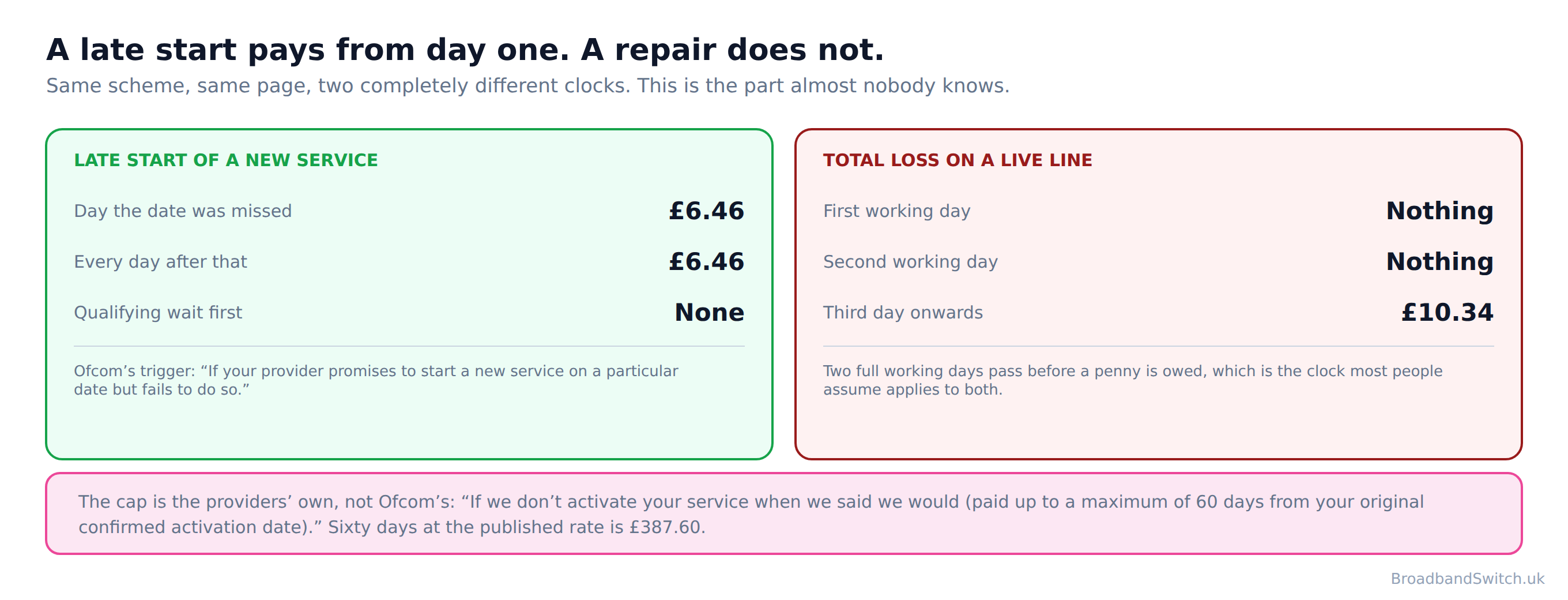
Here is Ofcom's trigger, and it is as plain as regulation gets: “If your provider promises to start a new service on a particular date but fails to do so.” The rate is “£6.46 for each calendar day of delay.”
A delayed start pays from the date that was missed. There is no qualifying period, which is the opposite of a repair, where nothing is owed until two full working days have passed. That difference is the single most useful thing on this page, and it is invisible to most people because the delayed start is the one trigger that only ever applies to somebody who is not a customer yet, and so is not reading their provider's help pages.
There is a ceiling, and the providers publish it rather than the regulator. Vodafone: “If we don't activate your service when we said we would (paid up to a maximum of 60 days from your original confirmed activation date).” BT publishes the same sixty days. At the published rate that is £387.60.
It does not arrive as money. Vodafone again: “If you're owed compensation, credit will be applied to your Vodafone account within 30 days of the issue being closed.” On a service that has not billed you yet, that is a credit waiting on an account you have barely opened, which is part of why so little of it is ever noticed.
Five providers where a late start is worth nothing
Direct answer: Ofcom's list is closed, and five of the fifteen we read are not on it.
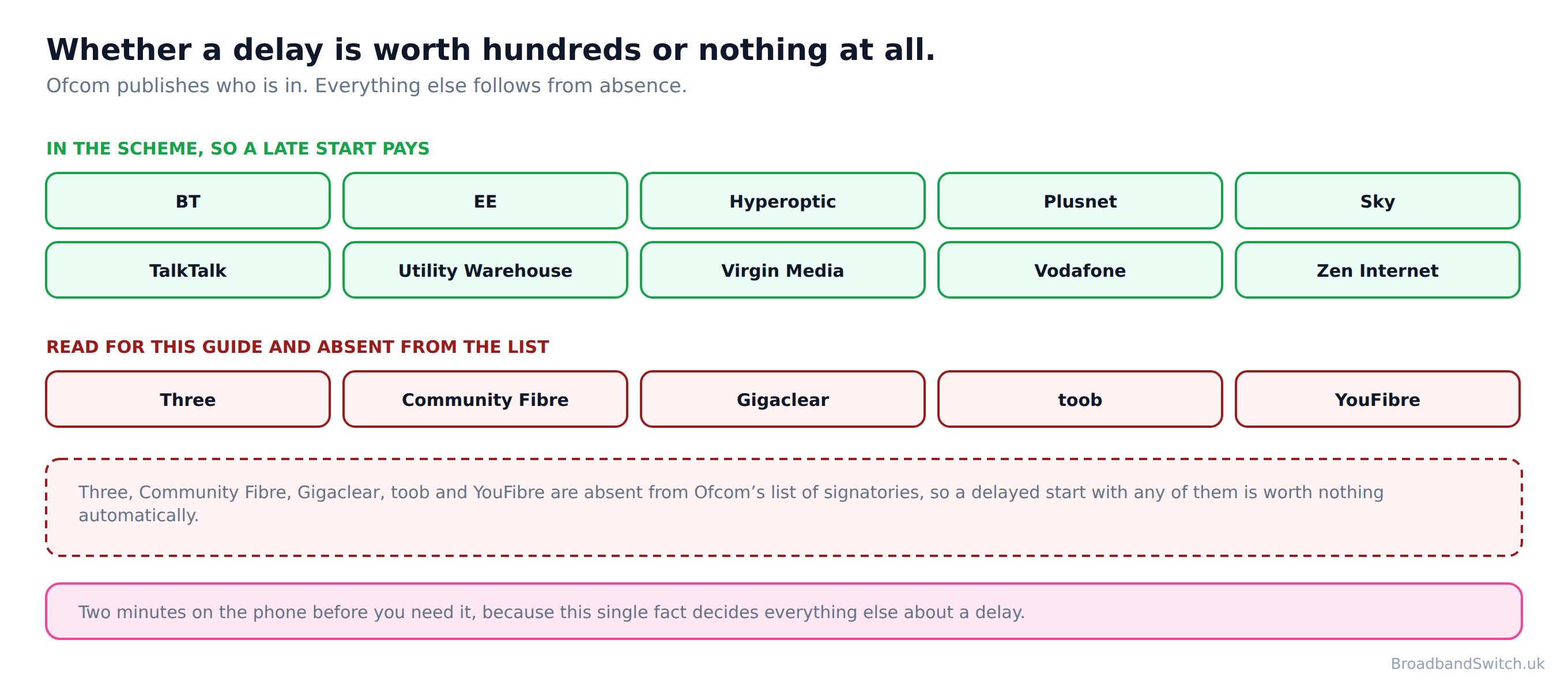
Three, Community Fibre, Gigaclear, toob and YouFibre are absent from Ofcom's list of signatories, so a delayed start with any of them is worth nothing automatically. That is not an accusation about any of them. Ofcom publishes who has signed up and says nothing at all about anybody else, so the only honest thing to say about a company further down that picture is that it is absent, and absence has a consequence.
One of the five publishes its own answer to a slipped date instead. Gigaclear: “Most delays are resolved within 21 days, for complex repairs or where we need private land access for your installation, the process can take a little longer.” If you are on a network with no full fibre alternative, our rural guide covers which routes are open at an address like yours.

So the useful phone call is not the one asking for a dongle. It is the two minute one that establishes whether the company holding your order is one of the ten, because that single fact decides whether a six week slip is worth nearly four hundred pounds or nothing whatsoever.
The three you can actually buy for a short wait
Direct answer: Three, EE and Vodafone. Everybody else either sells fixed lines or sells SIMs.

Three, EE and Vodafone are the only UK companies selling mobile home broadband to consumers, and all three publish a short term option. O2 is unusually direct about not being one of them: “We don't offer home broadband as O2.” Most of the absences in this research are structural rather than stated, so a company saying it plainly is worth quoting.
What makes any of them usable for a wait is the term rather than the price. EE publishes “Available on 18 month minimum term or 30 day contract.” Vodafone's terms, versioned May 2026, publish “5G Broadband unlimited data plan with a Minimum Period of either a 30-day monthly rolling contract or 24-month contract as per your contract summary.” Three sells a one month plan, and its own words on leaving it are “As long as you provide us with 30 days' notice, you can cancel a 1-month broadband plan at any time, with no unexpected costs or fees”.

One thing to settle before you order rather than after. Only one of the three publishes what it charges if the hub does not come back: Vodafone lists “5G Broadband 5G Hub (Indoor) £120 inc. VAT” for the indoor unit and a higher figure for the outdoor one. Neither Three nor EE publishes an amount at all, which means you are agreeing to a charge nobody will quote you.
Three's one month plan, and why no price for it is here
Direct answer: The plan is real. Three's own three documents give three different answers about it.
Three's own home broadband product page offers 12 and 24 month plans only. The one month plan appears in its regulated price guide and on a separate no contract page, and the three documents do not agree on what it costs.
We are saying that carefully, so here is exactly what we did. The product page offers twelve and twenty four month plans and no shorter one. The no contract page says the one month plans carry no upfront cost, and shows no monthly price at all without a postcode. The regulated price guide carries a one month row, and that row did not read the same way on two independent extractions of the same PDF, with the upfront figure contradicting the no contract page either way.
What we will state
That the plan exists, and that Three's own words about leaving it are “As long as you provide us with 30 days' notice, you can cancel a 1-month broadband plan at any time, with no unexpected costs or fees”. A figure that three of a company's own documents disagree about is not a figure to put in front of a household making a decision, so there is not one on this page.
How long the wait actually is
Direct answer: The wholesaler will not say. Two retailers will, and they disagree by nine days.
Openreach publishes what happens on installation day and how long the visit takes, and no figure at all for how long you wait to get one. It defers to the retailer for the date every time. Three of its pages were read for this guide. Between them they cover the drilling, the box on the wall, the testing and the tidying up, and none of them answers the only question a waiting household is actually asking.
Among the retailers, toob is the clearest of the fifteen: “We require a minimum of 5 days between the date you place an order with us and your installation.” Utility Warehouse publishes “We'll get your broadband switched within two weeks with zero installation and connection fees.” Those are the two ends of what anybody commits to in writing, and most of the rest commit to nothing.
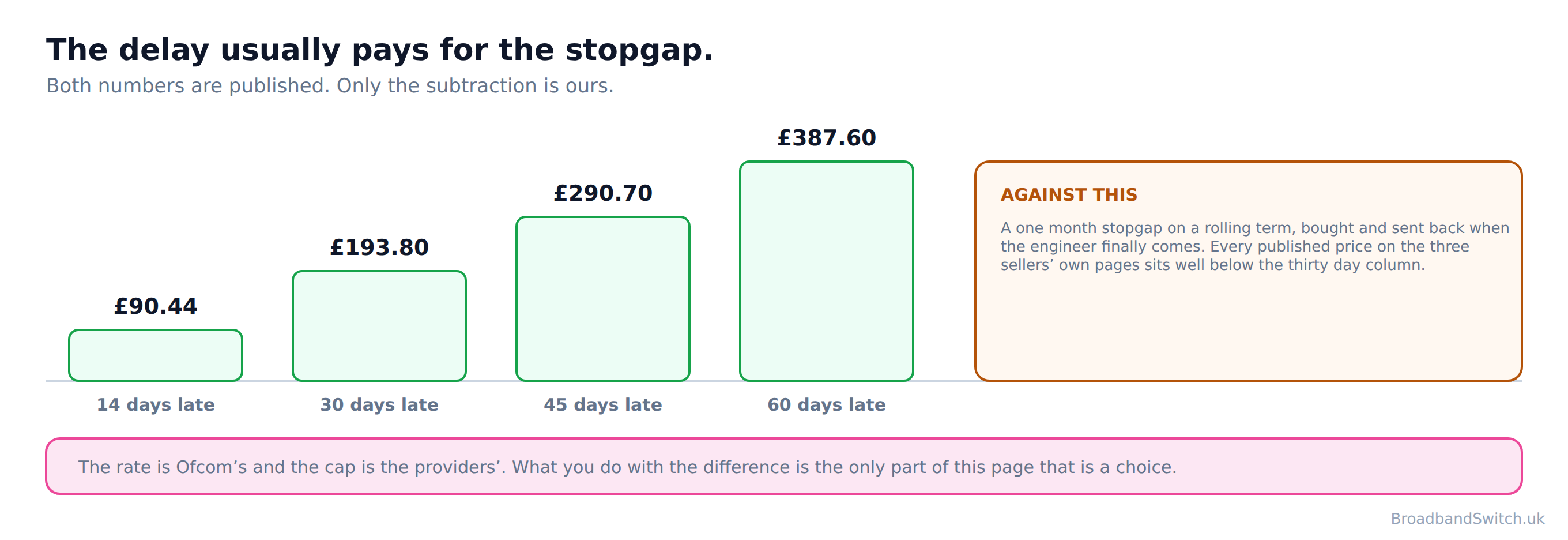
Which brings the two halves of this page together. If the wait runs to a month and the date you were given has been missed, the scheme owes you more over those days than a rolling month of any of the three stopgaps costs. The arithmetic is ours. Both of the numbers in it are published.
The cheapest answer, and one provider publishes it
Gigaclear publishes it as a recommendation: “we recommend that you do not terminate the service from your existing broadband provider until your Gigaclear installation is complete and we activate your service”. Leaving the old line running for a few more weeks usually beats a hub plus an upfront cost, and it needs no new contract at all. Our short lets guide runs the same sum for a stay rather than a wait.
How a claim gets refused, and a page that has not kept up
Direct answer: Three published exclusions, and one company quoting two different rates for the same right.
A delayed start pays automatically, which is not the same as unconditionally. BT publishes its exclusions plainly, and the first catches more people than the other two together: nothing is paid where “you weren't at the property to give access to the engineer at the appointment time”
The second is worth knowing before the phone call rather than after: “you didn't accept the earliest appointment date available at the time of rebooking”. Turning down an inconvenient slot because it does not suit the week can end the claim, so the useful move is to take the first date offered and rearrange your own diary around it. The third is the usual catch-all: “you break the terms and conditions of your service agreement”
And one company quotes two different figures
Virgin Media's help page publishes the current rates. Go to its legal terms instead and the figure you are given is “£6.24 for the missed activation date; plus b. £6.24 for each full calendar day”, with the older total loss and missed appointment amounts beside it, and nothing on the page dating itself beyond a reference to Ofcom approving the industry code back in November 2017.
Virgin Media's help page publishes the current rates and its own legal terms page still publishes the older ones, so the company quotes two different figures for the same right depending which of its pages you land on. We are not suggesting anybody is being underpaid. The figures that match Ofcom and BT are the ones on the help page, so the other simply looks as though nobody revisited it when the rates were last uprated. It is worth knowing which of a company's own pages to quote back at it.
What is worth doing in your situation?
Direct answer: Three questions, and five jobs sorted into the ones worth doing today and the ones that are not yours.
Work down the three in order. The first one reshapes everything after it, because whether your provider is one of Ofcom's ten decides whether the wait is worth hundreds of pounds or nothing at all.
Your plan for the wait, in three answers
Nothing you answer here leaves your browser: there is no form to submit, nothing sent to any server and nothing stored.
Live broadband at your postcode
Direct answer: Whether an outage is worth anything depends on which providers reach your address.
The check below shows every provider that reaches the address, lowest price first. Before you choose, it is worth looking up whichever name you are drawn to against Ofcom's list of ten, because that is the difference between an outage that pays and one that does not.
Every provider that reaches your address
One postcode shows every provider that reaches it, lowest price first. Check the name you choose against the list of ten before you sign.
Compare at your postcode →What this page used to say, and why it changed
Direct answer: Three corrections, and the first one is repeated almost everywhere this subject is written about.
The old version of this page ran to twenty numbered sections without reading a single provider term or quoting a single regulator sentence. This version quotes Ofcom and seven companies on their own sites, and the three things it got wrong are below.
Implying a provider would cover the gap
What this page said
That mobile broadband is something you arrange with your new provider while you wait, which this page's whole framing assumed and never checked.
What it says now, and why
Not one UK broadband provider publishes an offer of a temporary mobile connection to use while you wait for your installation. The four devices that do exist are outage cover for a live service. Zen is the bluntest about it: “The 4G backup service is intended solely for use as a backup solution in the event of an outage to your primary fixed line broadband service.” A page that implies otherwise sends somebody into a phone call that was never going to work.
Leaving out the compensation entirely
What this page said
Seventeen numbered sections on how to survive the wait, and not one line about the money the wait is worth.
What it says now, and why
A delayed start is the best paid trigger in Ofcom's scheme and the least claimed. “£6.46 for each calendar day of delay.” A delayed start pays from the date that was missed. There is no qualifying period, which is the opposite of a repair, where nothing is owed until two full working days have passed. Over Vodafone's published cap that is £387.60, which is more than any stopgap on this page costs for the same period.
Quoting a price for Three's one month plan
What this page said
A monthly figure for the plan Three sells on a rolling term, taken from a single reading of a price guide.
What it says now, and why
Three's own home broadband product page offers 12 and 24 month plans only. The one month plan appears in its regulated price guide and on a separate no contract page, and the three documents do not agree on what it costs. So this page quotes Three's own words about cancelling the plan and states no price for it. A figure three of Three's own documents disagree about is not a figure to put in front of a household.
Broadband downtime when you work from home: frequently asked questions
Will my new provider give me something to use while I wait?
No. Not one UK broadband provider publishes an offer of a temporary mobile connection to use while you wait for your installation. The devices that exist are for an outage on a service that is already live, and they all need a fault report first.
What about BT's 4G Mini Hub? I have seen that mentioned.
It is real, and it is not for this. BT: “If you're a Halo customer and have reported a broadband affecting fault, we'll send you a Mini Hub if you're eligible.” Two conditions, a Halo package and a reported fault, and you cannot report a fault on a line that does not exist yet.
And EE's Keep Connected Promise?
The same shape. “If you have our Premium plan and report an eligible fault, we'll send you a 4G WiFi device at no extra cost.” A Premium plan and an eligible fault.
Is there anywhere this is written down plainly?
Zen's product policy, which is also one of the few dated documents in this research: “The 4G backup service is intended solely for use as a backup solution in the event of an outage to your primary fixed line broadband service.” It even prices the misuse: “we reserve the right to charge you for the data usage at the rate of £4 per gigabyte or part gigabyte”
What am I owed if the installation date is missed?
“£6.46 for each calendar day of delay.” Ofcom's trigger is simple: “If your provider promises to start a new service on a particular date but fails to do so.” A delayed start pays from the date that was missed. There is no qualifying period, which is the opposite of a repair, where nothing is owed until two full working days have passed.
Is there a limit on that?
Vodafone publishes one, and BT publishes the same number: “If we don't activate your service when we said we would (paid up to a maximum of 60 days from your original confirmed activation date).” Ofcom's own page states no cap, so this comes from the providers rather than the regulator. Sixty days at the published rate is £387.60.
How does the money reach me if I have never had a bill?
As a credit rather than a payment. Vodafone: “If you're owed compensation, credit will be applied to your Vodafone account within 30 days of the issue being closed.”
Does this apply whoever I have ordered from?
No, and this is the catch. Three, Community Fibre, Gigaclear, toob and YouFibre are absent from Ofcom's list of signatories, so a delayed start with any of them is worth nothing automatically.
Who actually sells mobile home broadband in the UK?
Three, EE and Vodafone are the only UK companies selling mobile home broadband to consumers, and all three publish a short term option. O2 is unusually direct about not being one of them: “We don't offer home broadband as O2.”
Can I get one on a short term rather than two years?
All three publish one. EE: “Available on 18 month minimum term or 30 day contract.” Vodafone: “5G Broadband unlimited data plan with a Minimum Period of either a 30-day monthly rolling contract or 24-month contract as per your contract summary.” Three sells a one month plan too, and its own words on leaving it are “As long as you provide us with 30 days' notice, you can cancel a 1-month broadband plan at any time, with no unexpected costs or fees”.
Why does this page not tell me what Three's one month plan costs?
Because Three does not tell us the same thing twice. Three's own home broadband product page offers 12 and 24 month plans only. The one month plan appears in its regulated price guide and on a separate no contract page, and the three documents do not agree on what it costs.
What happens to the hub when my real broadband arrives?
You send it back, and only one company publishes what it costs if you do not. Vodafone lists “5G Broadband 5G Hub (Indoor) £120 inc. VAT” for the indoor unit. Neither Three nor EE publishes an amount at all.
How long is the wait, typically?
Nobody wholesale will say. Openreach publishes what happens on installation day and how long the visit takes, and no figure at all for how long you wait to get one. It defers to the retailer for the date every time. Among retailers, toob is the clearest: “We require a minimum of 5 days between the date you place an order with us and your installation.” Utility Warehouse publishes “We'll get your broadband switched within two weeks with zero installation and connection fees.”
Is there a cheaper answer than buying anything?
Sometimes, and one provider publishes it. Gigaclear: “we recommend that you do not terminate the service from your existing broadband provider until your Gigaclear installation is complete and we activate your service”. If your old line is still live, leaving it running for a few more weeks is often cheaper than a hub plus its upfront cost, and it needs no new contract at all.
In short
- The question this page is named after has an answer nobody likes.
- Not one UK broadband provider publishes an offer of a temporary mobile connection to use while you wait for your installation.
- Fifteen were read on their own sites, not on anybody else's summary of them.
- What they do publish is outage cover, and the difference is the whole point.
- Zen writes it into the policy: “The 4G backup service is intended solely for use as a backup solution in the event of an outage to your primary fixed line broadband service.”
- Vodafone scopes it to “For the first 90 days after installation, our Broadband Xperts will actively be working in the background to make sure you're re-connected if you experience any outages.”
- BT needs a fault first: “If you're a Halo customer and have reported a broadband affecting fault, we'll send you a Mini Hub if you're eligible.”
- EE needs the same: “If you have our Premium plan and report an eligible fault, we'll send you a 4G WiFi device at no extra cost.”
- A household waiting for a first line cannot report a fault on it.
- So the stopgap is yours to buy, and the market is small.
- Three, EE and Vodafone are the only UK companies selling mobile home broadband to consumers, and all three publish a short term option.
- O2 is blunt about not being one: “We don't offer home broadband as O2.”
- EE publishes “Available on 18 month minimum term or 30 day contract.”
- Vodafone publishes “5G Broadband unlimited data plan with a Minimum Period of either a 30-day monthly rolling contract or 24-month contract as per your contract summary.”
- Three publishes a one month plan but not a price we can trust.
- Three's own home broadband product page offers 12 and 24 month plans only. The one month plan appears in its regulated price guide and on a separate no contract page, and the three documents do not agree on what it costs.
- Now the half almost nobody claims.
- A missed start date pays “£6.46 for each calendar day of delay.”
- Ofcom's trigger: “If your provider promises to start a new service on a particular date but fails to do so.”
- A delayed start pays from the date that was missed. There is no qualifying period, which is the opposite of a repair, where nothing is owed until two full working days have passed.
- Most people assume both triggers behave the same way. They do not.
- Vodafone and BT both cap it: “If we don't activate your service when we said we would (paid up to a maximum of 60 days from your original confirmed activation date).”
- Sixty days at the published rate is £387.60.
- It arrives as a credit: “If you're owed compensation, credit will be applied to your Vodafone account within 30 days of the issue being closed.”
- And then the catch that decides whether any of it applies.
- Three, Community Fibre, Gigaclear, toob and YouFibre are absent from Ofcom's list of signatories, so a delayed start with any of them is worth nothing automatically.
- On the length of the wait, the wholesaler says nothing useful.
- Openreach publishes what happens on installation day and how long the visit takes, and no figure at all for how long you wait to get one. It defers to the retailer for the date every time.
- toob is the clearest retailer: “We require a minimum of 5 days between the date you place an order with us and your installation.”
- And the cheapest answer is sometimes Gigaclear's: “we recommend that you do not terminate the service from your existing broadband provider until your Gigaclear installation is complete and we activate your service”
Each line stands on its own and carries its date. Reviewed by a person at least quarterly, last on .
References
- ofcom.org.uk
Ofcom. Automatic compensation: what you need to know. Published 12 March 2024, last updated 20 July 2026. The delayed start trigger and its daily amount, the absence of any qualifying period on that trigger where the repair trigger has one, and the closed list of ten signatories that decides whether any of it applies to you. Read twice on 6 October 2026. ofcom.org.uk
- zen.co.uk
Zen Internet. 4G Backup for Broadband Services. Issue Date 20/07/2023, Version 2. The sentence restricting the backup to an outage on a live service, and the per gigabyte charge for using it any other way. The clearest statement of the exclusion in this research and one of the few dated documents in it. zen.co.uk
- bt.com
BT. Learn about the 4G Mini Hub for BT Halo customers. The two conditions on the Mini Hub, a Halo package and a reported fault. Carries no date, so read on 6 October 2026. bt.com
- ee.co.uk
EE. Keep Connected Promise. The same two conditions as BT, a Premium plan and an eligible fault. Carries no date. ee.co.uk
- ee.co.uk
EE. Mobile broadband. The 18 month or 30 day contract wording, which is load bearing on this page and was therefore read a second time. The page carries no date, which is worth knowing about a contract term. ee.co.uk
- vodafone.co.uk
Vodafone. Pro Broadband. The ninety days after installation wording that scopes the whole category to a live service. Carries no date. vodafone.co.uk
- vodafone.co.uk
Vodafone. 5G Broadband terms and conditions. Version: May 2026. The 30 day monthly rolling option, and the only hard non return figures published by any of the three sellers. vodafone.co.uk
- vodafone.co.uk
Vodafone. Automatic compensation for home broadband. The sixty day cap on a delayed start, in Vodafone’s own words, and how the credit arrives. BT publishes the same cap. Carries no date. vodafone.co.uk
- three.co.uk
Three. No contract broadband. The one month plan, the thirty days’ notice and the no fees wording, and the statement that the one month plans carry no upfront cost. No price is shown on the page without a postcode, and none is quoted here. Carries no date. three.co.uk
- three.co.uk
Three. Home Broadband Plans price guide. Effective from 01.04.2026, version P118_T4856-801167-98_HBB_Price_Guide_Post_1Apr2026_V1. Read for the one month row. Its monthly price and upfront cost did not extract identically on two independent readings, and either reading contradicts the no contract page on the upfront cost, so this page reports the disagreement and quotes no price. three.co.uk
- three.co.uk
Three. Moving home with Three Broadband. The between homes and waiting for works wording, which is the closest any UK company comes to selling for this situation, and it is a product rather than a gap being covered. Verified on a second read. Carries no date. three.co.uk
- o2.co.uk
O2. Broadband. The sentence stating plainly that O2 does not sell home broadband, which is rarer in this research than it sounds: most absences are structural rather than stated. Carries no date and no version number. o2.co.uk
- openreach.com
Openreach. How is full fibre installed? What the appointment involves and how long the visit takes. Read alongside two further Openreach pages, none of which publishes an order to activation lead time. Carries no date beyond a copyright year. openreach.com
- toob.co.uk
toob. Support. The five day minimum between order and installation, which is the clearest published lead time of the fifteen providers read. Page carries a modified date of 15 July 2026. toob.co.uk
- uw.co.uk
Utility Warehouse. Broadband. The two week switching statement. Carries no date. uw.co.uk
- gigaclear.com
Gigaclear. Installation delay and Installation. What happens once an install has slipped, and the recommendation not to cancel the old service until the new one is live, which is the only published answer to the gap from any provider in this research. Neither page carries a date beyond a copyright year. gigaclear.com
Ready to see what reaches your address?
Put the address in once and every provider that reaches it comes back, cheapest first. Then check the name against Ofcom’s list of ten.
Compare at this postcode →