Broadband for working from home: what a video call actually needs, what really breaks one, and the three fixes to try before you spend a penny
Home working does not need a faster connection so much as a steadier one, and the three things that make it steadier are mostly free. Here is the arithmetic nobody does. Microsoft recommends 2,500 kbps of upload for a group Teams call and Ofcom measured a median UK upload of 18.4 Mbit/s, so a typical line already carries about 7.4 times what the software asks for. Zoom asks 2.6Mbps for 720p group video and Webex 3.0 Mbps to send and 2.5 Mbps to receive, so none of the four platforms most people use asks for more than about 3 Mbit/s of upload. Not one of the four numbers the vendors publish for what ruins a call is a speed. They are jitter, packet loss, round trip time and, in Cisco's case, whether you are on Wi-Fi. Microsoft grades a Teams stream poor at more than 30 ms of jitter, more than 10% packet loss or more than 500 ms round trip, and only one metric needs to exceed the defined threshold. Cisco's advice to people working at home is one sentence long: “If the user is on a wireless network, have them connect physically to their router.” Before you upgrade anything, run one video call on a cable instead of Wi-Fi. If that fixes it, the line was never the problem, and you have just saved yourself an upgrade and a contract. Compare what is available at your address at broadbandswitch.uk/compare/.
See what your address can actually get
One postcode, every provider we can switch you to, sorted by price with the lowest first. Worth doing even if the conclusion of this page is that you probably do not need to switch: knowing what is available tells you whether your line is the problem or your house is.
IndependentLowest price firstLive, refreshed dailyPostcode only, nothing stored
Every number here carries the date it was checked, and here is where each one comes from. The bandwidth figures are Microsoft's, Zoom's, Google's and Cisco's own published requirements, read on 21 September 2026, in each company's own units. The jitter, packet loss and round-trip thresholds are Microsoft's, from its Call Quality Dashboard guide. The median upload speed and the latency figures by technology are Ofcom's, from its final Home Broadband Performance report. The definition of decent broadband and the data-use figure are Ofcom's, from Connected Nations 2025. The automatic compensation scope and the business code are Ofcom's; the repair-target wording is BT Business's own. The hybrid working figure is the Office for National Statistics'. The live comparison lower down is refreshed daily.
The short version, and who it does not apply to
Direct answer: Home working does not need a faster connection so much as a steadier one, and the three things that make it steadier are mostly free.
If you want the one-line answer and nothing else: Before you upgrade anything, run one video call on a cable instead of Wi-Fi. If that fixes it, the line was never the problem, and you have just saved yourself an upgrade and a contract. Everything below is the working, and the working matters here because the standard advice is not wrong so much as aimed at the wrong household.
Here is the arithmetic that started this page, in two numbers. Microsoft recommends you send 2,500 kbps for a group Teams call. Ofcom measured a median UK upload of 18.4 Mbit/s. That is not a close call and it is not a rounding difference: it is 7.4 times the recommended figure, sitting unused on a typical line, while most advice on this subject tells you to go and buy more of it.
The honest exception comes first rather than last, because a reader on the wrong side of it should stop reading and go shopping. On an old FTTC line the upload genuinely can be the problem: Openreach publishes up to 15Mbps and Ofcom measured 6 to 9 Mbit/s on the slower variants, which is where a group call and a file upload start to collide. If that is your line, the standard advice is right, a faster package will fix your calls, and the section on when to upgrade is the one to jump to. For everybody else, the three fixes below come first and none of the first three costs anything.
One more framing point before the numbers. More than a quarter (28%) of working adults in Great Britain hybrid worked between January and March 2025. That is hybrid working specifically, people splitting the week between home and a workplace, and it is the most recent official figure: the ONS has published nothing newer. So this is not a niche question, and it is being answered badly at scale: the advice most households meet first is to buy upload, and the companies whose software they are buying it for publish figures that say they already have enough.
The sister guide to this one is full fibre against FTTC against cable against 4G and 5G, which is the read if what you actually want is which technology to buy. The four technologies are closer on speed than the adverts suggest and further apart on what happens when it goes wrong. That is the comparison worth making, and it is the one nobody puts on the box.
What a video call actually asks for
Direct answer: Nothing the four platforms most people use asks for more than about 3 Mbit/s of upload, and Microsoft's own published minimum for video in meetings is 150 kbps up and 200 kbps down.
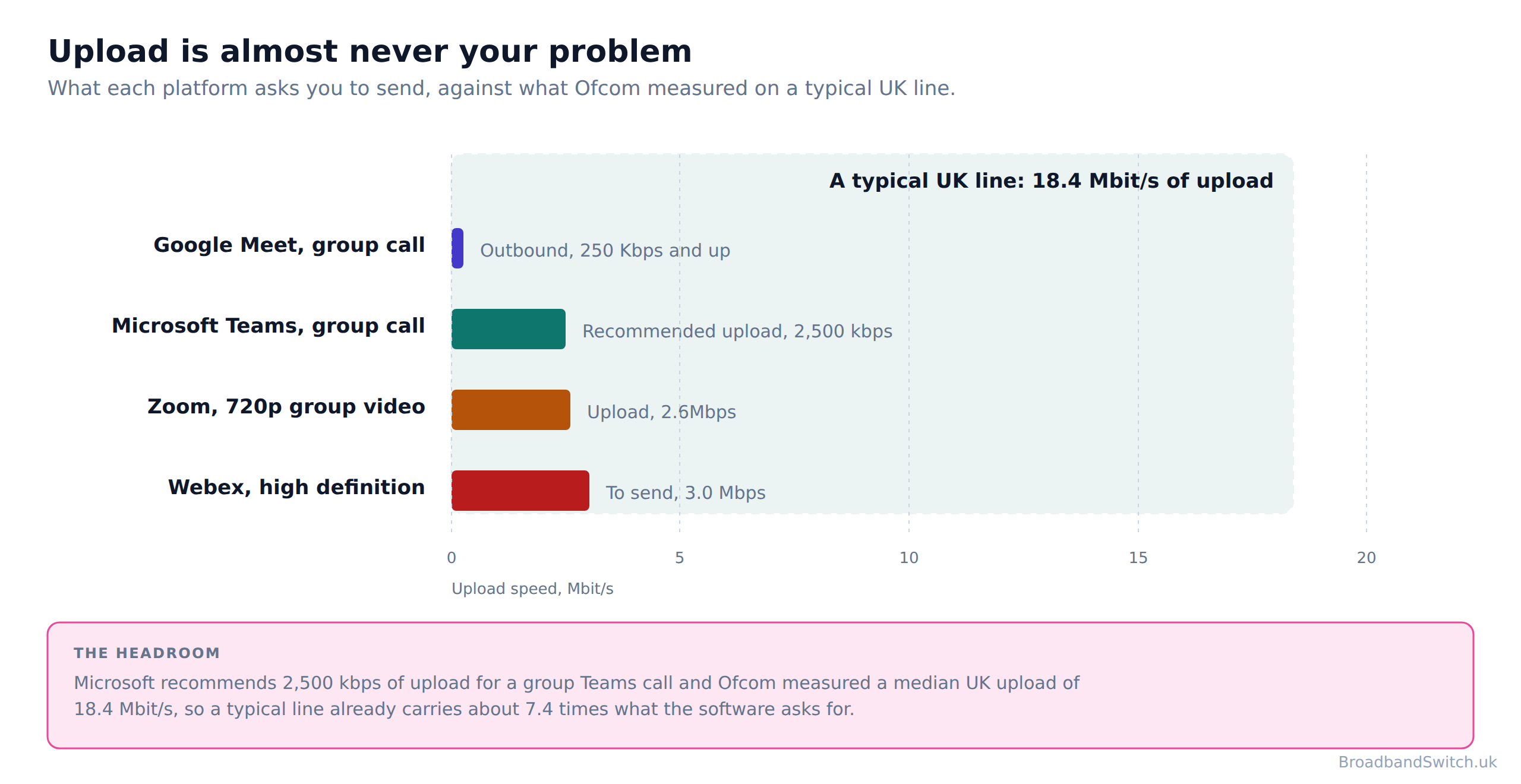
Every one of the four platforms most UK home workers use publishes what it needs, and the figures are public, dated and easy to check. Microsoft recommends 2,500 kbps of upload for video in meetings and 4,000 kbps down. Zoom asks 2.6Mbps for 720p group video. Google Meet's outbound figure for a group meeting is 250 Kbps and up. Cisco publishes 3.0 Mbps to send and 2.5 Mbps to receive for high definition video in Webex. Nothing on that list asks for more than about 3 Mbit/s in the direction people worry about.
| Platform and call type | What it asks for | What the figure actually is |
|---|---|---|
| Microsoft Teams, group call | 2,500 kbps up, 4,000 kbps down | Microsoft's recommended figures. Its published minimum for the same thing is 150 kbps up and 200 kbps down |
| Zoom, 720p group video | 2.6Mbps up and the same down | Zoom's own figures, in Zoom's own units. For 1080p group video it publishes 3.8Mbps |
| Google Meet, group meeting | Out: 250 Kbps and up. In: Up to 4.0 Mbps | Google's outbound figure is an open-ended floor rather than a recommendation |
| Cisco Webex, high definition | 3.0 Mbps to send and 2.5 Mbps to receive | Cisco labels these maximum consumption per video stream rather than a minimum |
One more of Microsoft's published figures is worth adding here, because it brackets the table. For a one-to-one video call it recommends 1,500 kbps of upload, less than for a group call. Two things in the table itself are worth a second look. The first is Microsoft's published minimum, which is 150 kbps up and 200 kbps down: an order of magnitude below the recommended figure, and far below what anybody would guess. The second is the top of Microsoft's own ladder. The rung it labels best performance is 4,000 kbps, so even Microsoft's idea of a generously provisioned Teams call is 4 Mbit/s each way.
Set that against the line. Ofcom's last measured median upload across all UK technologies was 18.4 Mbit/s, which is 7.4 times Microsoft's recommended figure and roughly seven times Zoom's. A household on a median line could run five simultaneous group Teams calls on the published numbers and still have upload left over.
The numbers that are genuinely large are download rather than upload, and they are for receiving other people rather than sending yourself. Zoom's largest published figures are for gallery view: 2.0Mbps for 25 views and 4.0Mbps for 49 views. Google's published inbound figure for a group meeting: Up to 4.0 Mbps. Those are the numbers that grow with the size of the meeting, and they are the direction every UK broadband package sells most of.
It is worth being clear about why those figures are so small, because the instinct is to assume the vendors are being optimistic. They are describing a continuous stream rather than a download. A video call sends a compressed picture of one person, adjusted continuously to whatever the connection is managing, and the amount of data that takes does not grow just because more capacity is available. A film downloads as fast as the line allows; a call sends what it needs and stops. That is why Microsoft's ladder tops out at 4,000 kbps rather than climbing with the package you bought.
Which also explains the shape of the problem people actually have. If a call needed a large and growing amount of bandwidth, a faster line would help and the standard advice would be right. Because it needs a small and steady amount, the thing that matters is whether the connection can deliver that small amount on time, every time, which is a question about steadiness rather than size. A line ten times faster is not ten times steadier, and in one case on this page it is measurably less steady.
Why the units are left alone in that table
Microsoft publishes kbps, Zoom writes Mbps with no space, Google writes Kbps with a capital K and Cisco writes Mbps with a space. Converting them all to one unit would tidy the table and quietly hide something useful: these are four companies describing the same job in four house styles, and one of them, Google's, is not a recommendation at all but an open-ended floor. Quoting each in its own units keeps that visible, and means any figure here can be found on the source page by searching for it.
Our guide to how much broadband speed your household really needs does the same arithmetic for the rest of the house, upload speed for security cameras and video doorbells covers the other thing competing for that upload, and broadband for music production and large uploads covers the one job where upload really is the headline number.
What actually breaks a call, in the vendors’ own words
Direct answer: Not one of the four numbers the vendors publish for what ruins a call is a speed. They are jitter, packet loss, round trip time and, in Cisco's case, whether you are on Wi-Fi.
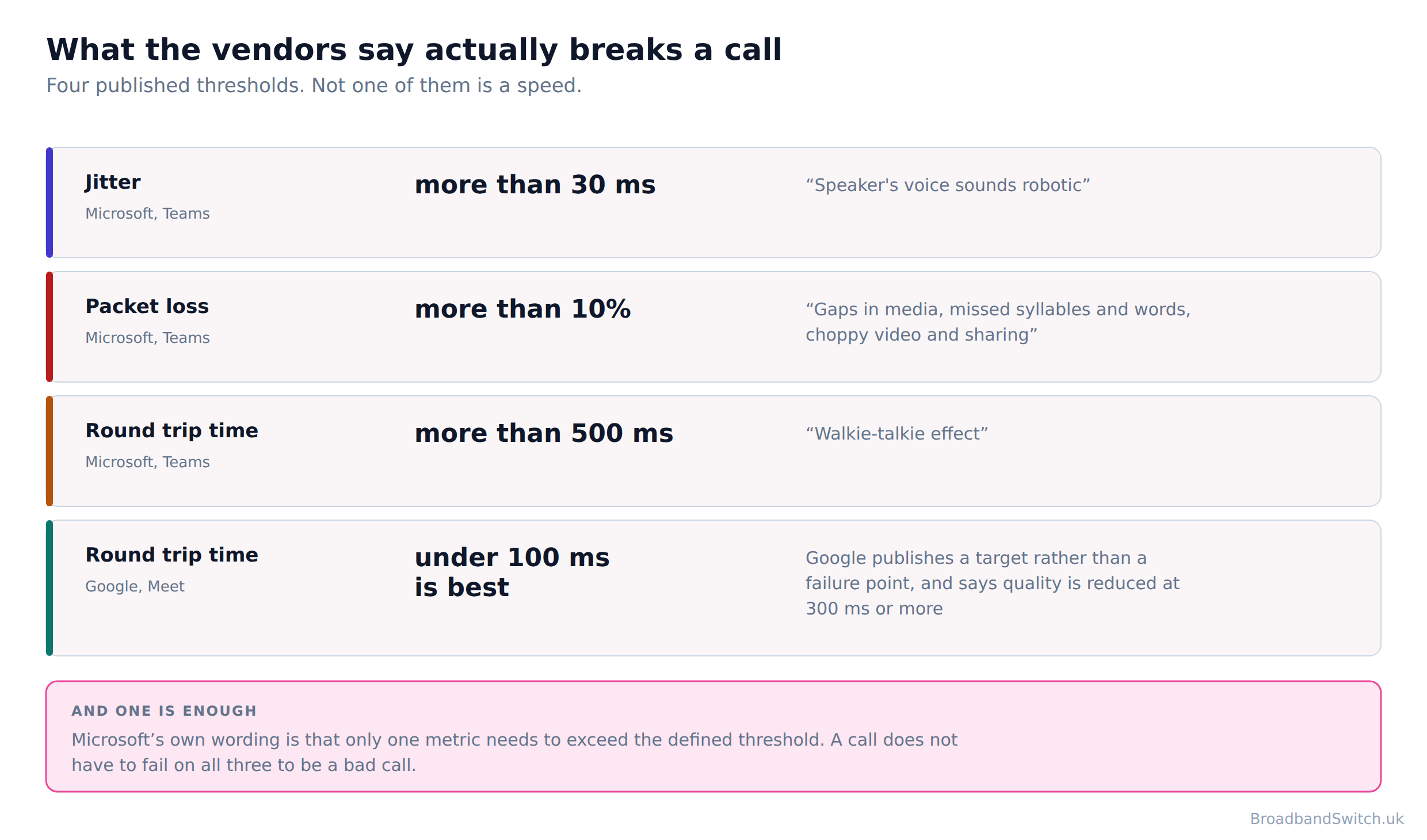
Microsoft is the most specific of the four, because it publishes the exact thresholds at which it grades one of its own streams poor and describes what each one sounds like at the other end. Jitter of more than 30 ms earns the description “Speaker's voice sounds robotic”, packet loss of more than 10% produces gaps in media, missed syllables and words and choppy video, and a round trip of more than 500 ms produces what Microsoft calls the walkie-talkie effect, where two people begin speaking at once because neither can hear the other start.
The sentence in Microsoft's guidance that matters most is the quiet one: only one metric needs to exceed the defined threshold. A call does not have to fail on all three counts to be a bad call. One is enough, which is why a household can have a fast line, a clean speed test and a meeting nobody enjoys.
Google publishes the same idea in round numbers rather than thresholds. “Video quality is highest when round-trip latency between the client and Google is lower than 100 ms.” And: “Meet media quality is reduced if latency is 300 ms or more.” Google also publishes a piece of advice that runs against the instinct to manage the problem: “You shouldn't use quality of service (QoS) for Google Meet in your network because Meet automatically adapts to network conditions.” So on Google's own account, the fix is not to prioritise the call but to give it a connection that does not need prioritising.
Cisco is the bluntest of the four, and its advice to people working at home is one sentence long: “If the user is on a wireless network, have them connect physically to their router.” That is a vendor with a support cost to reduce, telling residential users the single change that reduces it. It says nothing about buying a faster line.
The number that makes the case on its own
Microsoft sets itself twice the failure rate on 2.4 GHz Wi-Fi that it sets on a cable or on 5 GHz: 2.0% of audio streams poor against 1.0%. Microsoft is not guessing there: it is setting its own internal quality targets, and it writes itself twice the allowance for failure when the user is on the older Wi-Fi band. Its own guidance on the fix: “5 GHz provides less background interference and higher speeds, and should be prioritized when deploying VoIP over Wi-Fi.” If a company that runs the service accepts double the failure rate on 2.4 GHz, that is the strongest published evidence on this page that your Wi-Fi, not your line, is the thing between you and a good call.
Now put those four published thresholds next to what you can find out about a broadband package before you buy it. Providers publish a headline speed and, if they have signed Ofcom's speed code, a guaranteed minimum download speed: at least 50% of the advertised speed for the package that is being enquired about on full fibre, and on FTTC the 10th percentile of the ISP's similar customers, adjusted to account for the impact of congestion at peak time. Both are download figures. Not one UK broadband seller publishes a jitter figure, a packet loss figure or a latency commitment for a home line, and on the mobile side the position is starker still. None of the three publishes a latency figure, a guaranteed minimum speed, or anything at all about telecare and personal alarms.
So the three numbers that decide whether your working day goes well are published by the software companies and by nobody selling you the connection. That is the honest reason this page spends its length on things you can change at home: they are the only part of the chain where the evidence is public and the fix is in your hands.
This is why a speed test is such a poor guide here. A speed test measures how much data a single, short, greedy transfer can move. A video call is the opposite: a continuous trickle in both directions where the timing of each packet matters more than the total. A line can score beautifully on the first and be mediocre at the second, and nothing on a speed test result will tell you so.
Our explainer on latency, jitter and packet loss covers the three metrics properly, why broadband drops on video calls works through the usual causes in order, and what to know about internet speed tests covers what the test is and is not measuring.
Fix these, in this order
Direct answer: Three of the four things below cost nothing, and most households try them after signing a new contract rather than before.
Step one
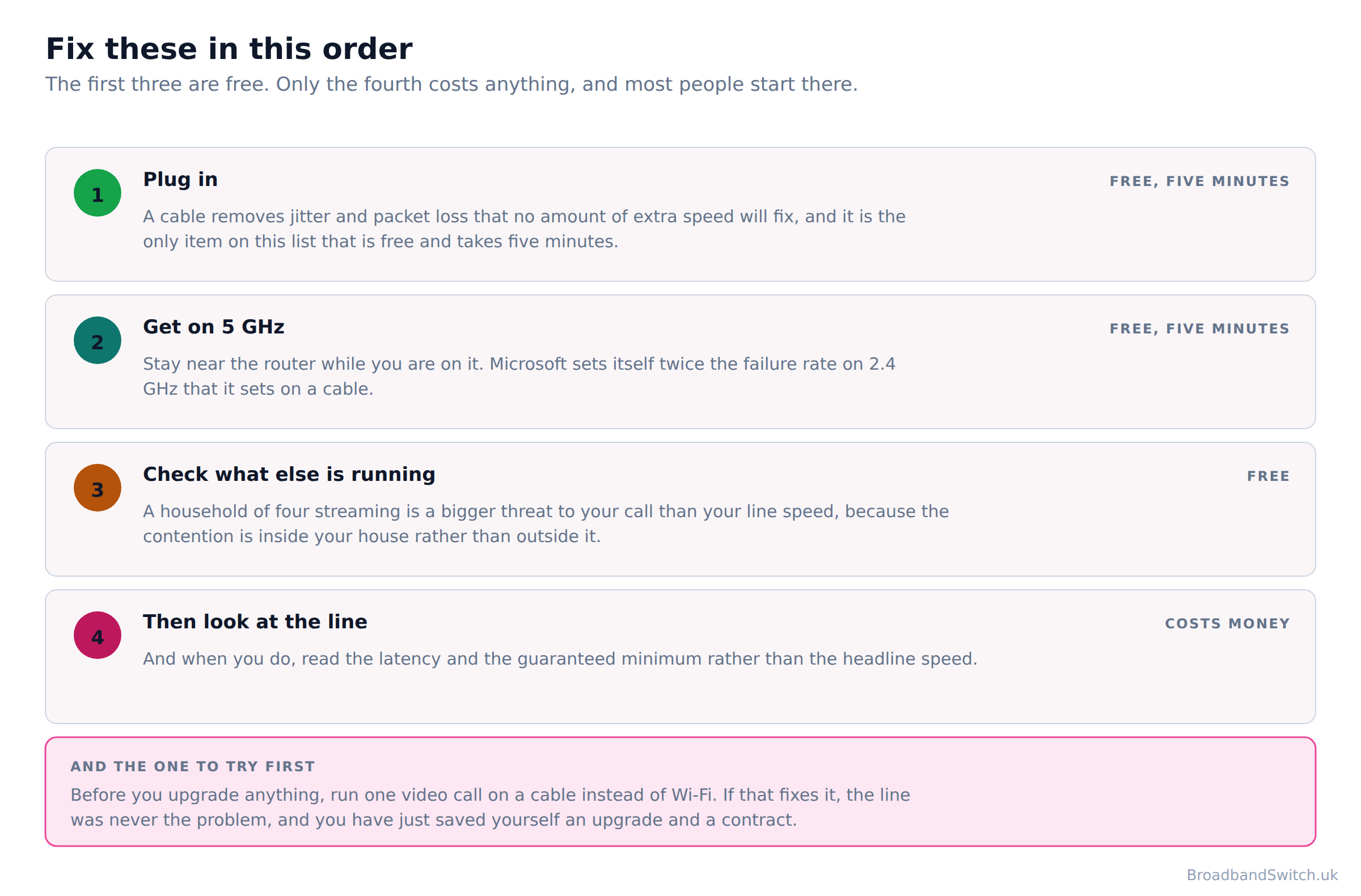
Plug in. A cable removes jitter and packet loss that no amount of extra speed will fix, and it is the only item on this list that is free and takes five minutes.
The evidence: Cisco's advice to residential users is this and nothing else, and Microsoft grades its own Wi-Fi streams against a weaker target than its wired ones.
Step two
If you cannot plug in, get on 5 GHz and stay near the router. Microsoft sets itself twice the failure rate on 2.4 GHz that it sets on a cable.
Microsoft's own words on the band: “5 GHz provides less background interference and higher speeds, and should be prioritized when deploying VoIP over Wi-Fi.” Moving the laptop nearer the router and off the crowded band is free and takes a minute.
Step three
Check what else is running. A household of four streaming is a bigger threat to your call than your line speed, because the contention is inside your house rather than outside it.
Ofcom measured average monthly use of 583 GB per connection, and on full fibre connections it measured more. That is being used by somebody, often at the same time as your call.
Step four
Only then look at the line, and look at latency and the guaranteed minimum rather than the headline speed.
And when you do, the number to ask for is the guaranteed minimum rather than the headline speed, because the headline is a maximum and the minimum is a commitment.
The order is the point. Each step is cheaper and faster than the one after it, and each one rules something out, so by the time you reach step four you are shopping with a diagnosis rather than a hunch. Run them the other way round, which is what most people do, and you sign a two-year contract to solve a problem a five-minute cable would have solved.
Step one deserves its own paragraph because it is so easy to skip. It is not a week of careful testing and it is not an experiment: it is one meeting, with the laptop plugged into the router instead of sitting on Wi-Fi. If the robotic voices and the frozen video stop, you have your answer and it cost you nothing. If they do not, you have ruled out the most common cause in a single call, and every decision after this one is better aimed for it.
Step three is the one people resist, because it feels like being told to stop using your own broadband. It is not: it is a test rather than a rule. Make one call at a genuinely quiet moment, early morning or when the house is empty, and compare it with a call at four in the afternoon. If the quiet call is clean and the busy one is not, the contention is inside your house, and a bigger package moves that problem rather than solving it, because the same devices will simply use more.
For step one, when to run an ethernet cable and ethernet cable categories explained cover what to buy and how long it can be. For step two, 5 GHz against 2.4 GHz and where to put your router are the two that matter most. For step three, do smart home devices slow down Wi-Fi and why is my broadband or Wi-Fi slow cover the usual suspects.
When a faster line genuinely is the answer
Direct answer: A faster package is the right answer when several people need the line at once, when you move large files rather than talk over them, or when you are on an old copper line where the upload really is in single figures.
This page argues against an upgrade for most households, so it owes you a clear account of the households it does not apply to, stated as plainly as the rest. There are three, and the first is the most common by a distance.
The first is an old copper line. On an old FTTC line the upload genuinely can be the problem: Openreach publishes up to 15Mbps and Ofcom measured 6 to 9 Mbit/s on the slower variants, which is where a group call and a file upload start to collide. At that level the arithmetic at the top of this page stops holding, the standard advice is correct, and the answer is to buy a faster line and a full fibre one if it can reach you. There is a second reason not to sit on that line: Buying a new FTTC line in 2026 is buying into a technology with a published end date and no published replacement date for the broadband half of it.
There is a floor worth knowing about underneath all of this, because a line can be legally adequate and still fall short of what a group call asks for. Ofcom's decent broadband floor is 1 Mbit/s of upload, which is less than half the 2,500 kbps Microsoft recommends for a group Teams call. The full definition is 10 Mbit/s download speed and 1 Mbit/s upload speed, and it was written as a universal minimum for the whole country rather than as a home working standard. It does that job well. It is just not a description of what a working day needs, and a household sitting at or near it belongs in the first group above.
The second is several people needing the line at once. Two group calls, a large sync and somebody streaming in 4K is a real load, and unlike the single-call case it grows with the household rather than with the software. This is the situation where a bigger package does something, because the constraint is genuinely the total rather than the timing.
The third is moving files rather than talking over them. If your work is video, design, photography, music or anything that ships a large file at the end of the day, upload is your headline number and you should shop for it directly. That is a different job from a video call and it deserves a different calculation.
And when you do go shopping, the useful question is not how fast. Before you sign anything, ask for the guaranteed minimum download speed in writing. If the seller cannot give you one, you have learned something more useful than any headline speed. On a video call the number that predicts your experience is latency rather than speed, and Ofcom's measured figures put full fibre at 4.9 to 7.3 ms, FTTC at 10.1 to 12.5 ms, cable at 12.5 to 14.8 ms and old ADSL at about 24 ms. Full fibre was the lowest, then FTTC, then cable, with old copper worst by a distance.
Peak-time steadiness matters too, and full fibre held 97.6% to 99.3% of its off-peak speed against cable's 94.2% to 97.9%. There is a caveat on all of this that belongs in the open. Nobody is measuring this any more, which is worth knowing before you trust any comparison of these four, including ours. Ofcom closed the programme. Its final report covered March 2023, so the most recent measured comparison of latency and upload speed by technology in this country is three and a half years old, and no regulator has published one since.
The gap in the evidence nobody mentions
The congestion figures everyone quotes are for 8pm to 10pm, which is not when you are working. Nobody publishes a measured peak-time figure for the middle of a weekday. Every congestion figure quoted in every comparison, including ours, describes the hours after your working day rather than during it. That is not a reason to distrust the figures, and it is a reason not to treat them as a measurement of your working week. This page would rather say so than quietly reuse an evening number as though it were a weekday one.
Our technology guide compares the four in full, the minimum guaranteed download speed explains the number to ask for, up to speed against guaranteed minimum covers the two figures you will be quoted, and best broadband for remote workers and home offices is the shopping list version of this section.
Home broadband or business broadband?
Direct answer: Usually not. It is worth it if a day of downtime costs you more than a day of your time, and if you will actually use the faster repair. It is not worth it for the badge.
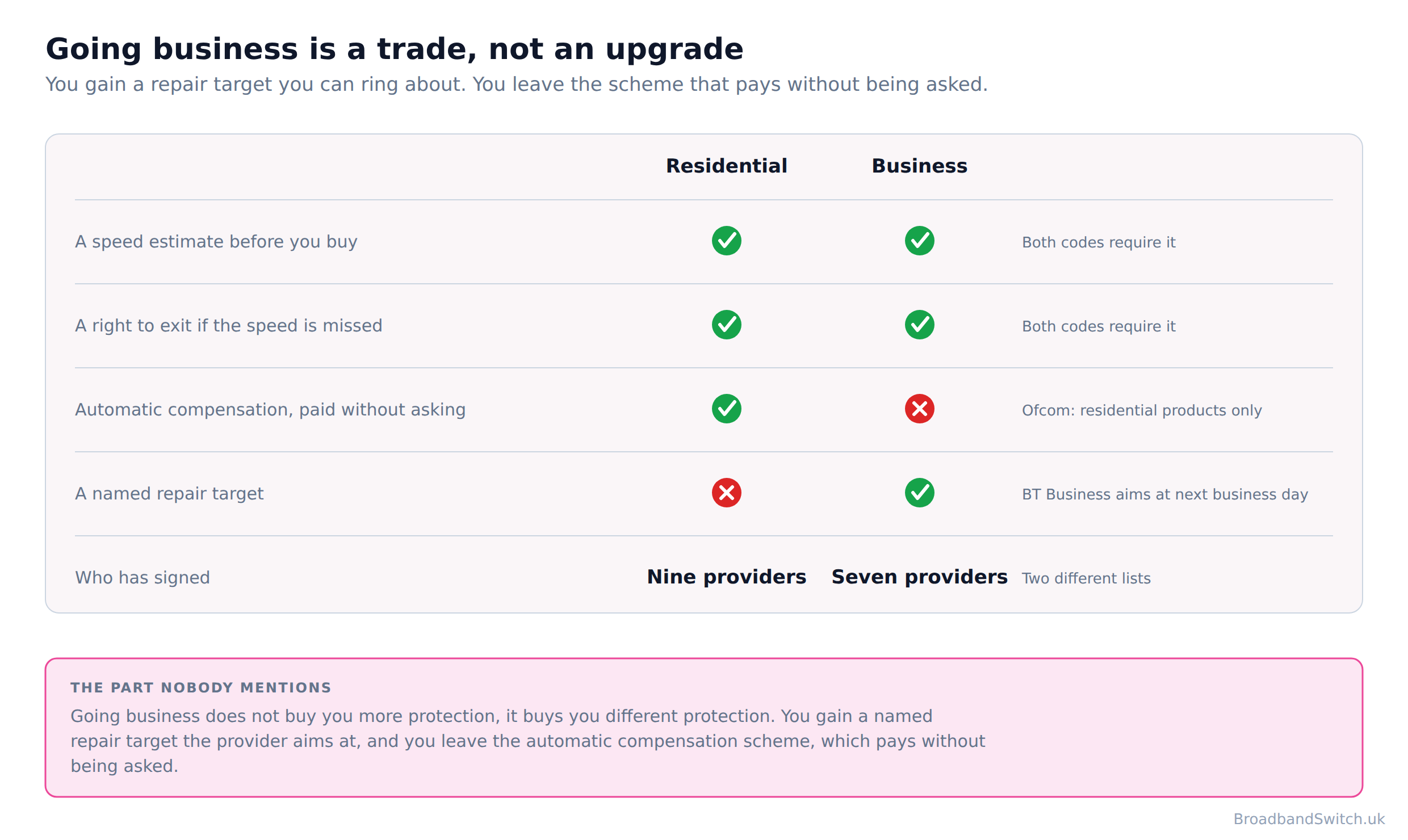
Most people assume a business tariff is the residential one with more protection bolted on. It is not, and the difference is visible in the scope wording of the scheme people usually have in mind. Ofcom's automatic compensation scheme says, in its own words: “This scheme covers all residential fixed broadband and landline products.” Residential. So moving your working line onto a business tariff moves it out of the scheme that pays you without being asked.
What you get instead is a named repair target, and it is worth reading the exact wording rather than the marketing around it. BT Business's service schedule says that “BT will aim to repair a Qualifying Incident before the end of the next Business Day”. Aim to is not a guarantee, and a target a provider aims at is a different kind of promise from a payment that lands on your bill whether or not you complained.
| What you are asking for | Residential broadband | Business broadband |
|---|---|---|
| Automatic compensation when it goes wrong | Yes, from a scheme signatory, paid without being asked | No. Ofcom's scheme is residential by its own scope |
| A published repair target | No named target. Repair happens when it happens | Yes. BT Business's wording is that it will aim to repair before the end of the next business day |
| A speed estimate before you buy, and an exit if it is missed | Yes, from a residential speed code signatory | Yes, from a business code signatory. The two lists are different lists |
| Who has signed the business code | Not applicable | BT Business, Daisy Communications, KCOM (Hull business), TalkTalk Business, Virgin Media, XLN and Zen |
| What you are actually buying | A scheme that pays out automatically when service fails | A faster promise to fix it, and the word aim is doing real work in that promise |
It helps to know what the residential scheme actually pays, because that is the thing being traded away and most people have never seen the figures. A signatory pays £10.34 for each full day the service is not fixed after two working days, £32.31 for a missed or cancelled engineer appointment, and £6.46 for each day an installation runs late. You do not have to claim. The payment appears as a credit on your bill within 30 days, and it is paid whether or not you asked for it. Its signatories are BT, EE, Hyperoptic, Plusnet, Sky including NOW Broadband, TalkTalk, Utility Warehouse, Virgin Media, Vodafone and Zen Internet.
There is a business code of practice and it is a real thing. Under the business code a signatory gives you a speed estimate before you buy and a right to exit without penalty if the speed falls below the guaranteed minimum, which is the same shape as the residential code. Its signatories are BT Business, Daisy Communications, KCOM (Hull business), TalkTalk Business, Virgin Media, XLN and Zen, which is a shorter list than the residential one and not the same list, so check the specific company rather than assuming the sector.
So the honest test is a simple one, and it is not about status. Going business does not buy you more protection, it buys you different protection. You gain a named repair target the provider aims at, and you leave the automatic compensation scheme, which pays without being asked. If a day without broadband costs you a day's income, a next-business-day target you can hold somebody to is worth paying for. If it costs you an awkward afternoon and a phone hotspot, the residential scheme that pays automatically is the better deal, and you keep it by doing nothing.
Our full comparison is home broadband against business broadband for working from home, broadband for a small business working from home covers the one-person-company case, compensation and service failure covers what the residential scheme pays, and small business broadband comparison tips covers the shopping.
Planning for the day it goes down
Direct answer: A second connection on a different network is the only home working fix that works when the first one is not working at all, and the cheapest version of it is already in your pocket.
Everything above this section is about a connection that works badly. This one is about the morning it does not work at all, which happens to every line eventually and tends to happen on a day with something in the diary. The useful thing about a backup is that it does not have to be good. It has to be different: a different network, reaching your house a different way, so that whatever took the first one out has not taken the second.
Your phone is the free version and it is better than most people expect. Microsoft's published minimum for video in meetings is 150 kbps up and 200 kbps down, which any usable mobile signal clears, and a tethered laptop on a call is a perfectly respectable fallback for a day. Test it before you need it, because the time to discover that tethering is off on your plan is not ten minutes before a client call.
A 4G or 5G home broadband router is the paid version, and it is genuinely good at this job. It installs in minutes, it needs no engineer and no cable, and it moves house with you. What it is not is a like-for-like replacement for a primary line, and the reason is published. None of the three publishes a latency figure, a guaranteed minimum speed, or anything at all about telecare and personal alarms. For a line you fall back to on the rare bad day, that matters far less than it would for the line your income sits on, which is exactly what makes it a good backup and a risky primary.
Two practical notes on the phone route, because it is the one most people will actually use. Data is the first: a video call is a continuous stream in both directions, and a day of meetings on a tethered phone will use a noticeable share of a monthly allowance, so it is worth knowing what your plan does when that allowance runs out rather than discovering it mid-meeting. Position is the second: a phone that is fine in your hand by the window can be poor on a desk in the middle of the house, and a tethered laptop cannot move the phone for you. Both are things to find out on a quiet Tuesday rather than on the morning it matters.
One thing to check before you rely on any of this: the fixed line's own switch-off timetable, because a copper line has a published end date. The old copper telephone network is being switched off, so landline calls move to a digital service that runs over your broadband connection. 31 January 2027 is the date, and if your broadband still runs over copper, the move is coming whether or not you plan for it. If you have a telecare alarm, a personal alarm or a lift line, tell your provider before any switch. Openreach can roll a line back to copper where a device will not work on digital, and there is a temporary voice service for homes where full fibre is not ready.
Our guides to 5G home broadband deals and 4G home broadband deals cover what is available, 4G against 5G broadband covers which to pick, a failover plan that actually works covers doing this properly, what to do during an outage covers the day itself and compensation after a storm covers what you are owed afterwards.
And if your working pattern is unusual, three of our guides cover the cases this page does not: broadband for shift workers and overnight households, UK broadband when working abroad temporarily and whether you can claim broadband as a working from home expense.
Broadband for home working at your postcode
See what your address can actually get
One postcode shows every provider we can switch you to, lowest price first, across full fibre, FTTC, cable and 5G home broadband. If you are on an old copper line, this is the page that tells you what you are missing.
Show every provider at my postcode →Broadband for working from home: frequently asked questions
What upload speed do I need to work from home?
Less than you think, and the vendors publish the numbers. Microsoft recommends 2,500 kbps of upload for a group Teams call and Ofcom measured a median UK upload of 18.4 Mbit/s, so a typical line already carries about 7.4 times what the software asks for. Zoom publishes 2.6Mbps for 720p group video, Webex 3.0 Mbps to send and 2.5 Mbps to receive for high definition, and Google Meet's outbound figure for a group meeting is 250 Kbps and up. Microsoft's own published minimum for video in meetings is 150 kbps up and 200 kbps down, which is lower again. So if your calls are poor and your upload is in double figures, the upload is not what is wrong.
Why are my video calls bad when my speed test is fine?
Because a speed test measures the wrong thing for a call. Not one of the four numbers the vendors publish for what ruins a call is a speed. They are jitter, packet loss, round trip time and, in Cisco's case, whether you are on Wi-Fi. Microsoft grades a Teams stream poor at more than 30 ms of jitter, describing the effect as “Speaker's voice sounds robotic”; at more than 10% packet loss, which it describes as gaps in media and missed words; and at more than 500 ms round trip, which it calls the walkie-talkie effect. Microsoft adds that only one metric needs to exceed the defined threshold, so a call does not have to fail on all three to be a bad call. A speed test will happily report a healthy number while all three are going wrong.
Should I use Wi-Fi or a cable for video calls?
A cable, and it is the strongest single piece of advice on this page. Cisco tells residential users plainly: “If the user is on a wireless network, have them connect physically to their router.” Microsoft goes further and writes its own quality targets differently by connection type. Microsoft sets itself twice the failure rate on 2.4 GHz Wi-Fi that it sets on a cable or on 5 GHz: 2.0% of audio streams poor against 1.0%. If you cannot run a cable, 5 GHz provides less background interference and higher speeds, and should be prioritized when deploying VoIP over Wi-Fi. Before you upgrade anything, run one video call on a cable instead of Wi-Fi. If that fixes it, the line was never the problem, and you have just saved yourself an upgrade and a contract.
Is 1 Mbit/s upload enough to work from home?
No, and it is worth knowing that a line delivering exactly that still counts as decent. Ofcom's decent broadband floor is 1 Mbit/s of upload, which is less than half the 2,500 kbps Microsoft recommends for a group Teams call. Ofcom's decent broadband definition is 10 Mbit/s download speed and 1 Mbit/s upload speed, which was written as a universal floor rather than as a home working standard. If your line is at or near that floor, you are one of the households where a faster package genuinely is the answer.
Do I need business broadband to work from home?
Usually not, and the comparison is not the one most people assume. Going business does not buy you more protection, it buys you different protection. You gain a named repair target the provider aims at, and you leave the automatic compensation scheme, which pays without being asked. Ofcom's automatic compensation scheme says in its own words: “This scheme covers all residential fixed broadband and landline products.” So a business tariff leaves it. What you get instead is a published repair target: BT Business's wording is that “BT will aim to repair a Qualifying Incident before the end of the next Business Day”, and aim to is doing a lot of work in that sentence. It is worth it if a day of downtime costs you more than a day of your time, and if you will actually use the faster repair. It is not worth it for the badge.
Does the whole household slow down my calls?
More often than the line does, and it is the fix people try last. Check what else is running. A household of four streaming is a bigger threat to your call than your line speed, because the contention is inside your house rather than outside it. The useful test is to make one call at a genuinely quiet moment and compare. If the call is fine at eight in the morning and poor at four in the afternoon when everyone is home, the contention is inside your house and a bigger package will move the problem rather than solve it.
What about peak-time congestion?
It is real, and it is measured at a time you are probably not working. The congestion figures everyone quotes are for 8pm to 10pm, which is not when you are working. Nobody publishes a measured peak-time figure for the middle of a weekday. Ofcom's peak-time window is its own definition and it is the evening, so the congestion figures quoted in most comparisons describe the hours after your working day rather than during it. That is a gap in the published evidence rather than a reassurance, and this page would rather say so.
Which technology is best for home working?
Full fibre, but for latency and steadiness rather than for speed. Our technology guide covers the four in detail; the short version for a home worker is that full fibre measured the lowest latency and the steadiest peak-time performance, and it has the most upload. The exception matters though. On an old FTTC line the upload genuinely can be the problem: Openreach publishes up to 15Mbps and Ofcom measured 6 to 9 Mbit/s on the slower variants, which is where a group call and a file upload start to collide.
Is 4G or 5G home broadband good enough for work?
As a backup, yes. As the line your income depends on, read what you give up first. It installs in minutes and moves with you, which makes it an excellent second line. But none of the three UK sellers publishes a latency figure or a guaranteed minimum speed, and Ofcom's automatic compensation scheme covers fixed products, so a wireless line sits outside it. For a backup that matters much less than for a primary connection, which is exactly why it is a good backup.
Can I claim my broadband as a working from home expense?
Sometimes, and the rules are narrower than people hope. It depends on whether you are employed or self-employed, whether your employer requires you to work from home, and whether the line would have existed anyway. We have a separate guide on it, and the general shape is that a proportion of a line you would have had regardless is harder to claim than a second line you installed purely for work.
In short
- Home working does not need a faster connection so much as a steadier one, and the three things that make it steadier are mostly free.
- Microsoft recommends 2,500 kbps of upload for a group Teams call and Ofcom measured a median UK upload of 18.4 Mbit/s, so a typical line already carries about 7.4 times what the software asks for.
- Zoom asks 2.6Mbps for 720p group video, Webex 3.0 Mbps to send and 2.5 Mbps to receive, and Google Meet's group outbound figure is 250 Kbps and up.
- Microsoft's own published minimum for video in meetings is 150 kbps up and 200 kbps down, and the top of its ladder is 4,000 kbps.
- Not one of the four numbers the vendors publish for what ruins a call is a speed. They are jitter, packet loss, round trip time and, in Cisco's case, whether you are on Wi-Fi.
- Microsoft grades a stream poor at more than 30 ms of jitter, more than 10% packet loss or more than 500 ms round trip, and only one metric needs to exceed the defined threshold.
- Google: “Video quality is highest when round-trip latency between the client and Google is lower than 100 ms.” And: “Meet media quality is reduced if latency is 300 ms or more.”
- Cisco to home users: “If the user is on a wireless network, have them connect physically to their router.”
- Microsoft sets itself twice the failure rate on 2.4 GHz Wi-Fi that it sets on a cable or on 5 GHz: 2.0% of audio streams poor against 1.0%.
- Ofcom's decent broadband floor is 1 Mbit/s of upload, which is less than half the 2,500 kbps Microsoft recommends for a group Teams call.
- On an old FTTC line the upload genuinely can be the problem: Openreach publishes up to 15Mbps and Ofcom measured 6 to 9 Mbit/s on the slower variants, which is where a group call and a file upload start to collide.
- Going business does not buy you more protection, it buys you different protection. You gain a named repair target the provider aims at, and you leave the automatic compensation scheme, which pays without being asked.
- The congestion figures everyone quotes are for 8pm to 10pm, which is not when you are working. Nobody publishes a measured peak-time figure for the middle of a weekday.
- A faster package is the right answer when several people need the line at once, when you move large files rather than talk over them, or when you are on an old copper line where the upload really is in single figures.
- Before you upgrade anything, run one video call on a cable instead of Wi-Fi. If that fixes it, the line was never the problem, and you have just saved yourself an upgrade and a contract.
Each line stands on its own and carries its date. Reviewed by a person at least quarterly, last on 21 September 2026.
References
- Microsoft
Microsoft. (2026, July 9). Prepare your organization’s network for Microsoft Teams, the published minimum, recommended and best-performance bandwidth for calls and meetings. learn.microsoft.com
- Microsoft
Microsoft. (2026, June 16). Use CQD to manage call and meeting quality in Microsoft Teams, the jitter, packet loss and round-trip thresholds at which a stream is graded poor, and what each one sounds like. learn.microsoft.com
- Zoom
Zoom. (2026). System requirements, the published bandwidth figures by video quality tier. The page carries no last-updated date. support.zoom.com
- Google
Google. (2026, July 29). Troubleshoot Meet network, audio and video issues, the 100 ms and 300 ms round-trip latency figures. knowledge.workspace.google.com
- Google
Google. (2026). Prepare your network for Meet meetings and live streams, the per-participant bandwidth tables. The page carries no last-updated date. knowledge.workspace.google.com
- Cisco
Cisco. (2026, March 30). Bandwidth requirements for sending and receiving video in Webex Meetings, the per-stream figures for high definition, high quality and standard video. help.webex.com
- Cisco
Cisco. (2021, March 10). How do I troubleshoot latency for residential users?, the advice to connect physically to the router. help.webex.com
- Ofcom
Ofcom. (2023, September). UK Home Broadband Performance, March 2023, the median measured upload speed and the latency figures by technology. ofcom.org.uk
- Ofcom
Ofcom. (2025, November 19). Connected Nations 2025, the definition of decent broadband and average monthly data use. ofcom.org.uk
- Ofcom
Ofcom. (2026). Automatic compensation: what you need to know, the scope wording limiting the scheme to residential products, and the published rates. ofcom.org.uk
- Ofcom
Ofcom. (2016). Business Broadband Code of Practice, what a signatory commits to and the list of signatories. ofcom.org.uk
- BT Business
BT Business. (2026, May 8). Business Broadband Essential, Enhanced and Pro service schedule, the Standard, Prompt and Critical Care repair targets. business.bt.com
- ONS
Office for National Statistics. (2025, June 11). Who has access to hybrid work in Great Britain?, the hybrid working figure for January to March 2025. ons.gov.uk
- BroadbandSwitch.uk
BroadbandSwitch.uk. (2026). Broadband deals, checked by hand, our own hand-checked prices and the date each was verified. broadbandswitch.uk
Ready to see what your postcode can get?
Run one call on a cable first. If that fixes it, you have saved yourself a contract. If it does not, one postcode shows every provider that can reach you, lowest price first, and you can go shopping with a much better question than how fast is it.
Compare at your postcode →