WI-FI GUIDE · COVERAGE · MESH
Weak Wi-Fi: Mesh vs Extenders, and the Garden Office
Mesh or a Wi-Fi extender? How to fix a weak signal in a far room, upstairs or a garden office, what each option really costs in 2026, what the big providers' Wi-Fi guarantees actually cover, and why a humble cable beats every wireless fix down the garden.
Written by Dr Alex J. Martin-Smith · Reviewed by Adrian James · Published 11 June 2026 · Prices and provider terms verified June 2026 · ~9 minute read
Prefer to read offline? Download the free PDF guide: Weak Wi-Fi, Mesh vs Extenders (6 pages, ~280KB). No signup, no email, just the guide.
The quick answer
For a single stubborn dead spot on a budget, an extender is a fair fix, but a single-radio model can halve your speed. For whole-home coverage, choose mesh, which keeps roughly 90% with tri-band or wired backhaul. And for a garden office, the gold standard is not wireless at all: run an outdoor-grade Cat6 cable and feed an access point at the far end.
Key facts · verified June 2026
- Wi-Fi is radio, so it weakens with distance and walls: 2.4GHz reaches furthest, 5GHz is faster but shorter, 6GHz fastest but shortest of all.
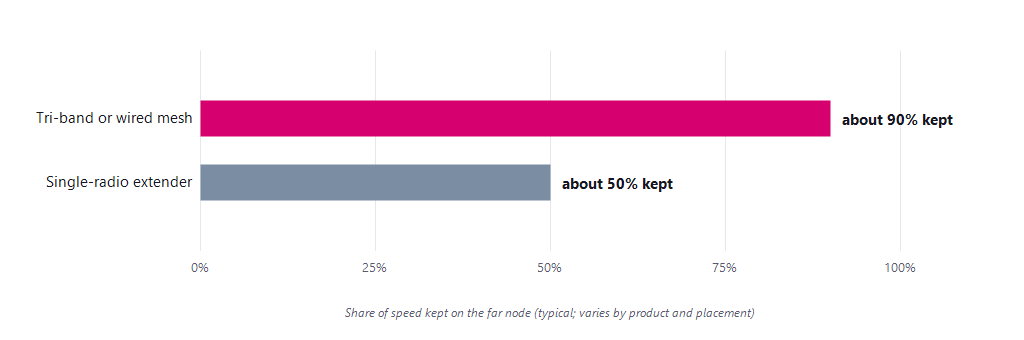
- A single-radio extender loses around half your speed, because it must receive and re-transmit on the same radio; a tri-band or wired-backhaul mesh keeps roughly 90%.
- Concrete, metal and foil-backed insulation block Wi-Fi worst, which is why a modern garden room can be a near-sealed box for signal.
- A typical home router reaches usefully around 20 to 30 metres outdoors before walls cut it down.
- Every major ISP Wi-Fi guarantee covers the main house only: gardens, sheds and outbuildings are explicitly excluded.
Why Wi-Fi fades with distance
Wi-Fi is radio, and it weakens with distance and through walls. The faster bands carry less far: 2.4GHz reaches furthest, 5GHz is faster but shorter range, and 6GHz is faster still but shortest of all. A garden office is hard because it stacks distance on top of two external walls. That speed-versus-range trade-off is the key to every decision in this guide: a far room sits where the fast bands no longer reach well, so the fix is either to carry the signal closer or to wire past the problem entirely.
| Material | Effect on signal |
|---|---|
| Plasterboard, wood, glass | Low; signal passes fairly easily |
| Brick and stone | Moderate; noticeable drop per wall |
| Concrete and metal | Severe; includes foil-backed insulation |
| Water and people | Moderate; a full room absorbs signal |
Foil-backed insulation and metal-coated energy-efficient glass are common surprises, since they can turn a modern garden room into a near-sealed box for Wi-Fi. A typical home router only reaches usefully around 20 to 30 metres outdoors before walls cut it down.
Try this first, for free: before buying anything, move your router into the open, up high and central, away from cupboards, thick walls and metal. Placement alone often recovers a weak room, and it costs nothing. And before blaming coverage at all, confirm the line itself is delivering with the wired test in our companion guide: why are my speeds lower than advertised?
Mesh versus extenders: the real gap
The two common fixes work very differently. An extender rebroadcasts your existing signal; a mesh replaces your Wi-Fi with a team of nodes acting as one network. The performance gap is large.
| Feature | Range extender | Mesh system |
|---|---|---|
| Network name | Often a second one | One, seamless |
| Moving around | May need reconnecting | Roams automatically |
| Speed on the far end | Can halve | Mostly kept |
| Best for | One stubborn dead spot | Whole-home coverage |
| Cost | Low | Higher |
The simple rule: for a single dead spot on a budget, an extender is a fair fix. For whole-home coverage, seamless roaming or a fast line you do not want to throttle, choose mesh, and if you can run a network cable between the nodes, that wired backhaul gives you the best speed of all.
Getting Wi-Fi down the garden
The gold standard: for a garden office, the best answer is almost always to run a network cable. An outdoor-grade Cat6 ethernet cable from your router to an access point or mesh node in the office gives full speed and rock-solid reliability that no wireless option down the garden can match. Wireless options struggle because the signal must cross your home's external wall, the open ground, and the office's own wall; wiring sidesteps all three. The realistic options, best first:
- A wired ethernet run (best). Outdoor or armoured Cat6, up to 100 metres, ideally buried in protective conduit and laid at the same time as the power cable. Feed an access point or mesh node at the far end.
- An outdoor access point. A weatherproof unit mounted outside, wired back to the router, designed to throw a strong signal across the garden.
- A point-to-point Wi-Fi link. A pair of units with clear line of sight between house and office; unlike an extender, it does not halve your speed.
- Powerline, or mobile. Powerline adapters can work if the office shares the house wiring; a 4G or 5G router is a good backup where wiring is impractical.
Do not rely on your ISP's Wi-Fi guarantee here: every major ISP whole-home Wi-Fi guarantee covers the main house only. Gardens, sheds and outbuildings are explicitly excluded, so a garden office is on you to wire or cover with your own outdoor kit.
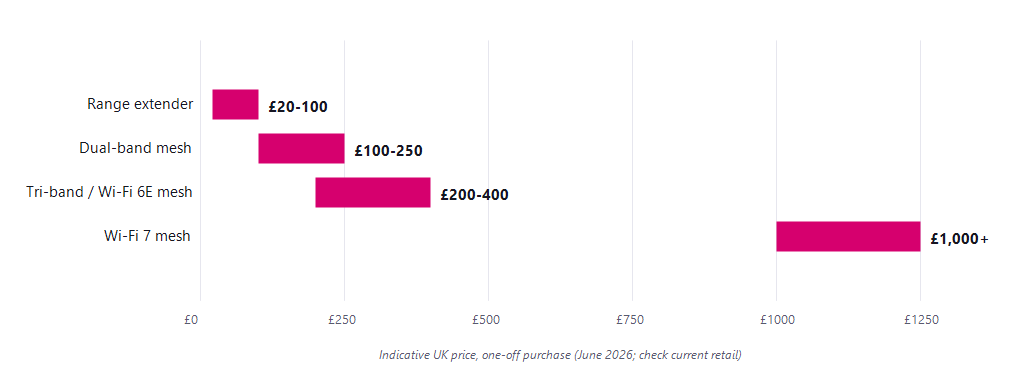
What to buy, and what it costs
You can rent whole-home Wi-Fi from your provider or buy your own. Provider kit is cheap or included on top tiers and is fine for the main house; buying your own gives the best performance and no monthly fee. Whether to use the router your ISP sent at all is its own question, covered at broadband routers and using your own router.
| Provider | Whole-home Wi-Fi | Guarantee |
|---|---|---|
| Virgin Media | WiFi Max, up to 3 pods | 30 Mbps per room or £100 credit |
| BT | Complete Wi-Fi, up to 3 discs | Signal in every room or £100 back |
| Sky | WiFi Max, up to 3 pods | Guaranteed speed per room or money back |
All three guarantees cover the main home only, not gardens or outbuildings. Prices and exact terms vary by tier and change often, so check the provider before signing up.
Once coverage is sorted, the next upgrade question is standards: Wi-Fi 6 vs 6E vs 7: should you upgrade?
Questions people ask
Is mesh Wi-Fi better than an extender?
For whole-home coverage, yes, by a wide margin: a tri-band or wired-backhaul mesh keeps roughly 90% of your speed on the far node and roams seamlessly, while a single-radio extender can lose around half your speed and often creates a second network name. For one stubborn dead spot on a budget, an extender remains a fair fix.
Why does a Wi-Fi extender halve my speed?
A single-radio extender must receive your router's signal and re-transmit it on the same radio, so every packet is handled twice on the same channel, costing around half the throughput. Tri-band mesh systems avoid this with a dedicated backhaul band, and a wired backhaul avoids it entirely.
What is the best way to get Wi-Fi in a garden office?
Run an outdoor-grade Cat6 ethernet cable from the router to an access point or mesh node in the office, ideally buried in conduit alongside the power cable. It delivers full speed and reliability that no wireless option crossing two external walls and open ground can match; a point-to-point wireless link is the best non-wired alternative.
Do ISP Wi-Fi guarantees cover garden offices?
No. The whole-home Wi-Fi guarantees from Virgin Media, BT and Sky cover the main house only, with gardens, sheds and outbuildings explicitly excluded, so a garden office needs your own wired run or outdoor kit.
How far does home Wi-Fi reach outside?
A typical home router reaches usefully around 20 to 30 metres outdoors before walls and obstructions cut it down, and the signal must first escape your home's external wall. Modern garden rooms with foil-backed insulation or metal-coated glass can block what remains almost entirely.
About this guide
This guide is part of the BroadbandSwitch.uk 2026 Guide Library, published by BroadbandSwitch.uk, the consumer arm of the SearchSwitchSave network. Our approach to evidence and corrections is documented in the methodology and trust hub, and every published correction appears in the corrections log.
Take it with you: download the free 6-page PDF guide, including the comparison tables, price ranges and full sources.
Citing this guide: BroadbandSwitch.uk. (2026, June 11). Weak Wi-Fi: Mesh vs extenders, and the garden office. SearchSwitchSave. https://broadbandswitch.uk/guides/mesh-vs-extenders/
Sources
- BT. (2026). What is Complete Wi-Fi? https://www.bt.com/help/bt-halo/what-is-complete-wi-fi-
- Sky. (2026). WiFi Max and the WiFi guarantee. https://www.sky.com/help/articles/wifi-guarantee
- Virgin Media. (2026). How to order WiFi Pods for your home. https://www.virginmedia.com/help/how-to/broadband/order-wifi-pods
- Wi-Fi Alliance. (2019, September 16). Wi-Fi CERTIFIED 6 delivers new Wi-Fi era. https://www.wi-fi.org/news-events/newsroom/wi-fi-certified-6-delivers-new-wi-fi-era
- Wi-Fi Alliance. (2021, January 7). Wi-Fi Alliance delivers Wi-Fi 6E certification program. https://www.wi-fi.org/news-events/newsroom/wi-fi-alliance-delivers-wi-fi-6e-certification-program
- Wi-Fi Alliance. (2024, January 8). Wi-Fi Alliance introduces Wi-Fi CERTIFIED 7. https://www.wi-fi.org/news-events/newsroom/wi-fi-alliance-introduces-wi-fi-certified-7
- IEEE 802.11 Working Group. (2025). IEEE Std 802.11be-2024. https://www.ieee802.org/11/
This guide is general consumer information. Speed-kept figures are typical and vary by product and placement; prices are indicative June 2026 retail and move quickly; provider Wi-Fi terms are the providers' own published figures and change over time.