Router login UK: find your login address, password and settings
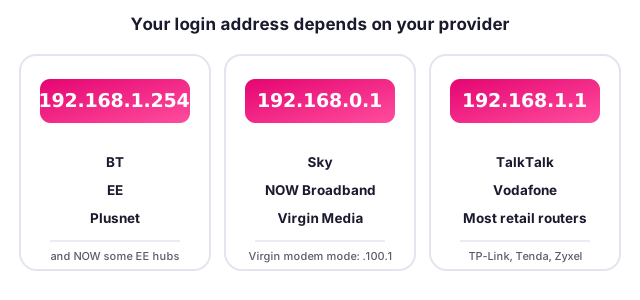
To log in to almost any UK router, type its gateway address into your web browser while connected to it: 192.168.1.254 for BT, EE and Plusnet; 192.168.0.1 for Sky, NOW and Virgin Media; and 192.168.1.1 for TalkTalk, Vodafone and most retail routers. Search your exact model below to get the precise login address, the default password rule, the light meanings and a safe reset guide.
Search for your router or hub
Type your ISP, brand or exact model (for example "Sky Broadband Hub", "BT Smart Hub 2" or "192.168.0.1").
Log in to your broadband provider's hub







Log in to a shop-bought router






What this router hub covers
Whether you need to change your Wi-Fi password, stop your connection dropping, understand a flashing light or set up your own router, start here. Every login address and firmware detail comes from our UK router directory of more than 240 models, and every entry carries a confidence rating so you know how firmly it is sourced.

Common router problems and how to fix them
The quickest fixes for the router faults UK broadband users hit most. Each fix lists the symptom, the likely cause and the steps to try, with our confidence rating.
WiFi keeps dropping / intermittent
Symptom: Wi-Fi drops randomly, devices reconnect, lag spikes
Likely causes: 2.4GHz/5GHz interference, channel congestion, DFS radar events on 5GHz, firmware bugs, overheating, band steering
How to fix: 1) Update firmware. 2) Change Wi-Fi channel (1/6/11 on 2.4GHz). 3) Split 2.4/5GHz SSIDs to stop steering flip-flop. 4) Move router away from other electronics. 5) Disable band steering. 6) Test wired to isolate Wi-Fi
Most affected: ASUS RT-AC86U (reported instability), any dual-band hub with aggressive band steering. Source: Manufacturer support + ISPreview/community. Medium
Latency spikes on Virgin Hub 3
Symptom: Ping spikes of 200 ms+ and packet loss, worse when gaming
Likely causes: Intel Puma 6 chipset flaw; per ISPreview and Intel advisory INTEL-SA-00097 (CVE-2017-5693); the modem CPU caused momentary latency spikes (increases of 200 milliseconds+) plus a little packet loss
How to fix: 1) Wire in via Ethernet. 2) Apply firmware (partial fix v9.1.116.603/.608 offloaded ICMP). 3) Put hub in modem mode and run own router with SQM/Cake for bufferbloat. 4) If critical, consider Openreach-based ISP
Most affected: Virgin Media Hub 3.0 (ARRIS TG2492S/CE). Source: ISPreview (2018 articles), Intel INTEL-SA-00097. High
Slow speeds vs paid-for
Symptom: Real speed well below advertised
Likely causes: Wi-Fi vs wired, distance/walls, old Wi-Fi standard, contention, wiring/microfilter faults, poor hub placement
How to fix: 1) Speed test wired at the master socket. 2) Compare wired vs Wi-Fi. 3) Check microfilter (FTTC) or ONT (FTTP). 4) Confirm FTTC vs FTTP tier. 5) Reposition or add mesh
Most affected: EE/BT Smart Hub (placement), all FTTC. Source: thinkbroadband / Ofcom / ISP support. High
No internet / no DSL sync
Symptom: Hub can't connect, DSL/broadband light not steady
Likely causes: Line fault, wrong PPPoE/PPPoA credentials, Openreach issue, ONT light out on FTTP
How to fix: 1) Check ONT/hub lights. 2) Reboot sequence: ONT then router. 3) Verify credentials/VLAN. 4) Wait for DLM to stabilise. 5) Report line fault
Most affected: All hubs; FTTP where ONT light is out. Source: ISP support + thinkbroadband. Medium
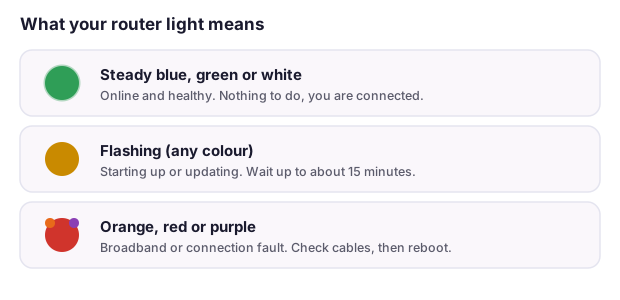
Router light meanings (BT)
Symptom: Colour/blink not solid blue
Likely causes: Various per colour
How to fix: Blue: connected/OK. Flashing orange: connecting (wait up to about 10 minutes). Solid orange: hub OK but no broadband. Flashing purple: broadband cable not connected/not online. Red: fault, restart then contact BT. Flashing blue: WPS pairing
Most affected: BT Smart Hub / Smart Hub 2. Source: BT Help (bt.com). High
Router light meanings (Virgin)
Symptom: Hub light not white/steady
Likely causes: Various
How to fix: Solid white/green good; flashing indicates connecting; red indicates fault; check base guide. Use 192.168.0.1 (or 192.168.100.1 in modem mode) to view status
Most affected: Virgin Media Hub 3/4/5. Source: Virgin Media Help. Medium
Forgotten admin/WiFi password / factory reset
Symptom: Locked out of settings or Wi-Fi
Likely causes: Password changed and lost
How to fix: 1) The 30-30-30 reset is a myth on modern units. 2) Use the pinhole Reset (hold about 10 seconds). 3) Reset wipes custom settings. 4) ISP hubs usually re-pull config; label credentials return
Most affected: All brands; ISP hubs re-provision automatically. Source: Manufacturer support (TP-Link/Netgear/BT). High
WiFi not reaching upstairs / dead zones
Symptom: Weak or no signal in parts of home
Likely causes: Distance, thick walls, single-point Wi-Fi
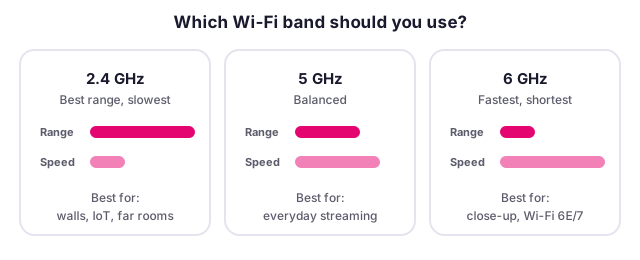
How to fix: 1) Reposition router centrally/high. 2) Add mesh nodes. 3) Use powerline or an extender. 4) Prefer 2.4GHz for range, 5GHz for speed. 5) Adjust channel width
Most affected: All single-hub setups. Source: Manufacturer + ISP guides. High
Disconnections after firmware/ISP update
Symptom: New drops right after an update
Likely causes: Firmware regression
How to fix: 1) Reboot. 2) Check vendor/ISP forum for known regression. 3) Roll back if possible (rarely possible on ISP hubs). 4) Report to ISP
Most affected: ISP hubs (no user rollback), some retail routers. Source: ISPreview/community. Medium
Overheating and placement
Symptom: Hub hot, drops when warm
Likely causes: Poor ventilation, enclosed/stacked, sunlight
How to fix: 1) Place upright in open air. 2) Keep clear of other electronics and heat. 3) Do not stack. 4) Replace if failing
Most affected: All routers. Source: Manufacturer guidance. Medium
2.4 vs 5 vs 6GHz and splitting SSIDs
Symptom: Devices pick wrong band, speed/range trade-off
Likely causes: Band steering, mixed device support
How to fix: Use 2.4GHz for range/IoT, 5GHz for speed, 6GHz (Wi-Fi 6E/7) for close-range high throughput. Split SSIDs when steering misbehaves or for fussy smart-home kit
Most affected: All dual/tri-band. Source: Manufacturer guidance. Medium
Bufferbloat / high ping for gaming
Symptom: High latency under load despite fast line
Likely causes: Buffer bloat, no smart queue management
How to fix: 1) Enable SQM/QoS (fq_codel/Cake). 2) Use a gaming router (DumaOS on Netduma/Netgear XR series). 3) Wire the console. 4) On Virgin, run own router in modem mode with SQM
Most affected: Virgin Hub 3, any hub without SQM. Source: Community (SNBForums/Overclockers) + vendor. Medium
Digital Voice / phone dead after PSTN migration
Symptom: Landline no dial tone after switch
Likely causes: Phone must plug into the green phone port on the hub, not the wall socket; no power-cut backup
How to fix: 1) Plug handset into the hub's green telephone port. 2) Request a battery backup unit if you rely on the line or have no mobile signal (Ofcom General Condition A3 requires a minimum of one hour of access to emergency organisations in a power cut for landline-dependent customers). 3) Flag telecare/alarms to your provider before migration. The national PSTN switch-off deadline is 31 January 2027
Most affected: BT Digital Voice, Sky, Virgin, TalkTalk, Vodafone, EE, Plusnet. Source: Which? / thinkbroadband / Ofcom GC A3 / House of Commons Library CBP-9471. High
Bridge mode, static IP, CGNAT and IPv6 by provider
Planning to run your own router, host a game server or reach a home camera from outside? These are the advanced networking capabilities of the major UK providers. See each provider guide for the exact method.
| Provider | Own router | Bridge / modem mode | Static IP | CGNAT | IPv6 |
|---|---|---|---|---|---|
| BT | FTTP: plug own router into ONT, PPPoE, password can be blank... | No true bridge on residential | Business only (residential dynamic) | No CGNAT | Yes (dual stack) |
| EE | Similar to BT (EE on BT network) | No true bridge | Business only | No CGNAT | Yes |
| Sky | Own router needs DHCP option 61 (MER), e.g. mac@skydsl|passw... | Historically locked; no simple bridge | Not on residential | No CGNAT | Yes (rolled out) |
| Virgin Media | Enable modem mode, connect own router to LAN1 | Yes, modem mode (login moves to 192.168.100.1) | Paid/static changes reported; largely dynamic | No CGNAT on fixed | No/partial (long-delayed) |
| TalkTalk | Residential uses DHCP (own router must use DHCP); business u... | Limited | Business only | No CGNAT on consumer | No (not enabled) |
| Vodafone | Own router supported; PPPoE creds on request (x@broadband.vo... | No bridge/modem mode | Free static on request (consumer and business) | No CGNAT on fixed (mobile only) | Yes (dual stack; 76% of subscribers by Dec 2024, target 100% by 31 Mar 2025; static /56 prefixes) |
| Plusnet | Bridge Hub Two, PPPoE @plusdsl.net on own router; FTTP direc... | Yes, bridge mode (pink light) | Available (High Touch) | No CGNAT | Trial only (April 2025 High Touch trial) |
| NOW Broadband | Runs on Sky network; own router needs MER/DHCP option 61, no... | Not supported | No | No CGNAT | Follows Sky (partial) |
Router login and settings: FAQs
How do I find my router's login IP address?
Most UK routers use 192.168.1.1, 192.168.0.1 or 192.168.1.254. BT, EE and Plusnet use 192.168.1.254; Sky, NOW and Virgin Media use 192.168.0.1; TalkTalk, Vodafone and most retail routers use 192.168.1.1. If none open, find the exact address on the label on the base of your router.
What is the default username and password for my router?
It varies by brand. Legacy kit often used admin and admin, or admin and password, but under the UK PSTI Act, in force since 29 April 2024, universal default passwords are banned on new kit, so most modern routers ship with a unique password printed on a label. Always change any default.
Why won't my router login page open?
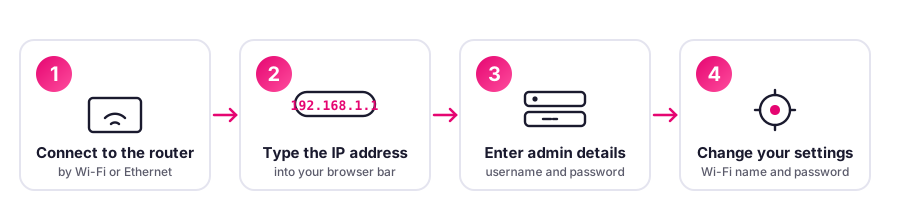
Make sure you are connected to the router by Wi-Fi or Ethernet, type the address straight into the browser bar rather than a search box, and try the full https address. If it still fails, your router may use a different gateway, so check the base label or your device's network settings.
How do I reset my router to factory settings?
Hold the recessed Reset pinhole for about 10 seconds until the lights blink and the router restarts. A reset erases custom settings. The 30-30-30 reset is a myth on modern units.
Can I use my own router instead of my ISP's hub?
Often yes, but it depends on the ISP. Some need PPPoE credentials or a VLAN ID, Sky needs DHCP option 61, and some hubs do not offer a true bridge mode. See the per-ISP guides for the exact method.
Spotted something wrong? Help us keep this accurate
We make good efforts to keep this page accurate and up to date, and we genuinely love working with our readers to get it right. If you think a detail is wrong, or you know something others would find helpful, please tell us and we will check it and update the page. Your collaboration is really valuable.