The work from home Wi-Fi check
Seven questions for anyone who has ever frozen mid-sentence on a video call. Find out what your calls actually need and where your router should live.
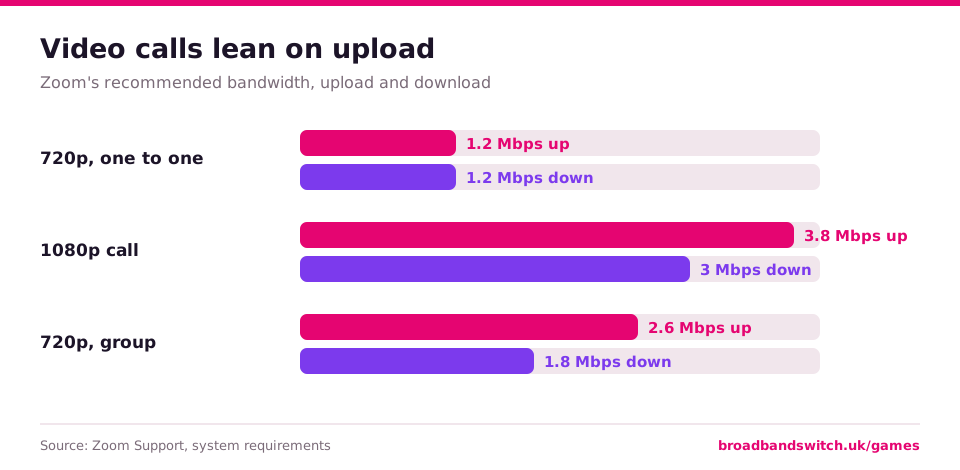
Video calls depend on upload: Zoom asks for 3.8 Mbps up for a 1080p call. Put the router centrally and off the floor, away from microwaves, fairy lights and fish tanks, and use a cable or mesh for a far-off office.
What you will learn
- 1Why upload decides your video calls
- 2Ofcom's tips for router placement
- 3Your rights when speeds fall short
Why it matters
When a call breaks up, the usual suspect is upload rather than download. Zoom asks for more upload than download for a 1080p call, because your camera has to send your picture out of the house. On copper lines the upload is often a small fraction of the download.
The other half is the room you work in. Ofcom's own advice is to keep the router central and off the floor, away from other electrical kit, and to use Ethernet or a mesh system where Wi-Fi struggles. If the line itself is the problem, the speeds code gives you a way out.
Every answer, explained
Spoilers below. Play first, then open any question to see the answer, the reason and the source.
1. On a 1080p Zoom call, which needs more speed?
Answer: Upload, at 3.8 Mbps
Zoom asks for 3.8 Mbps up and 3.0 Mbps down for 1080p video. Upload carries your picture out of the house.
2. What does Zoom ask for on a 720p HD one-to-one call?
Answer: 1.2 Mbps up and down
1.2 Mbps each way. Calls need far less than people expect, but they need it steadily.
3. Where does Ofcom suggest you put your router?
Answer: Centrally and off the floor, for example on a shelf
Ofcom suggests placing the router centrally in the home and off the floor, away from radiators and fish tanks.
4. Which of these does Ofcom list as something that can interfere with your router?
Answer: Fairy lights
Fairy lights, along with microwave ovens, baby monitors and cordless phones. Ofcom says to keep the router away from other electrical equipment.
5. Your desk is at the far end of the house. Which does Ofcom say improves Wi-Fi coverage without reducing your broadband's performance?
Answer: A mesh system
Ofcom says mesh systems improve coverage without reducing performance, while boosters and extenders can affect speeds and how responsive the connection feels.
6. Your speed sits below your minimum guarantee and is not fixed within 30 days. What can you do?
Answer: Leave without an early exit fee
With providers signed up to Ofcom's speeds code, you can leave without an early exit fee.
7. When does Ofcom's speeds code measure busy-time speeds for home broadband?
Answer: 8pm to 10pm
8pm to 10pm for home services, and 12pm to 2pm for business services. Your estimated speed should reflect those busy times.
Compare broadband
See every deal at your postcode
Every provider that reaches your address, cheapest first. It takes about ten seconds.
Questions people ask
- Why does my video call freeze when my speed test looks fine?
- Calls depend on upload speed and on a steady connection. Zoom asks for 3.8 Mbps upload for 1080p, and Wi-Fi between the router and your desk can lose a lot of speed.
- Where should my router go for working from home?
- Ofcom suggests a central spot, off the floor and away from other electrical equipment. If your office is far away, a mesh system or an Ethernet cable usually helps.
Play next
How we checked this quiz
Every answer was checked on 9 November 2026 against the source listed with it, mostly Ofcom and the companies that publish the figures, and dated figures say when they apply. Questions that depend on a date, such as compensation amounts that rise each April, are hidden automatically once they pass their review date, so the quiz never shows an out-of-date answer. Your scores, badges and streaks are kept on this device only. Anonymous answer counts help us show how other players did, with no names or personal details.
References
- Ofcom. (2024, February 19). Improving your wifi experience. https://www.ofcom.org.uk/phones-and-broadband/coverage-and-speeds/improving-your-wifi-experience
- Ofcom. (n.d.). Broadband speeds code of practice. Retrieved November 9, 2026. https://www.ofcom.org.uk/phones-and-broadband/coverage-and-speeds/broadband-speeds-code-practice
- Zoom. (n.d.). Zoom system requirements: Windows, macOS, Linux. Zoom Support. Retrieved November 9, 2026. https://support.zoom.com/hc/en/article?id=zm_kb&sysparm_article=KB0060748
We may earn a commission if you switch through BroadbandSwitch.uk. It never changes a quiz answer, a result or the order of deals. Quiz results never point to a particular provider. Spotted something we should check? Email editorial@broadbandswitch.uk and we will look at it.