Linksys router login and default password

To log in to a Linksys router, open a web browser and go to LinksysSmartWiFi.com or 192.168.1.1; Linksys app while connected to the router. Sign in with username admin or blank and the password (Legacy: admin (some blank/admin). Modern: set during app/web setup). Always change the default to a strong password of your own.
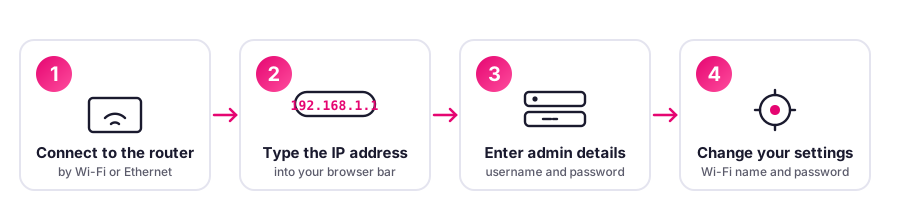
Linksys login address by model
Type the address for your model into your browser while connected to the router. Firmware is shown only where Linksys publishes an exact version openly, otherwise it is auto-updated or checked per device. See the full detail in our UK router directory.
| Model | Login address | Wi-Fi | Latest firmware | Confidence |
|---|---|---|---|---|
| Atlas Pro 6 | 192.168.1.1 | WiFi 6 | Gated behind device lookup | High |
| Velop MX4200 | 192.168.1.1 | WiFi 6 | Gated behind device lookup | High |
| Velop MX5300 | 192.168.1.1 | WiFi 6 | Gated behind device lookup | High |
| Velop Pro 6E | 192.168.1.1 | WiFi 6E | Gated behind device lookup | High |
| Velop Pro 7 | 192.168.1.1 | WiFi 7 | Gated behind device lookup | High |
| WRT1900ACS | 192.168.1.1 | WiFi 5 | Gated behind device lookup | High |
| WRT3200ACM | 192.168.1.1 | WiFi 5 | Gated behind device lookup | High |
Default Linksys username and password
Admin address: LinksysSmartWiFi.com or 192.168.1.1; Linksys app. Username: admin or blank. Password: Legacy: admin (some blank/admin). Modern: set during app/web setup. You will usually find the details label on base; linksys app.
Change on setup Under the UK PSTI Act, in force since 29 April 2024, universal default passwords are banned on new kit sold in the UK, so newer models ship with a unique password on the label.
How to factory reset a Linksys router
- Locate the recessed Reset button on the back or base.
- With the router on, hold it with a paperclip for about 10 seconds.
- Release when the lights change, then let the router restart.
- Set up your Wi-Fi name and a new strong password again.
A reset restores factory defaults and erases custom settings.
Frequently asked questions
How do I log in to a Linksys router?
Open a web browser and go to LinksysSmartWiFi.com or 192.168.1.1; Linksys app while connected to the router. Username: admin or blank. Password: Legacy: admin (some blank/admin). Modern: set during app/web setup
What is the default IP address for a Linksys router?
Common default gateway addresses for Linksys routers are 192.168.1.1. If one does not open, check the label on the base of the router for the exact address.
How do I reset a Linksys router?
Use a paperclip to press and hold the recessed Reset button for about 10 seconds until the router restarts. This restores factory defaults and erases any custom settings, so you will need to set up your Wi-Fi name and password again.
What do I do if the default Linksys password does not work?
Someone may have changed it, or your unit ships with a unique password printed on its label. Check the base sticker first, and if you are still locked out, factory reset the router to restore the label credentials.
Spotted something wrong? Help us keep this accurate
We make good efforts to keep this page accurate and up to date, and we genuinely love working with our readers to get it right. If you think a detail is wrong, or you know something others would find helpful, please tell us and we will check it and update the page. Your collaboration is really valuable.