
Every internet connection has an IP address, but most people have never seen theirs or know what it says about them. Here is what an IP address actually is, in plain English, and a free tool to check yours in a couple of seconds.
If you have ever set up a games console, tried to view your home CCTV while you are out, or been asked for your IP address by a support agent, you will have brushed up against one of the internet's most quietly important numbers. The good news is that it is far simpler than it sounds, and you do not need to be technical to understand it.
The quickest way to see your own IP address is to use our free What Is My IP tool. It shows your public IP, your provider, whether you have IPv6, and whether you are behind something called CGNAT, all without asking you to sign up for anything. We do not store your IP either, which we will come back to.
What is an IP address, really?
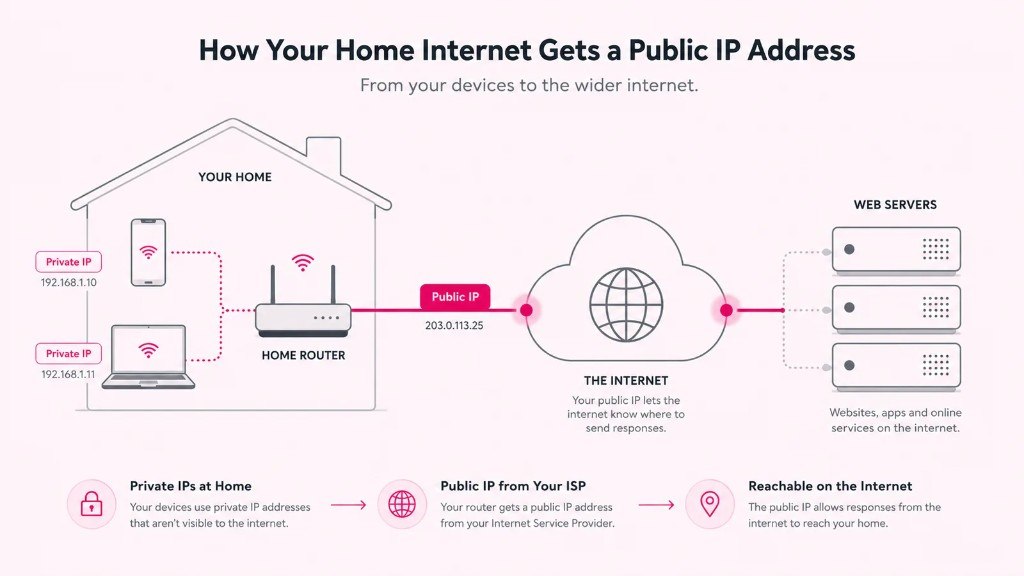
An IP address (Internet Protocol address) is a unique label given to your internet connection so that data knows where to go. When you load a web page, your device sends a request out, and the reply needs a return address to come back to. That return address is your IP. Think of it as the postal address for your connection: without it, the internet would not know where to deliver anything.
Here is the part that trips people up. You actually have two kinds of IP address at once.
Your public IP
This is the single address your whole home shares with the outside world, handed to your router by your internet provider. It is the one websites, apps and online services actually see. It is also the one our tool shows you at the top of the page.
Your private IP
Inside your home, each device (your laptop, phone, TV, console) has its own private address, usually something like 192.168.1.24. These are used only on your own network, and the outside world never sees them. Your router sits in the middle, sharing that one public address across all your devices. If you want to find a device's private IP, our tool includes a step-by-step guide for Windows, Mac, iPhone, Android and more.
IPv4 and IPv6: why there are two kinds
You may notice your connection has two very different looking addresses. A short one like 81.174.132.47, and a much longer one full of letters and colons. The short one is IPv4, the original addressing system the internet was built on. The trouble is there are only about 4.3 billion IPv4 addresses, and the world ran out of new ones years ago.
To fix that, IPv6 was introduced, using far longer addresses so there are effectively unlimited to go around. Most UK connections now run both at the same time, which is called dual-stack. Our tool tells you instantly whether your connection is IPv6-ready, which is worth knowing as more of the internet moves across to it.
What is CGNAT, and why might it matter to you?
This is where a free IP tool earns its keep, because it is something Google's built-in answer cannot tell you. Carrier-Grade NAT (CGNAT) is when your provider shares a single public IPv4 address between many customers at once, to cope with the shortage of addresses.
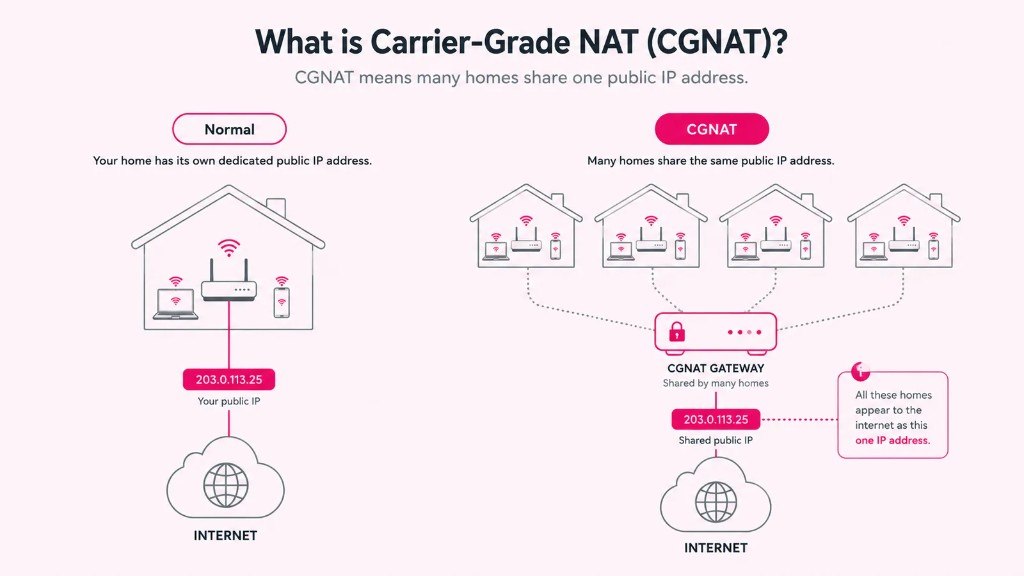
For most everyday browsing, streaming and video calls, CGNAT makes no difference at all. But it can quietly break a few specific things:
- Viewing home CCTV or a security camera while you are away
- Remote access to a device or server at home
- Port forwarding for certain games or applications
- Self-hosting anything that needs to be reachable from outside
If any of those sound like you and they are not working, CGNAT is a likely culprit. Our tool includes an honest CGNAT check: it will not pretend to give you a definitive verdict from your browser alone, because that is not technically possible, but it will tell you whether it is likely, and show you how to confirm it by comparing the public IP with your router's WAN address. A router address starting 100.64 to 100.127 is the giveaway.
Need a connection without CGNAT?
If you rely on remote access, CCTV or self-hosting, some providers and business packages offer a public or static IP address as standard. Our static IP broadband guide explains which options give you one, and our comparison tool lets you check what is available at your postcode.
Can people find you from your IP address?
This is the worry we hear most, so let us be clear and calm about it. On its own, your IP address does not reveal your name or your exact home address. What someone can see from it is your general area (often just the nearest town or your provider's local exchange) and which internet provider you use. That is why the location shown by any IP tool, including ours, is an estimate rather than a pin on your front door.
What your IP cannot do is let a stranger into your devices simply by knowing it. Your router's firewall blocks unsolicited connections by default. Keeping your router firmware updated and its firewall switched on covers the sensible basics for the vast majority of households.
A quick word on privacy and the law. An IP address counts as personal data under UK and EU GDPR, because it is treated as an online identifier. That is exactly why our tool shows your IP to you but does not log it, store it, or write it to any database. No cookies are needed to use it. We think a privacy tool should respect your privacy, not quietly harvest it.
Check your IP address now
See your public IP, provider, IPv6 status and CGNAT check in seconds. Free, private, no sign-up.
Open the free What Is My IP tool →While you are checking: is your broadband actually any good?
Finding your IP is often the first step when something is not working, or when you are thinking about your connection more generally. If you have got this far, it is worth two more minutes to check whether you are getting what you pay for.
Run a free speed test to see your real download, upload and latency. If the numbers are disappointing, or your bill has crept up, our postcode comparison shows live deals from more than 35 UK providers, and most switches now complete with a single contact under One Touch Switch. Not sure what speed you actually need in the first place? Our RightSpeed questionnaire works it out in eight quick questions.
The short version
- Your public IP is your connection's address on the internet. Your private IPs are used only inside your home.
- IPv4 is the old, short format; IPv6 is the newer, longer one. Most UK lines run both.
- CGNAT means sharing one public IP with other homes. Harmless for most, but it can block CCTV, remote access and port forwarding.
- Your IP reveals your provider and rough area, not your name or exact address.
- It is personal data under GDPR, which is why we never store yours.
Check your IP address with our free tool →
Written by Dr Alex J. Martin-Smith (CMgr, MBA, LLM, DBA), founder of BroadbandSwitch.uk and a UK online-safety consultant, and reviewed by Adrian James, Broadband Editor. Published 11 July 2026. BroadbandSwitch.uk is a free, independent UK broadband comparison service. See our methodology and corrections policy.