Upload speed versus download speed: the figure providers are told they must publish
Download speed is the number on the advert. Upload speed is the number that decides whether your video call holds, how long a backup takes and whether anyone can hear you properly.
There is a rule about it. Ofcom's speeds code says “the normally available upload speed must also be provided” at the point of sale. The same document then says of that figure: “it does not give rise to a right to exit the contract under Principle 5”. It has to be printed, and it is worth nothing printed.
So we went looking for it on nine providers' public pages. Plusnet publishes an upload speed for its copper packages and none at all for any of its five full fibre packages. This page is about what is actually published, why the numbers you do find cannot be compared with each other, and what changed this year at the top of the market.
Start with your postcode
Upload is decided by the technology reaching your address far more than by the tariff you pick on it, and symmetric tiers only exist on some networks. Check the exact address rather than the postcode.
Want to see the asymmetry rather than read about it? Watch a line split ten to one. Want to know how much upload you actually need? Answer three questions and find out.
The short version, in a minute
Direct answer: There is a rule saying your provider must publish an upload speed. Several do not, and the figure carries no right to anything.
Download speed is what the advert is about. Upload speed is what your video calls, your backups and anything you send are about, and it is typically a tenth the size.
Ofcom's code of practice is clear that it has to be published: “the normally available upload speed must also be provided”. It is just as clear that the figure is toothless. Of the minimum upload speed the same document says: “it does not give rise to a right to exit the contract under Principle 5”. Only the download minimum gives you a way out.
So we read nine signatories to that code on their own public pages. Plusnet publishes an upload speed for its copper packages and none at all for any of its five full fibre packages. TalkTalk publishes a full fibre upload figure on its gaming page and nowhere else, and none at all for its two cheaper tiers. And among the providers that do publish one, five different qualifiers are in use, which means the numbers are not comparable even when they are there.
This page is about the upload figure alone. Responsiveness is a different question and our guide to latency, jitter and packet loss answers it; the exit right belongs to our guide to leaving early for poor speeds.
How a line splits, drawn to scale
Direct answer: On a 900 Mbps line with 90 Mbps upload, the half you send on is a tenth the size of the half you receive on.
That is not a metaphor and the picture is not exaggerated: the two lanes above share one scale, because any other choice would be flattering. Sky publishes 900 Mbps download and 90 Mbps upload on Full Fibre Gigafast as average speeds, and the ratio is exactly ten to one.
Everything that leaves your house shares the thin lane. Your side of every call, every photo your phone backs up, every file you send, every save a console uploads. Nothing shares the wide one except the things you are watching, which have capacity to spare.
Only two of the companies we read explain why it is built this way. Sky says: “Most providers prioritise download speeds because most online activity involves consuming content”. Zen says: “Most broadband packages are designed to optimise download speeds so that they’re much faster than upload speeds.” Both describe a design decision about dividing capacity rather than a physical limit, which matters, because it means the decision can be made differently. At the top of the market it now is.
The rule, and the hole in it
Direct answer: The upload figure must be published at the point of sale, and missing it entitles you to nothing.
Ofcom's Better Broadband Speed Information code has been in force since December 2022 and its signatories are nine companies: BT, EE, NOW, Plusnet, Sky, TalkTalk, Utility Warehouse, Virgin Media and Zen. On upload it is not vague. Paragraph 2.9: “the normally available upload speed must also be provided”. Paragraph 2.16 adds that “normally available upload speeds should be provided in the form of a range”, and the estimate has to account for peak-time congestion in the same way the download estimate does.
Ofcom even defines the term, as “Rate of data transmission from a customer’s connection to a network operator’s access node”, which is a precise enough thing to be held to.
And then the same document takes it all back
Of the minimum upload speed, paragraph 2.35 says: “it does not give rise to a right to exit the contract under Principle 5”. The right to walk away attaches to the minimum guaranteed download speed and to nothing else. So a provider that publishes an upload figure and then misses it by half has breached no promise you can act on.
That is the whole shape of the thing: compulsory to state, impossible to enforce. Our guide to the minimum guaranteed speed covers the download figure, which is the one with teeth.
Who actually publishes one
Direct answer: Four of the nine publish an upload figure for every tier. One publishes none at all for full fibre.
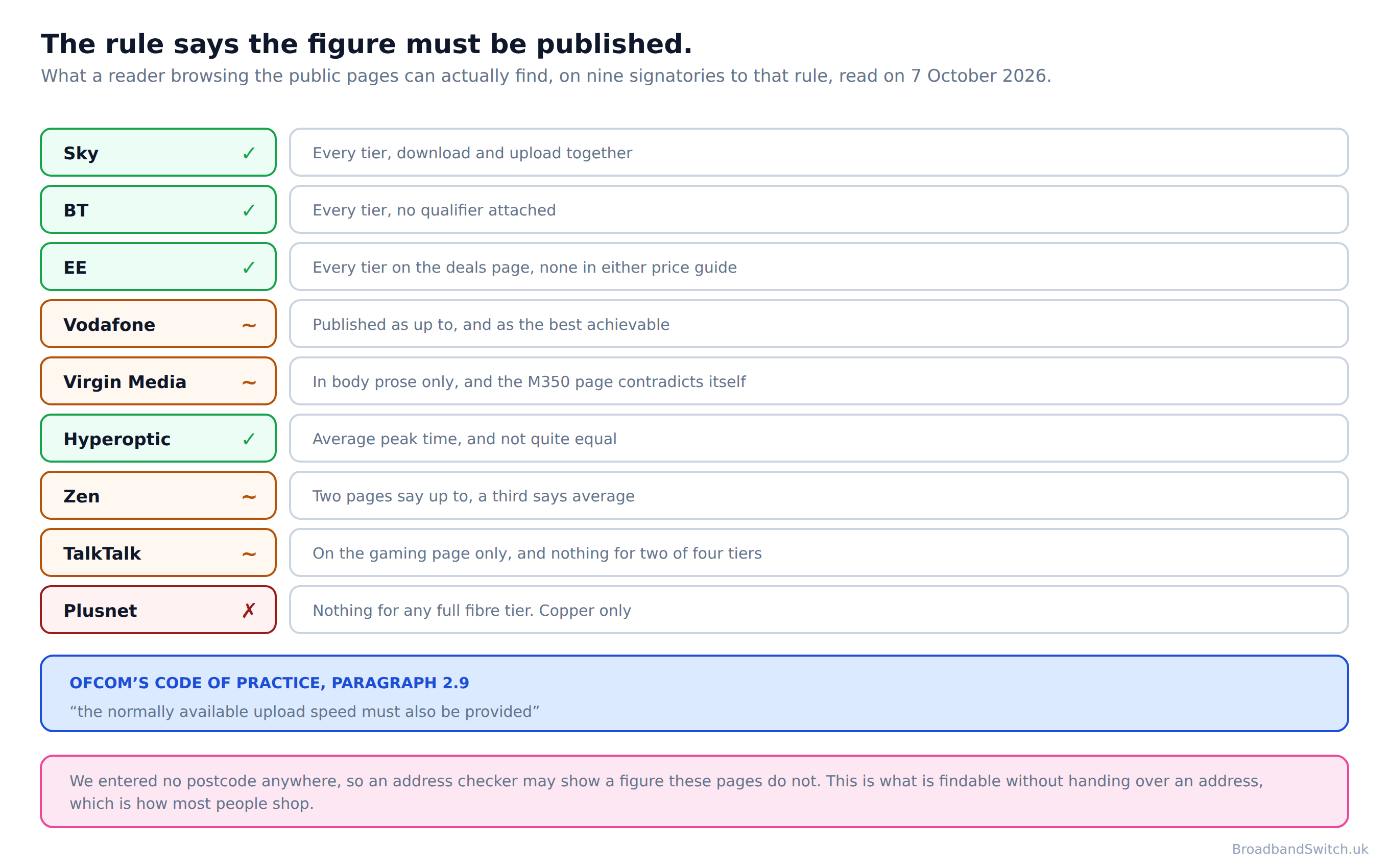
The clearest case is Plusnet's own broadband package guide, and it is worth describing precisely because it is not hiding anything. Its copper rows carry an upload column: 9Mb on one, 18Mb on the other, N/A on ADSL. Its full fibre table has five rows and a column headed “Average estimated download speed”. The old technology's upload is published and the new technology's is not.

TalkTalk's is published, but in an odd place: TalkTalk publishes a full fibre upload figure on its gaming page and nowhere else, and none at all for its two cheaper tiers. Virgin Media's appears in body prose on individual product pages rather than in the legal blocks where its download figures sit. Virgin Media’s own M350 page gives the upload as 35Mbps once and 36Mbps twice.
The fair qualification on all of this
We did not enter a postcode anywhere in this research, so a provider’s address checker may show a figure its public pages do not. Everything above describes what is findable by browsing, which is how most people shop and compare, rather than what appears once you have handed over an address and started an order.
Why the numbers do not compare
Direct answer: Five qualifiers across nine providers, so a single column of upload figures would imply a comparison nobody has made.
Suppose every provider did publish an upload figure. You still could not line them up, because they are not measuring the same thing. BT prints bare numbers, Sky prints average, Vodafone prints up to, Plusnet prints average estimated and Hyperoptic prints average peak time.
Vodafone goes furthest in describing its own: it calls its published figures “the maximum speeds that are achievable under the best conditions”. A maximum under best conditions and an average at peak time are close to opposites, and they are printed in the same units on the same kind of page.
Zen illustrates the problem inside a single company. Its figures appear as up to on two pages and as average on a third. Zen’s averages rest on thinkbroadband data covering the first quarter of 2018. None of that is dishonest. It is simply what happens when a rule says publish a number and does not say which number.
The one table that does compare
Direct answer: Inside a single provider the qualifier is consistent, and the shape it reveals is the opposite of what people expect.
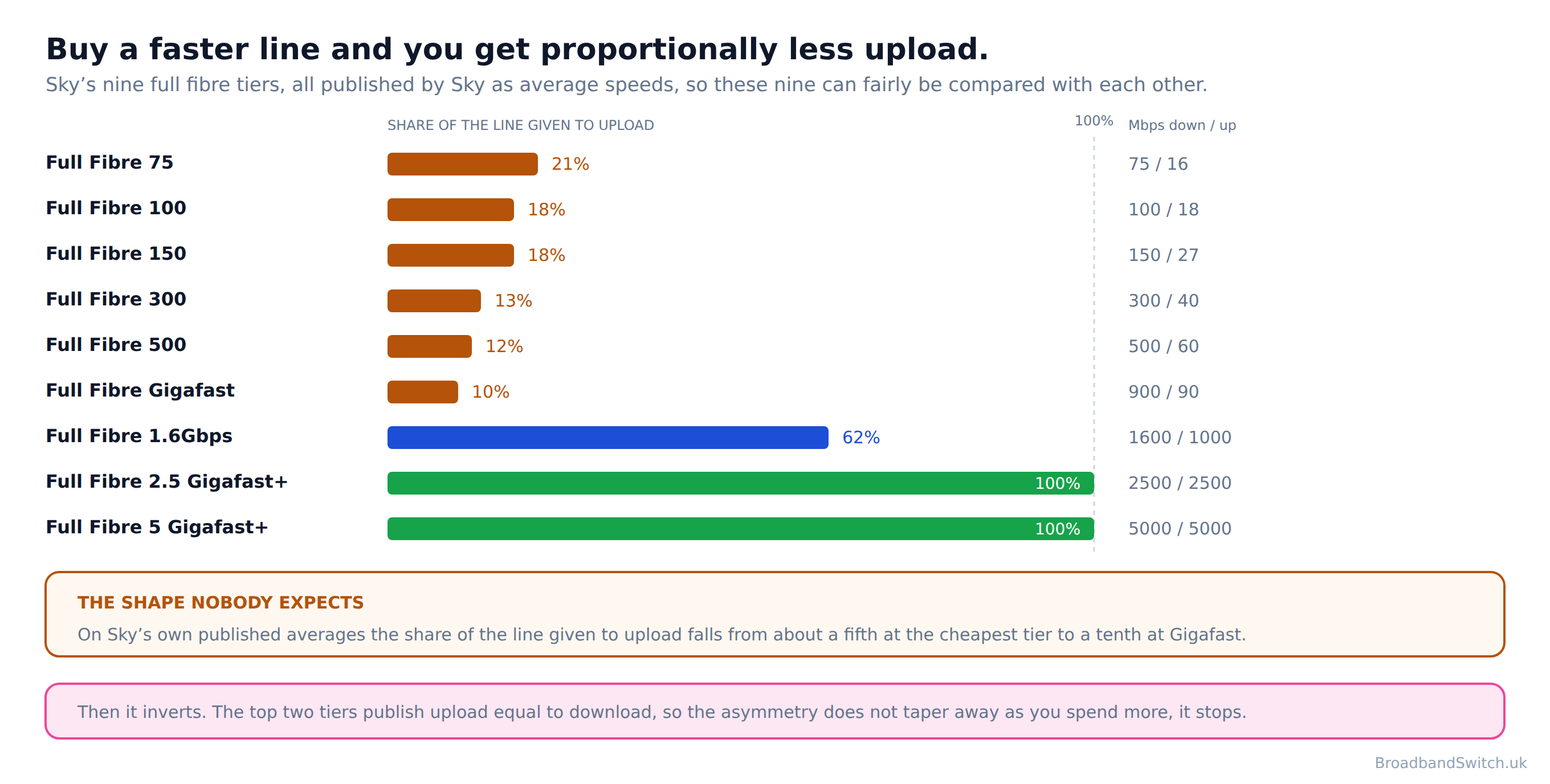
Sky publishes an average download and upload pair for all nine of its full fibre tiers, which makes those nine the only genuinely comparable upload dataset we found. The bottom six run 75/16, 100/18, 150/27, 300/40, 500/60 and 900/90, in megabits.
Work those out as a proportion and the result is counter-intuitive: the share of the line given to upload falls from about a fifth at the cheapest tier to a tenth at Gigafast. Spending more buys download much faster than it buys upload, so the better your package, the smaller the share of it that points outwards.
And then it stops. The top three tiers are 1600/1000, then 2500/2500 and 5000/5000, so the share goes from a tenth to nearly two thirds to all of it. The asymmetry does not taper off as you climb; it holds, and then it is simply gone.
What each provider actually publishes
Direct answer: Every figure below was read on the company’s own site on 7 October 2026, with the qualifier it uses printed beside it.
This is deliberately not a league table. The qualifiers differ, so ranking these against each other would be the exact mistake the section above warns about. It is a record of what each company states, so you can see both the number and how much weight it is carrying.
BT, which publishes bare numbers
Full Fibre 300 is 300 down and 49 up. Full Fibre 500 is 500 and 73. Full Fibre 900 is 900Mbps download and 110Mbps upload. BT attaches no average, up to or estimated to any of them, which is unusual and, read strictly, the strongest form of words on this page. Its range starts at 300, so there is no Full Fibre 100. BT publishes no symmetric residential package, and the word appears on bt.com only in its business material.
Sky, which publishes an average for every tier
Sky is the fullest disclosure we found. All nine tiers carry a download and upload pair, labelled average speeds: 75/16, 100/18, 150/27, 300/40, 500/60 and 900/90, then 1600/1000, then 2500/2500 and 5000/5000. Being able to see the whole range is what makes the share calculation above possible at all.
EE, which publishes on the deals page and nowhere else
The range is branded Core Broadband. The 100 tier publishes 20 Mbps up, the 300 tier 50, and 110Mbps on the 900Mbps tier and 115Mbps on the 1.6Gbps tier. Neither of EE’s two price guides carries an upload figure at all, so the deals page is the only place to find one.
Virgin Media, which publishes in prose rather than in the terms
M125 is 132 down and 20 up, M250 is 264 and 25, M500 is 516 and 52, and Gig1 is “1,130Mbps downloads, 104Mbps uploads (average speeds)”. M350 is where it gets awkward. Virgin Media’s own M350 page gives the upload as 35Mbps once and 36Mbps twice. And the symmetric option is sold separately: “Boost your upload speed for an extra £6 a month and upload as fast as you download.”
Vodafone, which publishes maxima rather than averages
Pro 3 Broadband publishes up to 2.2 Gbps in both directions, full fibre only. In Openreach areas it publishes 27 Mbps up on Full Fibre 150 and 68 on Full Fibre 500, with no download figure printed beside either. Its own description of the table is “the maximum speeds that are achievable under the best conditions”, which is a different claim from everyone else’s.
TalkTalk, Zen and Plusnet, where it gets thin
TalkTalk publishes a full fibre upload figure on its gaming page and nowhere else, and none at all for its two cheaper tiers. The two it does publish are 75 Mbps on Full Fibre 500 and an average 110 on Full Fibre 900. Zen publishes 910 down and 105 up as up to on two pages, and 900 and 100 as average on a third. Zen’s averages rest on thinkbroadband data covering the first quarter of 2018. Plusnet publishes an upload speed for its copper packages and none at all for any of its five full fibre packages.
The alternative networks, where symmetric started
toob publishes 150, 900 and 2300 Mbps with upload equal to download on each, and uses the word symmetrical itself. Gigaclear publishes 300, 600 and 900 as a single average covering both directions. Zzoomm publishes 200, 500, 1000 and 2300 with matching upload and download, though it never uses the word. Lightspeed publishes five tiers from 150 Mbps to 5 Gbps and does use it. Hyperoptic says equally fast rather than symmetric, and its own figures are 159 down against 157 up, and 527 against 523.
YouFibre is the one to read carefully. Its current terms list You 200, You 1000, You 2000 and You 8000, with published averages of 200, 900, 1800 and 7000 Mbps, and those figures are not broken out by direction anywhere in the terms. It claims symmetrical speeds in an article rather than in the terms. Brsk is now YouFibre.
One provider missing from this list, and why
Community Fibre’s website returned nothing our research tools could read, so no Community Fibre figure appears on this page at all. It is a significant London network and its absence here is a gap rather than a judgement. We would rather print nothing than print last year’s figure with this year’s date on it.
Why a call fails on the upload half
Direct answer: A call receives several streams and sends one, and the one it sends is on the narrow lane with everything else you send.
This is the commonest way people meet their upload figure without knowing its name. The call breaks up, the speed test says the line is fine, and both of those things are true at once, because the speed test is mostly measuring the half that is working.

What makes it worse is that nothing else competes for the download half. A backup, a phone syncing photos, a console uploading a save and a second person's call all queue in the thin lane together while the wide one sits half empty. That is why the trouble arrives in bursts rather than steadily, and why it so often clears up when somebody else finishes what they were doing.
If your calls break up on a line that passes every speed test, the other half of the diagnosis is responsiveness rather than capacity, and our guide to latency, jitter and packet loss covers how to tell the two apart.
What upload costs you in time
Direct answer: Upload time falls in exact proportion to upload speed, which makes it the rare broadband figure that does what it says.
Most broadband upgrades are hedged about with contention, peak hours and the state of your Wi-Fi. This one is arithmetic. A 25GB photo library is 200,000 megabits, and dividing that by the published upload speed gives you the time, give or take the overheads.

At 16 Mbps, which is what Sky publishes on its cheapest full fibre tier, that is three and a half hours. At 90 Mbps, its Gigafast tier, it is thirty seven minutes. On a symmetric gigabit line it is under four minutes. The download speed changes none of it.
Which is the honest case for caring about the number. Not that a bigger one is better in the abstract, but that if something large regularly leaves your house, this figure and no other decides how long you wait for it.
What each thing you do actually sends
Direct answer: Watching sends nothing. A call sends a steady trickle. Backups and live video send everything they have.
Upload matters in wildly different amounts depending on what a household does, and the gap between the extremes is larger than the gap between most tariffs. It is worth knowing which end you are at before paying to move.
Streaming and browsing: effectively nothing
Watching a film, scrolling, listening to music and reading are all download. The upload they use is a handful of kilobits of acknowledgements. A household that only does these things will not notice its upload figure at any tier, and should not be sold one.
Video calls: small, but at exactly the wrong moment
A single call sends a few megabits, which sounds trivial against a 90 Mbps upload and usually is. What makes calls the commonest complaint is that they are real time, so they cannot wait their turn behind a backup the way a file transfer can. A few megabits that arrive late are worse than a few megabits that arrive slowly.
Gaming: less than people think, except when it is not
Playing sends very little, because the game is sending your inputs rather than video. What does send heavily is streaming your play to an audience, and uploading captured footage afterwards. Responsiveness rather than capacity is what decides play itself, which our gaming guide covers.
Backups, photo sync and large files: the whole lane, for hours
These are the ones that fill the narrow lane and keep it full. A phone set to back up photos will quietly use everything available for as long as it takes, which is why so many households discover their upload figure during somebody else's video call rather than during their own backup.
Sending video for a living: the only case where the figure sets the working day
Uploading finished video, running a live stream or sending camera footage are the uses where upload stops being an annoyance and becomes the schedule. This is the household for which a symmetric tier is worth real money, and it is a much smaller group than the marketing for symmetric tiers implies.
How to check what you actually get
Direct answer: Wired, more than once, and while the house is busy, because upload is the figure most distorted by everything else.
Whatever your provider publishes, the number that matters is the one your line delivers, and upload is the half where the published figure and the delivered one most often part company. Any speed test reports it, including ours, but three things decide whether the reading means anything.
Test with a cable rather than over Wi-Fi. Wi-Fi is usually the weakest link in the chain, and because upload is the smaller number it is the one a weak link distorts first. A wired reading is the only one that describes your broadband rather than your house.
Test more than once, at different times. Ofcom's code requires the published figure to account for peak-time congestion, so comparing a quiet-morning reading against it is not a fair test of either. The useful comparison is your line at eight in the evening against the figure your provider published for eight in the evening.
And test while the house is doing what it normally does. An upload reading taken with everything else switched off is a laboratory number. If your calls break up when the family is home, that is the moment the measurement is worth taking.
What to do with a reading that falls short
Less than you would like, and the page has already said why: “it does not give rise to a right to exit the contract under Principle 5”. Report it as a fault and it will be investigated, which does fix real faults. What it will not do is give you a route out of the contract, because that route is keyed to the download figure alone.
Symmetric has arrived at the big providers
Direct answer: Upload equal to download used to be an alternative network thing. Sky, Vodafone and Virgin Media all now sell it.
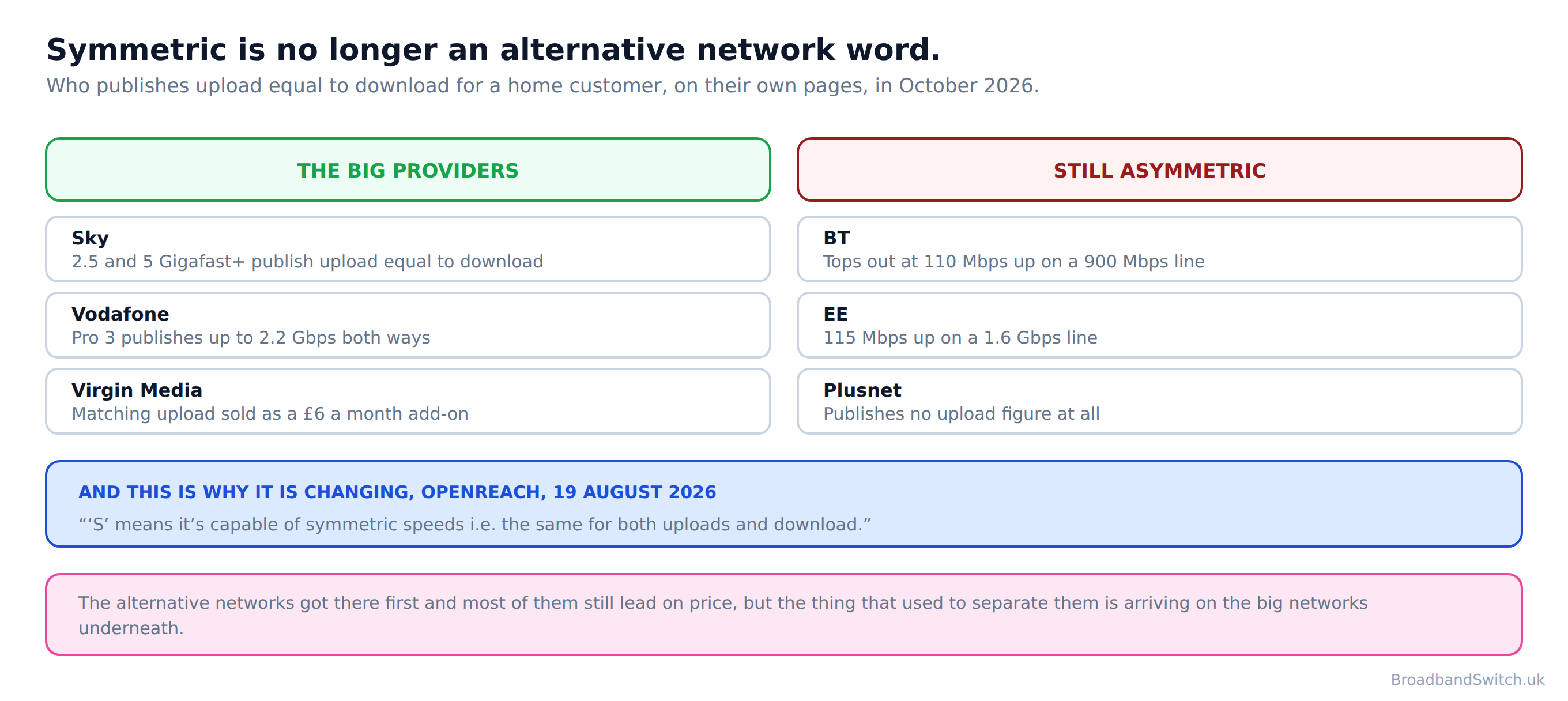
This is the part of the page that has changed most since it was last written. Sky on its two fastest tiers, Vodafone on Pro 3, and Virgin Media as a paid add-on. Sky's two fastest tiers publish 1600/1000, then 2500/2500 and 5000/5000 and Vodafone publishes up to 2.2 Gbps in both directions on Pro 3. Virgin Media sells it differently again, as an add-on rather than a tier: “Boost your upload speed for an extra £6 a month and upload as fast as you download.”
Not everyone has moved. BT publishes no symmetric residential package, and the word appears on bt.com only in its business material. EE publishes 110Mbps on the 900Mbps tier and 115Mbps on the 1.6Gbps tier, and Plusnet publishes nothing for full fibre at all.
The reason it is spreading is underneath the retail brands rather than in them. Openreach described the next generation of its network in August 2026 in these words: “‘S’ means it’s capable of symmetric speeds i.e. the same for both uploads and download.” And on what that gives a household: “Symmetric speeds give customers the ability to upload as quickly as they download.” It puts “today’s top download speeds of 1.8Gbps” today, and says the technology can “push up to 8.5Gbps”.
So the thing that used to separate the small networks from the large ones is now arriving on the infrastructure the large ones rent. On Ofcom's most recent published figures, “As of July 2025, 78% or 23.7 million residential premises across the UK had access to a full-fibre broadband network.”
What to compare instead
Direct answer: Compare inside a provider's own range, compare the qualifier before the number, and treat a missing figure as information.
Given all of the above, comparing upload figures across providers is not a thing you can do carefully. Here is what works instead.
Compare within a range rather than across brands. Sky's nine tiers can be set beside each other because Sky measured them the same way; Sky's 60 Mbps and Vodafone's up to 68 cannot, because one is an average at peak and the other is a maximum under best conditions.
Read the qualifier before the number, every time. Average, average estimated, average peak time, up to, and bare with nothing attached are five different claims, and the gap between the strongest and the weakest of them is wider than the gap between most of the tiers.

And treat an absent figure as something you have learned. A provider that publishes an upload speed for every tier has made itself checkable. One that publishes none has not, and while that breaks no promise you can enforce, it does tell you something about which number the company expects you to hold it to.
Then check the technology, because it constrains everything else. Our comparison of full fibre against the older technologies covers what each one can physically reach.
Work out how much upload you need
Direct answer: Three questions, and for a lot of households the honest answer is that this is not your problem.
Three answers, and an honest one of them is spend nothing
Nothing you answer here leaves your browser: there is no form to submit, nothing sent to any server and nothing stored.
Live broadband at your postcode
Direct answer: Which upload speeds you can even see depends on which providers reach your address.
The check below shows every provider that reaches the address, lowest price first. Before you choose, open the upload figure for the tier you are drawn to and look at the word in front of it, because an average and a maximum are not the same promise and one provider publishes no upload figure for full fibre at all.
Every provider that reaches your address
One postcode shows every provider that reaches it, lowest price first. Find the upload figure for the tier you want before you sign, and note which word comes in front of it.
Compare at your postcode →What this page used to say, and why it changed
Direct answer: Three corrections, and the first one is repeated almost everywhere this subject is written about.
The old version of this page ran to twenty numbered sections without reading a single provider term or quoting a single regulator sentence. This version quotes Ofcom and seven companies on their own sites, and the three things it got wrong are below.
A table where seven of ten rows were wrong
What this page said
The previous version carried a provider-by-provider upload table. We checked it against every company's own site and seven of the ten provider rows we checked did not survive. BT sells no Full Fibre 100 and no symmetric residential package, though the old page claimed both. “EE Full Fibre Max”, “Sky Full Fibre Gigafast 1000”, “TalkTalk Future Fibre 150” and “Vodafone Full Fibre Pro 2” are not current product names. Virgin Media’s M500 and Gig1 upload figures on the previous version were the ones Virgin published before it raised them.
What it says now, and why
The table is rebuilt from each provider's own published figures, with the qualifier each one uses printed beside it, because those qualifiers are not interchangeable.
Three altnet claims that no longer hold
What this page said
YouFibre sells no package called 7 Gig, makes no claim to be the UK’s fastest, and no longer sells the 150 the previous version listed. Brsk is now YouFibre. And the old page called Hyperoptic symmetric: Hyperoptic says equally fast rather than symmetric, and its own figures are 159 down against 157 up, and 527 against 523.
What it says now, and why
Corrected, with each company's own wording used rather than ours.
A gap we are leaving open rather than filling
What this page said
Community Fibre’s website returned nothing our research tools could read, so no Community Fibre figure appears on this page at all. The previous version listed three Community Fibre packages with speeds. We cannot verify any of them today.
What it says now, and why
The section on what each provider publishes names the gap instead, and says why it is there. A hole we can explain beats a number we have not read.
Upload speed versus download speed: frequently asked questions
Does upload speed matter more than download?
Not more, but it decides different things, and it is the half that runs out first. Everything you send leaves by it: your side of every video call, every photo backup, every file you share and every frame of a live stream. Downloads are the half with room to spare.
How much upload do I actually need?
Less than the marketing implies for most households, and more than the cheapest tiers give if anyone works from home. A single video call needs a few megabits. The problems start when the call shares the upload with a backup, a console update and somebody else's call, because they all queue in the same narrow lane.
Why is upload so much lower than download?
Only two of the companies we read publish an answer. Sky says: “Most providers prioritise download speeds because most online activity involves consuming content”. Zen says: “Most broadband packages are designed to optimise download speeds so that they’re much faster than upload speeds.” Both are describing a design choice about how capacity is divided, not a law of physics, which is why the choice is now being made differently at the top of the market.
Do providers have to tell me the upload speed?
Yes, at the point of sale. Ofcom's code says “the normally available upload speed must also be provided”, and the signatories are nine companies: BT, EE, NOW, Plusnet, Sky, TalkTalk, Utility Warehouse, Virgin Media and Zen. What it does not do is give that figure any force: of the minimum upload speed the same code says “it does not give rise to a right to exit the contract under Principle 5”
What happens if my upload is worse than advertised?
Less than you would hope. The right to leave is keyed to the minimum guaranteed download speed alone, so a line delivering its download while falling short on upload has not triggered it. Our guide to leaving early for poor speeds covers what that route does reach.
Which providers do not publish an upload figure?
Plusnet publishes an upload speed for its copper packages and none at all for any of its five full fibre packages. TalkTalk publishes a full fibre upload figure on its gaming page and nowhere else, and none at all for its two cheaper tiers. Virgin Media publishes its in prose on individual product pages rather than in the legal terms. Virgin Media’s own M350 page gives the upload as 35Mbps once and 36Mbps twice. We entered no postcode anywhere, so an address checker may show figures these pages do not.
Can I compare upload speeds between providers?
Not reliably, and that is the practical problem. BT prints bare numbers, Sky prints average, Vodafone prints up to, Plusnet prints average estimated and Hyperoptic prints average peak time. Vodafone describes its as “the maximum speeds that are achievable under the best conditions”, which is a different measurement again. Putting them in one column would imply a like-for-like comparison that nobody has actually made.
Does a faster package give me more upload?
More in absolute terms, less as a share. On Sky's own published averages the share of the line given to upload falls from about a fifth at the cheapest tier to a tenth at Gigafast. So the extra you pay buys download far faster than it buys upload, right up until the top tiers where that reverses completely.
What is symmetric broadband?
Upload equal to download. It used to be something only the alternative networks sold, and it is not any more: Sky on its two fastest tiers, Vodafone on Pro 3, and Virgin Media as a paid add-on. Openreach explains the reason in its own words: “‘S’ means it’s capable of symmetric speeds i.e. the same for both uploads and download.”
Is symmetric worth paying for?
It depends entirely on what leaves your house. If you back up large amounts, stream live, send video for a living or have several people on calls at once, it changes the day. If you mostly watch things, it changes nothing you will notice, and the money is better spent on a tier you will actually use.
How do I test my own upload speed?
Any speed test reports it, but test wired rather than over Wi-Fi and test more than once, because upload is the figure most affected by something else in the house sending at the same time. Our speed test reports both halves.
Is my upload slow because of my connection or my Wi-Fi?
Wi-Fi more often than people expect, and the test that separates them takes five minutes: plug into the router with a cable and run the same test again. Our guide to latency, jitter and packet loss goes through the method, because the same test settles all three questions at once.
How much full fibre is there in the UK now?
Ofcom's most recent published figure is this: “As of July 2025, 78% or 23.7 million residential premises across the UK had access to a full-fibre broadband network.” And on gigabit capability: “By July 2025, 87% or 26.4 million residential premises across the UK had access to a gigabit-capable broadband network.” Both describe July 2025 and both come from Connected Nations, published that November.
Is upload going to get better?
On the published evidence, yes, and not because providers changed their minds. Openreach is replacing the technology underneath them: ‘S’ means it’s capable of symmetric speeds i.e. the same for both uploads and download. It puts “today’s top download speeds of 1.8Gbps” today and says the new generation can “push up to 8.5Gbps”. Symmetric tiers at Sky and Vodafone are the first retail sign of it.
In short
- Upload is the half of your connection that decides calls, backups and anything you send.
- Ofcom's code says that at the point of sale “the normally available upload speed must also be provided”.
- Of that same figure the code says: “it does not give rise to a right to exit the contract under Principle 5”.
- Plusnet publishes an upload speed for its copper packages and none at all for any of its five full fibre packages.
- The providers that do publish one use five different qualifiers, so the numbers do not compare with each other.
- On one provider's own comparable table, the share of the line given to upload falls from about a fifth at the cheapest tier to a tenth at Gigafast.
- And symmetric has stopped being an alternative network word: Sky on its two fastest tiers, Vodafone on Pro 3, and Virgin Media as a paid add-on.
Each line stands on its own and carries its date. Reviewed by a person at least quarterly, last on .
References
- ofcom.org.uk
Ofcom. Better Broadband Speed Information: 2022 Voluntary Code of Practice (Residential). Dated 21 September 2022. Paragraphs 2.9, 2.16 and 2.35.
- ofcom.org.uk
Ofcom. Broadband speeds codes of practice. Lists the residential signatories.
- ofcom.org.uk
Ofcom. Connected Nations UK Report 2025. Published 19 November 2025, describing July 2025.
- sky.com
Sky. Full fibre broadband. Publishes an average download and upload pair for all nine tiers.
- sky.com
Sky. What is upload speed? One of only two provider explanations we found.
- bt.com
BT. Broadband deals. Publishes upload figures with no qualifier attached.
- ee.co.uk
EE. Broadband. Publishes uploads on the deals page and none in either price guide.
- plus.net
Plusnet. Broadband package guide. Publishes uploads for copper and none for full fibre.
- talktalk.co.uk
TalkTalk. Broadband for gaming. The only TalkTalk page carrying a full fibre upload figure.
- virginmedia.com
Virgin Media. Gigabit broadband. Carries the Gig1 and Gig2 figures and the upload add-on.
- virginmedia.com
Virgin Media. M350 fibre broadband. Gives 35Mbps once and 36Mbps twice.
- vodafone.co.uk
Vodafone. Broadband. Publishes Pro 3 at up to 2.2 Gbps both ways.
- zen.co.uk
Zen Internet. Broadband speeds. Last modified 7 November 2025.
- hyperoptic.com
Hyperoptic. Home broadband price plans. Average peak time speeds.
- youfibre.com
YouFibre. Offer terms and conditions, October 2026.
- youfibre.com
YouFibre. Brsk is now YouFibre.
- openreach.com
Openreach. Openreach plans for wider UK rollout of next-gen Full Fibre. Dated 19 August 2026.
Ready to see what reaches your address?
Put the address in once and every provider that reaches it comes back, cheapest first. Then look up the upload figure for the tier you want, and the word in front of it.
Compare at this postcode →