BROADBAND · VIDEO CALLS · WI-FI & UPLOAD
Why Does My Broadband Drop on Video Calls?
Why Zoom, Teams and Google Meet freeze and drop, even on a fast line. It is usually upload and Wi-Fi, not your download speed. Here is how to find the cause in two minutes, the free fixes that catch most problems, and the upgrade that ends it for good.
Written by Dr Alex J. Martin-Smith · Reviewed by Adrian James · Published 11 June 2026 · Platform figures verified June 2026 · ~9 minute read
Prefer to read offline? Download the free PDF guide: Why Does My Broadband Drop on Video Calls? (6 pages, ~280KB). No signup, no email, just the guide.
The quick answer
Video calls need surprisingly little speed: about 3 to 4 Mbps of upload per person for HD. They drop because they are real-time and unforgiving, and because most UK lines have far less upload than download. The usual culprits are weak Wi-Fi and a stretched upload, not your headline download speed.
Key facts · verified June 2026
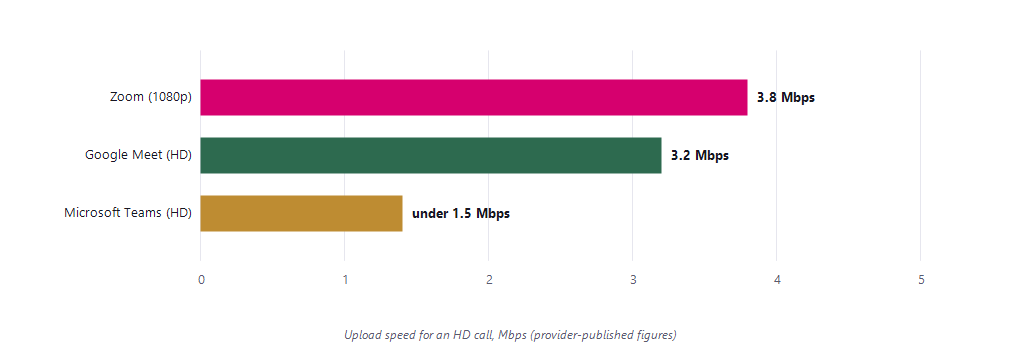
- HD calls are cheap on bandwidth: Zoom asks 3.8 Mbps of upload for 1080p, Google Meet 3.2, and Microsoft Teams under 1.5, per person.
- Three quiet measures decide call quality: latency under 150ms, jitter under 30ms and packet loss under 1% (long-standing ITU and Cisco voice standards).
- Calls cannot buffer the future: streaming rides out wobbles by buffering ahead; a live call shows the same wobble instantly as a freeze or robot voice.
- Bufferbloat is the hidden killer: on many routers, a heavy upload makes latency spike from around 15ms to 200ms or more, wrecking calls on otherwise fast lines.
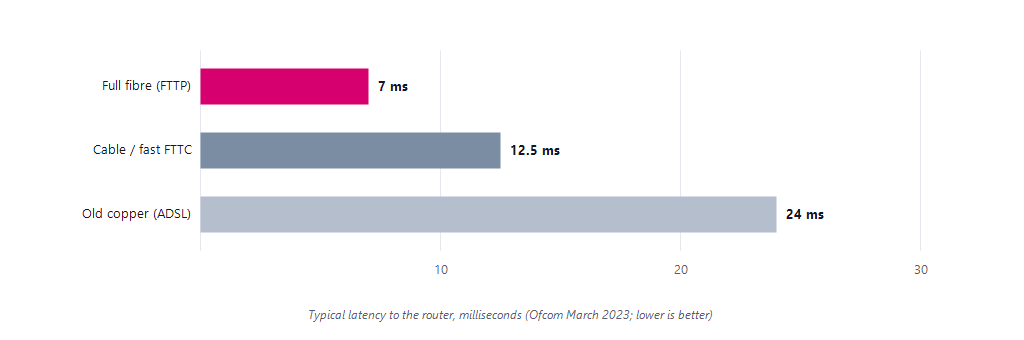
- Full fibre has the lowest latency of the main technologies, around 7ms to the router versus around 24ms on old copper (Ofcom's last published measurements).
It is usually upload, not download
On a call, your device constantly uploads your own camera and microphone while downloading everyone else's. Upload is the scarce resource on older copper and cable lines, so this is where calls fall over first. The good news is the bar is low, as the published figures show.
| Platform | HD call | Note |
|---|---|---|
| Zoom | 3.8 Mbps up | 1080p; audio-only just 60 to 80 kbps |
| Google Meet | 3.2 Mbps up | HD; needs latency under 50ms |
| Microsoft Teams | <1.5 Mbps | Drops video before audio if stretched |
| FaceTime | ~1 to 4 Mbps | Apple does not publish a figure; estimate |
The catch is that these are per person and per call. Two or three people on calls in the same home, plus a cloud backup running, can exhaust a typical copper or cable upload long before download is troubled. If your household runs on calls and uploads, weight upload accordingly when sizing a plan, with the full method in our companion guide: what broadband speed do I need by household size?
The three things that wreck a call
Raw speed is rarely the problem. Three quieter measures decide whether a call is smooth or stuttery, and a connection can look fast on a speed test while still failing on all three.
| Measure | What it is | Good for calls |
|---|---|---|
| Latency | The delay for data to travel one way | under 150ms |
| Jitter | How much that delay varies, packet to packet | under 30ms |
| Packet loss | The share of data that never arrives | under 1% |
Thresholds from long-standing voice and video standards (ITU-T G.114 for latency; Cisco guidance for jitter and packet loss). Lower is better on all three, and these are exactly the metrics a normal speed test hides, explained in depth at latency, jitter and packet loss: the hidden broadband metrics.
Why calls suffer when streaming does not. Netflix and YouTube quietly buffer several seconds ahead, so they ride out a brief wobble without you noticing. A live call cannot buffer the future, so the same wobble is heard and seen instantly as a freeze, a robotic voice or a dropped frame. That is why a line that streams 4K perfectly can still make calls painful.
The usual culprits
Most dropped calls trace back to a short list of causes. Work down it in order, because the first two are free to fix and catch the majority of problems.
- Weak or congested Wi-Fi. Distance, walls and a crowded 2.4GHz band starve the call before it even reaches your line. Moving closer or switching to 5GHz often fixes it outright.
- A stretched upload. Cloud photo backups, a second call in the house, big file uploads or a security camera can soak up a limited upload and choke your call.
- Bufferbloat. On many routers, a heavy upload or download makes latency spike from around 15ms to 200ms or more, which wrecks calls even on a fast line. Quality-of-service or smart-queue settings fix it.
- An old, high-latency line. Copper lines carry more delay than full fibre, and that gap matters for real-time calls.
A VPN adds delay too, often 10 to 30ms, and can cut your speed, so if work software allows it, turning the VPN off or routing calls around it can help noticeably. If calls only struggle in the evening, peak congestion may be stacking on top, covered in our companion guide: why is my broadband slow at night?
Find it, then fix it
A two-minute test points you straight at the cause. Run a speed test that reports upload and ping at ukspeedtest.co.uk, first plugged into the router with a cable, then on Wi-Fi in the room where calls drop.
| What you see | What it points to |
|---|---|
| Wired is fine, Wi-Fi is poor | A Wi-Fi coverage problem |
| Upload is low or maxed out | A stretched or weak upload |
| Ping jumps under load | Bufferbloat, fix with QoS |
| Only one person or app affected | The far end, not your line |
- Get closer, or wire up. Move nearer the router, switch to the 5GHz band, or plug in with ethernet for the steadiest possible call.
- Clear the upload. Pause cloud backups and big uploads, close bandwidth-heavy apps, and turn off the VPN if your work setup allows.
- Turn on QoS or smart queues. Most modern routers can prioritise calls and tame the latency spikes that cause bufferbloat.
- If your line is the limit, upgrade to full fibre. Full fibre brings high, symmetric upload and low latency, the three things calls most want: see full fibre deals at your address.
Working from home and need calls to survive even an outage? The resilience playbook lives at how to avoid broadband downtime when you work from home, with the wider setup guidance at broadband for working from home.
If the drops trace back to weak Wi-Fi rather than the line, the room-by-room fixes live in weak Wi-Fi: mesh vs extenders.
Questions people ask
Why do my video calls keep dropping?
Usually weak Wi-Fi or a stretched upload, not your download speed. Calls constantly upload your camera and microphone in real time, so distance from the router, a crowded 2.4GHz band, or a cloud backup soaking up a limited upload will freeze a call long before download speed is the problem.
What upload speed do I need for Zoom?
Zoom's published figure is 3.8 Mbps of upload for a 1080p HD call, per person, with audio-only needing just 60 to 80 kbps. Google Meet asks 3.2 Mbps for HD and Microsoft Teams under 1.5 Mbps, dropping video before audio when the connection is tight.
Why does Zoom freeze when Netflix works fine?
Because streaming buffers several seconds ahead and rides out wobbles invisibly, while a live call cannot buffer the future. The same brief latency spike or packet loss that Netflix absorbs appears on a call instantly as a freeze, a robotic voice or a dropped frame.
What is bufferbloat and does it affect calls?
Bufferbloat is when a heavy upload or download makes your router's latency spike, from around 15ms to 200ms or more, which wrecks real-time calls even on a fast line. Turning on quality-of-service or smart-queue settings on a modern router tames it.
What broadband is best for video calls?
Full fibre, on all three measures that calls care about: it has the lowest latency of the main technologies (around 7ms to the router versus around 24ms on old copper in Ofcom's last published data), the steadiest peak-time performance, and far higher upload than copper or cable equivalents.
About this guide
This guide is part of the BroadbandSwitch.uk 2026 Guide Library, published by BroadbandSwitch.uk, the consumer arm of the SearchSwitchSave network. Our approach to evidence and corrections is documented in the methodology and trust hub, and every published correction appears in the corrections log.
Take it with you: download the free 6-page PDF guide, including the platform requirements, the diagnosis table and full sources.
Citing this guide: BroadbandSwitch.uk. (2026, June 11). Why does my broadband drop on video calls? SearchSwitchSave. https://broadbandswitch.uk/guides/broadband-drops-on-video-calls/
Sources
- Zoom. (2025). Zoom system requirements and bandwidth usage. https://support.zoom.com/hc/en/article?knowledgeBase=true&id=zm_kb
- Google. (2026). Prepare your network for Meet meetings and live streams. https://support.google.com/meet/answer/7317473
- Microsoft. (2026). Prepare your organization's network for Microsoft Teams. https://learn.microsoft.com/en-us/microsoftteams/prepare-network
- International Telecommunication Union. (2003). ITU-T Recommendation G.114: One-way transmission time. https://www.itu.int/rec/T-REC-G.114
- Cisco. (n.d.). Quality of service for voice over IP. https://www.cisco.com/c/en/us/td/docs/ios/solutions_docs/qos_solutions/QoSVoIP/QoSVoIP.html
- Ofcom. (2023, September 14). UK home broadband performance (March 2023 data). https://www.ofcom.org.uk/phones-and-broadband/coverage-and-speeds/latest-home-broadband-performance-trends-revealed
- Ofcom. (2026). Connected Nations update: Spring 2026. https://www.ofcom.org.uk/phones-and-broadband/coverage-and-speeds/connected-nations-update-spring-2026
This guide is general consumer information. Platform requirements are provider-published figures and vary with settings and group size; latency figures are Ofcom's last published measurements; FaceTime's figure is an estimate as Apple does not publish one.