Plusnet router login: IP address, password and settings
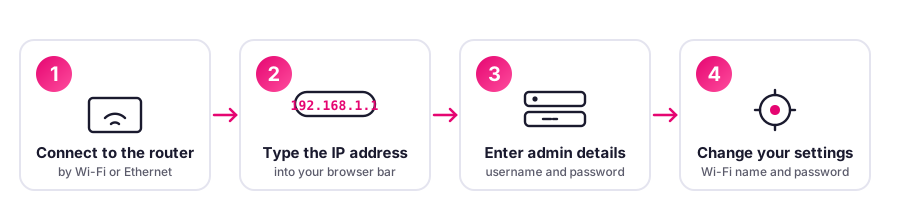
To log in to your Plusnet router, type 192.168.1.254 into your web browser while connected to your Plusnet broadband, then sign in with the admin details printed on the base of the hub. Below you will find the exact login address for every Plusnet hub, what each status light means, how to reset safely, and whether you can use your own router.
Plusnet router login address for every hub
Find your hub in the table below and type its login address into your browser. You must be connected to the hub by Wi-Fi or Ethernet for the page to open. Every row shows our confidence and is drawn from our UK router directory.
| Hub | Login address | Default sign-in | Wi-Fi | Supplied now? | Confidence |
|---|---|---|---|---|---|
| Hub Two | 192.168.1.254 | admin / password on base sticker | WiFi 5 | Yes | High |
| Hub One | 192.168.1.254 | admin / password on base sticker | WiFi 5 | Legacy | High |
| Technicolor 2704n (2704n) | 192.168.1.254 | admin / password on base sticker | WiFi 4 | Legacy | Medium |
Default Plusnet password and how to change it
Admin password on back of hub or on the password sticker supplied. You will usually find it back of hub / password sticker. Needed for advanced settings; separate from Wi-Fi key
Under the UK Product Security and Telecommunications Infrastructure (PSTI) Act, in force since 29 April 2024, universal default passwords are banned on new kit sold in the UK, so modern hubs ship with a unique password printed on a label. Always change any default to a strong password of your own.
Plusnet hub light meanings
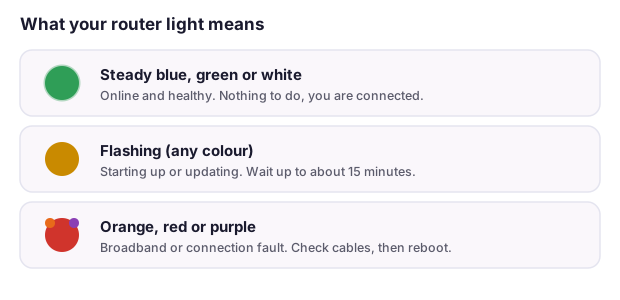
A steady blue, green or white light almost always means your Plusnet hub is online and healthy. Flashing usually means it is starting up or updating, which can take up to about 15 minutes. Orange, red or purple generally means a broadband or connection fault, so check your cables at the master socket first, then reboot the hub before contacting your provider.
How to factory reset your Plusnet hub
- Find the recessed Reset pinhole on the back or base of the hub.
- With the hub powered on, press and hold it with a paperclip for about 10 seconds.
- Release when the lights blink, then wait for the hub to restart fully.
- The hub usually re-pulls its configuration, and the label credentials apply again.
A reset erases any custom Wi-Fi name, password or settings. The 30-30-30 reset is a myth on modern hubs, so a single 10 second hold is all you need.
Advanced networking on Plusnet: bridge mode, static IP, CGNAT and IPv6
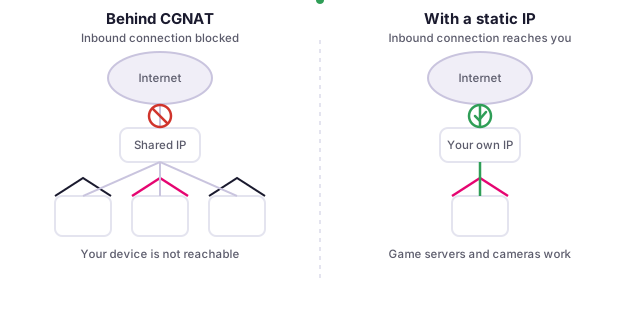
If you want to run your own router, host a game server or reach a home camera from outside, these are the Plusnet capabilities that matter. High confidence, sourced from Plusnet community / ISPreview.
| Capability | What to expect |
|---|---|
| Use your own router | Bridge Hub Two, PPPoE @plusdsl.net on own router; FTTP direct to ONT |
| Bridge / modem mode | Yes, bridge mode (pink light) |
| Static IP | Available (High Touch) |
| CGNAT | No CGNAT |
| Custom DNS | Limited |
| Port forwarding | Yes |
| IPv6 | Trial only (April 2025 High Touch trial) |
| Self-serve or call? | Self-serve |
Frequently asked questions
What is the Plusnet router login IP address?
For most Plusnet hubs you log in by typing 192.168.1.254 into your web browser's address bar while connected to your Plusnet broadband. You must be connected to the hub by Wi-Fi or an Ethernet cable for the page to open.
What is the default Plusnet router password?
Admin password on back of hub or on the password sticker supplied Needed for advanced settings; separate from Wi-Fi key. You will usually find it back of hub / password sticker.
How do I reset my Plusnet router to factory settings?
Press and hold the recessed Reset pinhole on the back of the hub for about 10 seconds until the lights blink and the hub restarts. A reset wipes any custom settings, and the hub will usually pull its configuration again automatically. The 30-30-30 reset is a myth on modern units, so a single 10 second hold is enough.
Can I use my own router with Plusnet?
Bridge Hub Two, PPPoE @plusdsl.net on own router; FTTP direct to ONT This is typically self-serve.
Does Plusnet use CGNAT?
No CGNAT If you need inbound connections for gaming, CCTV or self-hosting, a static IP is the usual way to get a public address.
Spotted something wrong? Help us keep this accurate
We make good efforts to keep this page accurate and up to date, and we genuinely love working with our readers to get it right. If you think a detail is wrong, or you know something others would find helpful, please tell us and we will check it and update the page. Your collaboration is really valuable.